Provider deliverability · HubSpot
Why are HubSpot emails going to spam?

By Samuel Chenard · CEO & Co-Founder, Palisade · Reviewed September 19, 2026
HubSpot marketing email is filed as spam when your email sending domain is not connected. HubSpot then rewrites the sending address onto a HubSpot-managed domain, so receiving filters judge that domain instead of yours. Partial authentication, a broken SPF record, shared IP reputation, and list quality are the next causes.
The 30-second check
Check the domain in your From address before you touch the template. HubSpot's connection flow asks for four DNS record types on that domain: MX, DKIM, SPF, and DMARC. If DKIM, SPF, or DMARC is missing, HubSpot reports the domain as partially authenticated or not authenticated, and receiving filters see the gap too. The free DMARC checker reads the records in about thirty seconds, and our HubSpot SPF and DKIM setup guide walks the records one at a time.
Check your domain now
Enter your sending domain and the check runs instantly on the next page. Free, no signup.
Why your HubSpot email is going to spam
| Likely cause | What's happening |
|---|---|
| The email sending domain was never connected | This is the first thing to check, every time. HubSpot documents what happens without it: "if you attempt to send an email from an unauthenticated domain, such as user@yourcompany.com, then HubSpot will modify the email address to use a HubSpot managed domain (e.g., hs-domain.com), so the resulting sending address will appear as: user=yourcompany.com@hs-domain.com." The receiving filter then judges that HubSpot domain, not yours, and no reputation you build accrues to you. |
| The domain shows as partially authenticated | HubSpot reports three states for an email sending domain. "Partially authenticated" means "DKIM has been correctly set up and verified but SPF or DMARC still need to be fully verified", and it is easy to stop there because mail keeps sending. Google and Yahoo both ask bulk senders for SPF, DKIM, and DMARC together, so a partially authenticated domain fails their checklist while HubSpot's own UI looks half-green. |
| The SPF record is broken, duplicated, or over the include limit | HubSpot's SPF value is an include statement of the form include:123456.spf03.hubspotemail.net, and it has to be added to your existing record rather than published as a second one. HubSpot's troubleshooting guide sets out the constraints plainly: "You can have up to 10 include: statements", "The -all flag only needs to be included once", and you should "remove any hard-coded HubSpot IP addresses or CIDRs". |
| A malformed DMARC record stops the domain verifying | HubSpot lists the exact DMARC mistakes it sees: more than one TXT record beginning with the version flag, a policy value that is not lower-cased none, quarantine, or reject, reporting addresses missing the mailto: prefix, adkim or aspf set to something other than r, and a pct value written with a percent sign. On multiple records, HubSpot notes the "receiving email server will immediately end its policy discovery process", which means no DMARC at all. |
| You are on HubSpot's shared IP pool | HubSpot states it directly: "If you haven't purchased the Dedicated IP or Transactional Email Add-Ons, marketing emails are sent through HubSpot's shared IP addresses." Nothing inside your portal explains a shared-pool problem, which is why it gets misread as a content problem. HubSpot does not publish a volume threshold at which the shared pool stops working for you. |
| A dedicated IP that has not finished warming up | If you did buy the add-on, the address starts with no history. HubSpot says "The warm-up process will take 40 days to complete". For a sending domain that has never been used, it separately recommends you "start by sending smaller campaigns to your most engaged contacts, then increase the number of recipients and emails over several weeks" — which is the pattern to follow on a new IP too. A full list send on day three outruns both, and filters read the spike as exactly what it looks like. |
| Sending from an address that is not on a connected domain | HubSpot's guidance is that "You should send emails only from email addresses that are hosted on connected email sending domains, or those that are verified", and that email sending domains "are only used for marketing and transactional emails". A one-to-one email from a personal mailbox behaves differently from a marketing send, so testing with the wrong kind of message tells you nothing about the problem. |
| List quality and permission, which HubSpot records but cannot repair | HubSpot's own criteria for contacts include that "They personally provided their email address directly to your organization" and that they have not opted out or marked earlier mail as spam elsewhere. It also names what ISPs weigh: "the sender's email reputation, whether the email is properly authenticated, and whether the email violates any of the ISP's guidelines and policies". Two of those three are yours to fix. |
Check the public signals before changing settings
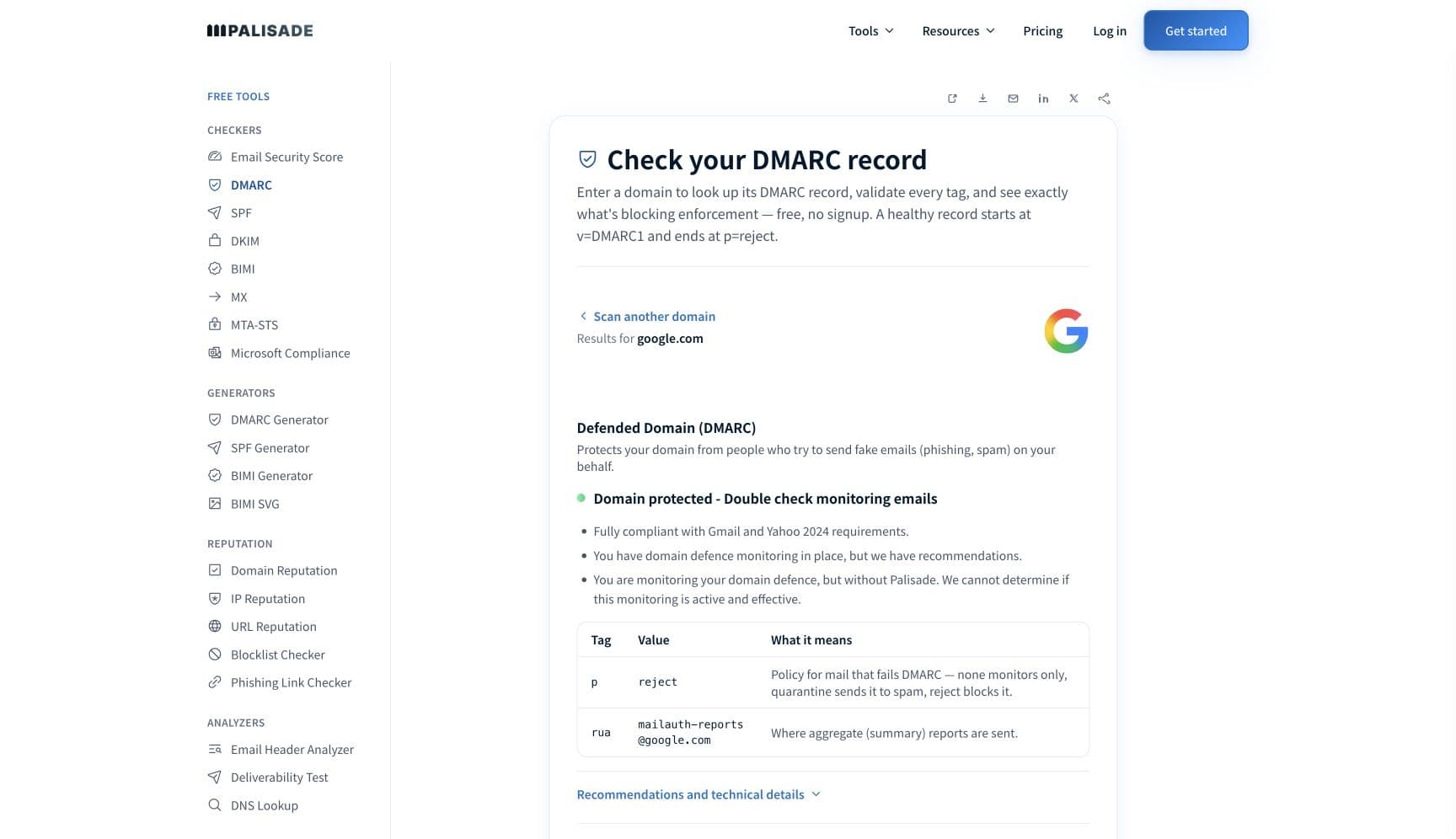
The free check above gives you a fast public baseline for how the receiving providers see mail sent through HubSpot. It does not replace the provider's private reputation or placement data, but it tells you whether the problem is visible from outside before you edit a sending platform.
How to fix it, step by step
Run the DMARC check on your From domain
Use the free checker above, or open the DMARC checker page directly. It reads SPF, DKIM, and DMARC for the domain in your From address, which is the domain a receiving filter actually judges. If DMARC is missing or malformed, you have found the reason HubSpot will not report the domain as authenticated.
Connect the email sending domain in HubSpot
In your settings, connect the domain you send From and publish everything HubSpot asks for. HubSpot sets up "four separate DNS record types: MX, DKIM, SPF, and DMARC", where "DKIM requires two CNAME records, while SPF records and DMARC each require a TXT record". Do not stop when the status turns partially authenticated.
Merge HubSpot into your one SPF record, do not add a second
Append HubSpot's include: value to the existing TXT record. Keep the record inside HubSpot's stated limits: at most 10 include: statements, one -all flag, and no hard-coded HubSpot IPs or CIDRs left over from an older setup. Verify the result at the SPF checker.
Fix the DMARC record so it parses
Publish exactly one TXT record at _dmarc that starts with the version flag. Lower-case the policy, prefix each reporting address with mailto:, leave adkim and aspf at r, and write pct as a bare number. Any one of those errors is enough for HubSpot to leave the domain unverified.
Confirm your own domain is in the DKIM signature
Send a test to an outside mailbox and paste the full source into the email header analyzer. You want the d= tag in the DKIM-Signature header to be your domain, dmarc=pass in the authentication results, and no rewritten hs-domain.com sending address. Check the published key separately at the DKIM checker.
Decide shared or dedicated deliberately, then respect the warm-up
Without the dedicated IP or transactional add-on you are on HubSpot's shared pool, and pool reputation is not yours to control. If you take a dedicated IP, plan for HubSpot's 40-day warm-up and start with your most engaged contacts rather than the whole list.
Meet the receiving side's bulk-sender rules
Google requires bulk senders to pass SPF and DKIM, publish DMARC, align the From domain, keep Postmaster Tools spam rates below 0.3%, and support one-click unsubscribe. Yahoo asks for the same shape with a 0.3% spam rate and unsubscribes honored within two days. HubSpot's records cover authentication; the rest is your list.
Related free tools: SPF checker · DKIM checker · Email header analyzer · Domain reputation
If you send in volume: the receiving providers' published rules
HubSpot is a sending platform, not a mailbox provider, so it publishes no bulk-sender requirements of its own. It does point at the ones that matter: "some inbox providers, such as Google and Yahoo, will be requiring DMARC, DKIM, and SPF to be fully set up on any domain sending bulk emails to their users. If you don't meet these requirements, emails from your domain will be bounced." Google's own sender guidelines ask every sender to set up SPF or DKIM, keep valid forward and reverse DNS, use TLS, format to RFC 5322, and "Keep spam rates reported in Postmaster Tools below 0.3%", and ask senders of roughly 5,000 or more messages a day to personal Gmail accounts to pass SPF and DKIM together, publish DMARC, align the From domain with the SPF or DKIM domain, and support one-click unsubscribe on marketing and subscribed messages. Yahoo's requirements run in parallel: "Implement both SPF & DKIM", "Publish a valid DMARC policy with at least p=none - DMARC must pass", a 1024-bit minimum DKIM key, From-domain alignment, spam rate below 0.3%, and unsubscribes honored within 2 days. Google and Yahoo guidance checked 2026-09-02.
Check your standing with HubSpot and the receiving providers
- Connect your email sending domain
HubSpot's setup guide for the MX, DKIM, SPF, and DMARC records, and the page where the authentication status for each domain is reported.
- Troubleshoot email authentication issues
HubSpot's list of the SPF and DMARC record errors that keep a domain from verifying, with the exact syntax constraints for each.
- Overview of email authentication
HubSpot's own explanation of what happens to your sending address on an unauthenticated domain, and how it handles SPF on the envelope return path.
- Google Postmaster Tools
The mailbox-provider side. Your spam rate against personal Gmail accounts is reported here, on the domain you connected in HubSpot.
- Yahoo Sender Hub
Yahoo's sender portal, including complaint feedback loop enrollment for the domain that signs your HubSpot mail.
If it bounces instead: the codes the receiving provider returns
Spam placement returns no SMTP error, so these are the readings and codes you see when the receiving provider refuses mail sent through HubSpot instead. Match yours below; where a code has a full guide, it is linked.
- No SMTP error at all: spam placement is recorded as delivered in HubSpot, because the receiving server accepted the message and then filed it in the spam folder
- user=yourcompany.com@hs-domain.com: HubSpot's rewritten sending address on an unauthenticated domain, and the clearest sign the sending domain was never connected
- 550 5.7.26 (unauthenticated email from your domain): Gmail refusing outright, the same authentication gap one step past spam-foldering Full guide →
- 421 4.7.0: the temporary deferral family a receiving provider uses when it is throttling a sending IP rather than refusing it Full guide →
The real root cause: unenforced authentication
HubSpot can publish records for you to add, but it cannot make a statement on your behalf about who is allowed to send as your domain. That statement is DMARC, and it belongs to the domain owner. Connecting the sending domain fixes HubSpot's leg of the journey: your domain in the DKIM signature, HubSpot in your SPF record, no rewritten hs-domain.com address. What it leaves untouched is every other service sending under the same domain, and that is usually why a fully connected HubSpot portal still sees spam placement. Aggregate reports name those senders one at a time, including the ones nobody remembers authorizing. Once each is authenticated and aligned, walking the policy from p=none to p=reject removes the last variable, because nothing that is not yours can spend the reputation your HubSpot campaigns depend on.
DMARC software that does the work
Palisade's AI agent takes domains all the way to enforcement: hosted SPF, DKIM, DMARC, and MTA-STS records on paid plans, DMARC reports monitored continuously, and every policy step drafted for your approval on the way to p=reject. The full product is open for a 15-day trial, and nothing is charged until it ends.
15-day full-product trial. Nothing is charged until it ends.
Fixing this across every client domain
A client on HubSpot is a client whose sending domain has two owners: the marketing team clicking through the domain connection wizard, and you holding the DNS. Half-finished connections are the normal state, because HubSpot keeps sending either way and simply rewrites the address. Palisade gives you the portfolio view: hosted and managed SPF, DKIM, DMARC, and MTA-STS records for every client domain, aggregate reports read for you so HubSpot and every other sender is named rather than guessed at, and a path to p=reject with your team approving each change. Native ConnectWise, HaloPSA, and Autotask integrations put it in your PSA, pricing is per client domain with rates that improve as the portfolio grows, and your own MSP domain is a free NFR domain to run the process on first.
Questions readers ask
Frequently asked questions
Does connecting a HubSpot email sending domain stop emails going to spam?
What does user=yourcompany.com@hs-domain.com mean?
What DNS records does HubSpot need for an email sending domain?
What does partially authenticated mean in HubSpot?
Do I need to add HubSpot to my SPF record?
Does HubSpot set up DMARC for me?
How long does a HubSpot dedicated IP take to warm up?
Why does HubSpot say delivered when the email is in spam?
Sources and last verified
Every claim about HubSpot on this page links to the source it came from, each with the date it was last checked. Provider policies change; if a detail looks off, the linked source is authoritative.
- HubSpot on unauthenticated domains: "if you attempt to send an email from an unauthenticated domain, such as user@yourcompany.com, then HubSpot will modify the email address to use a HubSpot managed domain (e.g., hs-domain.com), so the resulting sending address will appear as: user=yourcompany.com@hs-domain.com"; "Emails sent without DKIM authentication are more likely to bounce, quarantine, or be categorized as spam"; "some inbox providers, such as Google and Yahoo, will be requiring DMARC, DKIM, and SPF to be fully set up on any domain sending bulk emails to their users. If you don't meet these requirements, emails from your domain will be bounced"; SPF "is traditionally required for the envelope return path domain", which HubSpot configures for shared servers while dedicated IP customers configure it themselvesknowledge.hubspot.com · checked 2026-09-02
- HubSpot email sending domain connection: "During the connection process, you will set up four separate DNS record types: MX, DKIM, SPF, and DMARC"; "DKIM requires two CNAME records, while SPF records and DMARC each require a TXT record"; the three statuses are "Not authenticated", "Partially authenticated" ("DKIM has been correctly set up and verified but SPF or DMARC still need to be fully verified") and "Authenticated"knowledge.hubspot.com · checked 2026-09-02
- HubSpot SPF and DMARC troubleshooting: HubSpot's SPF value is added to the existing TXT record after any existing include: statements; "You can have up to 10 include: statements"; "The -all flag only needs to be included once"; "remove any hard-coded HubSpot IP addresses or CIDRs"; only a single DMARC TXT record beginning with the version flag, otherwise the "receiving email server will immediately end its policy discovery process"; policy values limited to none, reject, or quarantine and "must be lower-cased"; reporting addresses in "URI mailto format"; adkim and aspf "should be set to r for a relaxed alignment"; pct "should be a number and should exclude any additional characters"knowledge.hubspot.com · checked 2026-09-02
- HubSpot SPF include: the record value takes the form include:123456.spf03.hubspotemail.net, and "If you are prompted to update SPF, and you already have an SPF record, you will need to add HubSpot to the existing record, rather than creating a new one"knowledge.hubspot.com · checked 2026-09-02
- HubSpot email sending: "If you haven't purchased the Dedicated IP or Transactional Email Add-Ons, marketing emails are sent through HubSpot's shared IP addresses"; "You should send emails only from email addresses that are hosted on connected email sending domains, or those that are verified"; "Email sending domains are only used for marketing and transactional emails"; ISP decisions rest on "the sender's email reputation, whether the email is properly authenticated, and whether the email violates any of the ISP's guidelines and policies"; contacts must have "personally provided their email address directly to your organization"knowledge.hubspot.com · checked 2026-09-02
- HubSpot dedicated IP: "The warm-up process will take 40 days to complete"; "You can start by sending smaller campaigns to your most engaged contacts, then increase the number of recipients and emails over several weeks"; the add-on is required and all other marketing email uses shared IP addressesknowledge.hubspot.com · checked 2026-09-02
- Google sender guidelines that apply to mail sent through HubSpot: SPF or DKIM for all senders, valid forward and reverse DNS, a TLS connection, RFC 5322 formatting, and "Keep spam rates reported in Postmaster Tools below 0.3%"; senders of roughly 5,000 or more messages a day to personal Gmail accounts must set up SPF and DKIM together, set up DMARC, align the From header domain with either the SPF domain or the DKIM domain, and support one-click unsubscribe on marketing and subscribed messagessupport.google.com · checked 2026-09-02
- Yahoo sender requirements: all senders "Implement SPF or DKIM at a minimum", "Keep your spam rate below 0.3%", "Have a valid forward and reverse DNS record for your sending IPs" and "Comply with RFCs 5321 and 5322"; bulk senders must "Implement both SPF & DKIM", "Publish a valid DMARC policy with at least p=none - DMARC must pass", "Authenticate every email with DKIM with a minimum 1024-bit key length", "Ensure the domain in the From: header is aligned with either the SPF domain or the DKIM domain", "Implement a functioning list-unsubscribe header, which supports one-click unsubscribe" and "Honor unsubscribes within 2 days"senders.yahooinc.com · checked 2026-09-02
- RFC 5322, Internet Message Format, is the standard behind the message-formatting requirement Google and Yahoo both cite: it "specifies the Internet Message Format (IMF), a syntax for text messages that are sent between computer users"; "The only required header fields are the origination date field and the originator address field(s)" (Date and From), and "every message SHOULD have a 'Message-ID:' field"www.rfc-editor.org · checked 2026-09-02
Related guides
550 5.7.26421 4.7.0selectoradkim / aspfinclude: