Provider deliverability · Gmail (personal @gmail.com inboxes)
Why are my emails going to spam in Gmail?

By Samuel Chenard · CEO & Co-Founder, Palisade · Reviewed September 19, 2026
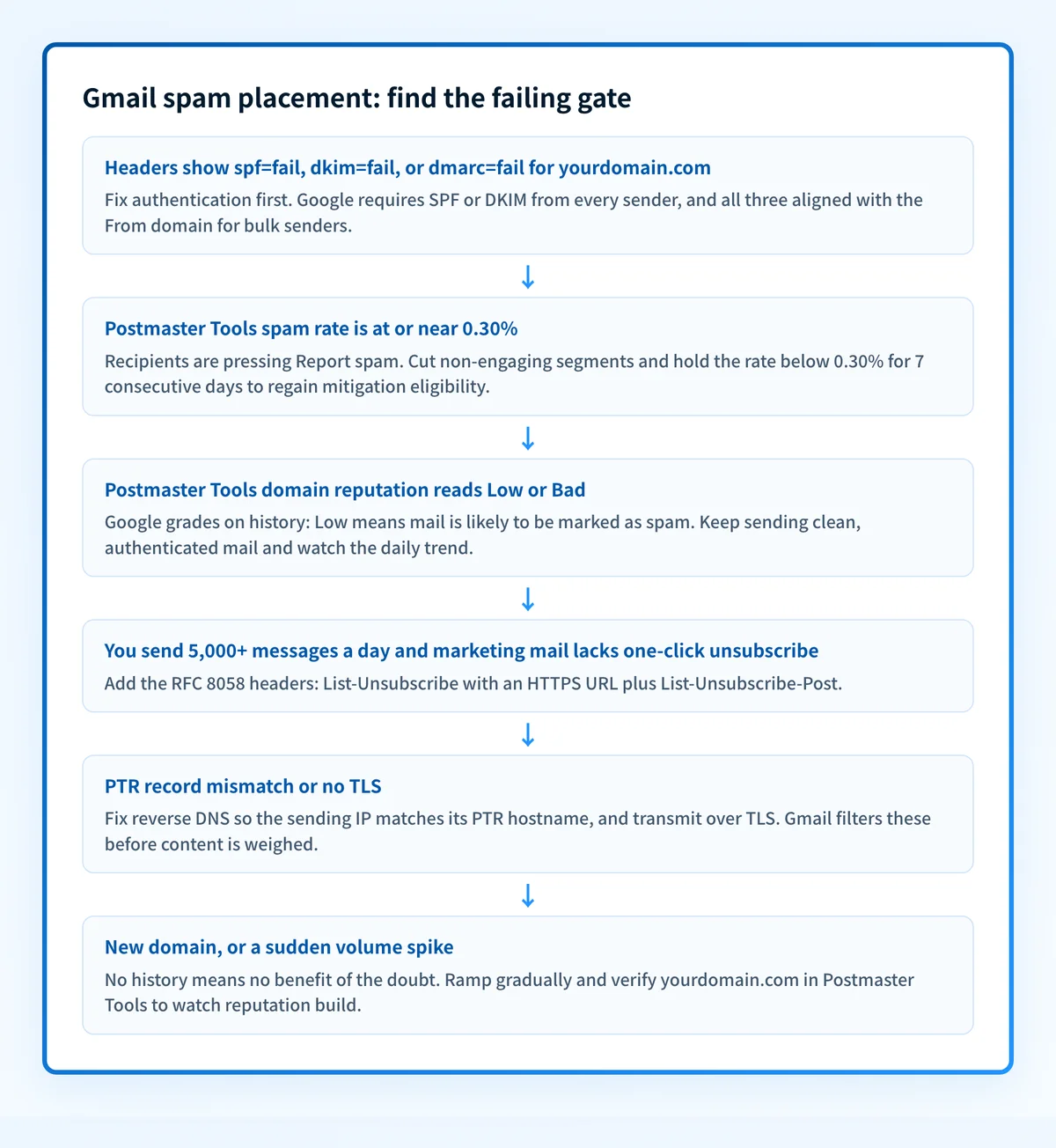
Gmail spam-folders outbound mail when it fails a gate in Google's Email sender guidelines: SPF, DKIM, or DMARC missing or unaligned, a user-reported spam rate at or above 0.30%, bulk mail without one-click unsubscribe, invalid PTR records or no TLS. Gmail's own reputation signals decide the rest: a Low or Bad domain reputation in Google Postmaster Tools, or a domain with no sending history. Google does not publish which fails most often; authentication is the one you can verify yourself in minutes.
The 30-second check
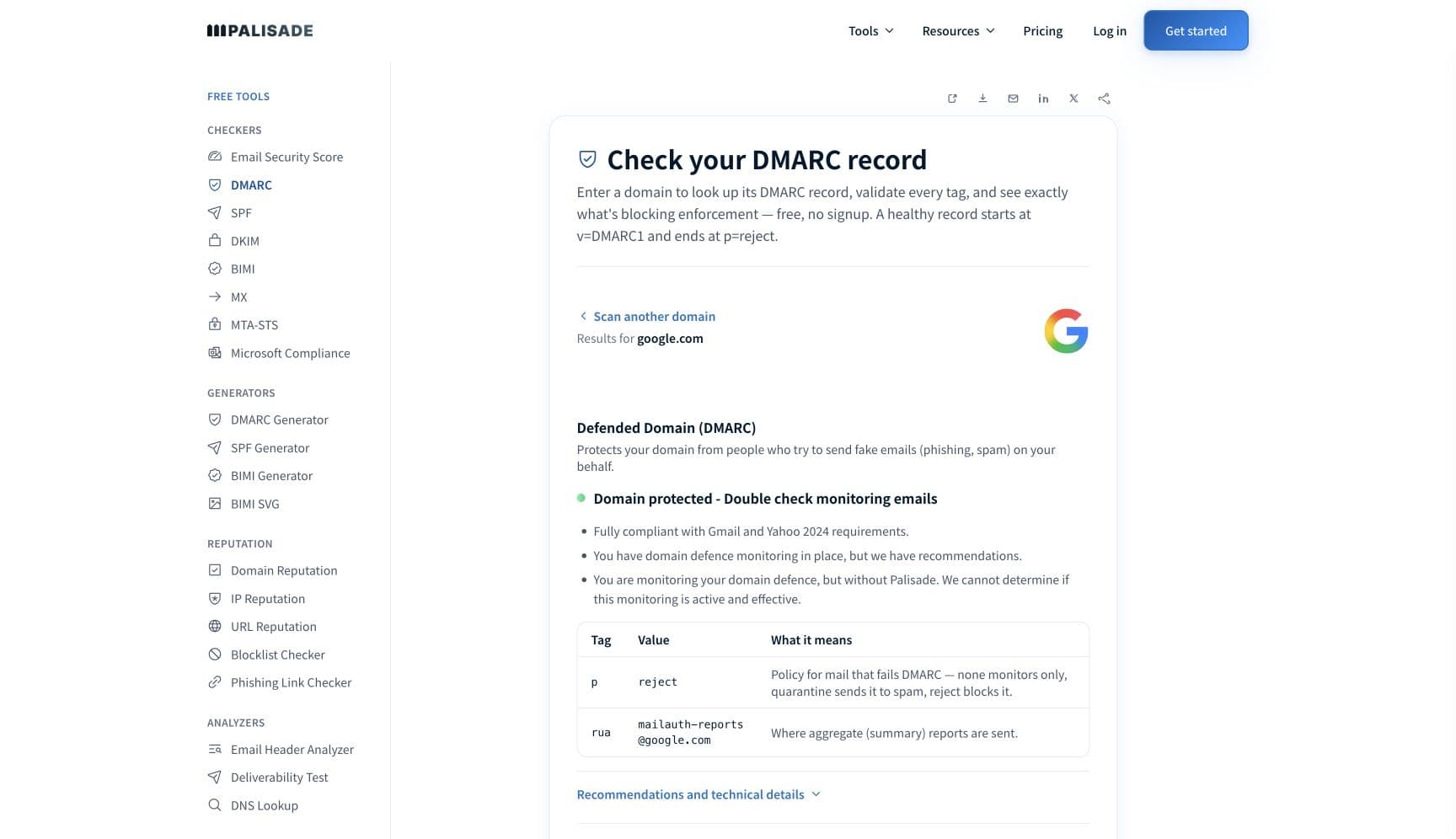
Gmail's first gate is authentication, and it is the one you can fix today. Run the domain you send from through the free DMARC checker below: it shows whether your SPF, DKIM, and DMARC records exist, whether they can align with your From domain, and what policy you are currently asking Gmail to apply.
Check your domain now
Enter your sending domain and the check runs instantly on the next page. Free, no signup.
Why Gmail sends your email to spam
| Likely cause | What's happening |
|---|---|
| SPF or DKIM is missing, or passes without alignment | Since February 2024, Google's Email sender guidelines require every sender to authenticate with SPF or DKIM; per Google, unauthenticated messages "might be marked as spam or rejected" (checked 2026-07-17). Alignment matters too: a DKIM pass on your email platform's default domain (like sendgrid.net) does nothing for the domain in your From header, so the mail still reads as unauthenticated for reputation purposes. |
| Your user-reported spam rate crossed Google's line | Google publishes two numbers: keep the spam rate reported in Postmaster Tools below 0.10%, and avoid ever reaching 0.30% or higher. The rate is calculated daily, and since June 2024 bulk senders above 0.30% are ineligible for mitigation until the rate holds below 0.30% for seven consecutive days. Enough recipients pressing Report spam will bury an otherwise perfectly authenticated stream. |
| Your domain reputation in Postmaster Tools is Low or Bad | Google grades sending domains Bad, Low, Medium, or High. Its own definitions: Low means mail is "likely to be marked as spam", Bad means it is almost always marked as spam or rejected. Reputation attaches to the domain that passes DKIM (or SPF if DKIM is absent), so it follows your domain across IPs and email providers. |
| You crossed the bulk-sender bar without the bulk-sender extras | Sending close to 5,000 messages or more to personal Gmail accounts within 24 hours makes you a bulk sender, counted across the whole primary domain (2,500 from yourdomain.com plus 2,500 from promo.yourdomain.com meets it). Bulk senders need SPF and DKIM together, a DMARC record, From-domain alignment, and one-click unsubscribe on marketing mail; missing any of these sends you to spam. |
| Infrastructure basics fail: PTR records or TLS | The guidelines require valid forward and reverse DNS: your sending IP must match the IP of the hostname in its PTR record, and mail must be transmitted over TLS. Hand-built servers and direct-to-MX senders on generic cloud IPs fail this constantly, and Gmail filters them before content is even weighed. |
| No sending history: a new domain or a sudden volume spike | Gmail builds reputation from observed traffic, and a domain with no history gets no benefit of the doubt. A cold start at full volume, or an established domain that suddenly multiplies its output, gets spam-foldered until the pattern proves out. Google publishes no warm-up schedule or numbers, so ramp gradually and watch Postmaster Tools. |
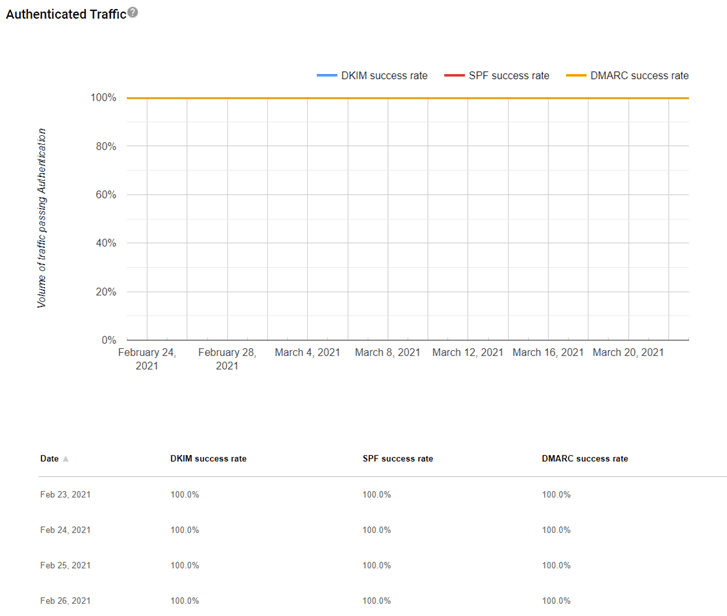
Confirm the pattern in Gmail's own sender data
Gmail publishes its own sender data separately from your DNS. Use it to confirm the provider-side symptom after you have checked the public authentication records below.
Check the public signals before changing settings
The free check above gives you a fast public baseline for how Gmail sees your mail. It does not replace the provider's private reputation or placement data, but it tells you whether the problem is visible from outside before you edit a sending platform.
How to fix it, step by step
Check the sending domain's DMARC, SPF, and DKIM in one pass
Run your From domain through the free DMARC checker above, or open the DMARC checker page directly. It shows whether all three records exist, what your DMARC policy currently orders receivers to do, and where alignment can break, so you fix the record Gmail is actually failing you on.
Authenticate and align every service that sends as your domain
Add each platform's documented include or IP range to your SPF record, then enable DKIM signing with your own domain at each service instead of the provider default. Google's bar for bulk senders is an aligned pass: the SPF or DKIM domain must share the organizational domain of your From header. Verify with the SPF checker and the DKIM checker.
Verify your domain in Google Postmaster Tools
Sign in at postmaster.google.com with any Google account, add your SPF or DKIM domain, and verify it with the DNS TXT record Google gives you. Until the domain is verified, the dashboards stay empty; after it, you get Google's own daily read on spam rate, domain reputation, authentication, and delivery errors.
Drive the spam rate under 0.10%
Cut recipients who never engage, honor unsubscribes immediately, and stop mailing purchased or scraped lists. Google's guideline is a rate below 0.10% with 0.30% as the hard ceiling; if you're a bulk sender who crossed 0.30%, you need seven consecutive days below it before Google will even consider mitigation again.
Add one-click unsubscribe if you send bulk
Marketing and subscribed messages from bulk senders must carry the RFC 8058 headers: a List-Unsubscribe header with an HTTPS URL and List-Unsubscribe-Post: List-Unsubscribe=One-Click. Most reputable email platforms add both when you switch the feature on; confirm in a sent message's raw headers.
Re-test at a Gmail mailbox, then keep DMARC reports flowing
Send a test to a personal Gmail address, open Show original, and confirm spf=pass, dkim=pass, and dmarc=pass with your own domain named. Then watch DMARC aggregate reports weekly: the next unauthenticated service, or the next spoofer forging your domain, shows up in a report before it becomes a deliverability problem.
Related free tools: SPF checker · DKIM checker · Domain reputation · Email security score
If you send in volume: Gmail's published rules
Since February 1, 2024, Google's Email sender guidelines require senders of close to 5,000 or more daily messages to personal Gmail accounts to pass both SPF and DKIM, publish a DMARC record (a policy of p=none is accepted), align the From domain with the SPF or DKIM domain, support one-click unsubscribe (RFC 8058) on marketing and subscribed mail, and keep the Postmaster Tools spam rate below 0.30% with 0.10% as the working guideline. The 5,000 count aggregates all mail from the same primary domain, subdomains included. Enforcement is documented as gradual and progressive, ranging from spam-foldering to temporary or permanent failure codes (per Google's sender FAQ, checked 2026-07-17). Below 5,000 a day you still need SPF or DKIM, valid PTR records, TLS, and the same spam-rate ceiling.
Check your standing with Gmail
- Google Postmaster Tools
Google's own daily dashboards for your domain: user-reported spam rate, domain and IP reputation, authentication success, and delivery errors. Free; verify your domain with a DNS TXT record.
- Postmaster Tools setup guide
Google's setup steps. Note the scope: dashboards cover mail sent to personal @gmail.com and @googlemail.com accounts only, not Google Workspace recipients.
- Email sender guidelines
The requirements document itself: authentication, spam-rate thresholds, one-click unsubscribe, and infrastructure rules for all senders and bulk senders.
If it bounces instead: the codes Gmail returns
Spam placement returns no SMTP error, so these are the readings and codes you see when Gmail refuses the mail instead. Match yours below; where a code has a full guide, it is linked.
- 550 5.7.26 (unauthenticated email is not accepted): Gmail's outright rejection when mail fails SPF and DKIM; spam-foldering is the softer stage of the same enforcement Full guide →
- 550 5.7.1: Gmail's policy rejection, seen when Google blocks the mail instead of filing it to spam Full guide →
- 421 4.7.0: temporary deferral for suspicious traffic or rate limits, common while your reputation is poor Full guide →
The real root cause: unenforced authentication
Gmail's spam folder is a reputation verdict, and reputation starts with identity. Unaligned or unauthenticated mail scores badly, badly scored mail lands in spam, spam-foldered mail collects more Report spam clicks, and the rising complaint rate drags your Postmaster reputation from Medium to Low to Bad, where even clean campaigns get filtered. Worse, while DMARC sits at p=none, forged mail using your domain is still delivered, which erodes recipient trust and pollutes your DMARC reports. The way out is to make authentication a settled fact: SPF and DKIM for every sending service, DMARC aligned on the From domain, and a policy enforced at p=reject so receivers can discard spoofed mail outright. Monitoring tells you which senders are failing; enforcement is what makes the reputation recover and stay recovered.
DMARC software that does the work
Palisade's AI agent takes domains all the way to enforcement: hosted SPF, DKIM, DMARC, and MTA-STS records on paid plans, DMARC reports monitored continuously, and every policy step drafted for your approval on the way to p=reject. The full product is open for a 15-day trial, and nothing is charged until it ends.
15-day full-product trial. Nothing is charged until it ends.
Fixing this across every client domain
One domain stuck in Gmail's spam folder is an afternoon of DNS work; a client fleet drifting there is a quarter of lost deliverability tickets, because Google scores every domain separately and each one needs SPF, DKIM, DMARC, Postmaster verification, and list hygiene of its own. Palisade does the authentication layer once per fleet: it hosts and manages the SPF, DKIM, DMARC, and MTA-STS records for every client domain, surfaces failing and unauthorized senders from DMARC reports before they dent the spam rate, and carries each domain to p=reject, with your team approving each step. Tickets land in ConnectWise, HaloPSA, or Autotask through native PSA integrations, pricing is per client domain with rates that improve as the portfolio grows, and your own MSP domain is a free NFR domain to prove it on.
Questions readers ask
Frequently asked questions
Why is my email going to spam in Gmail when SPF and DKIM pass?
What spam rate does Gmail allow?
How do I check my domain reputation with Gmail?
Does Gmail's 5,000-message rule apply to my domain?
How long does it take to stop going to spam in Gmail?
Do I need DMARC if I send fewer than 5,000 emails a day?
Will Gmail tell me why a specific email went to spam?
Sources and last verified
Every claim about Gmail on this page links to the source it came from, each with the date it was last checked. Provider policies change; if a detail looks off, the linked source is authoritative.
- Since February 2024 all senders to Gmail must authenticate with SPF or DKIM, have valid forward and reverse DNS (sending IP must match the PTR hostname's IP), use TLS, and keep spam rates below 0.3%; unauthenticated messages "might be marked as spam or rejected" (5.7.26 cited)support.google.com · checked 2026-07-17
- Bulk senders (5,000+ messages/day to personal Gmail accounts) must pass both SPF and DKIM, publish DMARC (enforcement policy can be none) with the From domain aligned to the SPF or DKIM domain, and support one-click unsubscribe with List-Unsubscribe and List-Unsubscribe-Post headers (RFC 8058)support.google.com · checked 2026-07-17
- Spam-rate thresholds: keep spam rates reported in Postmaster Tools below 0.10%; avoid ever reaching 0.30% or highersupport.google.com · checked 2026-07-17
- Spam rate is calculated daily; since June 2024 bulk senders exceeding 0.3% are ineligible for mitigation until spam rates remain below 0.3% for 7 consecutive days; enforcement for bulk senders is gradual and progressivesupport.google.com · checked 2026-07-17
- The 5,000-message bulk-sender threshold counts messages to personal Gmail accounts within a 24-hour period, aggregated across all mail from the same primary domain including subdomains; From-header organizational domain must align with the SPF or DKIM organizational domainsupport.google.com · checked 2026-07-17
- Postmaster Tools setup: any Google account, add your SPF or DKIM domain, verify via DNS TXT record; dashboards stay empty until verification; data covers personal @gmail.com and @googlemail.com accounts onlysupport.google.com · checked 2026-07-17
- Postmaster Tools reputation categories Bad/Low/Medium/High with definitions (Low: email "is likely to be marked as spam"; Bad: almost always marked as spam or rejected); reputation is shown for the DKIM-authenticated domain, or the SPF domain if DKIM is not usedsupport.google.com · checked 2026-07-17
- 550 5.7.26 is Gmail's rejection for unauthenticated email (verbatim bounce variants documented); 421 4.7.0 and 550 5.7.1 are Gmail's documented deferral and policy-rejection codesknowledge.workspace.google.com · checked 2026-07-17
- RFC 8058, Signaling One-Click Functionality for List Email Headers, is the standard Google's one-click unsubscribe requirement points at: it "describes a method for signaling a one-click function for the List-Unsubscribe email header field"; the message must carry a List-Unsubscribe header containing one HTTPS URI and the header "List-Unsubscribe-Post: List-Unsubscribe=One-Click", covered by a valid DKIM signature, and the receiver unsubscribes by sending an HTTPS POST to that URIwww.rfc-editor.org · checked 2026-09-02
Related guides
550 5.7.26550 5.7.1421 4.7.0p=rejectadkim / aspfp=noneinclude: