Provider deliverability · Gmail (personal Gmail + Google Workspace recipients)
Your email has been blocked because the sender is unauthenticated: the Gmail fix

By Samuel Chenard · CEO & Co-Founder, Palisade · Reviewed September 19, 2026
Gmail returns "blocked because the sender is unauthenticated" when a message passes neither SPF nor DKIM for your domain. Under Google's February 2024 sender requirements, unauthenticated mail may be spam-foldered or, as here, refused outright. The fix is DNS: publish SPF and DKIM for every service that sends as your domain, confirm both pass and align, then re-send.
The 30-second check
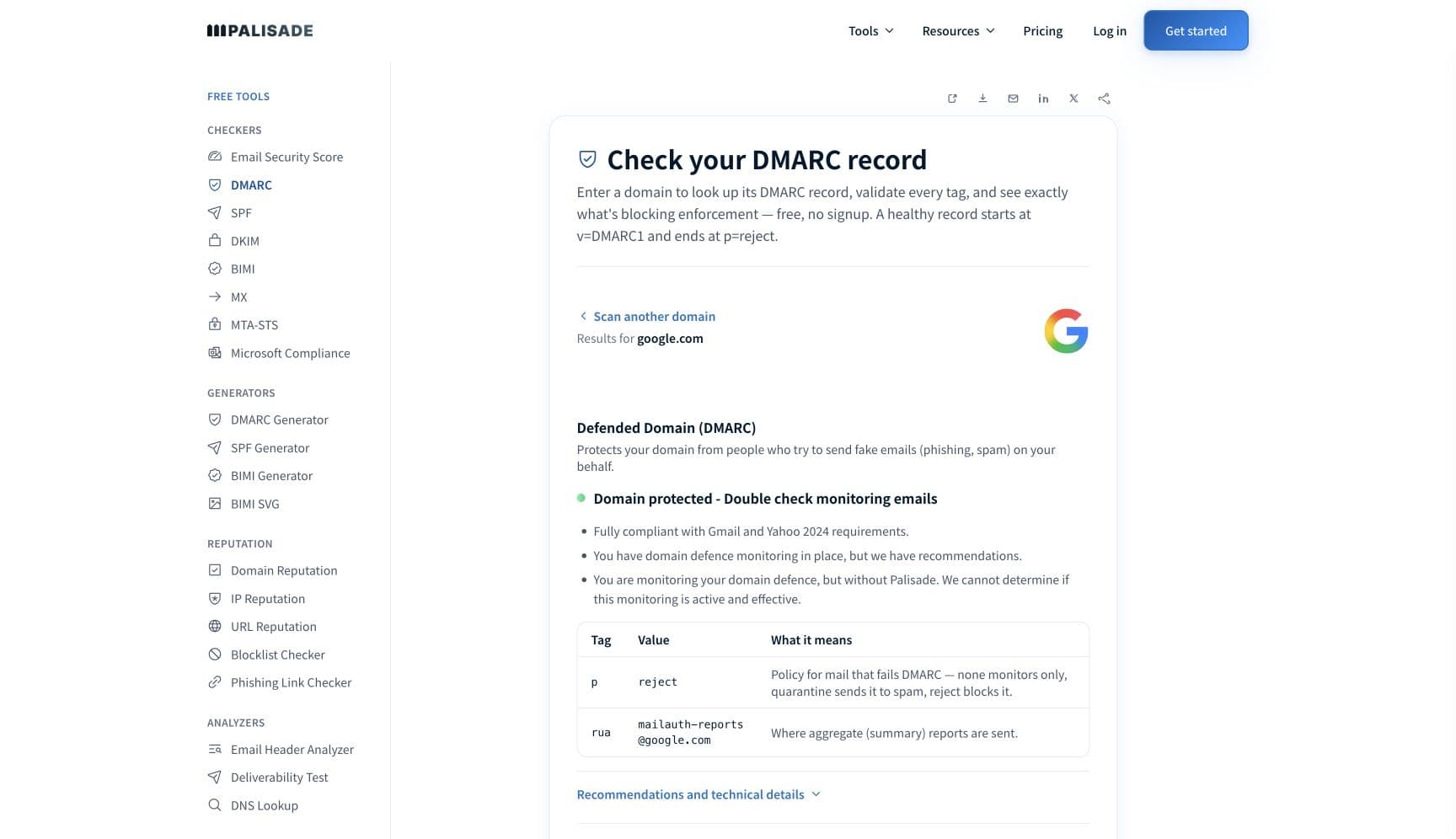
The notice names the problem for you: authentication. Run the domain from your From address through the free DMARC checker below. In one pass it shows whether your SPF, DKIM, and DMARC records exist, what they currently say, and which check Gmail could not verify when it refused the message.
Check your domain now
Enter your sending domain and the check runs instantly on the next page. Free, no signup.
Why Gmail is blocking your email
| Likely cause | What's happening |
|---|---|
| A service sends as your domain with no passing SPF or DKIM | The literal meaning of the notice. Gmail checked the connecting IP against your SPF record and looked for a DKIM signature that validates for your domain; neither passed, and Google's sender guidelines state that unauthenticated mail "might be marked as spam or rejected with a 5.7.26 error" (checked 2026-07-17). The usual culprit is a CRM, invoicing app, scan-to-email copier, or ticketing system nobody ever added to DNS. |
| DKIM signs the provider's domain instead of yours | Many platforms sign with their own default domain (like sendgrid.net) until you finish their custom-domain setup. The signature is cryptographically valid, but not for your domain, so when SPF also misses, Gmail still counts the message as unauthenticated. |
| Your SPF record ends in -all and the sending IP isn't listed | Gmail documents a separate variant of this rejection for SPF hard fails: your record explicitly tells receivers to refuse mail from unlisted IPs, and Gmail takes you at your word. A migrated mail host, a provider that changed IP ranges, or a flattened SPF record that drifted out of date all land here. |
| Your own DMARC policy ordered the rejection | If your domain publishes p=quarantine or p=reject and the message fails both aligned SPF and aligned DKIM, Gmail's bounce says the mail was refused due to the domain's DMARC policy. That is enforcement working as designed. The fix is authenticating the legitimate source, never weakening the policy. |
| You crossed Gmail's bulk-sender line without the full stack | Google counts 5,000+ daily messages to personal Gmail accounts across your primary domain and all its subdomains together, per its sender-guidelines FAQ (checked 2026-07-17). Bulk senders must pass both SPF and DKIM, publish DMARC, and align the From domain. Marketing, transactional, and notification streams on three subdomains can cross the line while each looks small on its own. |
| Forwarding broke SPF and no DKIM signature survived | A forwarder re-sends the message from its own IP, which your SPF record doesn't cover. If the forwarder also modified the body (footers, subject tags), the DKIM signature breaks too, and the forwarded copy arrives at Gmail with nothing passing. |
| Gmail's late-2025 enforcement ramp caught a stream it used to tolerate | Google's sender-guidelines FAQ says Gmail began ramping up enforcement on non-compliant traffic in November 2025 (checked 2026-07-17). Streams that skated through 2024 and 2025 with partial authentication are now the ones producing sudden rejection notices with no change on the sender's side. |
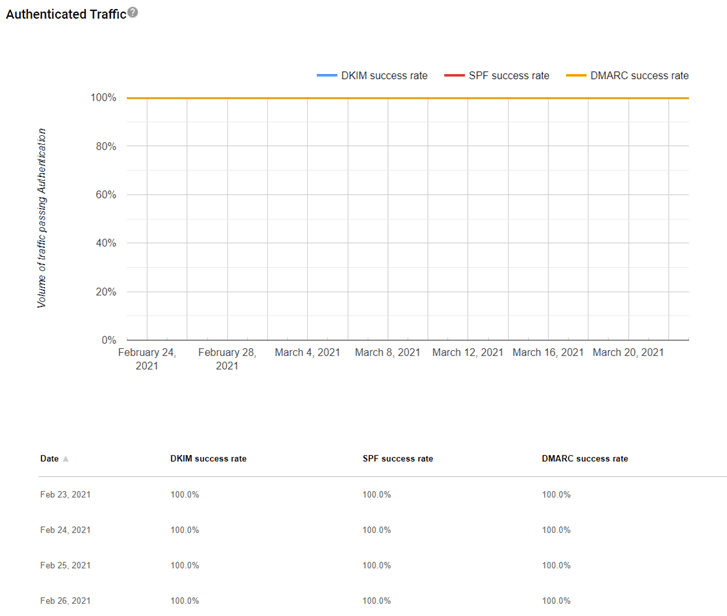
Confirm the pattern in Gmail's own sender data
Gmail publishes its own sender data separately from your DNS. Use it to confirm the provider-side symptom after you have checked the public authentication records below.
Check the public signals before changing settings
The free check above gives you a fast public baseline for how Gmail sees your mail. It does not replace the provider's private reputation or placement data, but it tells you whether the problem is visible from outside before you edit a sending platform.
How to fix it, step by step
Run your sending domain through the DMARC checker
Use the free checker above (also at the DMARC checker). It reads your live SPF, DKIM, and DMARC records the same way Gmail does and shows which leg is missing or failing, so you start from evidence instead of the bounce text alone.
Identify the message stream that tripped the notice
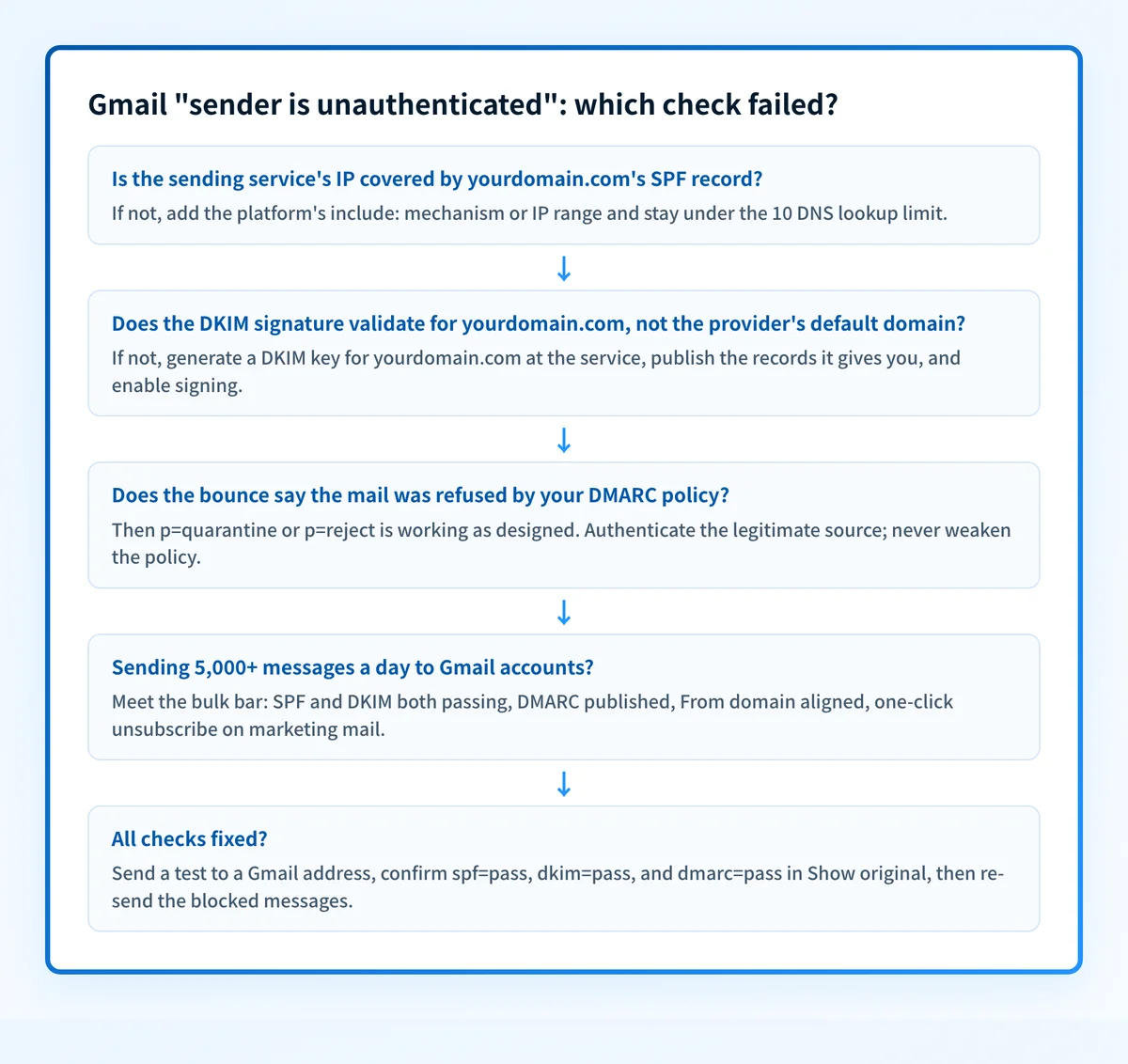
Gmail's rejection includes the domain and IP it evaluated. Match that IP to a sending service, then pull your DMARC aggregate reports for the complete list of sources sending as your domain; the unauthenticated one is usually a line-of-business app nobody documented.
Add every legitimate sender to your SPF record
Include each platform's documented include: mechanism or IP range. Workspace's own servers need include:_spf.google.com (v=spf1 include:_spf.google.com ~all if Google is your only sender, per Google's SPF setup doc). Verify with the free SPF checker and stay under the 10-DNS-lookup limit.
Turn on DKIM signing with your own domain at each service
Generate DKIM keys for your domain in each service (for Workspace, in the Admin console), publish the CNAME or TXT records they give you, and enable signing. A signature for the provider's default domain doesn't count. Confirm each selector resolves at the DKIM checker.
Meet the bulk-sender bar if you send 5,000+ a day
Publish a DMARC record (Google accepts p=none as the minimum), align the From domain with SPF or DKIM, add one-click unsubscribe to marketing mail, and keep your Postmaster Tools spam rate below 0.3%, ideally below 0.10%. Google counts the 5,000 across your primary domain and all subdomains.
Test against a live Gmail mailbox, then re-send
Send a test to any Gmail address, open Show original, and confirm spf=pass, dkim=pass, and dmarc=pass. Because 550 rejections are permanent, the blocked messages will not retry on their own; re-send them once headers pass, and keep DMARC reports flowing so the next gap surfaces as a report line, not a bounce.
Related free tools: SPF checker · DKIM checker · Email security score · Domain reputation
If you send in volume: Gmail's published rules
Google's Email sender guidelines (in force since February 1, 2024, checked 2026-07-17) require every sender to authenticate with SPF or DKIM, plus valid forward and reverse DNS and TLS transmission. Senders of 5,000+ daily messages to personal Gmail accounts must pass both SPF and DKIM, publish a DMARC record (minimum p=none) with the From domain aligned, support one-click unsubscribe on marketing mail, and keep the user-reported spam rate in Postmaster Tools below 0.3% (Google's stated goal is below 0.10%). The 5,000 counts across your primary domain and all subdomains combined, and Google's FAQ notes Gmail began ramping up enforcement on non-compliant traffic in November 2025.
Check your standing with Gmail
- Google Postmaster Tools
Google's own dashboards for your domain: user-reported spam rate, domain and IP reputation, authenticated-traffic share, and delivery errors. Free; verify your domain to enroll.
- Google Admin Toolbox Check MX
Google's quick domain check for MX and SPF records, with an optional DKIM selector lookup; useful as a second opinion straight from the receiver.
- Sender contact form (mitigation request)
Gmail publishes no IP delist portal. This form is the escalation path, and Google says it is for senders who already follow the guidelines; fix authentication before filing.
Bounce codes you may be seeing
A block from Gmail surfaces as a specific SMTP code. Some lists below also carry codes returned by the systems receiving your mail; each line names its issuer. Match yours below; where a code has a full guide, it is linked.
- 550 5.7.26: Gmail's rejection family for unauthenticated mail; the "sender is unauthenticated" notice is one of its three documented variants Full guide →
- 550 5.7.1: Gmail policy rejections, including rate limiting on senders it already distrusts Full guide →
- 421 4.7.0: temporary deferrals Gmail applies while it evaluates suspicious traffic Full guide →
The real root cause: unenforced authentication
Gmail's unauthenticated-sender block is the cleanest diagnosis in deliverability: no reputation mystery, no content filter to second-guess, just authentication that fails. It is also a preview of the world DMARC enforcement builds on purpose. When Gmail refuses unauthenticated mail claiming to be your domain, that is exactly what your own p=reject policy does to phishers who spoof you. The goal is to end up on the right side of that transaction: SPF and DKIM passing and aligned for every real sending service, DMARC reports confirming it week after week, and a policy enforced at p=reject so the only mail Gmail blocks in your name is mail you never sent. Monitoring shows you which senders fail; enforcement is what turns this bounce from your problem into a spoofer's.
DMARC software that does the work
Palisade's AI agent takes domains all the way to enforcement: hosted SPF, DKIM, DMARC, and MTA-STS records on paid plans, DMARC reports monitored continuously, and every policy step drafted for your approval on the way to p=reject. The full product is open for a 15-day trial, and nothing is charged until it ends.
15-day full-product trial. Nothing is charged until it ends.
Fixing this across every client domain
One unauthenticated-sender bounce is a ten-minute DNS fix. Across a managed fleet it is structural: every client has a scan-to-email copier, a legacy CRM, or an invoicing tool sending unauthenticated, and Gmail's enforcement ramp finds them one ticket at a time. Palisade hosts and manages the SPF, DKIM, DMARC, and MTA-STS records for every client domain, surfaces unauthenticated senders from DMARC reports before Gmail starts bouncing them, and carries each domain to p=reject, with your team approving each step. Tickets land in ConnectWise, HaloPSA, or Autotask through native PSA integrations, client domains are priced per domain with rates that improve as the portfolio grows, and your own MSP domain is a free NFR domain to prove it on first.
Questions readers ask
Frequently asked questions
What does "the sender is unauthenticated" mean in Gmail?
Is this the same as SMTP error 550 5.7.26?
Does Gmail require both SPF and DKIM, or just one?
Why is Gmail suddenly blocking emails that sent fine before?
Can the recipient whitelist me to get around the block?
How long after fixing SPF and DKIM will Gmail accept my mail?
Does this rejection hurt my domain reputation?
I use Google Workspace; why is Gmail blocking my own outbound mail?
Sources and last verified
Every claim about Gmail on this page links to the source it came from, each with the date it was last checked. Provider policies change; if a detail looks off, the linked source is authoritative.
- Verbatim rejection text: "This email has been blocked because the sender is unauthenticated. Gmail requires all senders to authenticate with either SPF or DKIM." plus the SPF hard-fail and DMARC-policy variants of 550 5.7.26knowledge.workspace.google.com · checked 2026-07-17
- All senders must authenticate with SPF or DKIM; unauthenticated messages "might be marked as spam or rejected with a 5.7.26 error"; bulk senders (5,000+/day to personal Gmail) need SPF and DKIM and DMARC with From-domain alignment plus one-click unsubscribe; spam rate below 0.3% required, below 0.10% the stated goal; PTR records and TLS required; Postmaster Tools shows spam rate, authentication, and domain/IP reputationsupport.google.com · checked 2026-07-17
- The 5,000-message threshold counts the primary domain and all subdomains together; DMARC minimum policy p=none accepted; requirements in force since February 2024; Gmail ramping up enforcement on non-compliant traffic from November 2025; spam rate at or above 0.3% makes senders ineligible for mitigationsupport.google.com · checked 2026-07-17
- Google's recommended Workspace SPF record is v=spf1 include:_spf.google.com ~all (when Google is the only sender), with DKIM set up separatelyknowledge.workspace.google.com · checked 2026-07-17
- Google Admin Toolbox Check MX is Google's own checker for MX and SPF records with an optional DKIM selector fieldtoolbox.googleapps.com · checked 2026-07-17
- The Sender contact form is Gmail's mitigation path for bulk senders and states it is for senders who already follow the sender guidelines; Gmail publishes no self-service IP delist portal equivalent to Microsoft'ssupport.google.com · checked 2026-07-17
- The Microsoft portal Gmail has no equivalent of: Microsoft publishes the "Office 365 Anti-Spam IP Delist Portal" at sender.office.com "for external message senders to request their removal from the blocked senders list", entering one email address and one IP address per visit, with removal taking "up to 24 hours or longer"learn.microsoft.com · checked 2026-09-02
Related guides
550 5.7.26550 5.7.1421 4.7.0p=reject-all vs ~alladkim / aspfselector