SMTP error code · permanent failure (5xx)
SMTP error 550 5.7.26: unauthenticated email is not accepted

By Samuel Chenard · CEO & Co-Founder, Palisade · Reviewed September 20, 2026
550 5.7.26 is Gmail's permanent rejection for unauthenticated email: your message failed both SPF and DKIM, or failed the sending domain's DMARC policy, so Google refused it outright. It's a sender-side problem: publish correct SPF and DKIM for every service that sends as your domain, and Gmail accepts the mail again.
550 5.7.26 at a glance | |
|---|---|
| Code | 550 5.7.26 |
| Class | Permanent (5xx): the message was refused and will not retry |
| Category | Authentication |
| Side at fault | Sender |
| Auth-related | Yes (SPF/DKIM/DMARC) |
What the bounce actually says
The exact wording varies by provider. These are the documented strings, verbatim. Match yours to pin down which variant you hit.
Gmail (Google Workspace): no passing SPF or DKIM
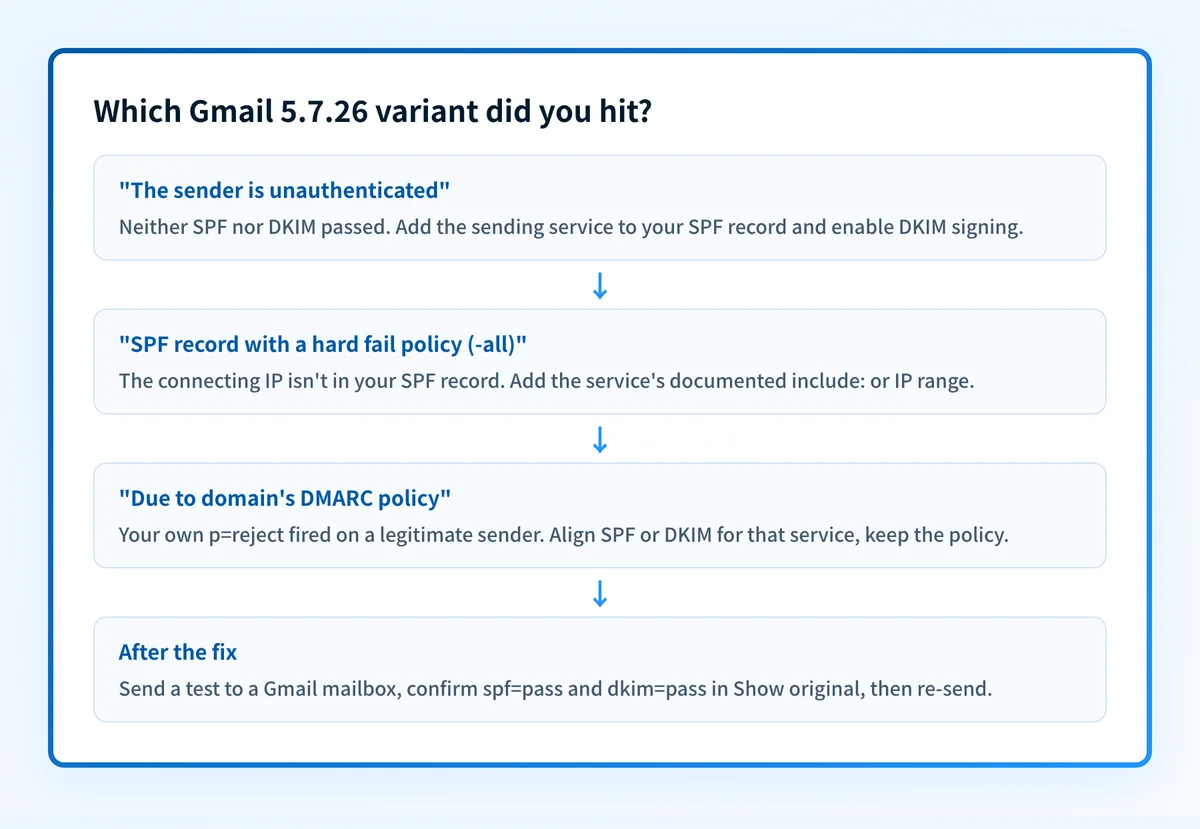
550 5.7.26 This email has been blocked because the sender is unauthenticated. Gmail requires all senders to authenticate with either SPF or DKIM. Authentication results: DKIM = did not pass SPF [domain-name] with ip: [ip-address] = did not pass. For instructions on setting up authentication, go to Email sender guidelines.Source: knowledge.workspace.google.com
Gmail (Google Workspace): SPF hard fail
550 5.7.26 The (E)MAIL FROM domain [domain-name] has an SPF record with a hard fail policy (-all) but it fails to pass SPF checks with the ip: [ip-address]. To best protect our users from spam and phishing, the message has been blocked. For more information, go to Email sender guidelines.Source: knowledge.workspace.google.com
Gmail (Google Workspace): DMARC policy rejection
550 5.7.26 Unauthenticated email from domain-name is not accepted due to domain's DMARC policy. Contact the administrator of domain-name domain if this was legitimate email. To learn about the DMARC initiative, go to Control unauthenticated email from your domain.Source: knowledge.workspace.google.com
Why you're seeing 550 5.7.26
Since February 2024, Gmail requires every sender to authenticate with SPF or DKIM, and bulk senders to pass both, plus DMARC. 550 5.7.26 is what enforcement looks like: Google checked the connecting IP against your domain's SPF record, checked the message for a valid DKIM signature, and neither passed. The bounce text tells you which variant you hit: a plain double failure, an SPF -all hard fail, or a rejection ordered by your own domain's DMARC policy. In every case the receiving side is working as designed; the fix is entirely in your DNS and your sending setup.
Likely causes, ranked
| Likely cause | What's happening |
|---|---|
| The sending service isn't in your SPF record | The most common trigger. A CRM, invoicing app, ticketing system, or new mail server sends as your domain, but your SPF record doesn't include its IPs. Gmail checks the connecting IP against SPF, finds no match and, with no passing DKIM to fall back on, blocks the message. |
| DKIM signing is off, or signs the wrong domain | The service sends without a DKIM signature, or signs with its own default domain (like sendgrid.net) instead of yours. Gmail sees DKIM = did not pass for your domain even though a signature technically exists. |
| No SPF or DKIM published at all | New domains and hand-built mail servers often skip authentication entirely. Before 2024 this mail was merely spam-foldered; under Gmail's sender requirements it's now rejected at the door. |
| SPF hard fail (-all) with an unlisted IP | Your SPF record ends in -all, which explicitly tells receivers to refuse mail from any IP not listed. Gmail takes you at your word. This is the second bounce variant. Google's wording for this variant names SPF alone, so a DKIM pass is not what it is testing. |
| Your own DMARC policy ordered the rejection | The third variant. Your domain publishes p=reject or p=quarantine, and this message failed both aligned SPF and aligned DKIM, so Gmail did exactly what your policy asked. Legitimate mail hitting this means a real sending source was never authenticated before enforcement. |
| Forwarding broke SPF | A forwarder re-sends the message from its own IP, which your SPF record doesn't cover. Without a surviving DKIM signature the forwarded copy arrives unauthenticated and gets blocked. |
How to fix 550 5.7.26
Check the sending domain's DMARC, SPF, and DKIM in one pass
Run the domain from the bounced message's From address through the free DMARC checker below. It shows whether SPF and DKIM records exist, what your DMARC policy currently orders receivers to do, and which of the three the bounce variant points at. Google's sender guidelines are the requirement behind the bounce: every sender must pass SPF or DKIM, and bulk senders must pass both plus DMARC.
Sources: Google: Email sender guidelines
Run the check now
Enter the domain from the step above and the check runs instantly on the next page. Free, no signup.
Add every sending service to your SPF record
List each platform that sends as your domain (mail host, CRM, billing, marketing, monitoring) and make sure your SPF record includes each one's documented
include:or IP range. Verify the result with the free SPF checker and stay under the 10-DNS-lookup limit RFC 7208 sets on evaluating a record.Turn on DKIM signing for your domain at each service
In each service's settings, generate DKIM keys for your domain (not the provider's default), publish the CNAME or TXT records they give you, and enable signing. Confirm the selector resolves with the free DKIM checker.
Confirm alignment with your From domain
Gmail's DMARC variant only clears when the domain that passes SPF or DKIM matches the visible From domain. A passing signature for
sendgrid.netdoesn't help mail sent asyourdomain.com. Set the custom return-path and signing domain each provider offers. DMARC calls this identifier alignment, and it is what turns a passing SPF or DKIM result into a passing DMARC result.Send a test to a Gmail mailbox and read the headers
After DNS propagates (minutes to a few hours), send a test to any Gmail address, open Show original, and check for
spf=pass,dkim=pass, anddmarc=pass. The free email header analyzer parses the raw headers for you.Re-send the failed mail and monitor DMARC reports
Once headers show passes, re-send whatever bounced: 550 is permanent, so nothing retries on its own. Then keep DMARC aggregate reports flowing so the next unauthenticated sender shows up in a report instead of a bounce.
Related free tools: SPF checker · DKIM checker
Authentication is the fix, not a workaround
Every path out of 550 5.7.26 runs through the same three DNS records: SPF, DKIM, and DMARC. Mailbox providers no longer treat them as best practice; they're the entry ticket, and a domain that drifts out of alignment starts bouncing again without anyone changing a thing on your side.
The durable fix is enforcement: publish correct records, watch the DMARC reports for senders you missed, and move the domain to p=reject so receivers drop spoofed mail instead of bouncing yours.
DMARC software that does the work
Palisade's AI agent takes domains all the way to enforcement: hosted SPF, DKIM, DMARC, and MTA-STS records on paid plans, DMARC reports monitored continuously, and every policy step drafted for your approval on the way to p=reject.
15-day full-product trial. Nothing is charged until it ends.
Why it matters for MSPs
One 550 5.7.26 bounce is a DNS fix; fifty client domains hitting Gmail's sender requirements at once is a Monday morning. Every tenant with an unauthenticated line-of-business app (the invoicing tool, the scan-to-email copier, the legacy CRM) is one Gmail update away from this ticket, and hand-auditing SPF and DKIM across a managed fleet doesn't scale. Palisade hosts and manages the SPF, DKIM, and DMARC records for every client domain, spots unauthenticated senders in the DMARC reports before Gmail bounces them, and carries each domain to p=reject, with your team approving each step. It plugs into ConnectWise, HaloPSA, and Autotask so the fix lands in your existing workflow, and your own MSP domain is a free NFR domain you can prove it on first.
Questions readers ask