SMTP error code · permanent failure (5xx)
SMTP error 554 5.7.1: message refused or relay access denied

By Samuel Chenard · CEO & Co-Founder, Palisade · Reviewed September 20, 2026
554 5.7.1 is a permanent policy rejection: the receiving server refused your message, most often because your sending IP is on a blocklist, your sender reputation is poor, or a relay rule doesn't recognize you. It will not retry on its own. Find the blocklist named in the bounce, fix the root cause, delist, and re-send.
554 5.7.1 at a glance | |
|---|---|
| Code | 554 5.7.1 |
| Class | Permanent (5xx): the message was refused and will not retry |
| Category | Policy |
| Side at fault | Sender |
| Auth-related | Yes (SPF/DKIM/DMARC) |
What the bounce actually says
The exact wording varies by provider. These are the documented strings, verbatim. Match yours to pin down which variant you hit.
Generic MTA: DNSBL rejection (Spamhaus, Postfix-style)
554 5.7.1 Service unavailable; Client host [11.22.33.44] blocked using sbl-xbl.spamhaus.orgSource: github.com
Microsoft 365 (Exchange Online Protection): IP on Microsoft's blocklist, documented without a reply code under 550 5.7.1
5.7.1 Service unavailable; Client host [xxx.xxx.xxx.xxx] blocked using Blocklist 1; To request removal from this list please forward this message to delist@microsoft.comSource: learn.microsoft.com
Postfix: default relay refusal
554 5.7.1 <user@domain.com>: Relay access deniedSource: access.redhat.com
Why you're seeing 554 5.7.1
554 5.7.1 pairs RFC 5321's catch-all rejection (554, transaction failed) with enhanced status 5.7.1, "delivery not authorized, message refused" (RFC 3463). In practice it means policy stopped your mail: the connecting IP is on a DNS blocklist, the message tripped a spam or reputation filter, or the server refused to relay it at all. The words after the code tell you which one you hit: a named blocklist means an IP-reputation problem, Relay access denied means an SMTP routing or authentication problem, and a bare policy refusal means the receiver's filters scored the message as unwanted. The same 5.7.1 status also arrives prefixed 550 5.7.1 from Gmail and Microsoft 365, so treat the two as one family and read the text, not the prefix.
Likely causes, ranked
| Likely cause | What's happening |
|---|---|
| Your sending IP is on a DNS blocklist | The most common trigger, and the bounce usually names the list: a Spamhaus zone on Postfix-style servers, "Blocklist 1" in Microsoft 365 NDRs. Which zone you see dates the deployment. The captured example above names the legacy sbl-xbl.spamhaus.org; current servers query the combined zen.spamhaus.org, and either one means the same thing for you. Once the IP is listed, every message it sends to servers that use that list is refused until it's delisted. |
| Poor IP or domain reputation tripped the spam filter | No named list, just a policy verdict. The receiver's own filtering scored the message as unwanted: spam-like content, a sudden volume spike, high complaint rates, or a history of failed authentication from your domain or IP. |
| Relay access denied: the server won't forward your mail | Postfix's default wording for this code. Either you're sending through a server unauthenticated (or on port 25 instead of the authenticated submission port), a device or app points at the wrong outbound server, or, on the receiving side, the destination domain is missing from the server's accepted or relay domain configuration. |
| A compromised mailbox or device got the IP listed | Blocklists list IPs because spam actually left them. A hacked mailbox, an infected machine, or an open relay on your network sends the spam; the 554 5.7.1 bounces on your legitimate mail are the symptom. Delisting without finding the leak just gets you relisted. |
| Missing SPF, DKIM, or DMARC is dragging reputation down | Unauthenticated mail scores worse with every reputation system feeding these policy verdicts, and a domain without DMARC enforcement can be freely spoofed: spammers burn its reputation and the legitimate owner collects the bounces. |
| Recipient-side restrictions | In Microsoft 365 the same 5.7.1 family covers restricted distribution groups, public folders that require authenticated senders (see 550 5.7.13), and mail flow rules. That's configuration on the recipient's side, not your reputation; the NDR text names the restricted group or folder when this is the case. |
How to fix 554 5.7.1
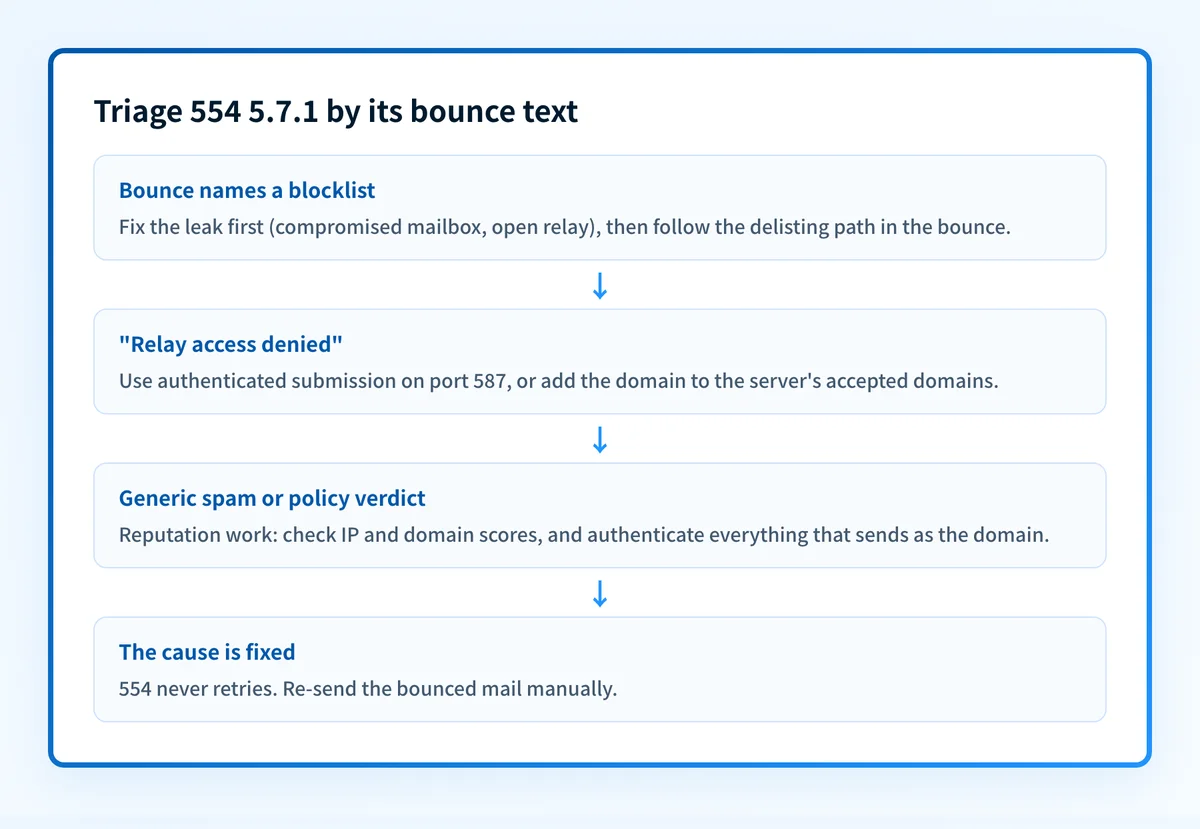
Read the words after the code first
The text after
554 5.7.1picks your path, and nothing else on this page applies until you have read it: a named blocklist means delisting work,Relay access deniedmeans an SMTP routing or authentication fix, and a generic spam or policy verdict means reputation work. Don't request delisting for a relay error; it won't help.If the bounce names a list, check your sending IP against the blocklists
Take the sending server's IP from the bounce (or from the Received headers of a sent message) and run it through the free blocklist checker. If the bounce already names a list, this confirms the listing and shows any other lists you're on that haven't bounced mail yet. Skip this step entirely on a relay error.
Find and fix the root cause before requesting delisting
Check for a compromised mailbox, an infected device, an open relay, or a purchased list before you ask for removal; delisting without fixing the leak means relisting within days. Then follow the removal path in the bounce itself: Spamhaus links its lookup and removal page, and Microsoft asks you to forward the NDR to delist@microsoft.com.
Fix relay errors with authenticated submission
If the bounce says
Relay access denied, point the sending device or app at your provider's submission endpoint on port 587 with a username and password, not anonymous port 25. If it's your own inbound server rejecting mail addressed to your domain, add the domain to its accepted or relay domain configuration.Check how reputation systems score your domain and IP
Run the sending domain through the free domain reputation checker and the IP through the IP reputation checker. Reputation-only blocks (no named list) recover gradually as clean, authenticated mail replaces whatever triggered the verdict.
Authenticate the domain, then re-send
Publish SPF and DKIM for every service sending as your domain and verify the DMARC record with the free DMARC checker. Authenticated mail protects the reputation you just repaired. Because 554 is permanent, nothing retries on its own: once the listing clears, re-send whatever bounced.
Related free tools: IP reputation checker · Domain reputation checker · DMARC checker
Authentication is the fix, not a workaround
Every path out of 554 5.7.1 runs through the same three DNS records: SPF, DKIM, and DMARC. Mailbox providers no longer treat them as best practice; they're the entry ticket, and a domain that drifts out of alignment starts bouncing again without anyone changing a thing on your side.
The durable fix is enforcement: publish correct records, watch the DMARC reports for senders you missed, and move the domain to p=reject so receivers drop spoofed mail instead of bouncing yours.
DMARC software that does the work
Palisade's AI agent takes domains all the way to enforcement: hosted SPF, DKIM, DMARC, and MTA-STS records on paid plans, DMARC reports monitored continuously, and every policy step drafted for your approval on the way to p=reject.
15-day full-product trial. Nothing is charged until it ends.
Why it matters for MSPs
A blocklisted IP rarely hurts just one mailbox. When a client's firewall relay, scan-to-email copier, or line-of-business server lands on a blocklist, every domain sending through that IP starts bouncing with 554 5.7.1, and if the trigger was a compromised mailbox, the next listing is a matter of time. Palisade covers the prevention side across a fleet: it hosts and manages SPF, DKIM, and DMARC for every client domain, and its AI agent carries each one to p=reject with your team approving each step, so spoofed mail can't burn a client's reputation while you work the delisting queue. The DMARC reports double as a map of every IP legitimately sending as each domain: exactly the list of tenant systems to check when a listing hits. It plugs into ConnectWise, HaloPSA, and Autotask, and your own MSP domain runs as a free NFR domain so you can prove it on yourself first.
Questions readers ask