SMTP error code · permanent failure (5xx)
550 5.7.1: delivery not authorized, message refused

By Samuel Chenard · CEO & Co-Founder, Palisade · Reviewed September 20, 2026
550 5.7.1 is the catch-all "delivery not authorized" rejection: the receiving server deliberately refused your message. The bounce text tells you which variant you hit: failed SPF/DKIM/DMARC authentication, a relay the server won't perform, a blocklisted sending IP, or a recipient-side restriction. It's permanent; fix the cause the text names, then re-send.
550 5.7.1 at a glance | |
|---|---|
| Code | 550 5.7.1 |
| Class | Permanent (5xx): the message was refused and will not retry |
| Category | Policy |
| Side at fault | Either side |
| Auth-related | Conditional: only when the complete bounce names SPF, DKIM, or DMARC |
What the bounce actually says
The exact wording varies by provider. These are the documented strings, verbatim. Match yours to pin down which variant you hit.
Gmail (Google Workspace): sender or recipient policy
550 5.7.1 The user or domain that you are sending to (or from) has a policy that prohibits the email that you sent.Source: knowledge.workspace.google.com
Gmail (Google Workspace): unauthorized direct sending
550 5.7.1 The IP you're using to send email is not authorized to send email directly to our servers.Source: knowledge.workspace.google.com
Gmail (Google Workspace): low IP reputation
550 5.7.1 This message is likely suspicious due to the very low reputation of the sending IP address.Source: knowledge.workspace.google.com
Microsoft 365 (Exchange Online): recipient requires authenticated senders
550 5.7.1 RESOLVER.RST.AuthRequired; authentication required [Stage: CreateMessage]Source: learn.microsoft.com
Microsoft 365 (Exchange Online): sending IP on Microsoft's blocklist
5.7.1 Service unavailable; Client host [xxx.xxx.xxx.xxx] blocked using Blocklist 1; To request removal from this list please forward this message to delist@microsoft.comSource: learn.microsoft.com
Microsoft 365 (Exchange Online): blocklisted IP hidden by the customer's IP Allow list
5.7.1. Unable To Relay: Blocked by Customer Allow listSource: learn.microsoft.com
Exchange Server (on-premises): relay not allowed for this sender
550 5.7.1 Unable to relaySource: learn.microsoft.com
RFC 3463: standard meaning of enhanced status 5.7.1
Delivery not authorized, message refusedSource: www.rfc-editor.org
Why you're seeing 550 5.7.1
5.7.1 is the broadest security code in the SMTP standard. RFC 3463 defines it as "delivery not authorized, message refused" (the sender is not authorized to send to this destination) and deliberately says nothing about why. So every provider reuses it for its own refusals: Gmail returns it for admin-policy and IP-reputation refusals, Exchange Online for denied relays, blocklisted IPs, and recipients that only accept authenticated senders, and countless MTAs for per-host or per-recipient filtering. That's why the number alone can't be diagnosed. The human-readable text after 550 5.7.1 is the actual verdict. Match it against the variants above, then work the fix that matches. The one constant: some policy on the receiving side judged your message unauthorized, and it will keep doing so until something changes.
Likely causes, ranked
| Likely cause | What's happening |
|---|---|
| The bounce explicitly names failed SPF, DKIM, or DMARC | This is an authentication failure only when the complete NDR says so. A sending service missing from SPF, disabled DKIM signing, or a DMARC alignment failure can make the message unauthorized, but the bare number does not prove any of them. Gmail and Microsoft 365 use more specific codes for DMARC rejections (550 5.7.26 and 550 5.7.509), and the DMARC-policy bounce text has its own guide at email rejected per DMARC policy, and Gmail's 5.7.1 "policy that prohibits" variant signals a Workspace admin or organization policy, not DMARC. |
| You're relaying through a server that won't relay for you | The classic Exchange wording. A printer, scanner, or line-of-business app submits mail through a server that doesn't recognize it as an authenticated or internal sender, so the server refuses to pass the message on. Common right after migrations, IP changes, or password rotations. If the rejecting server is Microsoft 365, the whole 5.7.x access-denied family shares one triage path: fix Microsoft 365 550 5.7.x access denied walks it tenant by tenant. |
| The sending IP is on a blocklist | Exchange Online's blocklist variant and Gmail's low-reputation variant both fit here. So does Exchange's "Blocked by Customer Allow list" NDR, despite the relay wording: the tenant's own IP Allow list hides the blocklist's name. The receiving side checked your connecting IP against a real-time blocklist or its own reputation data and refused the connection outright; nothing about this specific message mattered. |
| The recipient's organization restricts who can send to that address | Restricted distribution groups, mail-enabled public folders that require authenticated senders (Exchange Online also has a dedicated code for that case, 550 5.7.13), moderated recipients, and per-recipient allow-lists all bounce outsiders with 5.7.1. Your mail and your DNS are fine: the restriction lives entirely on their side. |
| You're sending directly to the provider from an unauthorized IP | Gmail refuses direct SMTP connections from IPs it considers unfit to send, typically dynamic or consumer ranges, or IPv6 senders without matching PTR records. Mail must go out through a proper mail server or smarthost instead. |
| A mail flow rule or content filter refused the message | Microsoft 365 transport rules and third-party gateways commonly reject with a 5.7.1 when a message trips an org-level rule: attachment types, keywords, geo restrictions. The bounce usually carries the custom text the admin configured. |
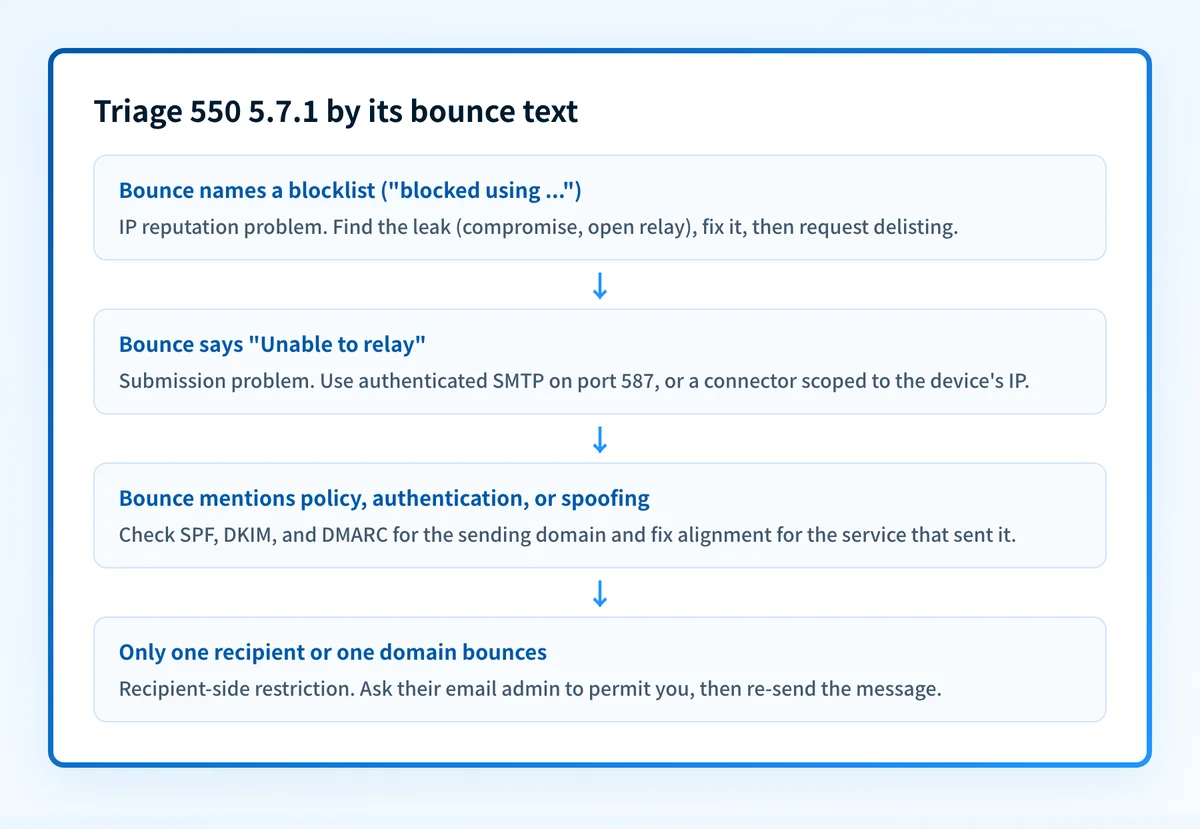
How to fix 550 5.7.1
Preserve the complete NDR and match its exact wording
Copy the entire non-delivery report before changing DNS or mail-flow settings, including the sentence after
550 5.7.1, the rejecting host, timestamps, and any attached original-message headers. Match that sentence to the provider variants above: relay wording, a named blocklist, an authentication result, a recipient restriction, and a content-policy refusal require different fixes. The number alone is not a diagnosis.If the NDR names DMARC, verify this message's alignment
Inspect the trusted receiver's
Authentication-Resultsfor the actual rejected message or a same-path test, not just the domain's DNS records. DMARC passes when SPF passes with an aligned envelope-from domain or DKIM passes with an alignedd=domain; it fails only when neither produces an aligned pass for the visible From domain. Preserve the NDR beside that message-level evidence so you do not mistake a relay or organization-policy rejection for DMARC.Sources: RFC 9989 (DMARC) · Google Workspace DMARC guidance
If it names authentication: fix the failed, unaligned path
For an SPF failure, authorize the real sending service and stay under the 10-DNS-lookup limit. For a DKIM failure, enable signing with your domain and verify the signature. For a DMARC failure, make at least one passing path align with the visible From domain; a valid SPF or DKIM record by itself does not establish alignment. Use the DMARC and SPF checkers only after the NDR identifies this authentication branch.
If it says relay: authenticate the submission
This step is for the classic "Unable to relay" or "not authorized to relay" wording, but not "Blocked by Customer Allow list", which is a blocklist problem (next step). Stop submitting anonymously: point the device or app at authenticated SMTP submission (SMTP AUTH on port 587 with a real account) or set up a connector scoped to its IP address. A mail server only relays for senders it can identify, and this error means it couldn't identify yours.
If it names a blocklist: check your IP and domain reputation
Run the connecting IP through the IP reputation checker and the domain through the domain reputation checker, then check public blocklists with the blocklist checker. Microsoft's own variant tells you where to send the delisting request; public RBLs each have their own removal process. If the bounce says "Blocked by Customer Allow list", your own settings are hiding the culprit: remove the sending IP from the IP Allow list under connection filtering in the Exchange admin center, and the NDR will name the actual blocklist. Then delist. Fix the leak (open relay, compromised account, spam burst) before requesting removal, or you'll be relisted.
If only one recipient bounces: ask their admin, then re-send
A single failing address while everything else delivers points at a recipient-side restriction only their email admin can lift. Once the cause is fixed, whichever it was, re-send the message yourself: 550 is a permanent failure, so nothing retries automatically.
Related free tools: DMARC checker · SPF checker · Domain reputation · Blocklist checker
Why it matters for MSPs
550 5.7.1 is an ambiguous MSP ticket: the same code can cover a scan-to-email device that lost relay rights, a tenant whose new CRM fails alignment, a blocklisted mail server, or a recipient restriction. Keep the complete NDR in the ticket and classify the wording before assigning work. For the authentication branch, Palisade can surface failing senders from DMARC reports, draft the record or policy change for review, and route the work through ConnectWise, HaloPSA, or Autotask; relay, reputation, and recipient-policy branches still need their own evidence and owner.
Questions readers ask