SMTP error code · permanent failure (5xx)
SMTP error 553 5.7.1: sender address rejected, not owned by user

By Samuel Chenard · CEO & Co-Founder, Palisade · Reviewed September 20, 2026
553 5.7.1 means the mail server refused your From address: you authenticated as one account but set a sender address that account doesn't own, or you tried to relay without logging in at all. It's a permanent, sender-side rejection: make your SMTP login match your sender address and the mail goes through.
553 5.7.1 at a glance | |
|---|---|
| Code | 553 5.7.1 |
| Class | Permanent (5xx): the message was refused and will not retry |
| Category | Policy |
| Side at fault | Sender |
| Auth-related | Yes (SPF/DKIM/DMARC) |
What the bounce actually says
The exact wording varies by provider. These are the documented strings, verbatim. Match yours to pin down which variant you hit.
Postfix, as documented by Hosting.XYZ (a bare enhanced status in its example)
5.7.1 <admin@example.com>: Sender address rejected: not owned by user mail@example.comSource: hosting.xyz
Postfix (upstream source, example address substituted for the placeholder)
553 5.7.1 <user@example.com>: Sender address rejected: not logged inSource: github.com
Why you're seeing 553 5.7.1
Unlike most bounce codes, 553 5.7.1 usually comes from the server you send through, not the one you send to. Submission servers enforce a simple ownership rule: the account you authenticate with must own the address you put in MAIL FROM. In Postfix this is reject_sender_login_mismatch backed by smtpd_sender_login_maps; hosting providers ship the same idea as an anti-spoofing filter, and some also enforce it at the receiving MX for domains they host, which produces a near-identical bounce on mail you send to a recipient on the same host. It exists for a good reason: without it, any authenticated mailbox could impersonate any other user, and an unauthenticated connection could use the server as an open relay. RFC 3463 defines the 5.7.1 status as "delivery not authorized, message refused": the server understood you fine, it just refuses to send as an identity you haven't proven you own.
Likely causes, ranked
| Likely cause | What's happening |
|---|---|
| Your From address doesn't match your SMTP login | The most common trigger. A mail client, script, or app authenticates as one mailbox but sets MAIL FROM to a different address: a colleague's mailbox, an alias, or another domain entirely. The bounce text names both: the rejected sender in angle brackets and the account you actually logged in as. |
| SMTP authentication is off, so the server sees a relay attempt | One source of the not logged in wording (the other is the anti-spoof filter below). The client connects without authenticating, often on port 25 with SMTP AUTH disabled, or with credentials that silently stopped working after a password change. Accepting that mail would make the server an open relay, so it refuses. |
| Your domain's own mail host rejects outside mail claiming to come from it (anti-spoof filter) | Some shared-hosting mail providers run the ownership check on the receiving side too: an anti-spoof filter on their MX refuses any message claiming to be from a domain they host that did not come through their own servers. It fires even on legitimate mail, when a newsletter ESP, a CRM, or another provider sends as your domain to a recipient who happens to be on the same host. The tell is that the rejecting host named in the bounce belongs to your own mail provider rather than the recipient's. |
| You're sending as an alias the server hasn't mapped to your account | You legitimately send as sales@ or a shared mailbox, but the server's sender-ownership map (smtpd_sender_login_maps in Postfix, "send as" settings in hosting panels) only lists your primary address. The server can't tell an unauthorized colleague from an unlisted alias. |
| A third-party app injects mail through your host with your address | A CRM, invoicing tool, printer, or scan-to-email device is pointed at your provider's SMTP server with stale or borrowed credentials, then sends as an address those credentials don't own. Devices configured years ago are the usual suspects. |
| Someone else is spoofing your address | If the bounce is for a message you never sent, a spammer used your address in MAIL FROM somewhere else and a rejection notice found its way back to you. The server that returned 553 5.7.1 did its job. Your job is making sure every receiver can reject those forgeries too, which is what SPF and DMARC are for. |
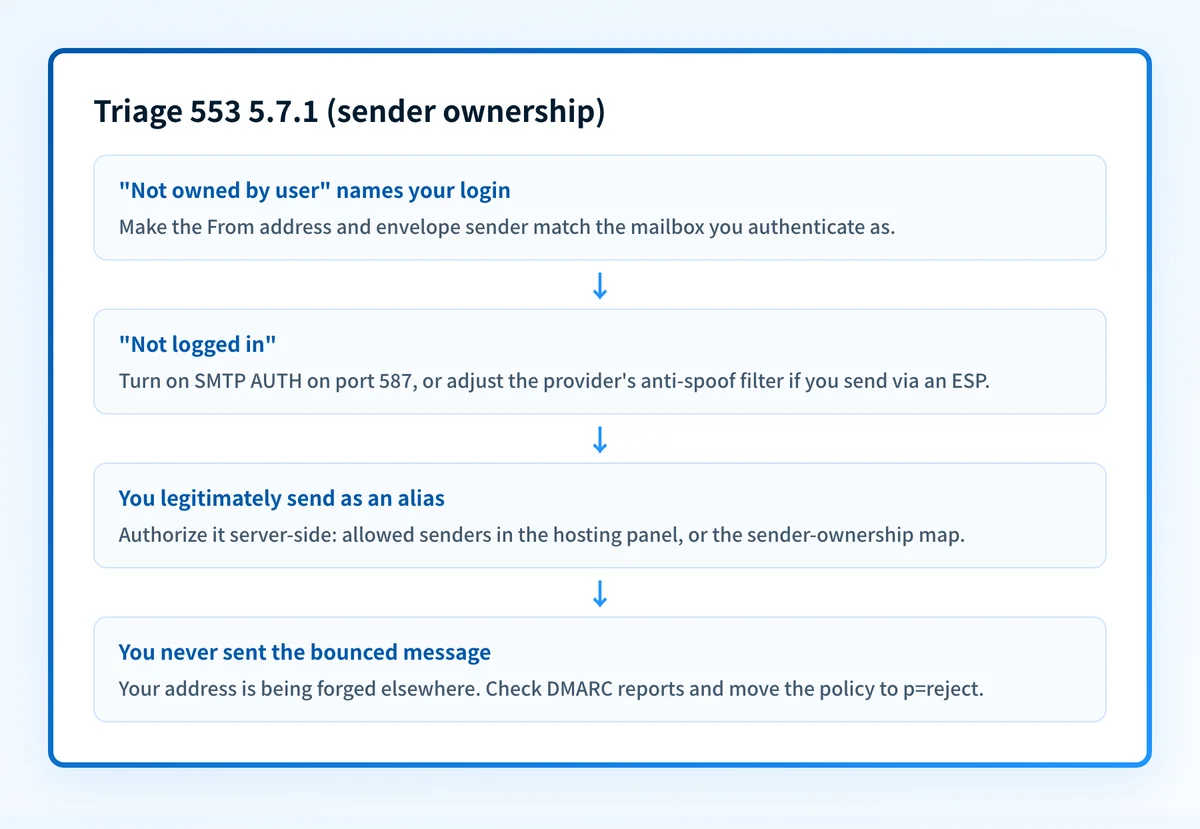
How to fix 553 5.7.1
Make your From address match your SMTP username
This is the fix that clears the bounce, so start here. In the failing client, script, or device, set both the visible From and the envelope sender to the mailbox you authenticate as. In PHPMailer and similar libraries that means
FromandSenderequal to the SMTP username, not a display alias.Then check who's authorized to send as your domain
Once the login mismatch is fixed, run your domain through the free SPF checker. SPF does not cause this bounce, but it is the same ownership question one hop downstream: if the server you send through is not in your SPF record, receivers that enforce DMARC may reject or junk the same mail after your submission server accepts it, unless DKIM signs and aligns for that domain.
Turn SMTP authentication on and use port 587
If your variant says
not logged in, enable SMTP AUTH with the full mailbox address as the username, on submission port 587 (or 465 with TLS). Unauthenticated relay on port 25 is exactly what this rejection is built to stop, so no client tweak talks the server out of it. One exception: if the bounce names a host belonging to your own mail provider rather than the recipient's, and you sent through a different service on purpose, it's an anti-spoof filter rather than an authentication problem; see the anti-spoof step below.Authorize aliases and shared senders on the server side
If you genuinely send as another address, grant it properly: add the alias to your account's allowed senders in the hosting panel, or map it to your login in
smtpd_sender_login_mapson a self-hosted Postfix. For an alias or shared mailbox on the provider's own servers, don't disable the anti-spoofing filter to make it work; that reopens impersonation for every mailbox on the server.Sending through an external service? Adjust the provider's anti-spoof filter
If your domain's mailboxes live with a shared-hosting mail provider but the failing mail goes out through an ESP, a CRM, or another host, the provider's anti-spoof filter can bounce it at the provider's own MX. Two clean fixes: route that mail through the provider's authenticated SMTP instead, or, if sending via the external service is deliberate, turn the provider's anti-spoof filter off for the domain per its own documentation, and let a correct SPF, DKIM, and DMARC setup do the anti-spoofing job for every receiver rather than just this one.
Give third-party apps their own authenticated identity
Point each CRM, billing tool, and scan-to-email device at credentials that own the address it sends as, or let the service send from its own infrastructure and add it to your SPF record with your domain as the aligned sender. Verify the result with the free SPF checker and DKIM checker after every change.
If you never sent the bounced mail, check your DMARC policy
Bounces for mail you didn't send mean your address is being forged elsewhere. Run your domain through the free DMARC checker: aggregate reports will show every source using your domain, and a policy of
p=rejecttells every receiver to refuse the forgeries the way this server just did.
Related free tools: DMARC checker · DKIM checker
Authentication is the fix, not a workaround
Every path out of 553 5.7.1 runs through the same three DNS records: SPF, DKIM, and DMARC. Mailbox providers no longer treat them as best practice; they're the entry ticket, and a domain that drifts out of alignment starts bouncing again without anyone changing a thing on your side.
The durable fix is enforcement: publish correct records, watch the DMARC reports for senders you missed, and move the domain to p=reject so receivers drop spoofed mail instead of bouncing yours.
DMARC software that does the work
Palisade's AI agent takes domains all the way to enforcement: hosted SPF, DKIM, DMARC, and MTA-STS records on paid plans, DMARC reports monitored continuously, and every policy step drafted for your approval on the way to p=reject.
15-day full-product trial. Nothing is charged until it ends.
Why it matters for MSPs
Every MSP fleet is full of devices and line-of-business apps that authenticate as one mailbox and send as another: the scan-to-email copier sending as office@, the ticketing system sending as support@, the invoicing tool a client set up in 2019. Each one is a 553 5.7.1 ticket waiting for a password change or a host migration, and the same unanswered question (who may send as this domain?) is what keeps client domains spoofable on the open internet. Palisade answers it once per domain: it hosts and manages the SPF, DKIM, and DMARC records, surfaces every sending source in the DMARC reports so unauthorized senders show up before they bounce, and carries each domain to p=reject, with your team approving each step. Native ConnectWise, HaloPSA, and Autotask integrations put the findings in your existing workflow, and your own MSP domain is a free NFR domain: prove it on yourself before rolling it out to clients.
Questions readers ask