SMTP error code · permanent failure (5xx)
SMTP error 550 5.7.23: the message failed SPF validation

By Samuel Chenard · CEO & Co-Founder, Palisade · Reviewed September 20, 2026
550 5.7.23 means the receiving server ran an SPF check on your message and got a fail: the IP that delivered it isn't authorized by your domain's SPF record. It's a permanent, sender-side rejection; the mail won't retry. Add the sending service's IPs to your SPF record, then send again.
550 5.7.23 at a glance | |
|---|---|
| Code | 550 5.7.23 |
| Class | Permanent (5xx): the message was refused and will not retry |
| Category | Authentication |
| Side at fault | Sender |
| Auth-related | Yes (SPF/DKIM/DMARC) |
What the bounce actually says
The exact wording varies by provider. These are the documented strings, verbatim. Match yours to pin down which variant you hit.
Microsoft 365 / Exchange Online
5.7.23 The message was rejected because of Sender Policy Framework violationSource: learn.microsoft.com
RFC 7372: the registered sample text for enhanced status 5.7.23
550 5.7.23 SPF validation failedSource: www.rfc-editor.org
Why you're seeing 550 5.7.23
550 5.7.23 is the one bounce code that names its cause outright. RFC 7372 registered X.7.23 specifically for "a message [that] completed an SPF check that produced a 'fail' result". It replaces the older, generic 5.7.1 so senders can see exactly which check failed. The receiving server looked up the SPF record for your envelope-from domain, compared it against the IP that actually connected, got fail, and rejected the message as its policy requires. Nothing is broken on the receiving side, and this isn't a reputation or blocklist problem: the receiver simply enforced what your own DNS told it. The fix always lives in the sending domain's SPF record or in the route the mail takes to get out.
Likely causes, ranked
| Likely cause | What's happening |
|---|---|
| The sending service's IP isn't in your SPF record | The most common trigger by far. A CRM, marketing platform, ticketing system, or on-premises relay sends as your domain, but your SPF record never picked up its include: or IP range. The receiver checks the connecting IP against the record, finds no match, and rejects. |
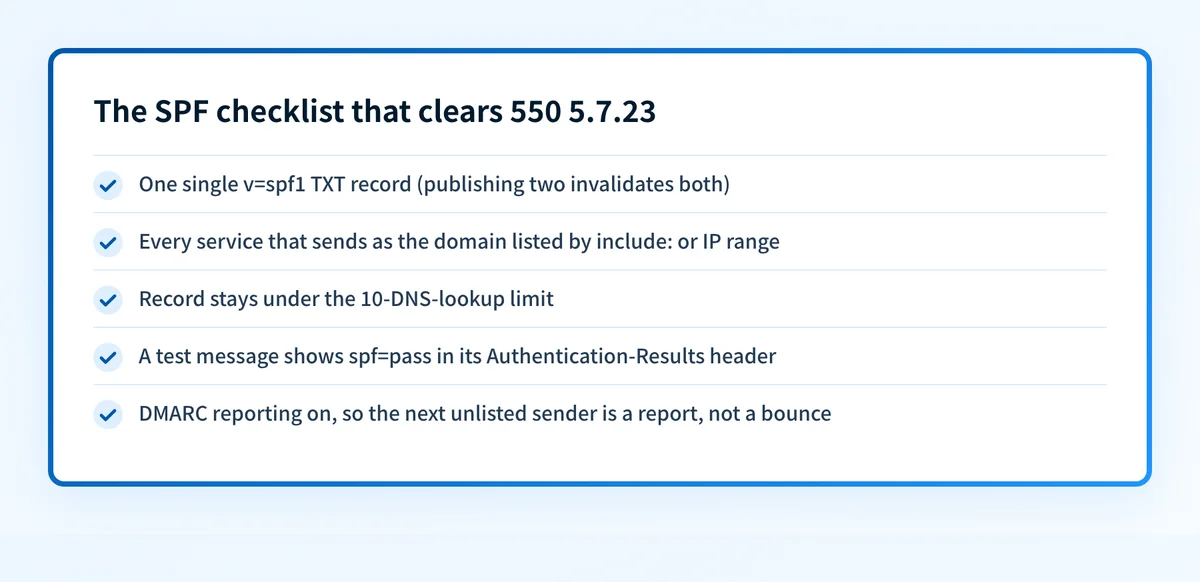
| A broken or duplicated SPF record | The domain publishes two v=spf1 TXT records (which invalidates both) or has a typo in a mechanism, so evaluation ends in a permerror, and strict receivers treat a record they can't evaluate as harshly as an outright fail. A completely missing record isn't this code: under RFC 7208 no record evaluates to none, not fail. |
| Forwarding or an external relay broke SPF | A forwarder or intermediate relay re-sends the message from its own IP while keeping your envelope-from domain. SPF is evaluated against the last hop's IP, which your record doesn't cover. It's a classic multi-hop failure that no SPF edit on your side can fully solve. |
| Your record exceeds the 10-DNS-lookup limit | Nested include: chains push the record past SPF's 10-lookup ceiling. Evaluation aborts with a permanent error before it ever reaches the mechanism that would have authorized your sender, so mail from a correctly listed service still bounces. |
| Microsoft 365 routed the message through its High Risk Delivery Pool | Specific to sending from Microsoft 365: outbound mail your tenant sends that Microsoft classifies as spam leaves through the High Risk Delivery Pool, whose IPs won't pass SPF checks at the destination. Your SPF record can be perfect and the mail still fails. |
How to fix 550 5.7.23
Run your domain through the free SPF checker
Use the checker below on the domain from the bounced message's From address. It confirms whether an SPF record exists, parses every mechanism, counts DNS lookups against the limit of 10, and flags syntax errors or duplicate records: the full list of things a receiver evaluates before returning 5.7.23.
Run the check now
Enter the domain from the step above and the check runs instantly on the next page. Free, no signup.
Find the IP that actually sent the rejected message
The bounce's diagnostic section (Microsoft labels it "Diagnostic information for administrators") includes the IP the receiver checked. Compare it against your record, and pull the raw TXT record with the free DNS lookup to see exactly what receivers resolve, not what your DNS panel claims to publish.
Add every legitimate sending source to the record
List each platform that sends as your domain (mail host, CRM, billing, marketing, monitoring, printers and scanners) and add each one's documented
include:orip4:/ip6:range to your singlev=spf1record. If a source you don't recognize sent the mail, that's your answer of a different kind: don't add it.Sending from Microsoft 365? Rule out the High Risk Delivery Pool
Microsoft's own guidance for this code: verify the outbound message wasn't classified as spam and routed through the High Risk Delivery Pool, provision every domain you send from in your tenant, and add any on-premises IPs you relay through to the SPF record.
Sources: Microsoft: fix error code 5.7.23 in Exchange Online
Re-send once the record checks out
550 is a permanent failure, so nothing retries on its own. After DNS propagates (minutes to a few hours depending on your TTLs), send a test to a mailbox you control, confirm
spf=passin the Authentication-Results header, then re-send whatever bounced.Turn on DMARC reporting so the next miss is a report, not a bounce
DMARC aggregate reports list every IP sending as your domain and whether each one passes SPF, which means the next unlisted service shows up in a report before it shows up in a customer-facing bounce. Check what your domain publishes today with the free DMARC checker.
Related free tools: DNS lookup · DMARC checker
Authentication is the fix, not a workaround
Every path out of 550 5.7.23 runs through the same three DNS records: SPF, DKIM, and DMARC. Mailbox providers no longer treat them as best practice; they're the entry ticket, and a domain that drifts out of alignment starts bouncing again without anyone changing a thing on your side.
The durable fix is enforcement: publish correct records, watch the DMARC reports for senders you missed, and move the domain to p=reject so receivers drop spoofed mail instead of bouncing yours.
DMARC software that does the work
Palisade's AI agent takes domains all the way to enforcement: hosted SPF, DKIM, DMARC, and MTA-STS records on paid plans, DMARC reports monitored continuously, and every policy step drafted for your approval on the way to p=reject.
15-day full-product trial. Nothing is charged until it ends.
Why it matters for MSPs
SPF is the record that silently rots across a managed fleet: every client that adopts a new SaaS tool adds a sender you were never told about, and the first symptom is a 550 5.7.23 ticket. Auditing include: chains and lookup counts across dozens of tenant domains by hand doesn't scale. Palisade hosts and manages SPF, DKIM, and DMARC records for every client domain, reads the DMARC reports so unauthorized senders surface before receivers start bouncing them, and its AI agent carries each domain to p=reject, with your team approving each step. Native ConnectWise, HaloPSA, and Autotask integrations put the alerts where your technicians already work, and your own MSP domain rides along as a free NFR domain, so you can prove the workflow on yourself before rolling it out.
Questions readers ask