SMTP error code · permanent failure (5xx)
DKIM signature verification failed: what the bounce means and how to fix it

By Samuel Chenard · CEO & Co-Founder, Palisade · Reviewed September 20, 2026
A DKIM signature verification failed bounce (550 with an enhanced code like 5.7.20 or 5.7.30) means the receiving server could not validate your message's DKIM signature against the public key in your DNS. It's permanent and sender-side: fix the key, selector, or signing setup, then re-send.
DKIM signature verification failure (550) at a glance | |
|---|---|
| Code | 550 |
| Class | Permanent (5xx): the message was refused and will not retry |
| Category | Authentication |
| Side at fault | Sender |
| Auth-related | Yes (SPF/DKIM/DMARC) |
What the bounce actually says
The exact wording varies by provider. These are the documented strings, verbatim. Match yours to pin down which variant you hit.
Gmail (Google Workspace): DKIM required for bulk senders
550 5.7.30 This message was blocked because it didn't pass DKIM authentication. Gmail requires bulk email senders to authenticate their email with DKIM. Authentication results: DKIM = did not passSource: knowledge.workspace.google.com
Outlook.com / Hotmail (Microsoft): high-volume domain below the required authentication level
550 5.7.515 Access denied, sending domain <domain> does not meet the required authentication level.Source: support.microsoft.com
Generic MTA wording (OpenDKIM / dkim-filter): seen from many receiving servers, no single provider
550 5.7.0 bad DKIM signature dataSource: me.n-able.com
RFC 7372 registered text: servers implementing the standard email-auth codes
550 5.7.20 No passing DKIM signature foundSource: www.rfc-editor.org
Why you're seeing DKIM signature verification failure (550)
DKIM works by attaching a cryptographic signature to every message; the receiving server fetches your public key from DNS (at <selector>._domainkey.<yourdomain>) and checks the math. A verification failure means that check didn't add up: the key was missing or wrong, or the message changed after it was signed. Receivers report it as dkim=fail in the Authentication-Results header and reject with 550-class codes: RFC 7372 registers 5.7.20 through 5.7.22 for DKIM, Gmail uses 5.7.30, Microsoft folds it into 5.7.515, and plenty of MTAs still send a plain 5.7.0. Whatever the number, the verdict is the same: the receiver couldn't prove the mail came from your domain, and the fix lives in your DNS and your signing setup.
Likely causes, ranked
| Likely cause | What's happening |
|---|---|
| The published key doesn't match the signing key | The sender signs with one key pair, but the TXT record at <selector>._domainkey holds a stale or mangled copy of the public key, usually after an ESP rotated keys or a copy-paste broke the p= value. Every signature fails with dkim=fail (signature did not verify) until the record matches again. |
| The selector record is missing from DNS | The DKIM-Signature header names a selector (the s= tag) that has no TXT or CNAME published under your domain. This is common right after switching ESPs, or on a Microsoft 365 tenant whose selector1/selector2 CNAMEs were never created. Receivers report dkim=fail (no key for signature). |
| The message was modified after signing | A gateway, security appliance, or mailing list added a footer, disclaimer, or subject tag after the signature was computed. The body hash no longer matches, so verification fails with dkim=fail (body hash did not verify) even though your DNS is perfect. |
| No DKIM signature where the receiver now requires one | Gmail (since 2024) and Outlook.com (since May 2025) require bulk senders to pass DKIM. Unsigned mail from a line-of-business app or an old server doesn't fail verification so much as fail to show up, and gets bounced with Gmail's 5.7.30 or Microsoft's 5.7.515 all the same. |
| The signature verifies, but for the wrong domain | The service signs with its own default domain (d=sendgrid.net, d=onmicrosoft.com) instead of yours. The signature is technically valid, but it isn't aligned with your From domain, so DMARC-checking receivers treat your domain's DKIM as failed. |
| A malformed or weak key record | A p= value split across TXT strings with a character lost, stray quotes, or a legacy 512-bit key. RFC 8301 tells receivers to refuse keys shorter than 1024 bits, so old keys fail verification even when the record itself is intact. |
How to fix DKIM signature verification failure (550)
Check the domain's DKIM record
Run the sending domain through the free DKIM checker below. It confirms whether a valid public key is published and flags syntax problems. If your bounce or headers name a selector (the
s=tag in the DKIM-Signature header), check that exact selector.Run the check now
Enter the domain from the step above and the check runs instantly on the next page. Free, no signup.
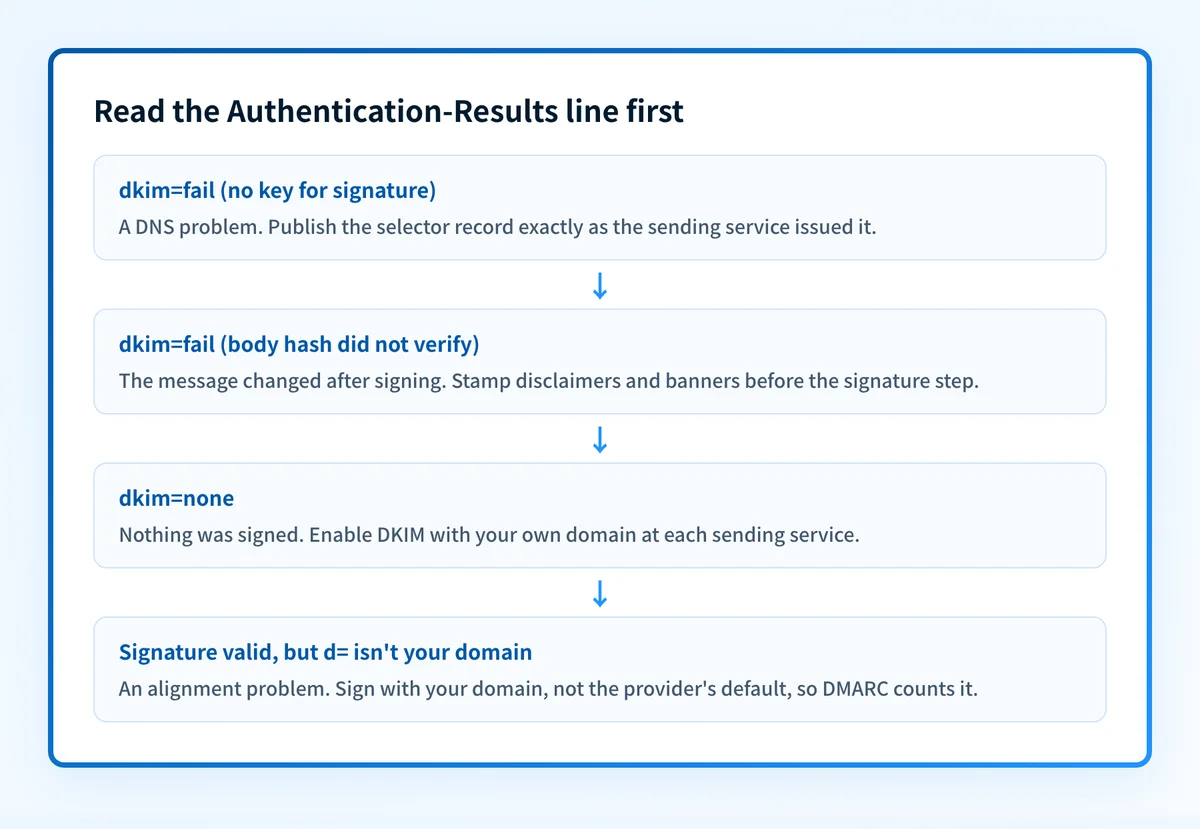
Read the Authentication-Results header to classify the failure
Send a test to a Gmail mailbox and open Show original.
dkim=fail (no key for signature)means a DNS problem,dkim=fail (body hash did not verify)means the message changed after signing, anddkim=nonemeans nothing was signed at all. Three different fixes.Re-publish the key exactly as the sender issued it
In your ESP or mail server, copy the CNAME or TXT record it generated and publish it unmodified at
<selector>._domainkey.<yourdomain>. Long keys split across multiple quoted strings are fine; dropped characters are not. Re-verify with the free DKIM checker once DNS propagates.Sign with your own domain at every sending service
Enable custom-domain DKIM in each platform that sends as you, so the signature's
d=matches your From domain. A valid signature for the provider's default domain does nothing for your DMARC alignment. Confirm the policy side with the free DMARC checker.Stop anything that edits mail after it's signed
Disclaimers, banners, and link-rewriting must happen before the DKIM signature is computed: sign at the last hop out of your infrastructure.
relaxed/relaxedcanonicalization also survives harmless whitespace changes thatsimpledoes not.Re-send the bounced mail and watch your DMARC reports
A 550-class DKIM failure is permanent and nothing retries on its own, so re-send once a test shows
dkim=pass. DMARC aggregate reports then show every source still failing DKIM before it turns into the next bounce.
Related free tools: DMARC checker · SPF checker
Authentication is the fix, not a workaround
Every path out of DKIM signature verification failure (550) runs through the same three DNS records: SPF, DKIM, and DMARC. Mailbox providers no longer treat them as best practice; they're the entry ticket, and a domain that drifts out of alignment starts bouncing again without anyone changing a thing on your side.
The durable fix is enforcement: publish correct records, watch the DMARC reports for senders you missed, and move the domain to p=reject so receivers drop spoofed mail instead of bouncing yours.
DMARC software that does the work
Palisade's AI agent takes domains all the way to enforcement: hosted SPF, DKIM, DMARC, and MTA-STS records on paid plans, DMARC reports monitored continuously, and every policy step drafted for your approval on the way to p=reject.
15-day full-product trial. Nothing is charged until it ends.
Why it matters for MSPs
DKIM is the authentication record that breaks silently: an ESP rotates keys, a Microsoft 365 tenant goes live without its selector CNAMEs, a client's gateway starts stamping disclaimers, and mail that passed for years starts bouncing with dkim=fail. Across a fleet of client domains, you find out one ticket at a time. Palisade hosts and manages the SPF, DKIM, and DMARC records for every client domain, watches the DMARC reports for sources that stop passing, and carries each domain to p=reject once everything aligns, with your team approving each step. It plugs into ConnectWise, HaloPSA, and Autotask so the fix lands in your existing workflow, and your own MSP domain is a free NFR domain, so it catches a broken selector on you before a customer ever sees one.
Questions readers ask