SMTP error code · temporary failure (4xx)
SMTP error 421 4.7.0: connection deferred or rate limited, try again later

By Samuel Chenard · CEO & Co-Founder, Palisade · Reviewed September 20, 2026
421 4.7.0 is a temporary deferral, not a permanent rejection: the receiving server (usually Gmail) is throttling or refusing your connection because of low IP reputation, content and links the filter reads as suspicious, missing reverse DNS, or a volume spike. Missing SPF or DKIM produces sibling codes such as 421 4.7.26, not 4.7.0. Your server retries automatically, but deferrals that outlast the retry window become permanent bounces.
421 4.7.0 at a glance | |
|---|---|
| Code | 421 4.7.0 |
| Class | Temporary (4xx): the message is deferred and the sender retries |
| Category | Rate limiting |
| Side at fault | Sender |
| Auth-related | Yes (SPF/DKIM/DMARC) |
What the bounce actually says
The exact wording varies by provider. These are the documented strings, verbatim. Match yours to pin down which variant you hit.
Gmail (Google Workspace): suspicious content or links
421 4.7.0 This message is suspicious due to the nature of the content or the links within. To best protect our users from spam, the message has been blocked.Source: knowledge.workspace.google.com
Gmail (Google Workspace): very low IP reputation
421 4.7.0 This message is suspicious due to the very low reputation of the sending IP address. To protect our users from spam, email sent from your IP address has been temporarily rate limited.Source: knowledge.workspace.google.com
Gmail (Google Workspace): 421 4.7.26, rate limited because unauthenticated (sibling code)
421 4.7.26 This email has been rate limited because it is unauthenticated. Gmail requires all senders to authenticate with either SPF or DKIM. Authentication results: DKIM = did not pass SPF domain-name with ip: ip-address = did not pass.Source: knowledge.workspace.google.com
Gmail (Google Workspace): no PTR record, or a mismatched one
421 4.7.0 The IP address sending this message does not have a PTR record, or the corresponding forward DNS entry does not point to the sending IP. To protect our users from spam, email sent from your IP address has been temporarily rate limited.Source: knowledge.workspace.google.com
Gmail (Google Workspace): the recipient domain accepts only allowlisted senders
421 4.7.0 IP not in whitelist for RCPT domain, closing connection.Source: knowledge.workspace.google.com
Gmail (Google Workspace): TLS required for the recipient domain
421 4.7.0 TLS required for RCPT domain, closing connection.Source: knowledge.workspace.google.com
Yahoo Mail: volume or complaint deferral (production bounce)
421 4.7.0 [TSS04] Messages from 0.0.0.0 temporarily deferred due to unexpected volume or user complaintsSource: smtpfieldmanual.com
Outlook.com / Hotmail: 421 RP-001 (siblings RP-002 rate limit per connection, RP-003 connection limit)
421 RP-001 The mail server IP connecting to Outlook.com server has exceeded the rate limit allowed. Reason for rate limitation is related to IP/domain reputation.Source: substrate.office.com
Why you're seeing 421 4.7.0
421 4.7.0 combines two standard codes: 421 is RFC 5321's "service not available, closing transmission channel," and 4.7.0 is RFC 3463's transient security-or-policy status. Together they mean the receiving server chose not to accept your mail right now, almost always because something about your sending IP or domain looks risky at this moment. If the bounce you are holding shows a bare 421 with no enhanced status code after it, start with the general guide to what SMTP error 421 means and how to fix it, which covers the wider set of 421 triggers rather than this one code. Gmail issues most of the 421 4.7.0 deferrals you'll see in the wild, and its documented 4.7.0 variants name several triggers: very low reputation on the sending IP or domain, content and links the filter reads as suspicious, a missing PTR record, a recipient allowlist you are not on, and a TLS requirement your connection did not meet. The unusual-volume wording people remember belongs to the sibling code 421 4.7.28, not to 4.7.0. Mail arriving without SPF or DKIM draws the same throttle under Gmail's closely related sibling codes (421 4.7.26, 4.7.27, 4.7.30, 4.7.32 and 4.7.40) rather than 4.7.0 itself. Outlook.com issues the same class of reputation deferral with its own 421 RP-001 through RP-003 qualifiers, which its postmaster documentation attributes to IP or domain reputation. The connection closes, your server queues the message and retries on its normal schedule, and if the underlying cause clears, the mail lands late instead of bouncing. If it doesn't clear, the deferrals harden into permanent failures once your queue gives up. Read the words after the code before you act on any of this, though: Gmail uses the same 4.7.0 for TLS required for RCPT domain, closing connection., which is a transport-encryption problem that no amount of slowing down will fix.
Likely causes, ranked
| Likely cause | What's happening |
|---|---|
| Your IP's spam reputation just dropped | The trigger Gmail names first in its own 4.7.0 wording: reputation on the sending IP has fallen far enough that the filter throttles it. A large cold-outreach blast, a purchased or stale list, spam-trap hits, or a burst of recipient complaints will all move an IP's reputation fast, and the throttle follows within hours. |
| You're sending faster than the receiver allows | Mailbox providers cap connections and messages per IP per hour, and the cap scales with sending history. A brand-new IP with no history hits the ceiling at very low volume, which is why unwarmed IPs see 421 4.7.0 on their first serious send. |
| Unauthenticated mail draws the same throttle under sibling codes | Since Gmail's 2024 sender requirements, mail with no passing SPF or DKIM is explicitly rate limited before it's rejected. Gmail gives each failure its own code: 421 4.7.26 for unauthenticated mail, 4.7.27 for SPF, 4.7.30 for DKIM, 4.7.32 for a From domain that doesn't align with what was authenticated, and 4.7.40 for a missing DMARC policy. The throttle behaves exactly like 421 4.7.0's. Two codes inside that range are not authentication at all: 4.7.28 is the unsolicited-volume deferral that has its own page, and 4.7.29 rate-limits bulk mail sent without a TLS connection. |
| A compromised account or device shares your egress IP | A hijacked mailbox, a malware-infected workstation, or a misconfigured device relaying through your network sends spam from the same public IP as your legitimate mail. Receivers throttle the IP, and everyone in the office bounces together. |
| You're on a shared IP with a bad neighbor | On shared hosting or a shared ESP pool, the IP's reputation is collective. Someone else's bad campaign can put every sender on the IP behind the same throttle: your logs look clean, but the deferral is real. |
| The recipient domain requires TLS and your connection didn't offer it | The one variant on this page that has nothing to do with reputation or volume. Gmail's TLS required for RCPT domain, closing connection. means the recipient's Google Workspace domain has a Secure transport (TLS) compliance rule requiring inbound mail from your address or domain to arrive over TLS, and your connection did not. Usually STARTTLS is off on your sending server, or its certificate failed the CA-signed or hostname checks the same setting can turn on. Slowing down will never clear it: enable STARTTLS, fix the certificate chain, and re-send. (Google: secure transport (TLS) compliance) |
How to fix 421 4.7.0
Read the string after the code first
Gmail documents ten different messages behind
421 4.7.0, and several of them are not reputation problems at all.TLS required for RCPT domainis a transport-encryption refusal,does not have a PTR recordis a reverse-DNS fix, andIP not in whitelist for RCPT domainmeans the recipient domain accepts only allowlisted senders and has to add you. Match your bounce against the strings above before working any step below.Check the sending IP's reputation
Pull the connecting IP from your mail server's logs (the address the receiving server actually saw) and run it through the free IP reputation checker. Then run the sending domain through the domain reputation checker: Gmail's variants throttle on either one.
Let the retry queue work: don't force resends
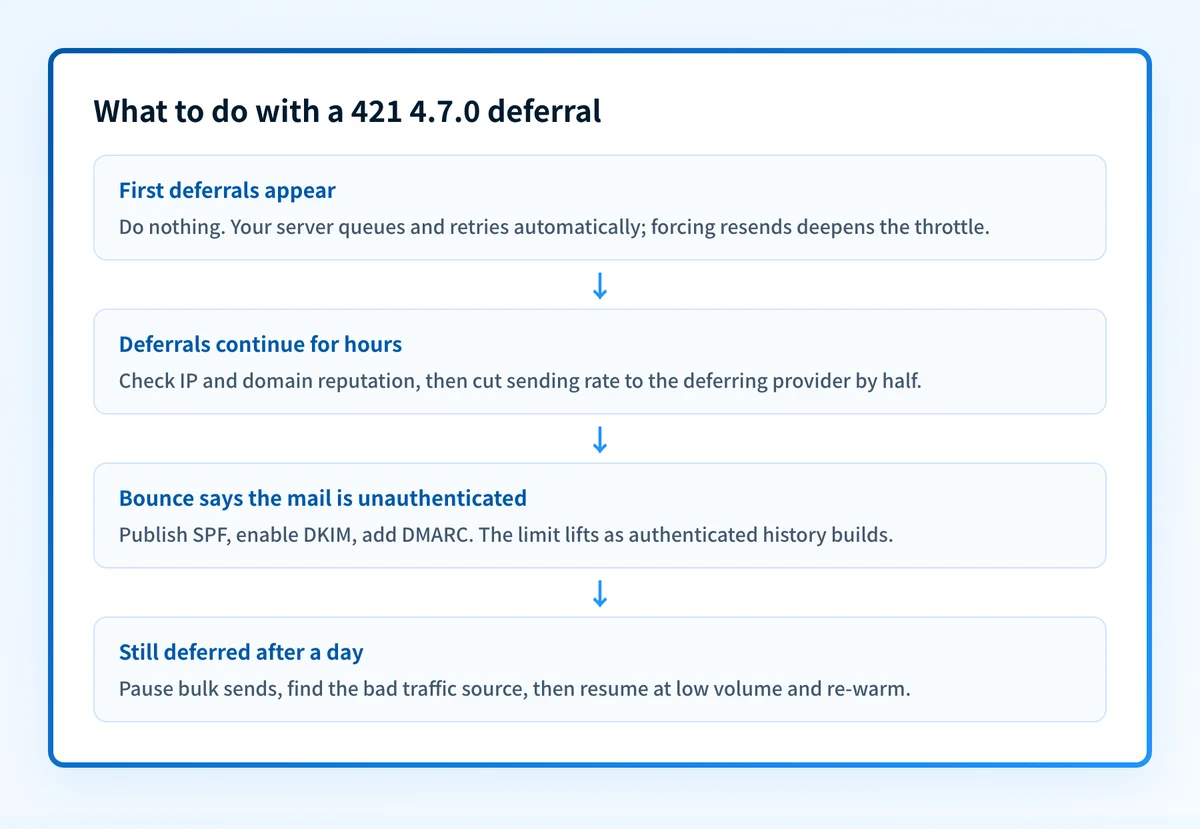
A 4xx deferral means your server is already retrying on an escalating schedule. Flushing the queue or resending manually just delivers a bigger burst to a server that's throttling you for volume, which deepens the block. Slow down and let the retries clear.
Cut your sending rate to the affected provider
Set per-destination rate and concurrent-connection limits in your MTA or ESP and drop volume to the deferring provider. Halving it is a reasonable first move. If the IP is new, treat this as a warm-up: start low and ramp over weeks, not hours.
Find the source of the bad traffic
If you didn't change your sending, something else on your IP did: audit for compromised mailboxes, infected machines, and open relays behind the same egress address. Check the public blocklists with the free blocklist checker, and watch your IP and domain reputation trend in Google Postmaster Tools.
If deferrals persist, pause, fix, and re-warm
Queued mail expires after roughly two to five days (server-dependent) and then bounces permanently. If you're still deferred after a day, pause bulk sends entirely, fix the root cause, then resume at low volume and ramp back up as the deferrals stop.
Related free tools: Domain reputation · Blocklist checker
Authentication is the fix, not a workaround
Every path out of 421 4.7.0 runs through the same three DNS records: SPF, DKIM, and DMARC. Mailbox providers no longer treat them as best practice; they're the entry ticket, and a domain that drifts out of alignment starts bouncing again without anyone changing a thing on your side.
The durable fix is enforcement: publish correct records, watch the DMARC reports for senders you missed, and move the domain to p=reject so receivers drop spoofed mail instead of bouncing yours.
DMARC software that does the work
Palisade's AI agent takes domains all the way to enforcement: hosted SPF, DKIM, DMARC, and MTA-STS records on paid plans, DMARC reports monitored continuously, and every policy step drafted for your approval on the way to p=reject.
15-day full-product trial. Nothing is charged until it ends.
Why it matters for MSPs
Throttling becomes a fleet problem the moment clients share infrastructure. One compromised mailbox at one tenant (or one line-of-business app blasting invoices) drags down the reputation of the egress IP every client behind that firewall sends from, and the ticket queue fills with 421 4.7.0 under a dozen different client names. Palisade hosts and manages the SPF, DKIM, and DMARC records for every client domain, surfaces the rogue sending source in the DMARC reports before Gmail's throttle turns into a block, and carries each domain to p=reject, with your team approving each step. It plugs into ConnectWise, HaloPSA, and Autotask so the fix lands in your existing workflow, and your own MSP domain is a free NFR domain you can prove it on first.
Questions readers ask