Provider deliverability · All mailbox providers
Why are my emails being blocked?

By Samuel Chenard · CEO & Co-Founder, Palisade · Reviewed September 19, 2026
Emails get blocked for six main reasons: your domain fails SPF, DKIM, or DMARC, your spam complaint rate crossed the provider's threshold, your IP or domain sits on a blocklist, your sending infrastructure is broken, you broke a bulk-sender rule, or the domain has no sending history. Read the bounce to identify the provider, and fix authentication first.
The 30-second check
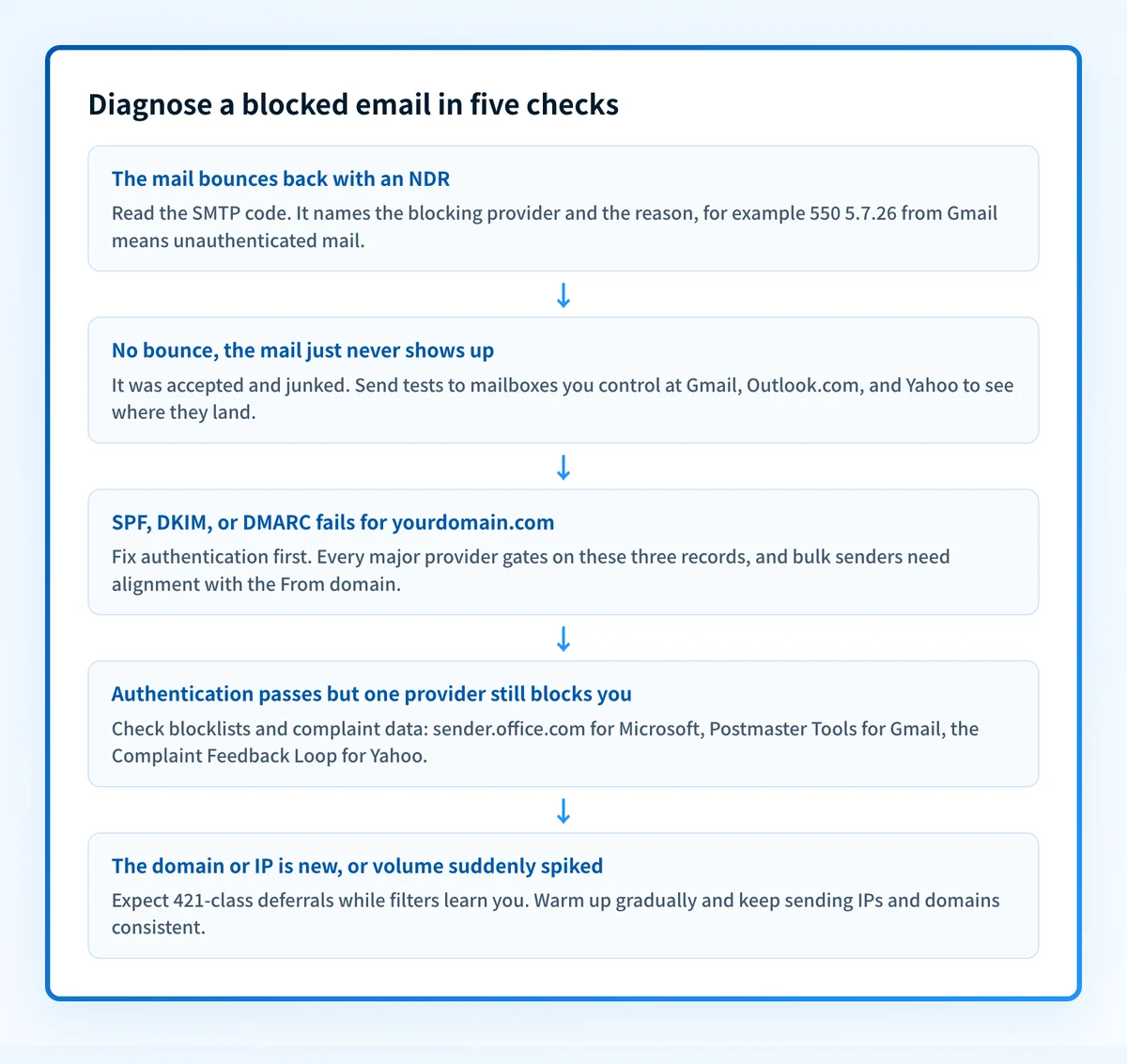
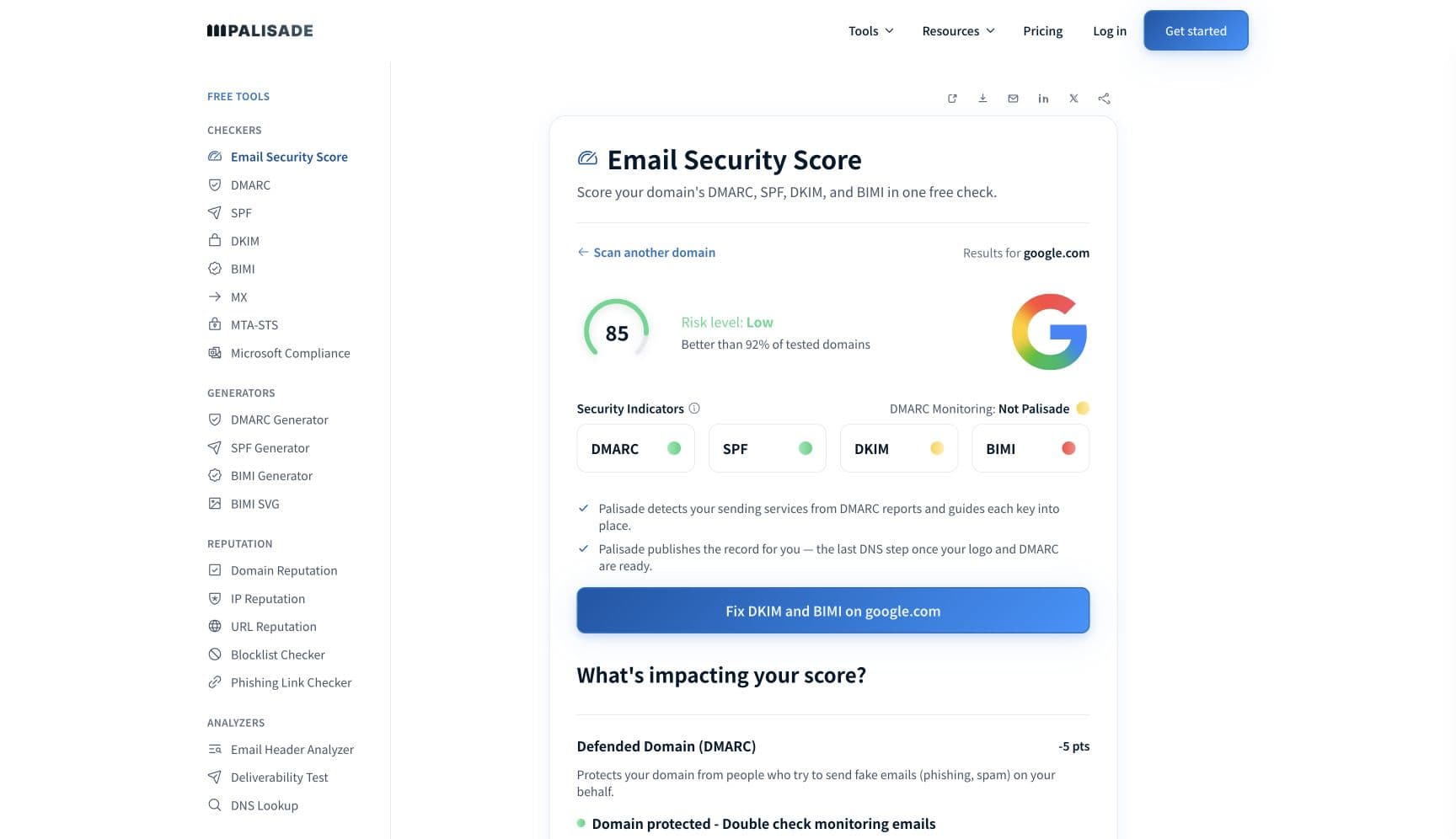
Start with the symptom. Bounced mail comes back with an NDR naming the blocking server; silently missing mail was accepted and junked. Either way the diagnosis begins with your own domain, because every major provider now gates on the same three records. The free email security score below grades SPF, DKIM, DMARC, and the rest of your domain's mail security in one pass.
Check your domain now
Enter your sending domain and the check runs instantly on the next page. Free, no signup.
Why mailbox providers block your email
| Likely cause | What's happening |
|---|---|
| Your domain fails SPF, DKIM, or DMARC | Since 2024 authentication is the entry ticket everywhere. Gmail and Yahoo require SPF or DKIM to pass for every sender; Gmail demands SPF plus DKIM plus a DMARC policy once you send 5,000+ messages a day, and Yahoo imposes the same trio on bulk senders while explicitly declining to publish a volume threshold; Microsoft enforced the same trio for domains sending 5,000+ daily messages to Outlook.com from May 5, 2025; Apple lists SPF, DKIM, and a published DMARC policy among its bulk requirements for iCloud Mail, with rejection if they're not met (each provider's own documentation, checked 2026-07-17). |
| Your spam complaint rate crossed the provider's line | Gmail tells senders to keep the spam rate in Postmaster Tools below 0.3% and recommends staying under 0.10%; Yahoo publishes the same 0.3% ceiling. Microsoft names the junk-complaint rate one of the principal factors driving a sender's reputation down but publishes no number, and Apple publishes none either; both still filter on user feedback. Past the line, even fully authenticated mail stops arriving. |
| Your sending IP or domain is on a blocklist | Microsoft runs an internal block list; the tell is a marker like S3150 inside a 550 5.7.1 bounce, and the remedy is Microsoft's self-service delist portal. Public DNS blocklists feed corporate gateways and smaller providers. Shared IPs inherit listings from noisy neighbors, so you can be listed without ever sending a bad message yourself. |
| Broken sending infrastructure: reverse DNS, TLS, dynamic IPs | Gmail's guidelines require valid forward and reverse DNS (PTR records) and a TLS connection from every sender, and Apple asks bulk senders to publish reverse DNS that identifies their IPs. Microsoft rejects direct-to-MX mail from dynamic or residential IP space outright with its DY-class codes. These basics fail silently until a provider tightens enforcement. |
| You broke a bulk-sender list rule | Gmail and Yahoo require one-click unsubscribe in marketing mail, and Yahoo requires unsubscribes honored within two days. Apple requires explicitly subscribed recipients only (no purchased, rented, or appended lists) plus ARC headers on forwarded mail. Blasting a stale or bought list also drives the complaint rate that the second cause above punishes. |
| No sending history: new domain, new IP, or a volume spike | Filters rate-limit senders they have never seen. A new domain or IP starting at full volume reads as a spam cannon and collects deferrals (421-class codes) before outright blocks. No provider publishes a warm-up schedule; Apple tells bulk senders to keep sending IPs and domains consistent, which is the same advice from the other direction. |
Check the public signals before changing settings
The free check above gives you a fast public baseline for how providers see your mail. It does not replace the provider's private reputation or placement data, but it tells you whether the problem is visible from outside before you edit a sending platform.
How to fix it, step by step
Run the email security score on your sending domain
Use the free checker above, or run the Email Security Score. It grades SPF, DKIM, DMARC, and the rest of your domain's mail security in one pass and shows which record is missing, misaligned, or failing, which settles the most common cause before you chase anything else.
Read the bounce, or notice there isn't one
A rejection returns an NDR with an SMTP code and the blocking server's name; that code plus the SMTP error code reference tells you which provider refused the mail and why. No bounce and no reply usually means silent spam-foldering: send tests to mailboxes you control at each major provider and see where they land.
Fix SPF, DKIM, and DMARC for every sending service
Add each platform that sends as your domain to your SPF record, enable DKIM signing with your own domain rather than the provider's default, and publish a DMARC record. Verify with the free SPF checker, DKIM checker, and DMARC checker; Gmail, Yahoo, and Microsoft all require the passing domain to align with your From address at bulk volume.
Check the blocklists and request removal
Run your sending IP and domain through the blocklist checker. For a Microsoft block, submit the IP at sender.office.com; for public lists, follow each list's own delisting process. Fix the root cause first, because delisting a still-broken sender is a round trip back onto the list.
Enroll in the providers' own reputation programs
Google Postmaster Tools shows your spam rate and reputation with Gmail; Microsoft's SNDS and JMRP do the same for Outlook.com; Yahoo's Complaint Feedback Loop sends you a copy of every complaint. Apple offers no feedback loop; its postmaster contact is icloudadmin@apple.com with your domain, sending IPs, and the SMTP errors you received.
Go provider-specific and re-test
Once you know who is blocking you, follow the per-provider guides linked below for that filter's quirks: Outlook's SmartScreen and delisting, Gmail's sender requirements, Yahoo's feedback loop, iCloud's bulk rules. After DNS changes propagate, re-send and confirm spf=pass, dkim=pass, and dmarc=pass in the received headers.
Related free tools: SPF checker · DKIM checker · DMARC checker · Blocklist checker · Domain reputation
If you send in volume: the published bulk-sender rules
All four major providers publish bulk-sender requirements; only Gmail and Microsoft attach a volume number to them. Gmail (since February 1, 2024) and Yahoo require SPF or DKIM from every sender. At 5,000+ messages a day Gmail demands SPF plus DKIM plus a DMARC policy of at least p=none that passes with From-domain alignment, one-click unsubscribe, and a spam rate below 0.3%; Yahoo requires the same of bulk senders but states in its sender FAQ that it "will not specify a volume threshold". Microsoft matched Gmail's number on May 5, 2025 for domains sending 5,000+ daily messages to Outlook.com: non-compliant mail was junked first, with rejection to follow. Apple publishes bulk requirements for iCloud Mail without numeric thresholds: SPF and DKIM, a published DMARC policy, ARC headers on forwarded mail, and opt-in-only lists, otherwise "the email will be rejected" (each provider's own documentation, checked 2026-07-17).
Check your standing with each provider
- Google Postmaster Tools
Google's dashboard for your domain's spam rate, authentication results, and reputation with Gmail. The 0.3% spam-rate ceiling is measured here.
- Microsoft Smart Network Data Services (SNDS)
Microsoft's view of your IP space for Outlook.com: filter verdicts, complaint rates, and trap hits per sending IP.
- Microsoft anti-spam IP delist portal
Self-service removal from Microsoft's block list: submit the blocked IP, verify your email address, request delisting.
- Yahoo Complaint Feedback Loop (CFL)
Sends you a copy of every message Yahoo users mark as spam. Yahoo asks for an active CFL on all DKIM domains.
- Yahoo sender support
Yahoo's contact form for delivery issues its sender documentation doesn't resolve.
- Apple iCloud Mail postmaster page
Apple offers no feedback loop and no delist portal; this page documents the bulk rules and the postmaster contact (icloudadmin@apple.com).
Bounce codes you may be seeing
A block from a provider surfaces as a specific SMTP code. Some lists below also carry codes returned by the systems receiving your mail; each line names its issuer. Match yours below; where a code has a full guide, it is linked.
- 550 5.7.26 (sender is unauthenticated): Gmail's rejection for mail that fails SPF and DKIM Full guide →
- 550 5.7.1: the generic policy rejection; Microsoft's version carries markers like S3150 when your IP is on its block list Full guide →
- 550 5.7.509: Microsoft's rejection for a sending domain that fails DMARC verification Full guide →
- 421 4.7.0 and Microsoft's 421 RP codes: temporary deferrals from reputation rate limits on new or spiking senders Full guide →
- 554 5.7.1: a content or policy refusal issued after the message body was seen Full guide →
The real root cause: unenforced authentication
Strip away the provider differences and the same root cause sits under almost every block: mail that can't prove it came from your domain. Unauthenticated mail scores badly, bad scores draw junk placements and complaints, and complaints push you onto the lists that turn filtering into refusal. The way out is to make authentication a settled fact: correct SPF and DKIM for every sending service, DMARC alignment on the From domain, and a policy enforced at p=reject so spoofers can't burn your reputation while you rebuild it. Monitoring shows you which senders fail; enforcement is what makes the blocking stop and stay stopped, at every provider at once.
DMARC software that does the work
Palisade's AI agent takes domains all the way to enforcement: hosted SPF, DKIM, DMARC, and MTA-STS records on paid plans, DMARC reports monitored continuously, and every policy step drafted for your approval on the way to p=reject. The full product is open for a 15-day trial, and nothing is charged until it ends.
15-day full-product trial. Nothing is charged until it ends.
Fixing this across every client domain
One blocked domain is a support ticket; a fleet of client domains hitting the Gmail, Yahoo, and Microsoft enforcement waves is a recurring queue, because every provider scores every domain separately and each one needs its own SPF, DKIM, DMARC, and postmaster enrollments. Palisade runs this per fleet: it hosts and manages the SPF, DKIM, DMARC, and MTA-STS records for every client domain, flags failing senders from DMARC reports before a provider starts refusing them, and carries each domain to p=reject, with your team approving each step. Tickets land in ConnectWise, HaloPSA, or Autotask through native PSA integrations, pricing is per client domain with rates that improve as the portfolio grows, and your own MSP domain is a free NFR domain to prove it on.
Questions readers ask
Frequently asked questions
How do I find out why my emails are being blocked?
Why are my emails being blocked without a bounce message?
Why are my emails suddenly being blocked in 2026?
How do I check if my email domain or IP is blacklisted?
Why are my emails blocked by one provider but not others?
Why are my business emails being blocked by customers' mail servers?
Can fixing DMARC stop my emails from being blocked?
Sources and last verified
Every provider claim on this page links to the source it came from, each with the date it was last checked. Provider policies change; if a detail looks off, the linked source is authoritative.
- Gmail sender requirements effective February 1, 2024: SPF or DKIM for all senders; SPF, DKIM, DMARC (at least p=none) with From-domain alignment and one-click unsubscribe for senders of 5,000+ messages/day; spam rate below 0.3% with 0.10% recommended; valid forward and reverse DNS (PTR) and TLS required; Postmaster Tools measures the spam ratesupport.google.com · checked 2026-07-17
- Yahoo sender requirements: SPF or DKIM minimum for all senders; bulk senders need SPF, DKIM, and DMARC of at least p=none that passes; spam rate below 0.3%; one-click unsubscribe honored within 2 days; an active Complaint Feedback Loop is needed for all DKIM domainssenders.yahooinc.com · checked 2026-07-17
- Yahoo publishes no numeric bulk-sender volume threshold: its sender FAQ classifies a bulk sender as one "sending a significant volume of mail" and states "We will not specify a volume threshold"senders.yahooinc.com · checked 2026-07-17
- Yahoo's Complaint Feedback Loop signup and sender support contact form locations on the Yahoo sender hubsenders.yahooinc.com · checked 2026-07-17
- Since May 5, 2025 Outlook.com enforces SPF, DKIM, and DMARC for domains sending over 5,000 emails per day; non-compliant messages were junked first with rejection to follow until DNS records are correctedsubstrate.office.com · checked 2026-07-17
- SmartScreen is Outlook.com's filter; the junk-complaint rate is named one of the principal factors driving down a sender's reputation; DY-class codes reject mail from dynamic IP space; 421 RP codes are reputation-based rate limitssubstrate.office.com · checked 2026-07-17
- sender.office.com is Microsoft's self-service anti-spam IP delist portal (submit IP, verify email, request delisting)sender.office.com · checked 2026-07-17
- S3150 appears in Outlook.com 550 5.7.1 bounces ("part of their network is on our block list (S3150)"); Microsoft discusses it in Q&A but publishes no dedicated doc page for the markerlearn.microsoft.com · checked 2026-07-17
- Apple iCloud Mail bulk requirements: SPF and DKIM, a published DMARC policy, ARC headers on forwarded email, published reverse DNS, consistent sending IPs and domains, explicitly subscribed recipients only, or "the email will be rejected"; no allow list, no feedback loop, no published numeric thresholds; postmaster contact is icloudadmin@apple.comsupport.apple.com · checked 2026-07-17
Related guides
550 5.7.26550 5.7.1421 4.7.0p=rejectinclude:adkim / aspf