Provider deliverability · Yahoo Mail (Yahoo + AOL)
Why is Yahoo blocking my emails?

By Samuel Chenard · CEO & Co-Founder, Palisade · Reviewed September 19, 2026
Yahoo blocks outbound mail when your domain fails SPF, DKIM, or DMARC under the sender requirements Yahoo has enforced since February 2024. A spam complaint rate above Yahoo's published 0.3% ceiling, and an IP with a poor reputation or a listing on a blocklist Yahoo consults, are also published triggers, alongside content Yahoo classifies as phishing or malware and a broken one-click unsubscribe. AOL runs on the same filters, so one fix clears both.
The 30-second check
Start with the domain in your From address. Yahoo requires every sender to pass SPF or DKIM at a minimum, and requires bulk senders to pass both, publish DMARC, and align the From domain with the SPF or DKIM domain. The free DMARC checker shows all three records and whether alignment can succeed, in about thirty seconds.
Check your domain now
Enter your sending domain and the check runs instantly on the next page. Free, no signup.
Why Yahoo Mail is blocking your email
| Likely cause | What's happening |
|---|---|
| Your domain fails SPF, DKIM, or DMARC | Yahoo's sender requirements, enforced since February 2024, set the floor at SPF or DKIM for every sender and all three (SPF, DKIM, and DMARC at "at least p=none") for bulk senders. For bulk senders, Yahoo also requires the From domain to align with either the SPF domain or the DKIM domain. Yahoo accepts DKIM keys of 1024 bits or longer. Mail that misses the bar goes to spam or is rejected (per Yahoo's Sender Hub best practices, checked 2026-07-17). |
| Your spam complaint rate is above 0.3% | Yahoo publishes a hard number: "Keep your spam rate below 0.3%", and notes the rate is calculated on mail delivered to the inbox, so a shrinking inboxed base makes the same complaint count worse. Yahoo's FAQ adds that it may defer mail from domains with a high complaint rate, which is why complaint problems usually show up as deferrals before they become blocks. |
| Unusual volume or traffic patterns from your IP | Yahoo's error documentation lists unusual traffic patterns from your sending IP, spam-like message characteristics, and complaints from Yahoo users as the drivers of its TS-series temporary deferrals. A cold IP or domain jumping straight to full volume is the classic trigger; the deferrals lift as reputation builds, or harden into blocks if the pattern continues. |
| Missing or broken one-click unsubscribe | For marketing and subscribed messages, Yahoo requires a functioning list-unsubscribe header with one-click unsubscribe support, and requires senders to honor unsubscribes within two days. Enforcement of the list-unsubscribe policy began in June 2024. Recipients who can't leave your list with one click leave it with the Spam button instead, which pushes your complaint rate toward Yahoo's 0.3% ceiling. |
| Your IP is on Spamhaus, or reverse DNS doesn't check out | Yahoo's permanent-failure documentation names Spamhaus listings among the reasons for 5XX rejections, and its baseline requirements include valid forward and reverse DNS for your sending IPs plus RFC 5321/5322 compliance. These are infrastructure checks: no amount of good content compensates for a listed IP or a generic rDNS record. |
| Content Yahoo classifies as phishing or malware | Yahoo documents a separate family of content-based blocks (its PH-series errors) for mail carrying phishing or malware characteristics. Legitimate senders hit this through compromised accounts, spoofed lookalike links, or URL shorteners with a bad history rather than through their own copy. |
Check the public signals before changing settings
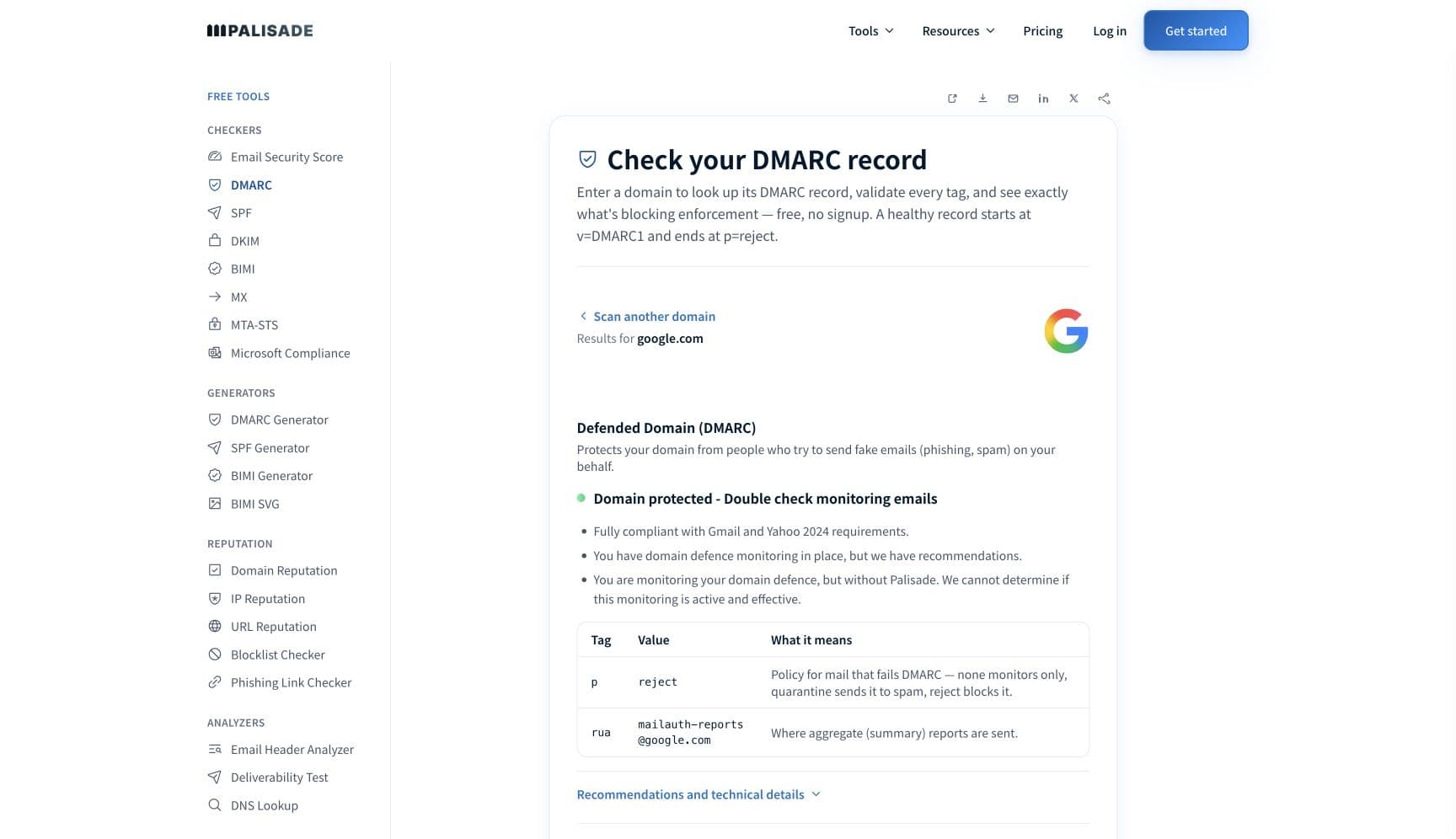
The free check above gives you a fast public baseline for how Yahoo Mail sees your mail. It does not replace the provider's private reputation or placement data, but it tells you whether the problem is visible from outside before you edit a sending platform.
How to fix it, step by step
Run the DMARC check on your sending domain
Use the free checker above, or open the DMARC checker page directly. It reads your SPF, DKIM, and DMARC records exactly as Yahoo's filters do and shows which record is missing, misaligned, or too weak, so you fix the actual gap instead of guessing at content tweaks.
Authenticate every service that sends as your domain
Add each platform's IPs or include to your SPF record and turn on DKIM signing with your own domain (1024-bit keys minimum, per Yahoo). Verify both with the free SPF and DKIM checkers, and confirm the passing domain aligns with your From address; Yahoo requires that alignment for bulk senders, and DMARC cannot pass without it.
Publish DMARC and head toward enforcement
Yahoo's bulk-sender floor is a DMARC record at p=none, but p=none only observes. Collect aggregate reports, authenticate the legitimate senders they reveal, then move to quarantine and reject so spoofed mail stops spending your Yahoo reputation for you.
Enroll in Yahoo's Complaint Feedback Loop
Create a Sender Hub profile at senders.yahooinc.com, verify your domain, and enroll it in the CFL. Yahoo then sends an ARF report for each complaint so you can suppress that recipient immediately. The program is domain-based and only supports DKIM-signed mail, which is one more reason step 2 comes first.
Fix the hygiene items: unsubscribe, rDNS, blocklists
Add a one-click list-unsubscribe header to marketing mail and honor requests within two days. Confirm forward and reverse DNS match on every sending IP. Run your IPs through the free blocklist checker and clear any Spamhaus listing, since Yahoo's docs name it explicitly.
Re-test, then escalate to Yahoo sender support if needed
Send a test to a Yahoo or AOL mailbox and confirm spf=pass, dkim=pass, and dmarc=pass in the received headers. If compliant mail is still deferred or rejected after a week of clean sending, open a ticket through Sender Hub's contact page under "Problems Delivering Mails to AOL or Yahoo mailboxes".
Related free tools: SPF checker · DKIM checker · Blocklist checker · Domain reputation
If you send in volume: Yahoo Mail's published rules
Yahoo's bulk-sender requirements went into enforcement in February 2024, in step with Gmail's: SPF and DKIM both passing, a DMARC record at "at least p=none", From-domain alignment, a spam rate held below 0.3%, and one-click list-unsubscribe honored within two days (list-unsubscribe enforcement began June 2024). One deliberate difference from Gmail: Yahoo's FAQ states "We will not specify a volume threshold" for who counts as a bulk sender, so there is no 5,000-a-day line to duck under. If Yahoo's systems consider you bulk, you are bulk. The requirements cover all domains and consumer email brands hosted by Yahoo Mail, and Yahoo's FAQ confirms they apply to AOL too (Yahoo Japan is separate). Per Yahoo's Sender Hub documentation, checked 2026-07-17.
Check your standing with Yahoo Mail
- Yahoo Sender Hub
Yahoo's sender portal: create a profile and manage CFL enrollment, BIMI, and subscription features from one place. Domain verification happens here as part of CFL enrollment.
- Complaint Feedback Loop (CFL)
Sends you an ARF report for every message a Yahoo or AOL user marks as spam. Domain-based and DKIM-signed mail only; enroll each signing domain.
- Yahoo SMTP error code reference
Yahoo's own explanation of its 4XX deferrals and 5XX rejections, including the TS-series and PH-series code families.
- Sender support (delivery problems ticket)
The escalation path for blocks and deferrals that persist after your records are fixed. Covers both AOL and Yahoo mailboxes.
Bounce codes you may be seeing
A block from Yahoo Mail surfaces as a specific SMTP code. Some lists below also carry codes returned by the systems receiving your mail; each line names its issuer. Match yours below; where a code has a full guide, it is linked.
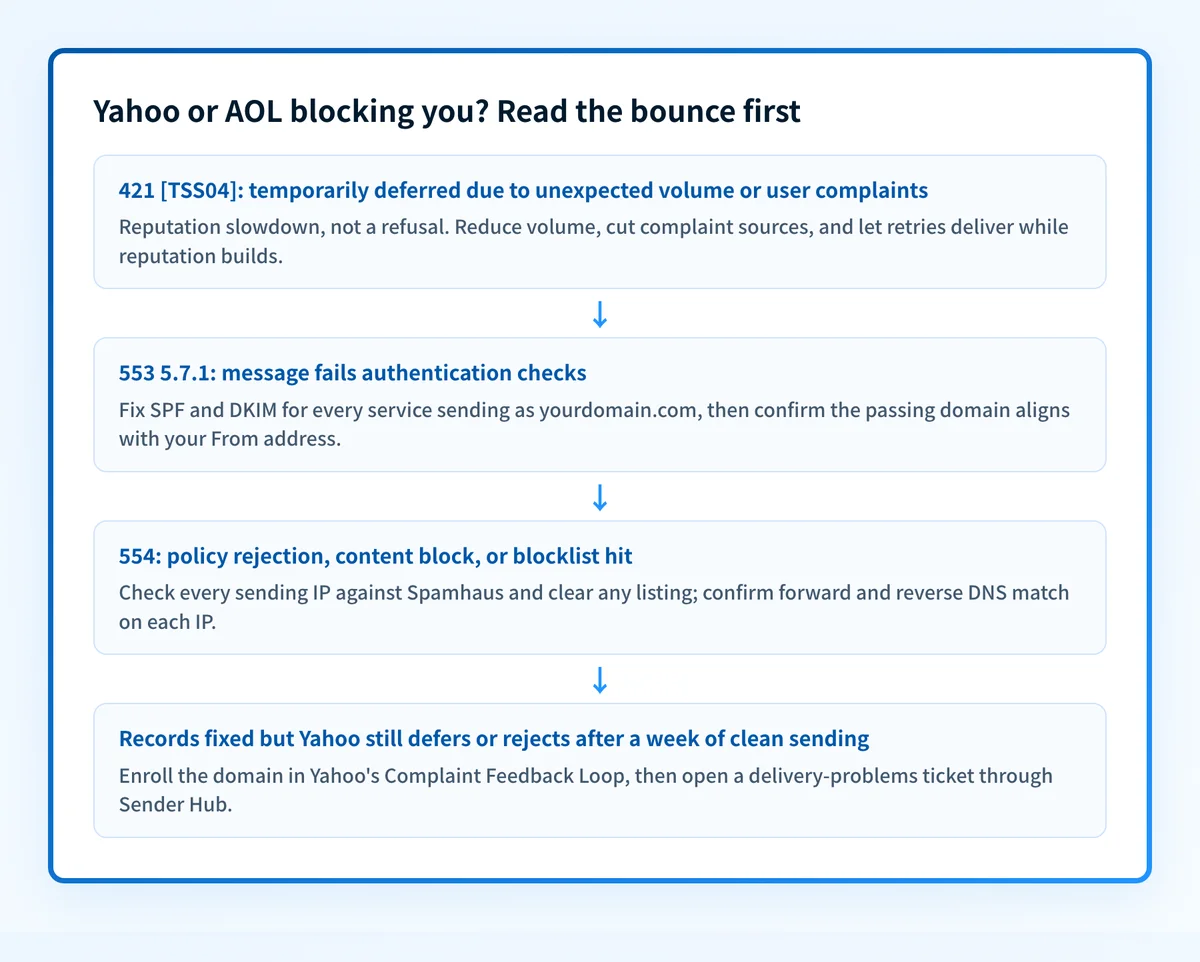
- 421 4.7.0 [TSS04] (temporarily deferred due to unexpected volume or user complaints): Yahoo's reputation deferral, the usual first symptom Full guide →
- 553 5.7.1: part of Yahoo's permanent rejection family, which it returns for an invalid recipient, a failed DMARC or DKIM check, unacceptable content, other suspicious behaviour, or a Spamhaus listing Full guide →
- 554: the same permanent family. Yahoo documents one set of causes for both codes and does not say which code it returns for which cause Full guide →
The real root cause: unenforced authentication
Yahoo's causes chain together, and authentication sits at the head of the chain. Unauthenticated or misaligned mail filters badly; filtered mail that still reaches inboxes draws complaints from recipients who never wanted it (including spoofed mail you never sent); complaints push the rate toward 0.3%; and a high rate turns deferrals into blocks. You cannot suppress complaints on spoofed traffic, because the CFL only reports on DKIM-signed mail that is really yours. The durable fix is to make authentication a settled fact: SPF and DKIM correct for every sending service, DMARC aligned with the From domain, and the policy walked from p=none up to p=reject so Yahoo drops impostor mail before a single user can complain about it. Monitoring shows you which senders are failing; enforcement is what makes Yahoo's blocking stop and stay stopped, at yahoo.com and aol.com addresses alike.
DMARC software that does the work
Palisade's AI agent takes domains all the way to enforcement: hosted SPF, DKIM, DMARC, and MTA-STS records on paid plans, DMARC reports monitored continuously, and every policy step drafted for your approval on the way to p=reject. The full product is open for a 15-day trial, and nothing is charged until it ends.
15-day full-product trial. Nothing is charged until it ends.
Fixing this across every client domain
Yahoo grades each sending domain on its own records, its own complaint rate, and its own CFL enrollment, so a fleet of 50 client domains is 50 separate compliance projects with no volume threshold to exempt the small ones. Palisade turns that into one workflow: it hosts and manages the SPF, DKIM, DMARC, and MTA-STS records for every client domain, surfaces failing senders from DMARC aggregate reports before Yahoo starts deferring them, and carries each domain to p=reject, with your team approving each step. Native ConnectWise, HaloPSA, and Autotask integrations plug it into your PSA, pricing is per client domain with rates that improve as the portfolio grows, and your own MSP domain is a free NFR domain to prove the process on before any client conversation.
Questions readers ask
Frequently asked questions
Does fixing Yahoo also clear my AOL delivery?
postmaster.aol.com, see why AOL is blocking your emails.Why are my emails going to spam in Yahoo instead of bouncing?
What is Yahoo's spam complaint rate limit?
Does Yahoo require DMARC for all senders?
What does "temporarily deferred" from Yahoo mean?
How do I contact the Yahoo postmaster to get unblocked?
How long does a Yahoo block last?
Sources and last verified
Every claim about Yahoo Mail on this page links to the source it came from, each with the date it was last checked. Provider policies change; if a detail looks off, the linked source is authoritative.
- Yahoo sender requirements: all senders need SPF or DKIM (1024-bit DKIM keys minimum); bulk senders need SPF, DKIM, DMARC at "at least p=none", and From-domain alignment with the SPF or DKIM domain; "Keep your spam rate below 0.3%" with the rate calculated on mail delivered to the inbox; one-click list-unsubscribe honored within 2 days; valid forward/reverse DNS; ARC for forwarderssenders.yahooinc.com · checked 2026-07-17
- Requirements apply to all domains and consumer email brands hosted by Yahoo Mail, explicitly including AOL (Yahoo Japan excluded); "We will not specify a volume threshold" for bulk senders; enforcement began February 2024 with list-unsubscribe enforcement from June 2024; non-compliant mail may be spam-foldered or rejected; Yahoo may defer mail from domains with a high complaint ratesenders.yahooinc.com · checked 2026-07-17
- Yahoo documents its SMTP errors by category: 421/451 temporary deferrals driven by unusual traffic patterns, spam characteristics, and user complaints (TS-series); 553/554 permanent rejections including authentication failures against the domain's DKIM or DMARC policy, Spamhaus listings, and content blocks (PH-series); no per-code public directory with verbatim strings is publishedsenders.yahooinc.com · checked 2026-07-17
- Complaint Feedback Loop: enroll via Sender Hub (create profile, verify domain, enroll); Yahoo sends ARF reports for user spam complaints so senders can suppress recipients; the program is domain-based and only supports DKIM-signed emailsenders.yahooinc.com · checked 2026-07-17
- Yahoo sender support path: Sender Hub contact page offers a delivery-problems ticket covering both AOL and Yahoo mailboxes; no self-service delist portal is publishedsenders.yahooinc.com · checked 2026-07-17
- The Gmail bulk-sender line Yahoo declines to draw: Google's Email sender guidelines state "If you send more than 5,000 messages per day to Gmail accounts, follow the Requirements for sending 5,000 or more messages per day", where high-volume senders must "Set up SPF and DKIM email authentication for your domain" and "Set up DMARC email authentication for your sending domain"; every sender must "Set up SPF or DKIM email authentication for your sending domains" and "Keep spam rates reported in Postmaster Tools below 0.3%"support.google.com · checked 2026-09-02
- The public delist portal Yahoo has no equivalent of: Microsoft provides "the Office 365 Anti-Spam IP Delist Portal page at https://sender.office.com for external message senders to request their removal from the blocked senders list", using the email address that received the NDR and the IP address named in the error, after which "Results can vary widely before the restrictions are removed. It might take up to 24 hours or longer"learn.microsoft.com · checked 2026-09-02
- RFC 5321, Simple Mail Transfer Protocol, is one of the two standards Yahoo asks senders to comply with: the EHLO/HELO "argument clause contains the fully-qualified domain name of the SMTP client, if one is available", and a rejecting server "MUST return a reply indicating whether the failure is permanent (i.e., will occur again if the client tries to send the same address again) or temporary (i.e., the address might be accepted if the client tries again later)" — the 5yz and 4yz split behind Yahoo's rejections and deferralswww.rfc-editor.org · checked 2026-09-02
- RFC 5322, Internet Message Format, is the other standard Yahoo asks senders to comply with: it "specifies the Internet Message Format (IMF), a syntax for text messages that are sent between computer users"; "The only required header fields are the origination date field and the originator address field(s)" (Date and From), and "every message SHOULD have a 'Message-ID:' field"www.rfc-editor.org · checked 2026-09-02
Related guides
421 4.7.0553 5.7.1554 5.7.1p=nonep=rejectadkim / aspf