Provider deliverability · Gmail (personal Gmail and Google Workspace inboxes)
Why does Gmail mark new domain emails as spam?

By Samuel Chenard · CEO & Co-Founder, Palisade · Reviewed September 19, 2026
Gmail spam-folders mail from a new domain because the domain has no sending history, so authentication and behavior are the only signals Google can score. Missing SPF, DKIM, or DMARC, a cold start at full volume, and a bare domain with no web presence all read as spam. Authenticate everything first, then warm up gradually.
The 30-second check
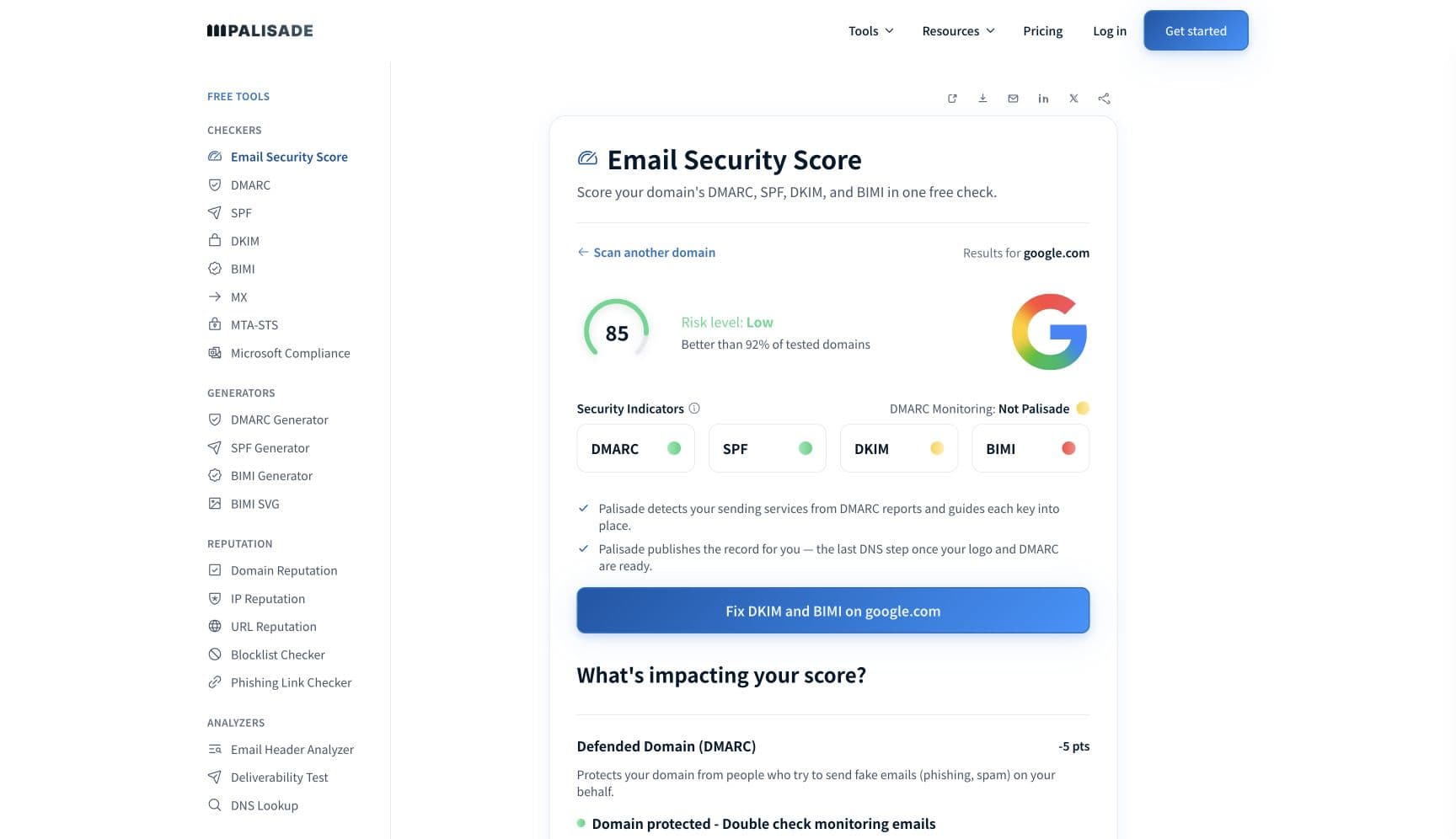
A new domain gets no benefit of the doubt, so every signal you control has to be right before the first campaign. The free email security score below grades SPF, DKIM, DMARC, MX, and the supporting DNS in one pass: the same surface Gmail evaluates when it meets your domain for the first time.
Check your domain now
Enter your sending domain and the check runs instantly on the next page. Free, no signup.
Why Gmail sends your email to spam
| Likely cause | What's happening |
|---|---|
| The domain has zero sending history with Gmail | Gmail rates every sending domain on its track record. Postmaster Tools grades domain reputation from Bad to High, and Google defines the High tier by a "History of very low spam rates" plus compliance with the sender guidelines; a domain registered last month has no history at all, so it cannot start anywhere good. Worse, Postmaster Tools shows no data until your volume to personal Gmail accounts is high enough, so the early weeks give you no feedback either (per Google's Postmaster documentation, checked 2026-07-17). |
| SPF, DKIM, or DMARC is missing or misaligned | Since February 2024 Gmail requires every sender to pass SPF or DKIM, and bulk senders to pass both plus DMARC. On an established domain, weak authentication costs points; on a new domain it decides everything, because authentication is the only identity signal Gmail has while there is no history. Registrar-default DNS, DKIM signing under the platform's domain instead of yours, and a missing DMARC record are the standard new-domain misses. |
| No warm-up: full volume from a cold start | Google states directly that "Increasing your sending volume too quickly can result in delivery issues" and describes a common daily increase of 25% to 100% once sending starts. A new client domain that opens with a 5,000-recipient blast is running the exact pattern the filters were built to catch, and spam-foldering is Gmail going easy on you; the next step is deferral. |
| The domain looks parked or disposable | Gmail publishes no domain-age threshold and no parked-domain rule, so nobody can quote you a safe age. The pattern its filters must catch is real though: spammers register fresh domains, burn them in a burst, and move on. A domain that was a registrar parking page last week, with no website, no MX history, and thin DNS, starts with the same observable profile. Give it a real web presence and complete DNS before mail flows. |
| Early complaints on tiny volume | Google's spam-rate dashboard measures the share of delivered mail that recipients manually mark as spam. On a warm-up-sized send, three or four complaints can cross the never-exceed 0.30% line in an afternoon, and above it you lose mitigation eligibility until the rate holds under 0.30% for 7 consecutive days. Purchased cold-outreach lists concentrate complaints exactly when the domain can least afford them. |
| Infrastructure basics fail: PTR, TLS, MX | Gmail's baseline for all senders includes valid reverse DNS (the sending IP's PTR record must resolve to a hostname whose forward lookup returns the same IP) and TLS on the connection. Fresh infrastructure misses these constantly: a new VPS keeping the host's default PTR, or a domain with no MX because "it only sends". Each miss is another vote against a domain with no credit to draw on. |
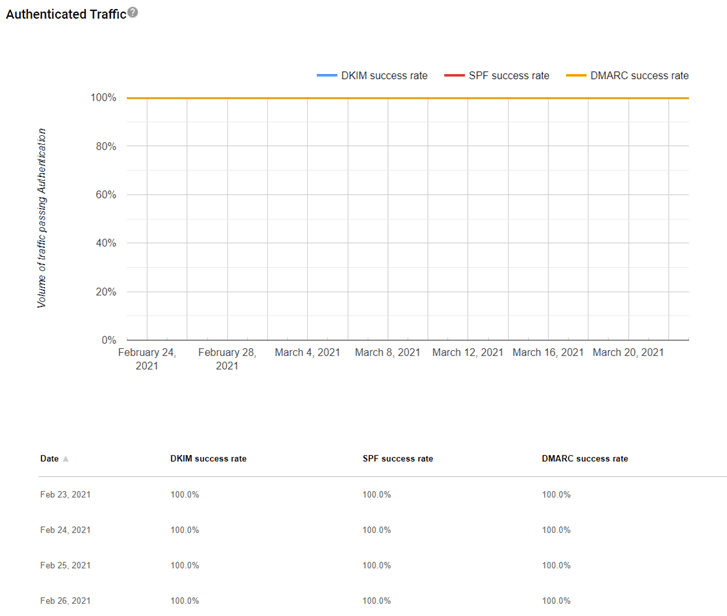
Confirm the pattern in Gmail's own sender data
Gmail publishes its own sender data separately from your DNS. Use it to confirm the provider-side symptom after you have checked the public authentication records below.
Check the public signals before changing settings
The free check above gives you a fast public baseline for how Gmail sees your mail. It does not replace the provider's private reputation or placement data, but it tells you whether the problem is visible from outside before you edit a sending platform.
How to fix it, step by step
Run the email security score on the new domain
Use the free checker above, or open the Email Security Score page directly. It grades SPF, DKIM, DMARC, MX, and the supporting DNS in one pass and tells you what to fix before the first campaign instead of after the first spam-foldering.
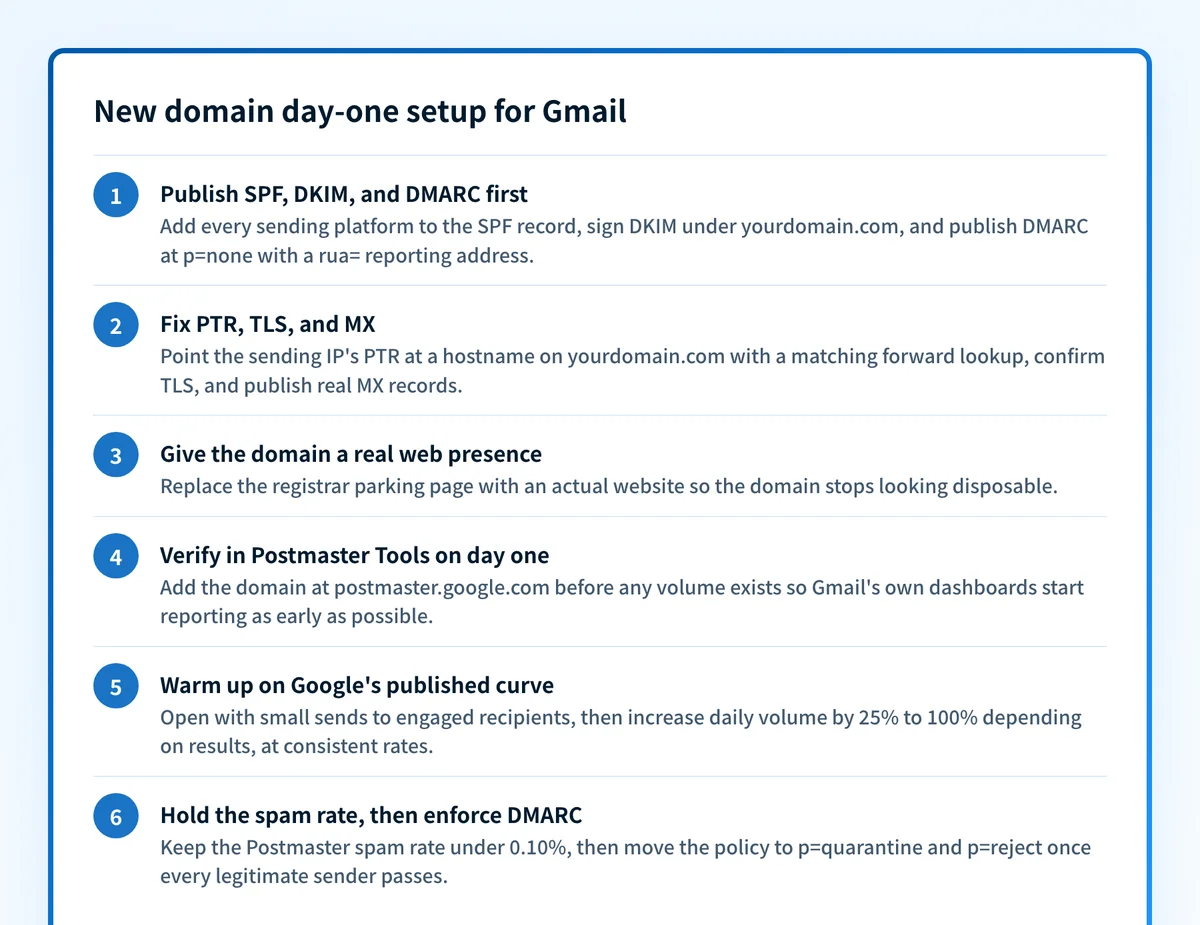
Publish SPF, DKIM, and DMARC before the first real send
Add every sending platform to the SPF record, enable DKIM signing under your own domain at each platform, and publish a DMARC record (start at p=none with a rua= reporting address so aggregate reports flow). Verify each with the SPF checker, the DKIM checker, and the DMARC checker, and confirm the passing domain aligns with the From address; Gmail's bulk-sender requirements demand that alignment.
Fix PTR, TLS, and the domain's public face
Set the sending IP's PTR to a hostname on your domain and make the forward lookup match, confirm the connection uses TLS, and publish real MX records. Then put an actual website on the domain: a parking page tells every reputation classifier the domain is disposable.
Verify the domain in Postmaster Tools on day one
Add and verify the domain at postmaster.google.com before any volume exists. Dashboards stay empty until you send enough mail to personal Gmail accounts, so the earlier you verify, the sooner compliance status, spam rate, and domain reputation start reporting Gmail's own verdict instead of a third-party guess.
Warm up on Google's published curve
Open with small sends to recipients who know the sender and will engage. Google's guidance: increase daily volume by 25% to 100% depending on results, and pace traffic at consistent volumes rather than bursts. If messages start deferring, Google says to stop for 15 minutes, send a single test, and resume more slowly.
Hold the spam rate down, then enforce DMARC
Keep the Postmaster spam rate under 0.10%, prune recipients who never engage, and read the DMARC aggregate reports as volume grows. Once every legitimate sender passes with alignment, move the policy from p=none to p=quarantine and then p=reject so the reputation you just built cannot be spent by a spoofer.
Related free tools: SPF checker · DKIM checker · DMARC checker · Domain reputation · DNS lookup
If you send in volume: Gmail's published rules
Gmail's sender requirements have been in force since February 1, 2024. Every sender to personal Gmail addresses needs passing SPF or DKIM, valid forward and reverse DNS (PTR) on the sending IP, TLS, and a spam rate that never reaches 0.30% (Google's stated target: "Keep spam rates reported in Postmaster Tools below 0.10%"). Send close to 5,000 messages or more to personal Gmail accounts within 24 hours and you are a bulk sender permanently; Google's FAQ says the status has no expiration date. Bulk senders must pass both SPF and DKIM, publish DMARC (p=none satisfies the requirement), align the From domain with the passing SPF or DKIM domain, and support one-click unsubscribe on marketing mail (per Google's sender guidelines and FAQ, checked 2026-07-17). A new client domain that will carry real volume should be built to the bulk bar from day one.
Check your standing with Gmail
- Google Postmaster Tools
Gmail's own dashboards: compliance status, spam rate, domain and IP reputation, authentication, delivery errors. Free; verify the domain via a DNS TXT record. Shows no data until volume to personal Gmail accounts is high enough.
- Google Admin Toolbox Check MX
Google's own DNS configuration check for a domain: MX, SPF, DKIM, and DMARC record problems in one report.
- Gmail sender contact form
Google's escalation path for senders who meet the guidelines but still see delivery problems. Google may need enough volume for Postmaster Tools data before it can analyze a request.
If it bounces instead: the codes Gmail returns
Spam placement returns no SMTP error, so these are the readings and codes you see when Gmail refuses the mail instead. Match yours below; where a code has a full guide, it is linked.
- 550 5.7.26 (unauthenticated email is not accepted): what spam-foldering escalates to when a new domain's authentication is missing outright Full guide →
- 421 4.7.0 / 421 4.7.28: temporary deferrals when a domain ramps volume faster than its reputation supports Full guide →
- 550 5.7.1: Gmail's policy rejection for mail whose content or behavior looks like spam Full guide →
The real root cause: unenforced authentication
A new domain's core problem is that Gmail knows nothing about it, and the only part of that you can fix on day one is identity. Warm-up takes weeks; correct authentication takes an afternoon. Publish SPF and DKIM for every service that sends as the domain, add DMARC at p=none, and watch the aggregate reports as volume ramps: they show which senders pass, which are misaligned, and whether anyone else is already borrowing the name. Then enforce. A domain that reaches p=reject builds reputation that belongs to it alone, because spoofers and forgotten test systems cannot send as the domain and spend the history you are accruing. Monitoring shows you the gap; enforcement closes it and keeps a young reputation yours.
DMARC software that does the work
Palisade's AI agent takes domains all the way to enforcement: hosted SPF, DKIM, DMARC, and MTA-STS records on paid plans, DMARC reports monitored continuously, and every policy step drafted for your approval on the way to p=reject. The full product is open for a 15-day trial, and nothing is charged until it ends.
15-day full-product trial. Nothing is charged until it ends.
Fixing this across every client domain
MSPs hit this problem on a schedule: every new client, rebrand, or acquisition ships a fresh domain that Gmail treats as a stranger. The day-one work (SPF per platform, DKIM per platform, DMARC, Postmaster verification, then a watched warm-up) is exactly the ticket type that never gets billed, multiplied by the fleet. Palisade does it once per fleet: it hosts and manages the SPF, DKIM, DMARC, and MTA-STS records for every client domain, flags unauthenticated senders from DMARC reports while the domain is still warming, and carries each domain to p=reject, with your team approving each step. Tickets land in ConnectWise, HaloPSA, or Autotask through native PSA integrations, pricing is per client domain with rates that improve as the portfolio grows, and your own MSP domain runs as a free NFR domain to prove it on.
Questions readers ask
Frequently asked questions
How long does it take a new domain to build reputation with Gmail?
Why does Gmail mark my emails as spam when SPF and DKIM pass?
Does Gmail block newly registered domains?
How do I warm up a new domain for Gmail?
What spam rate does Gmail allow?
Should I send from a subdomain instead of my main domain?
Will sending through Google Workspace keep my new domain out of spam?
Sources and last verified
Every claim about Gmail on this page links to the source it came from, each with the date it was last checked. Provider policies change; if a detail looks off, the linked source is authoritative.
- All-sender requirements since Feb 1, 2024 (SPF or DKIM, valid forward/reverse DNS PTR, TLS) and the verbatim spam-rate target: "Keep spam rates reported in Postmaster Tools below 0.10%" and avoid ever reaching 0.30%; bulk senders need SPF and DKIM, DMARC, From alignment, and one-click unsubscribe; guidance to increase sending volume gradually and at consistent rates. The guidelines contain no domain-age or parked-domain rule; new-domain caution appears only as ramp-up guidancesupport.google.com · checked 2026-07-17
- Bulk sender = close to 5,000 messages or more to personal Gmail accounts within a 24-hour period; the status has no expiration date; spam rates above 0.1% hurt delivery and 0.3%+ removes mitigation eligibility until the rate stays below 0.3% for 7 consecutive days; non-compliant mail may be rejected or delivered to spam; requirements evaluated at the primary domain levelsupport.google.com · checked 2026-07-17
- Verbatim ramp-up guidance: "Increasing your sending volume too quickly can result in delivery issues"; after a deferral stop for 15 minutes and send a single test; "After 24 hours, slowly increase your sending volume, with a common daily increase of 25% to 100% depending on various factors"; pace traffic at consistent volumes; low-volume senders may see no Postmaster Tools datasupport.google.com · checked 2026-07-17
- Postmaster Tools dashboards (compliance status, spam rate, IP reputation, domain reputation, feedback loop, authentication, encryption, delivery errors); domain reputation tiers Bad/Low/Medium/High with High defined as "History of very low spam rates, and complies with Gmail's sender guidelines"; spam rate = share of delivered mail recipients manually mark as spamsupport.google.com · checked 2026-07-17
- Postmaster Tools requires domain verification via DNS TXT record and displays no information until the domain is verifiedsupport.google.com · checked 2026-07-17
- Gmail sender contact form is Google's escalation path for senders meeting the guidelines; Postmaster-level volume may be needed before a request can be analyzedsupport.google.com · checked 2026-07-17
- Google Admin Toolbox Check MX is Google's own domain DNS/authentication configuration checkertoolbox.googleapps.com · checked 2026-07-17
Related guides
550 5.7.26421 4.7.0550 5.7.1p=nonep=reject-all vs ~allselector