Provider deliverability · SendGrid
Why are SendGrid emails going to spam?

By Samuel Chenard · CEO & Co-Founder, Palisade · Reviewed September 19, 2026
Mail sent through SendGrid lands in spam when domain authentication was never completed, so the message is DKIM-signed by sendgrid.net and Gmail shows a via sendgrid.net line instead of your domain. Nothing bounces: SendGrid records spam placement as delivered. Shared-IP reputation, an unwarmed dedicated IP, and a missing DMARC record are the other causes this page covers.
The 30-second check
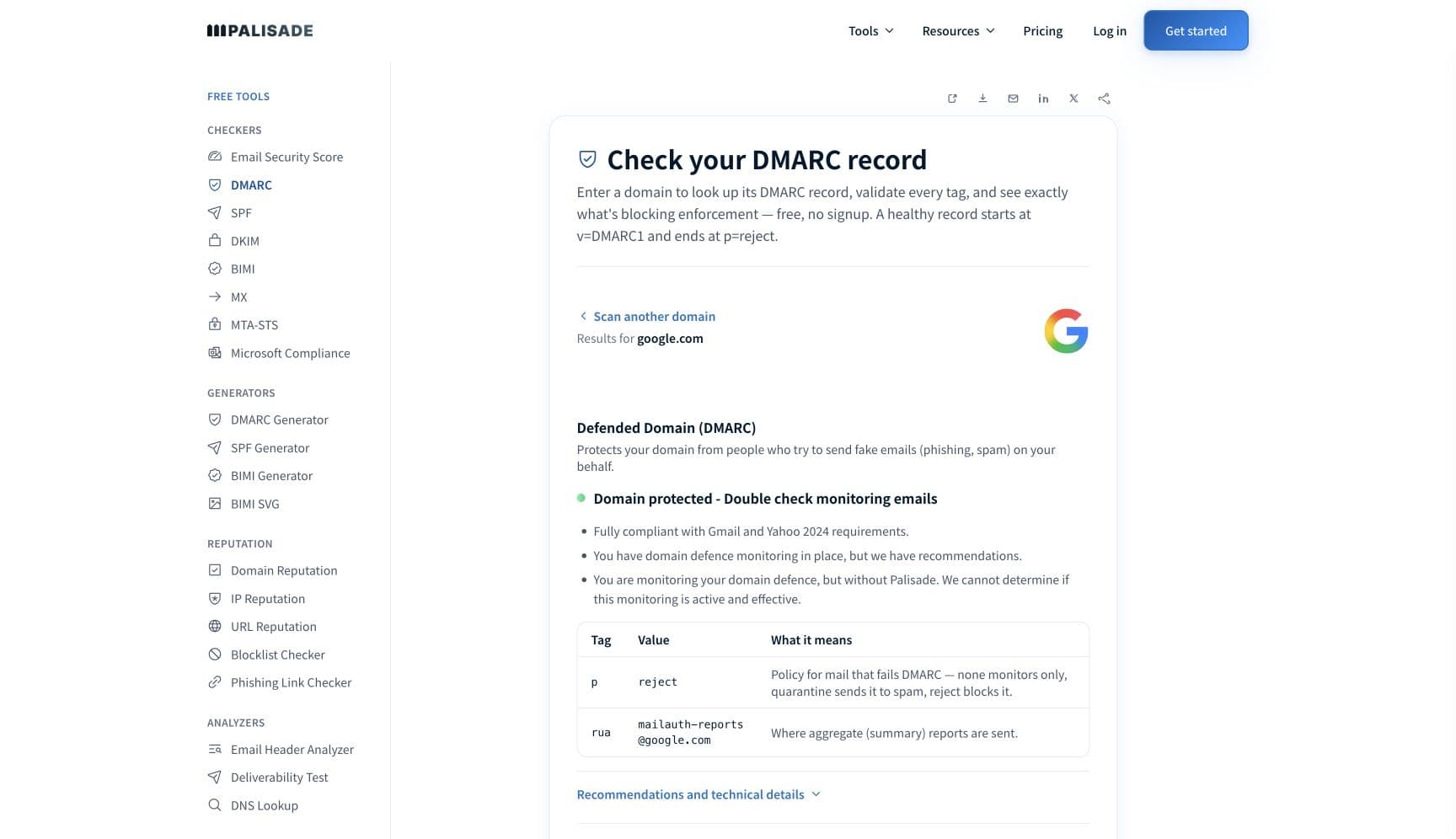
Check the domain in your From address before you touch the template. SendGrid's own documentation says domain authentication "improves your chance of reaching an inbox instead of a spam folder", and everything downstream of that (DKIM alignment, DMARC, the From domain a recipient's filter reads) depends on those DNS records existing. The free DMARC checker reads all three in about thirty seconds.
Check your domain now
Enter your sending domain and the check runs instantly on the next page. Free, no signup.
Why your SendGrid email is going to spam
| Likely cause | What's happening |
|---|---|
| Domain authentication was never completed | Until you finish domain authentication, SendGrid signs on its own behalf and recipients see the via sendgrid.net tagline after your From address. SendGrid describes the setup as CNAME records that let it handle "the signing of your DKIM and the authentication of your SPF", and says completing it "improves the trust in the legitimacy of your messages for both receiving email servers and human recipients. This improves your chance of reaching an inbox instead of a spam folder." This is the first thing to check, every time. |
| You verified a single sender instead of authenticating the domain | Single Sender Verification proves you control one mailbox. It is not the same as domain authentication, and SendGrid's documentation treats them as separate things: if an authenticated domain exists and your sender address matches it exactly, sender identity is verified as a matter of course. A verified single sender with no authenticated domain still leaves DKIM signed by SendGrid rather than by you. |
| Your shared IP pool is carrying someone else's reputation | SendGrid is direct about the trade: "If anyone who shares that IP address violates the inbox provider's reputation standards, your reputation changes as well and your messages can be throttled or blocked." On Free and Essentials plans you are on a shared pool by design. Nothing in your account explains a shared-pool problem, which is why this cause is so often misdiagnosed as a content problem. |
| A dedicated IP that has not finished warming up | SendGrid's automated warmup throttles a new dedicated IP by hourly limit, starting at 20 messages an hour on day zero and rising through a schedule that runs to day 41, after which automated warmup releases the address. Pushing a full marketing send through a cold IP outruns that schedule. SendGrid also notes that transactional senders should not chase a strict warmup schedule, because you cannot control when transactional mail triggers. |
| No DMARC record on your domain | SendGrid's CNAMEs cover DKIM signing and SPF. They do not publish a DMARC record for you, and no ESP can, because DMARC is a policy statement by the domain owner. Gmail requires bulk senders to set up DMARC and to align the From domain with the SPF or DKIM domain, so a fully authenticated SendGrid account can still fail the receiving side's checklist. |
| Complaints and list quality, which SendGrid records but does not fix | SendGrid groups rejections into published classifications, and two of them point straight at you: Reputation is used "to group rejections that indicate the mailbox provider detects reputation issues with your sending domain or sending IP", and Content covers cases where "the mailbox provider believes the content of your messages is potentially spam, malicious, or otherwise untrustworthy". Read the classification before deciding what to change. |
| Marketing and transactional mail sharing one identity | SendGrid's dedicated IP guidance is written around volume: allocate at least two dedicated IPs once you reach 250,000 messages a month, and roughly one for every three to four million messages a day. The same guidance publishes the stream-separation rule outright: "Use one for your marketing email and another for your transactional emails." Complaint-heavy marketing mail and password resets sharing a reputation means the resets inherit the marketing verdict. |
Check the public signals before changing settings
The free check above gives you a fast public baseline for how the receiving providers see mail sent through SendGrid. It does not replace the provider's private reputation or placement data, but it tells you whether the problem is visible from outside before you edit a sending platform.
How to fix it, step by step
Run the DMARC check on your From domain
Use the free checker above, or open the DMARC checker page directly. It reads SPF, DKIM, and DMARC for the domain in your From address, which is the domain the receiving filter judges. If DMARC is missing or DKIM resolves to nothing, you have found the problem before opening SendGrid.
Complete domain authentication in SendGrid
In Sender Authentication, authenticate the domain you send From and publish the CNAME records SendGrid gives you. With automated security on, SendGrid handles DKIM signing and SPF through those CNAMEs and rotates them for you. Completing this also removes the
via sendgrid.nettagline recipients currently see.Confirm your own domain is in the DKIM signature
Send a test to an outside mailbox and paste the full source into the email header analyzer. You want the
d=tag in the DKIM-Signature header to be your domain or a subdomain of it, not sendgrid.net, and you want dmarc=pass. Verify the published key separately at the DKIM checker.Publish DMARC yourself, because SendGrid will not
Add a DMARC record on the domain you send From. Start at
p=noneto collect aggregate reports, confirm that SendGrid and every other service are authenticating and aligning, then raise the policy. This is the step no ESP can do on your behalf.Pick shared or dedicated deliberately, then warm up
Use SendGrid's own thresholds: at least two dedicated IPs from 250,000 messages a month, roughly one per three to four million a day. If you take a dedicated IP, let automated warmup run its schedule rather than sending around it. On Free and Essentials you are on shared pools, where warmup does not apply and pool reputation is not yours to control.
Read the bounce and block classification, not the raw string
SendGrid classifies rejections as Invalid Address, Technical, Content, Reputation, Frequency or Volume Too High, Mailbox Unavailable, and Unclassified. Reputation and Content lead to completely different repairs. Sort your suppressions by classification before you change anything.
Meet the receiving side's bulk-sender rules
Gmail requires bulk senders to pass SPF and DKIM, publish DMARC, align the From domain, keep spam rates below 0.3% in Postmaster Tools, and support one-click unsubscribe on marketing mail. SendGrid gives you the first two. The rest are yours.
Related free tools: DKIM checker · SPF checker · Email header analyzer · IP reputation
If you send in volume: the receiving providers' published rules
SendGrid is a sending platform, not a mailbox provider, so it publishes no bulk-sender requirements of its own. The rules that decide whether your SendGrid mail is filed as spam are the receiving providers': Google's Email sender guidelines require every sender to set up SPF or DKIM, keep valid forward and reverse DNS, use TLS, format to RFC 5322, and keep spam rates in Postmaster Tools below 0.3%, and require senders of roughly 5,000 messages or more a day to personal Gmail accounts to pass SPF and DKIM together, publish DMARC, align the From domain with the SPF or DKIM domain, and support one-click unsubscribe on marketing and subscribed messages. SendGrid's domain authentication covers the SPF and DKIM half of that list. The DMARC record, the From domain, the complaint rate, and the unsubscribe header remain yours. Google's guidelines checked 2026-09-02.
Check your standing with SendGrid and the receiving providers
- Sender Authentication (domain authentication)
SendGrid's setup guide for the CNAME records that let it sign DKIM and authenticate SPF for your domain, and that remove the via sendgrid.net tagline.
- Bounce and block classifications
SendGrid's own definitions for Reputation, Content, Technical, Frequency or Volume Too High, Invalid Address, Mailbox Unavailable, and Unclassified. Use it to tell a reputation problem from a content problem.
- Dedicated IP addresses
SendGrid's volume thresholds for moving off shared pools, and its statement of what a shared IP means for your reputation.
- Warm up an IP address
The automated warmup schedule, including the day-zero hourly limit and the day-41 completion point, plus SendGrid's note that transactional senders should not force a strict schedule.
- Google Postmaster Tools
The mailbox-provider side of the picture. Your spam rate against personal Gmail accounts is reported here, on the domain you authenticated in SendGrid.
If it bounces instead: the codes the receiving provider returns
Spam placement returns no SMTP error, so these are the readings and codes you see when the receiving provider refuses mail sent through SendGrid instead. Match yours below; where a code has a full guide, it is linked.
- No SMTP error at all: spam placement is recorded as delivered in SendGrid's activity, because the mailbox provider accepted the message and then filed it in the spam folder
- Reputation and Content: SendGrid's own block classifications, which separate a sending-domain or IP reputation problem from a message-content problem
- 550 5.7.26 (unauthenticated email from your domain): Gmail rejecting outright, the same authentication gap one step past spam-foldering Full guide →
- 421 4.7.0: the temporary deferral family a receiving provider uses when it is throttling your IP rather than refusing it Full guide →
The real root cause: unenforced authentication
SendGrid can sign for you, but it cannot vouch for you. Domain authentication puts your domain in the DKIM signature and in the SPF path, and that is genuinely most of the work. What it leaves behind is the part that only the domain owner can state: a DMARC record saying what receivers should do with mail that fails, and an inventory of every other service sending under the same domain. Those other services are why an authenticated SendGrid account still sees spam placement. Aggregate reports name them, one by one, including the ones nobody remembers signing up for. Once each is authenticated and aligned, walking the policy from p=none to p=reject removes the last variable: nothing that is not yours can spend the reputation your SendGrid mail depends on.
DMARC software that does the work
Palisade's AI agent takes domains all the way to enforcement: hosted SPF, DKIM, DMARC, and MTA-STS records on paid plans, DMARC reports monitored continuously, and every policy step drafted for your approval on the way to p=reject. The full product is open for a 15-day trial, and nothing is charged until it ends.
15-day full-product trial. Nothing is charged until it ends.
Fixing this across every client domain
A client running SendGrid is a client whose sending domain has at least two owners: the marketing team clicking through Sender Authentication, and you holding the DNS. Half-finished authentication is the normal state, because mail still sends without it. Palisade gives you the portfolio view: hosted and managed SPF, DKIM, DMARC, and MTA-STS records for every client domain, aggregate reports read for you so the SendGrid subuser and every other sender is named rather than guessed at, and a path to p=reject with your team approving each change. Native ConnectWise, HaloPSA, and Autotask integrations put it in your PSA, pricing is per client domain with rates that improve as the portfolio grows, and your own MSP domain is a free NFR domain to run the process on first.
Questions readers ask
Frequently asked questions
Does SendGrid domain authentication stop emails going to spam?
What does "via sendgrid.net" mean on my emails?
How long does SendGrid IP warmup take?
Does SendGrid set up DMARC for me?
Why does SendGrid say delivered when the email is in spam?
What is the difference between Single Sender Verification and domain authentication?
How do I tell a reputation problem from a content problem in SendGrid?
Sources and last verified
Every claim about SendGrid on this page links to the source it came from, each with the date it was last checked. Provider policies change; if a detail looks off, the linked source is authoritative.
- SendGrid domain authentication: CNAME records let Twilio SendGrid handle "the signing of your DKIM and the authentication of your SPF with CNAME records" under automated security; completing it "removes tagline via sendgrid.net (or via eu.sendgrid.net for Regional customers) after the from address in your email messages"; "It improves the trust in the legitimacy of your messages for both receiving email servers and human recipients. This improves your chance of reaching an inbox instead of a spam folder."www.twilio.com · checked 2026-09-02
- SendGrid treats Single Sender Verification and domain authentication as distinct: "If you configured an authenticated domain in the Twilio SendGrid console and the domain of your sender email address matches that domain exactly, Twilio verifies your sender identity as a matter of course."www.twilio.com · checked 2026-09-02
- SendGrid on shared versus dedicated IPs: "If anyone who shares that IP address violates the inbox provider's reputation standards, your reputation changes as well and your messages can be throttled or blocked"; with a dedicated IP "your sending practices determine your Reputation Score"; "When your volume reaches 250,000 messages each month, allocate a minimum of two dedicated IP addresses"; allocate roughly "one dedicated IP address for every three to four million messages sent each day"www.twilio.com · checked 2026-09-02
- SendGrid automated IP warmup: the schedule starts at a 20-message hourly limit on day 0 and rises daily; "Upon completion of day 41 in the warmup schedule, automated warmup removes these IP addresses"; "If you send transactional emails, don't focus on a strict IP warmup schedule. You can't control the rate at which transactional emails trigger"; Free and Essentials customers use shared pools and do not require a warmup strategywww.twilio.com · checked 2026-09-02
- SendGrid bounce and block classifications: Invalid Address, Technical, Content ("the mailbox provider believes the content of your messages is potentially spam, malicious, or otherwise untrustworthy"), Reputation ("rejections that indicate the mailbox provider detects reputation issues with your sending domain or sending IP"), Frequency/Volume Too High, Mailbox Unavailable, and Unclassifiedwww.twilio.com · checked 2026-09-02
- Gmail sender guidelines that apply to mail sent through SendGrid: SPF or DKIM for all senders, valid forward and reverse DNS, TLS, RFC 5322 formatting, spam rates below 0.3% in Postmaster Tools; bulk senders at roughly 5,000 messages a day to personal Gmail accounts need SPF and DKIM together, DMARC (policy may be none), From-domain alignment with the SPF or DKIM domain, and one-click unsubscribesupport.google.com · checked 2026-09-02
- RFC 5322, "Internet Message Format", is the Standards Track specification (October 2008) that Gmail's formatting requirement points at: it defines the syntax of an email message and its header fields, including From, To, Date and Message-IDwww.rfc-editor.org · checked 2026-09-02
Related guides
550 5.7.26421 4.7.0selectoradkim / aspfinclude: