Provider deliverability · Mailgun
Why are Mailgun emails going to spam?

By Samuel Chenard · CEO & Co-Founder, Palisade · Reviewed September 19, 2026
Mail sent through Mailgun lands in spam when the receiving provider's own checks fail; Mailgun itself accepts the message and reports it delivered. The first thing to rule out is whether the sending domain was ever verified in Mailgun. An unverified domain is capped at 300 messages a day and recipients see a sent via Mailgun.org line, because Mailgun signs with its own domain rather than yours. Missing DMARC, shared-IP reputation, and list quality are the other causes this page covers.
The 30-second check
Check the domain in your From address before you change a template. Mailgun's four required DNS records cover SPF, DKIM, inbound routing and click tracking, and stop there. No DMARC record is among them, and DMARC is what Gmail and Yahoo ask bulk senders for. The free checker below reads all three records for the domain a receiving filter actually judges.
Check your domain now
Enter your sending domain and the check runs instantly on the next page. Free, no signup.
Why your Mailgun email is going to spam
| Likely cause | What's happening |
|---|---|
| The sending domain was never verified | Mailgun lists the consequences itself: verified domains "are not subject to a sending limit of 300 emails per day", verification means "No more 'sent via Mailgun.org' message in your emails", it "Establishes a positive email reputation for your own domain", and "Mailgun is less suspicious of traffic that is being sent on verified domains and that reduces the likelihood of being disabled". An unverified domain fails on all four counts at once. |
| One of the four required DNS records is missing or truncated | Mailgun marks all four as required: a TXT record carrying v=spf1 include:mailgun.org ~all, a TXT DKIM record taken from the Domain Verification & DNS panel, a CNAME to mailgun.org for tracking clicks, opens and unsubscribes, and MX records 10 mxa.mailgun.org and 10 mxb.mailgun.org. The MX pair is what lets Mailgun receive mail for the domain, so publish it only if Mailgun should: on a send-only subdomain of a domain that already receives mail through another provider, adding it reroutes that inbound mail. Mailgun allows 24 to 48 hours for propagation before verification succeeds. |
| A 2048-bit DKIM key that the DNS provider split badly | Mailgun offers both key lengths and warns about the longer one: 2048 bit "is more secure but can be more complex to set up because the record length is significantly longer, and some DNS providers require you to split the record into two parts". A record split wrong publishes a key that never validates, and the signature then fails silently on every message. |
| No DMARC record on the domain | Mailgun's required records do not include DMARC, and no sending platform can publish one for you, because DMARC is a policy statement by the domain owner. Google requires bulk senders to set up DMARC and to align the From domain with the SPF or DKIM domain, so a fully verified Mailgun domain can still fail the receiving side's checklist. |
| Marketing mail going out on your corporate domain | Mailgun's own advice is to separate them: "We suggest that you use your top level domain for your corporate mail and using different domains or subdomains for your marketing and transactional mail." The same page notes that "Your email reputation is not only tied to your IP, but your domain name as well", which is why a bad campaign on the root domain follows your invoices and password resets around. |
| The wrong IP arrangement for your volume | Mailgun draws the line at both ends. Above 50K messages a week "it is best to isolate your reputation by having a dedicated IP address", because on a shared IP "you are sharing your reputation with those other senders". Below roughly 5,000 messages a day "a shared IP may be the right solution", since too little volume means providers "won't acknowledge your reputation". |
| Bulk and transactional mail sharing one reputation | Mailgun gives two reasons to split them: time-sensitive transactional mail "may get queued behind a large batch of bulk/marketing emails", and "Your transactional mail will be affected by the reputation created by your bulk/marketing mail". Mailgun separates its sending queues per domain, which is why the domain split matters as much as the IP split. |
| Volume spikes and low engagement | Mailgun warns that "If your email sending is volatile with large spikes of volume, MBPs may assume those large spikes are spam." On the engagement side it is blunt: "If recipients are opening, forwarding and replying to your emails, it will improve your reputation", and it advises against do-not-reply addresses for exactly that reason. |
Check the public signals before changing settings
The free check above gives you a fast public baseline for how the receiving providers see mail sent through Mailgun. It does not replace the provider's private reputation or placement data, but it tells you whether the problem is visible from outside before you edit a sending platform.
How to fix it, step by step
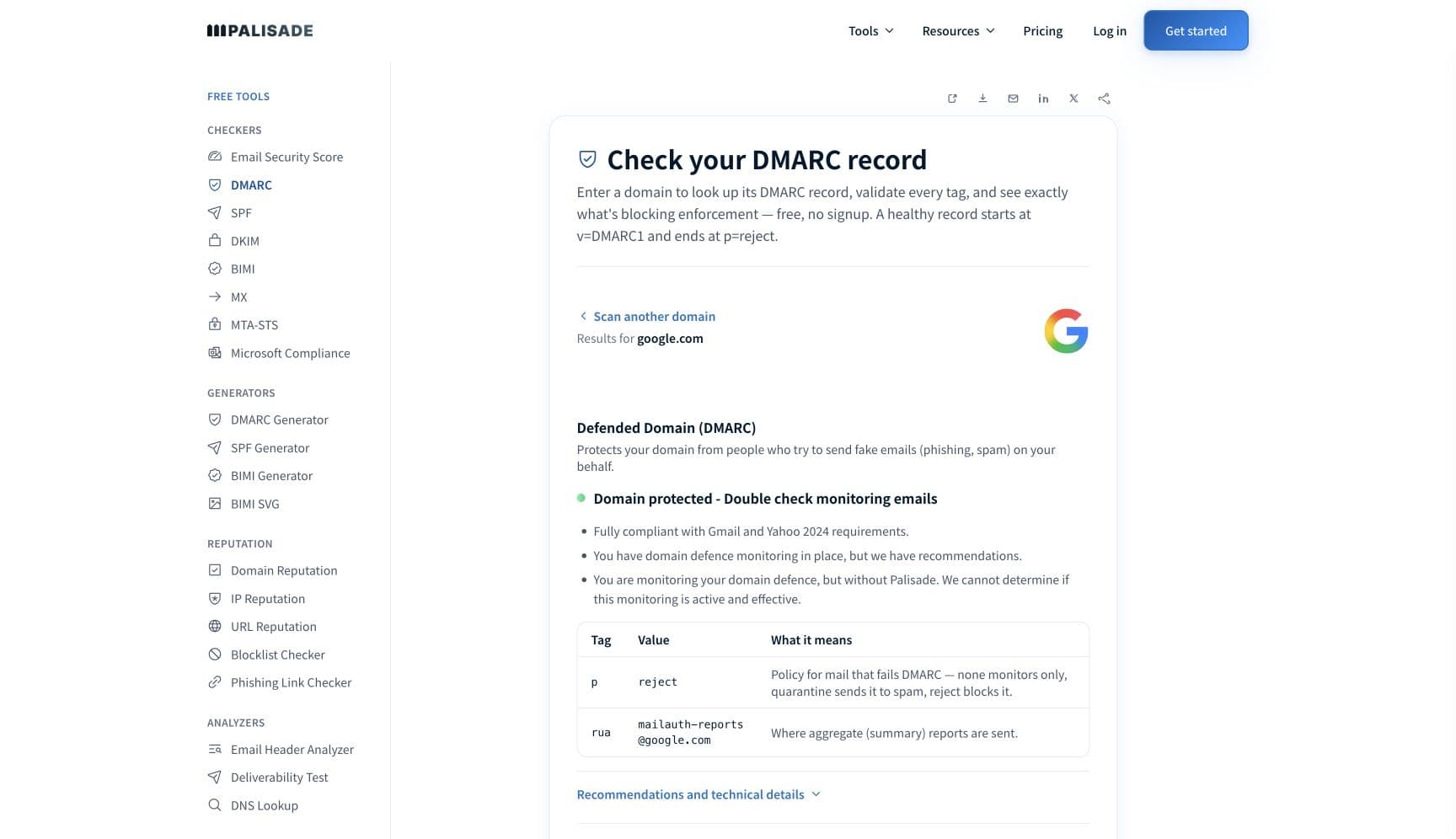
Run the DMARC check on the domain in your From address
Use the free checker above, or open the DMARC checker page directly. It reads SPF, DKIM, and DMARC for the domain the receiving filter judges. If DMARC is missing or DKIM resolves to nothing, you have the answer before you open the Mailgun control panel.
Verify the domain in Mailgun and publish all four records
Add the SPF TXT record and the DKIM TXT record from the Domain Verification & DNS section. Those two are what a receiving filter reads. The tracking CNAME governs click and open tracking, and the MX pair lets Mailgun receive mail for the domain, so add those only if you want them — publishing MX on a domain that receives mail elsewhere reroutes it. Our Mailgun SPF and DKIM setup guide walks the records one at a time. Allow 24 to 48 hours for propagation, then verify from the control panel or the API.
Confirm your own domain is in the DKIM signature
Send a test to an outside mailbox and paste the full source into the email header analyzer. The
d=tag in the DKIM-Signature header should be your sending domain or subdomain, not mailgun.org, and the message should show dmarc=pass. Check the published key separately at the DKIM checker, especially if you chose a 2048-bit key.Publish DMARC yourself, because Mailgun will not
Add a DMARC record on the domain you send From. Start at
p=noneto collect aggregate reports, confirm that Mailgun and every other service authenticate and align, then raise the policy. This is the step that is not on Mailgun's list and cannot be.Move marketing and transactional mail onto their own subdomains
Follow Mailgun's own split: corporate mail on the top-level domain, marketing and transactional on separate domains or subdomains. Mailgun also recommends valid MX records on a sending domain, for its own stated reason: there are mailbox providers "(albeit, a minority)" that "will check if mx records for the domain are valid before accepting email" — and a send-only subdomain with no MX at all is exactly the case that minority may refuse. Mailgun does not say where those records should point. Aim them at the parent domain's inbound host rather than at Mailgun, so the record is valid and inbound mail still goes where it always did.
Pick shared or dedicated deliberately, then let the warm-up run
Use Mailgun's thresholds: dedicated above 50K a week, shared below roughly 5,000 a day. Mailgun says it has "queuing algorithms that gradually warm up your IPs" and that "Our sending rates automatically increase over time as your IP warms up", so pushing a full campaign through a new address works against its own scheduling.
Cut the volatility and the dead addresses
Even out large spikes rather than sending a quarter's volume in one afternoon, and remove addresses that have never opened. Mailgun's suppression lists record hard bounces and complaints already; use them as the list to remove, not just as a log.
Meet the receiving side's bulk-sender rules
Google requires bulk senders to pass SPF and DKIM, publish DMARC, align the From domain, keep spam rates in Postmaster Tools below 0.30%, and support one-click unsubscribe on marketing mail. Mailgun's verification covers SPF and DKIM. The rest is yours.
Related free tools: DKIM checker · SPF checker · Email header analyzer · IP reputation
If you send in volume: the receiving providers' published rules
Mailgun is a sending platform, not a mailbox provider, so it publishes no bulk-sender requirements of its own. The rules that decide whether your Mailgun mail is filed as spam belong to the receiving providers. Google's Email sender guidelines require every sender to set up SPF or DKIM, keep valid forward and reverse DNS, use TLS, format to RFC 5322, and keep spam rates in Postmaster Tools below 0.30%, and require senders of more than 5,000 messages a day to personal Gmail accounts to pass SPF and DKIM together, publish DMARC, align the From domain with the SPF or DKIM domain, and support one-click unsubscribe on marketing and subscribed messages. Yahoo sets the same shape with its own 0.3% spam-rate ceiling, DKIM keys of at least 1024 bits, and unsubscribes honored within two days. Mailgun's domain verification covers the SPF and DKIM half. The DMARC record, the From domain, the complaint rate, and the unsubscribe header remain yours. Google's and Yahoo's guidelines checked 2026-09-02.
Check your standing with Mailgun and the receiving providers
- Verify a domain (Mailgun)
The four required DNS records, the 300-a-day limit on unverified domains, the sent via Mailgun.org message, and the 24 to 48 hour propagation window.
- DNS best practices (Mailgun)
Mailgun's guidance on keeping corporate mail on the top-level domain and putting marketing and transactional mail on separate domains or subdomains.
- IP address best practices (Mailgun)
The 50K-a-week and 5,000-a-day thresholds, what a shared IP means for your reputation, automatic warm-up, IP pools, and why to split bulk from transactional.
- Google Postmaster Tools
The mailbox-provider side. Your spam rate against personal Gmail accounts is reported here, on the domain you verified in Mailgun.
If it bounces instead: the codes the receiving provider returns
Spam placement returns no SMTP error, so these are the readings and codes you see when the receiving provider refuses mail sent through Mailgun instead. Match yours below; where a code has a full guide, it is linked.
- No SMTP error at all: spam placement is recorded as delivered in Mailgun's logs, because the receiving server accepted the message and filed it afterwards
- sent via Mailgun.org in the received message: not an error, but the visible sign that the sending domain is unverified
- 550 5.7.26 (unauthenticated email from your domain): Gmail rejecting rather than foldering, the same authentication gap one step further along Full guide →
- 421 4.7.0: the temporary deferral family a receiving provider uses when it is rate limiting your IP rather than refusing it Full guide →
The real root cause: unenforced authentication
Mailgun's four required records are a good checklist for getting mail out of Mailgun. They are not the checklist a receiving provider runs. The difference is one record and one question: is there a DMARC policy on the domain, and does every service sending under that domain produce an aligned pass? Mailgun cannot answer either for you, because both belong to the domain owner. That gap is what keeps a fully verified Mailgun domain in the spam folder: the CRM, the helpdesk, the invoicing tool and the two form handlers nobody remembers connecting are all sending as the same domain, unsigned. Aggregate reports name them one by one. Once each is authenticated and aligned, walking the policy from p=none to p=reject closes the last hole, so nothing that is not yours can spend the reputation your Mailgun traffic depends on.
DMARC software that does the work
Palisade's AI agent takes domains all the way to enforcement: hosted SPF, DKIM, DMARC, and MTA-STS records on paid plans, DMARC reports monitored continuously, and every policy step drafted for your approval on the way to p=reject. The full product is open for a 15-day trial, and nothing is charged until it ends.
15-day full-product trial. Nothing is charged until it ends.
Fixing this across every client domain
Mailgun usually arrives in a client environment as a developer decision, which means the DNS records were added once and never revisited, and nobody outside engineering knows the domain is sending at all. Palisade gives you the portfolio view: hosted and managed SPF, DKIM, DMARC, and MTA-STS records for every client domain, aggregate reports read for you so the Mailgun selector and every other sender is named rather than guessed at, and a path to p=reject with your team approving each change. Native ConnectWise, HaloPSA, and Autotask integrations put it in your PSA, pricing is per client domain with rates that improve as the portfolio grows, and your own MSP domain is a free NFR domain to run the process on first.
Questions readers ask
Frequently asked questions
What does "sent via Mailgun.org" mean on my emails?
Which DNS records does Mailgun require?
v=spf1 include:mailgun.org ~all, a DKIM record from the Domain Verification & DNS panel — one TXT record, or two pdk1 and pdk2 CNAMEs when Automatic Sender Security is enabled — a CNAME to mailgun.org for tracking clicks, opens and unsubscribes, and MX records 10 mxa.mailgun.org and 10 mxb.mailgun.org. Only SPF and DKIM change how a receiving filter judges your mail: the CNAME drives tracking, and the MX pair matters only if Mailgun should receive mail for the domain. DMARC is not among Mailgun's four, and you should publish one anyway.Does Mailgun set up DMARC for me?
Should I send Mailgun email from a subdomain?
When should I get a dedicated IP on Mailgun?
Why does Mailgun show delivered when the email is in spam?
Why did my Mailgun DKIM stop validating after I switched to 2048-bit?
Does a large send at once hurt Mailgun deliverability?
Sources and last verified
Every claim about Mailgun on this page links to the source it came from, each with the date it was last checked. Provider policies change; if a detail looks off, the linked source is authoritative.
- Yahoo sender requirements applying to mail sent through Mailgun: all senders implement SPF or DKIM at a minimum; bulk senders implement both plus a valid DMARC policy with at least p=none, DKIM keys of at least 1024 bits, From-domain alignment with the SPF or DKIM domain, a functioning one-click list-unsubscribe header honored within 2 days, and a spam rate below 0.3%senders.yahooinc.com · checked 2026-09-02
- RFC 5322, Internet Message Format, is the standard the sender guidelines above point at: it defines the Date, From and Message-ID header fields, and its section 3.6 table limits Date and From to exactly one occurrence and Message-ID to at most onewww.rfc-editor.org · checked 2026-09-02
- Mailgun domain verification: four required DNS records, TXT SPF "v=spf1 include:mailgun.org ~all", TXT DKIM from the "Domain Verification & DNS" section of the control panel, CNAME to mailgun.org "Required for Mailgun to track clicks, opens, and unsubscribes", and MX "10 mxa.mailgun.org 10 mxb.mailgun.org"; "Verified domains are not subject to a sending limit of 300 emails per day"; "No more 'sent via Mailgun.org' message in your emails"; verification "Establishes a positive email reputation for your own domain" and "Mailgun is less suspicious of traffic that is being sent on verified domains and that reduces the likelihood of being disabled"; DNS propagation typically takes 24-48 hoursdocumentation.mailgun.com · checked 2026-09-02
- Mailgun DNS best practices: "We suggest that you use your top level domain for your corporate mail and using different domains or subdomains for your marketing and transactional mail"; MX records for a sending domain are recommended because some mailbox providers check them before accepting mail; "Your email reputation is not only tied to your IP, but your domain name as well"documentation.mailgun.com · checked 2026-09-02
- Mailgun IP address best practices: "If you are sending a lot of email (greater than 50K per week), it is best to isolate your reputation by having a dedicated IP address"; "When you use a shared IP, you are sharing your reputation with those other senders"; "Generally, if you are sending less than 5,000 emails per day, a shared IP may be the right solution"; "we have queuing algorithms that gradually warm up your IPs. Our sending rates automatically increase over time as your IP warms up"; "we separate our sending queues for each domain you set up at Mailgun"; "If your email sending is volatile with large spikes of volume, MBPs may assume those large spikes are spam"; transactional mail "may get queued behind a large batch of bulk/marketing emails" and "Your transactional mail will be affected by the reputation created by your bulk/marketing mail"documentation.mailgun.com · checked 2026-09-02
- Mailgun DKIM key length: "You can choose the DKIM key length: either 1024 bit or 2048 bit. The 2048 bit option is more secure but can be more complex to set up because the record length is significantly longer, and some DNS providers require you to split the record into two parts."documentation.mailgun.com · checked 2026-09-02
- Mailgun deliverability and reputation FAQ: reputation is built on limited spam complaints and bounces plus recipient engagement, and new senders should increase rates graduallydocumentation.mailgun.com · checked 2026-09-02
- Mailgun recipient engagement best practices: "If recipients are opening, forwarding and replying to your emails, it will improve your reputation"; Mailgun advises against do-not-reply addresses because they work against engagementdocumentation.mailgun.com · checked 2026-09-02
- Google Email sender guidelines applying to mail sent through Mailgun: SPF or DKIM for all senders, valid forward and reverse DNS, TLS, RFC 5322 formatting, spam rates in Postmaster Tools below 0.30%; senders of more than 5,000 messages a day to Gmail accounts must also pass SPF and DKIM, publish DMARC, align the From domain with the SPF or DKIM domain, and support one-click unsubscribesupport.google.com · checked 2026-09-02
Related guides
550 5.7.26421 4.7.0selectorinclude:adkim / aspf