Provider deliverability · Salesforce Marketing Cloud
Why are Salesforce Marketing Cloud emails going to spam?

By Samuel Chenard · CEO & Co-Founder, Palisade · Reviewed September 19, 2026
Salesforce Marketing Cloud mail is usually filed as spam because the sending address is not actually authenticated. Salesforce states that adding an address or registering a domain in From Address Management "will not authenticate those addresses"; only a Sender Authentication Package or a Private Domain does. Unaligned SPF, an under-volume dedicated IP, and complaint rate follow.
The 30-second check
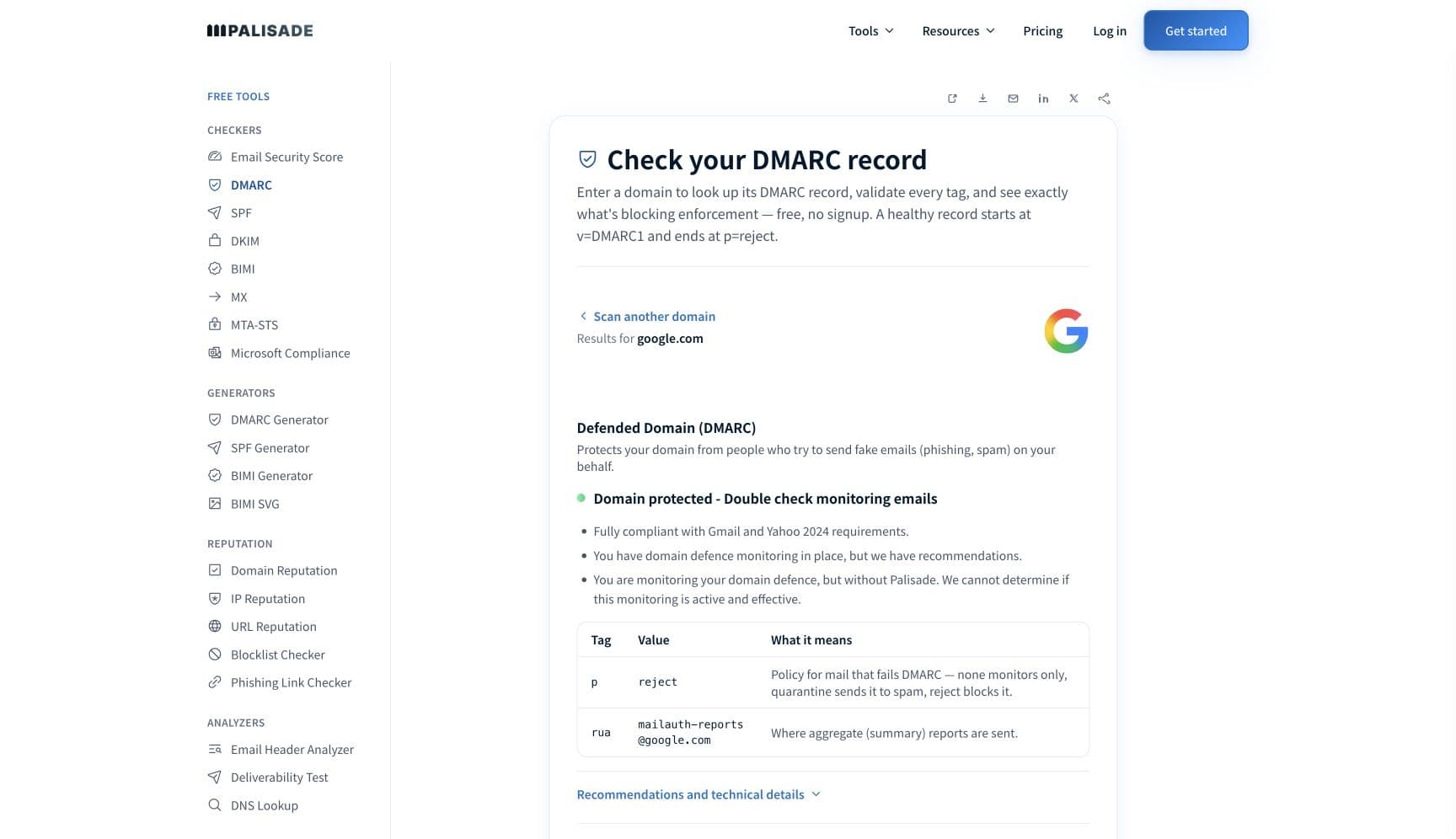
Check the domain in your From address before you touch a send. Marketing Cloud has two products that authenticate a domain and one function that looks like it does and does not, so the fastest test is external rather than in-app: read what your domain actually publishes. The free checker below reads SPF, DKIM, and DMARC for that domain in about thirty seconds.
Check your domain now
Enter your sending domain and the check runs instantly on the next page. Free, no signup.
Why your Salesforce Marketing Cloud email is going to spam
| Likely cause | What's happening |
|---|---|
| The From address was registered but never authenticated | Salesforce is direct about this in its bulk-sender addendum: "Use of the Add Email Address and Register Domain functions in From Address Management will not authenticate those addresses. Use SAP and Private Domain." It also gives the check: "Only those marked as SAP or Private Domain are authenticated domains." A registered but unauthenticated address sends fine and fails every receiving filter's identity test. |
| SPF alignment fails because the sending domain differs from the SAP domain | Salesforce names the exact case: "When sending with a Private Domain whose base domain does not match the SAP domain (e.g., sending with secondbrand.com when the SAP domain is e.firstbrand.com), SPF alignment will not be achieved unless multi-bounce domain is enabled." Multi-bounce domain has to be requested through a support case. Multi-brand accounts hit this constantly and read it as a content problem. |
| A dedicated IP carrying less volume than it needs | SAP assigns a dedicated IP by default, and Salesforce publishes the floor: "To maintain a reputation on a dedicated IP address, send 100,000 or more emails per month." Below that you can ask to stay on shared IPs, stating the request in the SAP submission, "Otherwise, we assign a dedicated IP address to the account". A low-volume dedicated IP has too little traffic to build a reputation at all. |
| Nobody is reading the DMARC failure reports | Salesforce sets a DMARC policy on an SAP or Private Domain, but says the visibility is not included: "Marketing Cloud helps users meet DMARC requirements, but to gain insight into authentication failures, enlist the aid of a DMARC reporting tool." It adds that reviewing failure reports "can also identify legitimate but misconfigured messages". Without that, an unaligned sender stays invisible until placement drops. |
| Complaint rate you cannot see for Gmail | Marketing Cloud records complaints in the _Complaint data view, and Salesforce notes that Yahoo authenticated domains "are enrolled in the Complaint Feedback Loop at time of configuration". For Gmail there is no equivalent: "Gmail does not provide individual spam complaints. To see your Gmail complaint rate, enroll in access for Postmaster Tools." So the largest inbox in most lists is a blind spot by default. |
| One-click unsubscribe that is not reaching the recipient | Commercial messages carry one-click unsubscribe by default, but Salesforce lists two things that break it. The standard "requires the use of HTTPS", so an unsecured SAP click subdomain has to be given a certificate. And on a brand new base domain the link "may not begin appearing until sufficient volume and engagement is seen on the domain", because mailbox providers decide whether to show it. |
| A send that seems to have vanished after a clean 250 OK | This one is Marketing Cloud's own architecture, not a filter verdict. Salesforce says its inbound MTAs acknowledge "All messages ... with a 250 OK, though they may be discarded after assessment of the sender and message contents, downstream of the accepting MTA". An acceptance at submission is not a promise that the message ever left. |
Check the public signals before changing settings
The free check above gives you a fast public baseline for how the receiving providers see mail sent through Salesforce Marketing Cloud. It does not replace the provider's private reputation or placement data, but it tells you whether the problem is visible from outside before you edit a sending platform.
How to fix it, step by step
Run the DMARC check on the domain in your From address
Use the free checker above, or open the DMARC checker page directly. It reads SPF, DKIM, and DMARC for the domain a receiving filter judges, which is the fastest way to see whether the domain is genuinely authenticated rather than merely registered in the account.
Confirm the address is on an SAP or Private Domain
Salesforce gives the exact path: "Navigate to From Address Management within the Setup menu to see a list of verified sending domains. Only those marked as SAP or Private Domain are authenticated domains." Anything else in that list sends without authentication, whatever it looks like in the UI.
Check the DKIM signature on a real message
Send to an outside mailbox and paste the full source into the email header analyzer. The
d=tag in the DKIM-Signature header should be your authenticated domain, and the message should show both dkim=pass and dmarc=pass. Verify the published key separately at the DKIM checker.Fix SPF alignment across brands with a multi-bounce domain
If a Private Domain's base domain does not match the SAP domain, SPF alignment fails until multi-bounce domain is enabled. Salesforce requires a support case to turn it on. Do this before changing anything about creative, because no template edit repairs an alignment failure.
Point DMARC aggregate reports somewhere you actually read
Salesforce recommends a DMARC reporting tool and notes smaller senders "might consider routing failure reports directly to an inbox they manage". Add an
ruaaddress and read the output at the DMARC report analyzer, so every service sending as your domain is named rather than guessed at.Secure the SAP click subdomain
One-click unsubscribe requires HTTPS on the URL in the List-Unsubscribe header, which is hosted on the SAP click subdomain by default. If that subdomain has no certificate, provision one from Domain SSL Certificates. Salesforce also warns that an unsecured image domain makes Content Builder fall back to a Marketing Cloud-branded domain for images.
Match your IP arrangement to your monthly volume
If you send fewer than 100,000 messages a month, Salesforce says you can request to keep shared IPs, and you have to state that in the SAP submission or a dedicated IP is assigned. Above that, a dedicated IP is the right choice and its reputation is entirely yours.
Watch complaints in both places
Read the
_Complaintdata view for the providers that send feedback, and enroll the authenticated domain in Google Postmaster Tools for Gmail, which does not pass individual complaints back. Google's threshold is 0.30% and Yahoo's is 0.3%; Marketing Cloud will not warn you when you cross either.
Related free tools: DKIM checker · SPF checker · Email header analyzer · DMARC report analyzer
If you send in volume: the receiving providers' published rules
Salesforce publishes its own addendum to Google's and Yahoo's bulk-sender guidelines for Marketing Cloud Engagement, and the headline is conditional: "Marketing Cloud Engagement users sending with authenticated domain products already meet requirements for email construction and authentication." The condition is the whole point. "Domains configured as SAP or Private Domain meet authentication requirements by including an SPF policy, signing messages with DKIM, and setting a DMARC policy", while addresses added through From Address Management do not. Salesforce also confirms its sending IPs "have forward and reverse (PTR) records set and aligned with each other", that sends are transmitted over opportunistic TLS, and that commercial messages carry List-Unsubscribe and List-Unsubscribe-Post: List-Unsubscribe=One-Click by default. Separately, Marketing Cloud requires SAP above a volume line of its own: "Customers who send more than 250,000 email messages per month must use SAP." Checked 2026-09-02.
Check your standing with Salesforce Marketing Cloud and the receiving providers
- Working with the Email Sender Authentication Package
What SAP includes, the 250,000-a-month requirement, the 100,000-a-month dedicated IP floor, and the note that Salesforce makes only the DNS changes while you buy the domains.
- Bulk Sender Guidelines for Marketing Cloud Engagement: Addendum
The article that says From Address Management does not authenticate, plus the multi-bounce domain rule, the one-click unsubscribe requirements, and where complaint data lives.
- Private Domain: DKIM, SPF, and DMARC Authentication FAQ
Private Domain is authentication only and carries no dedicated IP, so it suits any sending volume. It does not brand link and image domains; SAP does.
- Google Postmaster Tools
The only place your Gmail complaint rate appears, because Salesforce notes Gmail does not pass individual complaints back to the platform.
If it bounces instead: the codes the receiving provider returns
Spam placement returns no SMTP error, so these are the readings and codes you see when the receiving provider refuses mail sent through Salesforce Marketing Cloud instead. Match yours below; where a code has a full guide, it is linked.
- 250 OK at submission, then nothing: Salesforce says its inbound MTAs acknowledge all messages and may discard them downstream after assessing sender and content
- No SMTP error at all: spam placement is recorded as a successful send, because the receiving provider accepted the message and filed it afterwards
- 550 5.7.26 (unauthenticated email from your domain): Gmail rejecting rather than foldering, the same authentication gap one step further along Full guide →
- 421 4.7.0: the temporary deferral family a receiving provider uses when it is throttling your IP rather than refusing it Full guide →
The real root cause: unenforced authentication
Marketing Cloud will authenticate a domain properly when you buy the product that does it, and Salesforce's own guidance on DMARC is the same advice you would give any sender: "If you're new to DMARC, start in monitoring mode", then "After everything works properly, select the strictest policy to protect your brand and business." The gap is that Marketing Cloud sets the policy on a delegated domain and hands you no way to read the reports, and it takes a support case to change that policy afterwards. So the domain ends up with a record nobody owns, sitting at monitoring, while the CRM, the service desk, the invoicing tool and the last agency's platform all send under the same name unsigned. Aggregate reports are the only thing that names them. Route those reports somewhere you read, authenticate each sender that shows up, then move the policy up to p=reject deliberately, so nothing that is not yours can spend the reputation your campaigns depend on.
DMARC software that does the work
Palisade's AI agent takes domains all the way to enforcement: hosted SPF, DKIM, DMARC, and MTA-STS records on paid plans, DMARC reports monitored continuously, and every policy step drafted for your approval on the way to p=reject. The full product is open for a 15-day trial, and nothing is charged until it ends.
15-day full-product trial. Nothing is charged until it ends.
Fixing this across every client domain
A client on Marketing Cloud is a client whose sending domain is delegated to a platform your team does not administer, where the DMARC policy is changed by support case and the aggregate reports go nowhere by default. Palisade gives you the half you can hold: hosted and managed SPF, DKIM, DMARC, and MTA-STS records for every client domain, aggregate reports read so the SAP domain and every other sender is named rather than guessed at, and a path to p=reject with your team approving each change. Native ConnectWise, HaloPSA, and Autotask integrations put it in your PSA, pricing is per client domain with rates that improve as the portfolio grows, and your own MSP domain is a free NFR domain to run the process on first.
Questions readers ask
Frequently asked questions
Does adding a From address in Marketing Cloud authenticate it?
What is the difference between SAP and a Private Domain in Marketing Cloud?
Do I have to buy SAP for Marketing Cloud?
Why does SPF alignment fail in Marketing Cloud?
How much volume does a Marketing Cloud dedicated IP need?
Where do I see spam complaints in Marketing Cloud?
_Complaint data view. Yahoo authenticated domains are enrolled in its Complaint Feedback Loop at configuration time. Gmail is the exception: Salesforce notes it does not provide individual complaints, so enroll the domain in Google Postmaster Tools.Does Marketing Cloud add one-click unsubscribe automatically?
List-Unsubscribe and List-Unsubscribe-Post: List-Unsubscribe=One-Click. Two things break it: the standard requires HTTPS, so the SAP click subdomain needs a certificate, and mailbox providers may not display the option on a brand new domain until it has volume and engagement.Why did a Marketing Cloud send disappear with no bounce?
Sources and last verified
Every claim about Salesforce Marketing Cloud on this page links to the source it came from, each with the date it was last checked. Provider policies change; if a detail looks off, the linked source is authoritative.
- RFC 5322, Internet Message Format, is the standard the sender guidelines above point at: it defines the Date, From and Message-ID header fields, and its section 3.6 table limits Date and From to exactly one occurrence and Message-ID to at most onewww.rfc-editor.org · checked 2026-09-02
- RFC 8058, Signaling One-Click Functionality for List Email Headers, is the one-click unsubscribe standard: the List-Unsubscribe header field must contain one HTTPS URI, List-Unsubscribe-Post must carry "List-Unsubscribe=One-Click", and the message needs at least one valid DKIM signature covering both header fields or receivers should not offer the one-click optionwww.rfc-editor.org · checked 2026-09-02
- Salesforce on the Sender Authentication Package: "Customers who send more than 250,000 email messages per month must use SAP"; SAP includes Account Branding, a Private Domain for email sending authenticated "by using the Sender Policy Framework (SPF), Sender ID, and DomainKeys Identified Mail (DKIM) authentication", Custom Domains for CloudPages, a Dedicated IP Address, and Reply Mail Management; "Marketing Cloud Engagement only makes the necessary DNS changes for SAP setup. You're responsible for purchasing domains to use with SAP"; "To maintain a reputation on a dedicated IP address, send 100,000 or more emails per month" and low-volume senders must state a request to keep shared IPs in the SAP submission, "Otherwise, we assign a dedicated IP address to the account"; an unsecured SAP image domain makes Content Builder use a Marketing Cloud-branded domain for imageshelp.salesforce.com · checked 2026-09-02
- Salesforce bulk-sender addendum for Marketing Cloud Engagement: "Domains configured as SAP or Private Domain meet authentication requirements by including an SPF policy, signing messages with DKIM, and setting a DMARC policy"; "Use of the Add Email Address and Register Domain functions in From Address Management will not authenticate those addresses. Use SAP and Private Domain"; "When sending with a Private Domain whose base domain does not match the SAP domain (e.g., sending with secondbrand.com when the SAP domain is e.firstbrand.com), SPF alignment will not be achieved unless multi-bounce domain is enabled. Request multi-bounce domain with a support case"; "Marketing Cloud sending IPs have forward and reverse (PTR) records set and aligned with each other"; "All messages are acknowledged with a 250 OK, though they may be discarded after assessment of the sender and message contents, downstream of the accepting MTA"; sends use opportunistic TLS; "Gmail does not provide individual spam complaints. To see your Gmail complaint rate, enroll in access for Postmaster Tools"; Yahoo authenticated domains "are enrolled in the Complaint Feedback Loop at time of configuration" with data in the _Complaint data view; "Marketing Cloud helps users meet DMARC requirements, but to gain insight into authentication failures, enlist the aid of a DMARC reporting tool" and "Make changes to your delegated domain's DMARC policy with a support request"; commercial messages carry List-Unsubscribe and "List-Unsubscribe-Post: List-Unsubscribe=One-Click" by default; "The List-Unsubscribe one-click standard requires the use of HTTPS" and requires a DKIM signature; on a brand new base domain one-click links "may not begin appearing until sufficient volume and engagement is seen on the domain"; "Navigate to From Address Management within the Setup menu to see a list of verified sending domains. Only those marked as SAP or Private Domain are authenticated domains"help.salesforce.com · checked 2026-09-02
- Salesforce Private Domain FAQ: "The Marketing Cloud Engagement Private Domain product applies DomainKeys Identified Mail (DKIM), Sender Policy Framework (SPF), and Domain-based Message Authentication, Reporting, and Conformance (DMARC) authentication to your sending domain"; "Private Domain is a paid add-on and does not include a Dedicated IP address"; "It is an authentication only product" and "This makes it suitable for any sending volume"; "The Private Domain product does not brand link and image domains in an account. For complete branding features, use the Sender Authentication Package (SAP)"; an account can hold multiple Private Domains, and changing one requires purchasing a new Private Domainhelp.salesforce.com · checked 2026-09-02
- Salesforce deliverability fundamentals on authentication: DMARC "tells receiving servers how to handle emails that have failed authorization checks"; "If you're new to DMARC, start in monitoring mode. The system delivers unauthenticated emails and logs a report, allowing you to investigate DKIM or SPF failures without impacting customer engagement. After everything works properly, select the strictest policy to protect your brand and business"; DMARC identifier alignment requires the SPF policy to authorize the sending IP and match the domain used in the From addresshelp.salesforce.com · checked 2026-09-02
- Google Email sender guidelines applying to Marketing Cloud mail: SPF or DKIM for all senders, valid forward and reverse DNS, TLS, RFC 5322 formatting, spam rates in Postmaster Tools below 0.30%; senders of more than 5,000 messages a day to Gmail accounts must also pass SPF and DKIM, publish DMARC, align the From domain with the SPF or DKIM domain, and support one-click unsubscribesupport.google.com · checked 2026-09-02
- Yahoo sender requirements applying to Marketing Cloud mail: all senders implement SPF or DKIM at a minimum; bulk senders implement both plus a valid DMARC policy with at least p=none, DKIM keys of at least 1024 bits, From-domain alignment with the SPF or DKIM domain, a functioning one-click list-unsubscribe header honored within 2 days, and a spam rate below 0.3%senders.yahooinc.com · checked 2026-09-02
Related guides
550 5.7.26421 4.7.0adkim / aspfp=noneinclude: