Provider deliverability · Google Workspace
Why are Google Workspace emails going to spam?

By Samuel Chenard · CEO & Co-Founder, Palisade · Reviewed September 19, 2026
Google Workspace does not authenticate your domain for you. Mail lands in spam when DKIM was never switched on in the Admin console, when your SPF record misses a service that sends as your domain, or when no DMARC record exists. Google also requires a spam rate below 0.3% in Postmaster Tools.
The 30-second check
Start with the domain in your From address rather than the message content. Google's sender guidelines are checked against that domain, and a Workspace tenant can be perfectly configured for mail flow while still publishing no DKIM key and an SPF record that covers Google and nothing else. The free DMARC checker reads all three records the way a receiving filter does.
Check your domain now
Enter your sending domain and the check runs instantly on the next page. Free, no signup.
Why your Google Workspace email is going to spam
| Likely cause | What's happening |
|---|---|
| DKIM was never turned on in the Admin console | Adding your domain to Google Workspace does not publish a DKIM key for it. Google's setup guide has three separate steps: generate the key pair in the Admin console, add the TXT record at your DNS host, then come back and click "Start authentication". Skipping the last step is common, because mail keeps flowing either way. Google's page does not describe what signature is applied before you finish, so read a real message header rather than assuming (per Google's DKIM setup guide, checked 2026-09-02). |
| Your SPF record covers Google but not your other senders | Google tells Workspace admins to publish v=spf1 include:_spf.google.com ~all, and many domains stop there. Google's own warning is explicit: "If you start using a new mail server or third-party sender, make sure to update your SPF record... Otherwise, messages sent by the new senders could be marked as spam." Google also notes an SPF record can carry up to 10 include tags, so a long list of vendors runs out of room. |
| No DMARC record, or a From domain that does not align | Google's bulk-sender requirements ask for a DMARC record with the enforcement policy allowed to be none, and separately require that "the domain in the sender's From: header must be aligned with either the SPF domain or the DKIM domain" for direct email. A Workspace domain that signs with a vendor's key, or bounces to a vendor's return path, passes the underlying check and still fails alignment. |
| Your spam rate in Postmaster Tools is at or above 0.3% | Google's guideline for every sender is to "Keep spam rates reported in Postmaster Tools below 0.10%" and to "avoid ever reaching a spam rate of 0.30% or higher", with the all-sender requirement stated as below 0.3%. The rate is only visible if you have registered the domain in Postmaster Tools, and Google warns that data "might be missing if the total number of messages for a given day is too low", so small tenants often cannot see the number that is judging them. |
| You crossed the bulk-sender line without noticing | Google counts the 5,000-a-day threshold across the whole domain family: "When we calculate the 5,000-message limit, we count all messages sent from the same primary domain." Google's FAQ also states that bulk sender status does not expire, so a single large send moves the domain permanently into the stricter tier that requires SPF and DKIM together, DMARC, alignment, and one-click unsubscribe. |
| Forwarding or a mailing list is breaking your DKIM signature | Google's DKIM troubleshooting page states that "Even when DKIM is correctly set up for your domain, forwarded messages can fail DKIM", and that a "body hash did not verify" result means the message was modified during transit. Google's forwarding guidance adds that forwarded messages from your domain are more likely to be marked as spam, and asks you to change the envelope sender to reference the forwarding domain. |
| Marketing mail with no one-click unsubscribe | For bulk senders, Google requires that "Marketing messages and subscribed messages must support one-click unsubscribe", implemented with the List-Unsubscribe-Post: List-Unsubscribe=One-Click and List-Unsubscribe headers, and separately requires a "clearly visible unsubscribe link in the message body". Workspace adds neither for you. Newsletters sent from a Workspace mailbox or a connected marketing platform have to carry them. |
| Infrastructure basics: TLS, PTR, and message format | Google's all-sender requirements also cover the connection and the message itself: use TLS, keep valid forward and reverse DNS records for the sending IPs, and "Format messages according to the Internet Message Format standard, RFC 5322". Google notes the sending IP address must match the IP of the hostname in the PTR record. These rarely break for mail sent through Google's own servers, and often do for anything relaying through your own gear. |
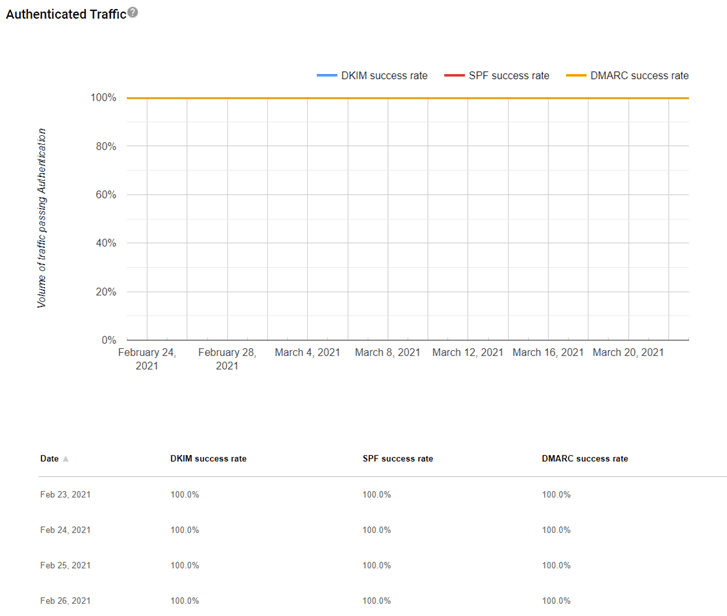
Confirm the pattern in the receiving provider's sender data
The providers that receive your mail publish sender data about what you send through Google Workspace, separately from your DNS. Use it to confirm the provider-side symptom after you have checked the public authentication records below.
Check the public signals before changing settings
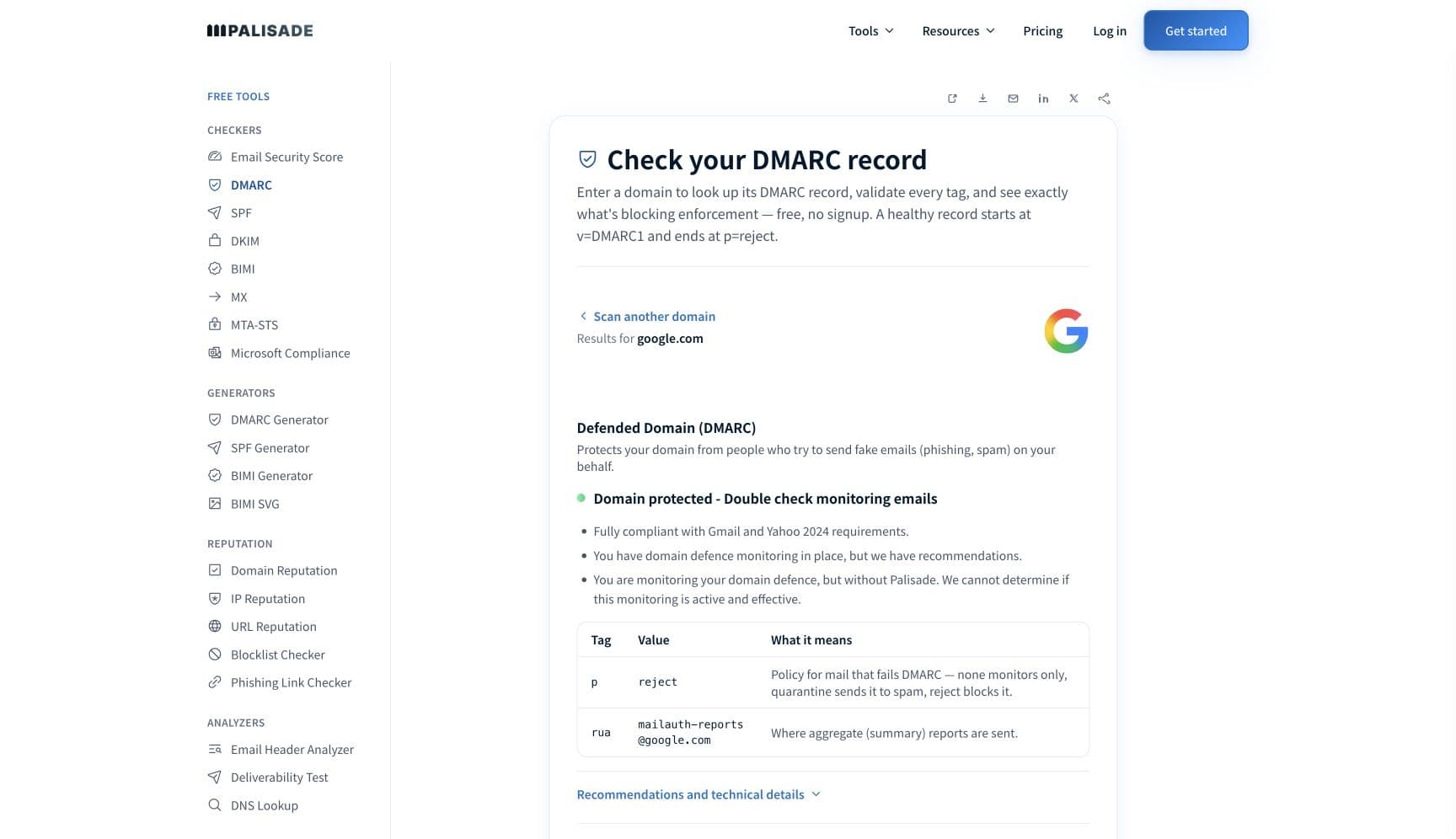
The free check above gives you a fast public baseline for how the receiving providers see mail sent through Google Workspace. It does not replace the provider's private reputation or placement data, but it tells you whether the problem is visible from outside before you edit a sending platform.
How to fix it, step by step
Run the DMARC check on your Workspace domain
Use the free checker above, or open the DMARC checker page directly. It reads SPF, DKIM, and DMARC for the domain in your From address and shows which of the three is missing or unusable, so you fix the gap Google is actually reacting to instead of rewriting subject lines.
Finish DKIM in the Admin console, including Start authentication
Generate the key in the Admin console, publish the TXT record, then return and click "Start authentication". Google recommends 2048-bit keys where your DNS host supports them and 1024-bit otherwise, and the default prefix selector is
google. Confirm the published record with the free DKIM checker.Rebuild SPF so it lists every service that sends as your domain
Start from Google's
v=spf1 include:_spf.google.com ~alland add each marketing, ticketing, invoicing, and monitoring platform that sends under your domain. Google's own wording is that a record can have "up to 10 include: tags", but the binding limit is RFC 7208's ten DNS lookups, whicha,mx,ptr,existsandredirectalso consume — so a record can break at eight includes. Flatten or consolidate rather than stacking vendors. Verify at the SPF checker.Publish DMARC and confirm the From domain aligns
Google's bulk-sender floor is a DMARC record whose policy may be none. Publish it, then check that the domain passing SPF or DKIM is the same domain your users send From. Alignment is a separate requirement from passing, and it is the one Workspace tenants miss most often.
Read a real message header end to end
Send a test to an outside mailbox, open the full source, and paste it into the email header analyzer. You want spf=pass, dkim=pass with your own domain in the
d=tag, and dmarc=pass. Anything else tells you which record to go back to.Register the domain in Google Postmaster Tools
Postmaster Tools reports spam rate, reputation, authentication results, and delivery errors for mail sent to personal Gmail accounts. Google warns the dashboards can stay empty at low volume, so register early and check back as volume grows rather than waiting for a problem.
Meet the bulk-sender rules if you are anywhere near 5,000 a day
Because Google counts the threshold across the whole primary domain and never removes bulk status once earned, treat the stricter tier as your target: SPF and DKIM both passing, DMARC published, From alignment, and one-click unsubscribe on marketing and subscribed mail.
Related free tools: SPF checker · DKIM checker · Email header analyzer · Email deliverability test
If you send in volume: Gmail's published sender rules
Google's Email sender guidelines took effect on 1 February 2024 and apply to Google Workspace senders too. Every sender must set up SPF or DKIM, keep valid forward and reverse DNS records for sending IPs, use a TLS connection, format messages to RFC 5322, and keep spam rates in Postmaster Tools below 0.3%. Senders of roughly 5,000 messages or more a day to personal Gmail accounts must additionally set up SPF and DKIM together, publish DMARC (the enforcement policy may be none), align the From domain with the SPF or DKIM domain for direct email, and support one-click unsubscribe on marketing and subscribed messages, with a clearly visible unsubscribe link in the message body as well. Google's FAQ adds two details worth planning around: the 5,000 count includes all messages sent from the same primary domain, and "bulk sender status doesn't have an expiration date". Sending to personal Gmail accounts requires a DKIM key of 1024 bits or longer. The guidelines govern mail to personal Gmail accounts and do not apply to Google Workspace inbound or intra-domain messages. Per Google's own documentation, checked 2026-09-02.
Check your standing in Google's own sender data
- Google Postmaster Tools
Google's sender dashboard for mail sent to personal Gmail accounts: spam rate, domain and IP reputation, authentication results, and delivery errors. Dashboards can stay empty when daily volume is too low.
- Email sender guidelines
The requirements Gmail actually checks, split into all-sender and bulk-sender tiers. Read this before arguing with a filtering result.
- Email sender guidelines FAQ
Google's answers on how the 5,000-message threshold is counted, that bulk status never expires, and which messages the rules exclude.
If it bounces instead: the codes the receiving provider returns
Spam placement returns no SMTP error, so these are the readings and codes you see when the receiving provider refuses mail sent through Google Workspace instead. Match yours below; where a code has a full guide, it is linked.
- 550 5.7.26 (unauthenticated email from your domain): Gmail rejecting rather than junking, which is the same authentication gap one step further along Full guide →
- 4.7.28: Gmail's temporary rate-limit family; Google's guidelines say to wait at least 10 minutes before retrying and to raise connection counts gradually
- 550 5.7.1: a broad policy-rejection family Gmail uses for admin rules, reputation and RFC 5322 non-compliance. It is not the DMARC refusal, which Gmail codes as 5.7.26 Full guide →
The real root cause: unenforced authentication
Google Workspace handles your mail flow, not your identity. The Admin console will happily route mail for a domain with no DKIM key, an SPF record that names Google alone, and no DMARC record at all, and every one of those gaps is invisible until a receiving filter reacts to it. That is why spam placement here almost never resolves through content edits. The durable fix is to make the domain's authentication a settled fact: DKIM turned on and signing with your own domain, SPF listing every service that sends as you, DMARC published and aligned, and the policy then walked from p=none up to p=reject so nobody else can spend your domain's reputation. Aggregate reports are how you find the senders you forgot; enforcement is what stops the forgotten ones from mattering.
DMARC software that does the work
Palisade's AI agent takes domains all the way to enforcement: hosted SPF, DKIM, DMARC, and MTA-STS records on paid plans, DMARC reports monitored continuously, and every policy step drafted for your approval on the way to p=reject. The full product is open for a 15-day trial, and nothing is charged until it ends.
15-day full-product trial. Nothing is charged until it ends.
Fixing this across every client domain
Google grades each client domain separately, and a Workspace tenant you did not build is exactly where a half-finished DKIM setup hides. Across a portfolio, that means checking whether "Start authentication" was ever clicked on every domain you manage, not just the ones that complained. Palisade turns that into one workflow: it hosts and manages the SPF, DKIM, DMARC, and MTA-STS records for every client domain, reads the aggregate reports to name the services sending as each domain, and carries each domain toward p=reject with your team approving each step. Native ConnectWise, HaloPSA, and Autotask integrations plug it into your PSA, pricing is per client domain with rates that improve as the portfolio grows, and your own MSP domain is a free NFR domain to prove the process on first.
Questions readers ask
Frequently asked questions
Does Google Workspace set up DKIM automatically?
What SPF record does Google Workspace need?
v=spf1 include:_spf.google.com ~all on the sending domain. That value covers Google's servers only. Google warns that messages from a new mail server or third-party sender could be marked as spam unless you update the record, and notes an SPF record can carry up to 10 include tags.Do Gmail's sender requirements apply to Google Workspace accounts?
What spam rate does Google allow before Workspace mail goes to spam?
Am I a bulk sender if I only occasionally send 5,000 messages?
Why does my Workspace mail reach the inbox sometimes and spam other times?
Will Google Postmaster Tools show data for a small Workspace domain?
Does turning on DMARC fix Google Workspace spam placement by itself?
Sources and last verified
Every claim about Google Workspace on this page links to the source it came from, each with the date it was last checked. Provider policies change; if a detail looks off, the linked source is authoritative.
- Gmail's SMTP error reference lists 550 5.7.1 for administrator rules, sender and recipient domain policy, unsolicited mail, low IP or domain reputation and RFC 5322 non-compliance, and codes the DMARC refusal separately as 550 5.7.26.knowledge.workspace.google.com · checked 2026-09-02
- RFC 5322, Internet Message Format, is the IETF specification behind Google's "Format messages according to the Internet Message Format standard, RFC 5322" requirement: it defines "a syntax for text messages that are sent between computer users, within the framework of electronic mail messages"www.rfc-editor.org · checked 2026-09-02
- Gmail sender guidelines, effective 1 February 2024. All senders: set up SPF or DKIM, valid forward and reverse DNS (PTR) records with the sending IP matching the PTR hostname, TLS for transmission, RFC 5322 message format, and spam rates in Postmaster Tools kept below 0.3%. Bulk senders (roughly 5,000+ messages a day to personal Gmail accounts): SPF and DKIM both, a DMARC record whose enforcement policy may be none, From-domain alignment with the SPF or DKIM domain for direct email, and one-click unsubscribe via List-Unsubscribe-Post: List-Unsubscribe=One-Click plus List-Unsubscribe. DKIM keys of 1024 bits or longer for mail to personal Gmail accounts. Exceeding quotas typically returns SMTP error 4.7.28support.google.com · checked 2026-09-02
- Sender guidelines FAQ: "When we calculate the 5,000-message limit, we count all messages sent from the same primary domain"; "bulk sender status doesn't have an expiration date"; all senders including Google Workspace users must meet the requirements when sending to personal Gmail accounts, and the guidelines do not apply to Google Workspace inbound or intra-domain messages; non-compliant mail might be rejected or delivered to spam, with 4.7.x codes indicating temporary rate limitingsupport.google.com · checked 2026-09-02
- Google Workspace DKIM setup requires generating the key pair, publishing the TXT record, and clicking "Start authentication" in the Admin console; 2048-bit keys are recommended where the DNS host supports them, with 1024-bit as the fallback; the default prefix selector is google. The page does not describe any signature applied before setup is completedknowledge.workspace.google.com · checked 2026-09-02
- Google Workspace SPF setup: publish "v=spf1 include:_spf.google.com ~all"; "An SPF record can have up to 10 include: tags"; "If you start using a new mail server or third-party sender, make sure to update your SPF record... Otherwise, messages sent by the new senders could be marked as spam"; each domain needs its own SPF recordknowledge.workspace.google.com · checked 2026-09-02
- Google DKIM troubleshooting: "If the text next to the dkim entry is body hash did not verify, the message was modified during transit"; "Even when DKIM is correctly set up for your domain, forwarded messages can fail DKIM"knowledge.workspace.google.com · checked 2026-09-02
- Google Postmaster Tools monitors outgoing email sent to personal Gmail accounts and reports spam rate, reputation, message authentication, and delivery errors; "Data might be missing if the total number of messages for a given day is too low" to protect user privacy; it covers accounts ending in @gmail.com or @googlemail.comsupport.google.com · checked 2026-09-02
- Google's guidance on forwarded mail: forwarded messages from your domain are more likely to be marked as spam when recipients report them; change the envelope sender to reference your forwarding domain, and include the IP addresses or domains of all forwarding servers or services in your SPF record; avoid modifying subjects, MIME boundaries, or message bodies because that breaks DKIMsupport.google.com · checked 2026-09-02
Related guides
550 5.7.26550 5.7.1include:selectoradkim / aspf