Provider deliverability · GMX / Web.de
Why is GMX blocking my emails?

By Samuel Chenard · CEO & Co-Founder, Palisade · Reviewed September 19, 2026
GMX rejects mail that misses one of its published requirements, and it names the reason in the last line of a multi-line SMTP error. The two most common are a missing or unaligned DKIM signature, which GMX makes mandatory, and a sending IP that is block listed. GMX uses no enhanced status codes.
The 30-second check
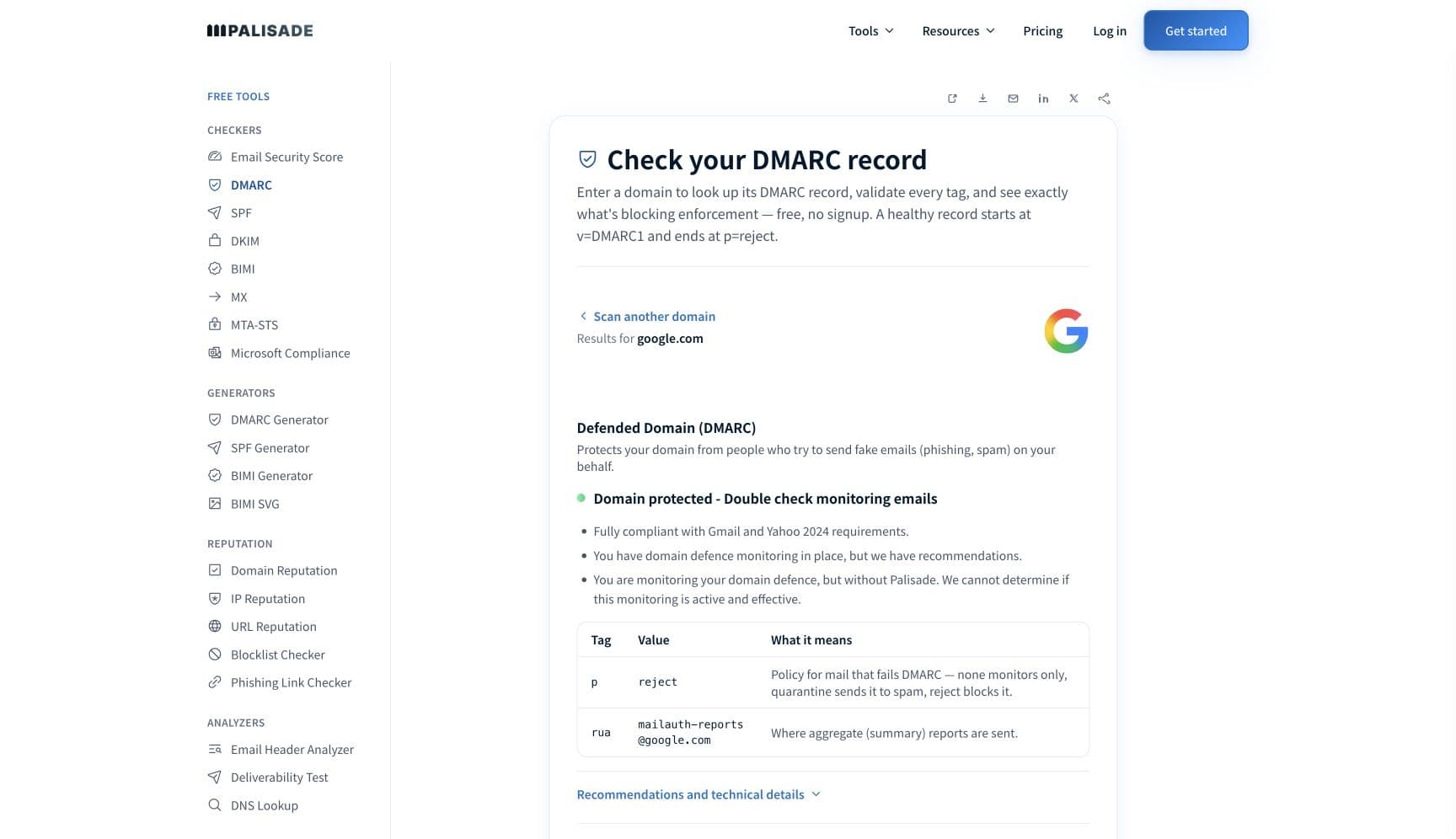
Start with DKIM, not SPF. GMX is unusual among mailbox providers in making a signature compulsory: "To ensure the security and confidentiality of messages, the use of a valid DKIM signature is mandatory", and it adds that "we require DKIM as a minimum requirement; SPF alone is not sufficient". The signature also has to align with your From domain. The free checker below reads SPF, DKIM, and DMARC for that domain in about thirty seconds.
Check your domain now
Enter your sending domain and the check runs instantly on the next page. Free, no signup.
Why GMX is blocking your email
| Likely cause | What's happening |
|---|---|
| No valid DKIM signature, or the DKIM domain does not align | GMX makes DKIM mandatory and requires alignment with it: "An essential component is DKIM alignment. The DKIM domain must match the sender domain (RFC 5322.From) - at least in 'relaxed' mode." A message signed by your ESP's own domain rather than yours satisfies neither half. GMX states plainly that SPF alone does not substitute. |
| Your sending IP is on a block list | GMX requires that "neither the IP address nor the domain is listed on known block lists (e.g. Spamhaus.org)", and it maintains internal lists of its own. The example rejection GMX publishes is exactly this case: 554-gmx.net (mxgmx104) Nemesis ESMTP Service not available, 554-No SMTP service, 554-IP address is block listed. followed by a case URL. |
| Generic or missing reverse DNS, or a dynamic IP | GMX requires a static IP and a PTR record that resolves to a fully qualified domain name belonging to you, recommending the form mail.yourdomain.tld. It says "Generic default entries (e.g. 123-123-123-123-static.ihrprovider.tld) usually result in rejection", and that addresses "from dial-up ranges or dynamically assigned addresses are not accepted". |
| Too much of your list is dead | GMX is specific about the consequence: "If many messages are sent to unknown or deactivated addresses, this can lead to the temporary suspension of the mailing system. In severe cases, we reserve the right to permanently reject the system." A stale German list is one of the fastest ways to earn a GMX block, because the bad addresses are concentrated at one provider. |
| Bulk mail without documented consent or a working unsubscribe | For newsletters and promotional mail GMX requires express consent, "ideally obtained via a double opt-in procedure", a clearly identifiable sender including any service provider sending on their behalf, and an unsubscribe option that ideally complies with RFC 8058. It warns that mail not meeting M3AAWG or CSA standards "are not automatically classified as desired". |
| Throttling on a mass mailing, even after warm-up | GMX documents this separately from blocking: "in the case of mass mailings, our system may throttle delivery despite IP warm-up. In this case, too, you can contact us via the corresponding error message." Throttling arrives as a 4xx temporary error, and GMX asks senders to retry automatically rather than treat it as a failure. |
| Message formatting that breaks RFC 5321 or RFC 5322 | GMX requires a valid FQDN in HELO or EHLO, correct Date, From and Message-ID fields, and that "Each of the fields BCC, CC, Date, From, Sender, Subject, To may only appear once in the header". Timestamps must be correct and not deviate significantly from the actual time. Home-grown sending scripts fail these checks far more often than commercial platforms do. |
Check the public signals before changing settings
The free check above gives you a fast public baseline for how GMX sees your mail. It does not replace the provider's private reputation or placement data, but it tells you whether the problem is visible from outside before you edit a sending platform.
How to fix it, step by step
Check DKIM, SPF and DMARC on the domain you send From
Use the free checker above, or open the DMARC checker page directly. GMX judges the domain in the RFC 5322 From header, so that is the one to check. If DKIM is missing or the signing domain is your ESP's rather than yours, you have found the blocking reason before touching anything else.
Read the last line of GMX's error, not the bounce your server wrote
GMX says the error is multi-line and "The last line of the multi-line error message is decisive". It also warns that the NDR is written by your own mail server, not by GMX, and that some systems paraphrase or drop the original text. Find the original in your own logs.
Open the case URL GMX put in the error
Every GMX rejection carries a URI to a postmaster page for that specific problem, carrying parameters GMX needs for analysis. Search your logs for the pattern
https://postmaster.(gmx|web|mail)to find it. GMX deliberately does not use enhanced status codes such as 5.1.1, so the case URL is the identifier, not the code.Sign with an aligned DKIM key on your own domain
Publish the selector for every service that sends as your domain and confirm the
d=tag matches your From domain or a parent or child of it. Relaxed alignment is enough for GMX. Verify the published key at the DKIM checker before you retry.Fix the sending IP: static, named PTR, off the block lists
Point the reverse DNS at your own mail hostname rather than an ISP default, and confirm the address is static. Run it through the IP reputation checker for the PTR record and the blocklist checker for DNSBL listings, and clear anything you find, Spamhaus first.
Clean the list before you send to GMX again
Remove undeliverable and long-inactive addresses. GMX suspends a sending system that keeps hitting unknown or deactivated mailboxes, so the cleanup has to happen before the retry, not after another failed campaign.
Add an RFC 8058 one-click unsubscribe and name the sender clearly
GMX says that when the standard is met "an unsubscribe button can be displayed automatically", and that otherwise a valid reply address must be offered instead. The sender, including any provider mailing on your behalf, must be unambiguous to the recipient.
Contact the GMX postmaster team with the exact error
Use the postmaster contact form. GMX asks for the IP addresses or ranges of your mail system in CIDR notation, the domain you send from, and the exact error message, and states that "we will be unable to process your query if you do not provide a specific error message or your IP address".
Related free tools: DKIM checker · IP reputation and reverse DNS · Blocklist checker · SPF checker
If you send in volume: GMX's published rules
GMX publishes bulk-sender requirements that sit on top of its general rules, and they are consent-led rather than threshold-led. Only send bulk email "to people who have expressly agreed to receive them", ideally via double opt-in. Follow the M3AAWG and CSA guidelines, which GMX says cover "technical authentication, sending practices, formatting, and unsubscribing". Make the sender, and any service provider mailing on their behalf, clearly identifiable. Give every message an easy unsubscribe, ideally RFC 8058 one-click. Send only to active addresses, because repeated delivery to unknown or deactivated mailboxes "can lead to the temporary suspension of the mailing system" and in severe cases permanent rejection. GMX publishes no numeric complaint-rate ceiling, no volume threshold, and no bulk-sender start date; it asks instead that content be relevant and sending frequency appropriate. Checked 2026-09-02.
Check your standing with GMX
- GMX Postmaster: requirements and recommendations
The complete checklist GMX filters against, including the mandatory DKIM rule and the alignment table. Read this before opening a ticket.
- GMX Postmaster: error messages
How GMX structures a rejection, why the last line is the one that matters, and the case URL that identifies the specific problem.
- GMX Postmaster contact form
The escalation path. Requires your IP ranges in CIDR notation, the sending domain, and the exact error message, or GMX will not process the request.
- WEB.DE Postmaster
The same documentation set published under the WEB.DE brand. mail.com carries it too, and GMX's own log-search advice spans all three hostnames.
- Certified Senders Alliance (via GMX)
GMX describes the CSA as a positive list project by eco and the DDV, and recommends participation for bulk senders. GMX does not operate an allowlist of its own.
Bounce codes you may be seeing
A block from GMX surfaces as a specific SMTP code. Some lists below also carry codes returned by the systems receiving your mail; each line names its issuer. Match yours below; where a code has a full guide, it is linked.
- 554-gmx.net (mxgmx104) Nemesis ESMTP Service not available / 554-No SMTP service / 554-IP address is block listed: GMX's own published example of a block-list rejection, ending in a case URL Full guide →
- Any 4xx code from GMX: a temporary error, including the throttling GMX applies to mass mailings even after IP warm-up. Retry automatically rather than treating it as a failure Full guide →
- A GMX error with no enhanced status code such as 5.7.1: expected behaviour, because GMX states it does not use enhanced status codes. The case URL is the identifier
The real root cause: unenforced authentication
GMX has arranged its requirements so that identity comes first and everything else follows. It is one of the few mailbox providers that will not accept SPF as a substitute for a signature, and it wants that signature tied to the domain in your From header. That is a DMARC-shaped demand made without waiting for DMARC: prove the message really came from the domain it claims. Once you can satisfy GMX, you can satisfy almost everyone, because the same aligned DKIM signature is the strongest half of a DMARC pass. The step GMX only recommends, publishing a DMARC policy, is the one that turns the arrangement into enforcement. Aggregate reports name every service sending as your domain, including the ones nobody remembers authorising; authenticate each, then move the policy from p=none to p=reject so mail that cannot produce your signature is refused everywhere, not just at GMX.
DMARC software that does the work
Palisade's AI agent takes domains all the way to enforcement: hosted SPF, DKIM, DMARC, and MTA-STS records on paid plans, DMARC reports monitored continuously, and every policy step drafted for your approval on the way to p=reject. The full product is open for a 15-day trial, and nothing is charged until it ends.
15-day full-product trial. Nothing is charged until it ends.
Fixing this across every client domain
A client with German or Austrian customers hits GMX, WEB.DE and mail.com constantly, and GMX's mandatory-DKIM rule turns a fleet of client domains into a fleet of separate signing projects. Palisade makes that one workflow: hosted and managed SPF, DKIM, DMARC, and MTA-STS records for every client domain, aggregate reports read so each unsigned sending service is named rather than guessed at, and a path to p=reject with your team approving every change. Native ConnectWise, HaloPSA, and Autotask integrations put it in your PSA, pricing is per client domain with rates that improve as the portfolio grows, and your own MSP domain is a free NFR domain to prove the process on first.
Questions readers ask
Frequently asked questions
What does "IP address is block listed" from GMX mean?
Does GMX require DKIM?
Are GMX and WEB.DE the same for senders?
How do I get on the GMX allowlist?
Why does GMX not include an enhanced status code like 5.7.1?
How do I contact the GMX postmaster about a block?
Does sending to old addresses get you blocked at GMX?
Sources and last verified
Every claim about GMX on this page links to the source it came from, each with the date it was last checked. Provider policies change; if a detail looks off, the linked source is authoritative.
- RFC 5322, Internet Message Format, is the standard the sender guidelines above point at: it defines the Date, From and Message-ID header fields, and its section 3.6 table limits Date and From to exactly one occurrence and Message-ID to at most onewww.rfc-editor.org · checked 2026-09-02
- RFC 8058, Signaling One-Click Functionality for List Email Headers, is the one-click unsubscribe standard: the List-Unsubscribe header field must contain one HTTPS URI, List-Unsubscribe-Post must carry "List-Unsubscribe=One-Click", and the message needs at least one valid DKIM signature covering both header fields or receivers should not offer the one-click optionwww.rfc-editor.org · checked 2026-09-02
- GMX sender requirements: "The delivering server must have a static IP address" and addresses "from dial-up ranges or dynamically assigned addresses are not accepted"; a PTR record resolving to an FQDN of your own, recommended form mail.yourdomain.tld, with "Generic default entries (e.g. 123-123-123-123-static.ihrprovider.tld) usually result in rejection"; "Make sure that neither the IP address nor the domain is listed on known block lists (e.g. Spamhaus.org)"; valid MX or A records; a valid FQDN HELO/EHLO; RFC 5321 and RFC 5322 compliance with correct Date, From and Message-ID and each of BCC, CC, Date, From, Sender, Subject, To appearing only once; "the use of a valid DKIM signature is mandatory" with "The DKIM domain must match the sender domain (RFC 5322.From) - at least in 'relaxed' mode"; "An SPF record in the DNS is recommended"; DMARC recommended; "we require DKIM as a minimum requirement; SPF alone is not sufficient"; bulk senders need express consent ideally by double opt-in, M3AAWG and CSA compliance, an identifiable sender, an unsubscribe option ideally per RFC 8058, and active-address hygiene, because many messages to unknown or deactivated addresses "can lead to the temporary suspension of the mailing system. In severe cases, we reserve the right to permanently reject the system"; "in the case of mass mailings, our system may throttle delivery despite IP warm-up"postmaster.gmx.net · checked 2026-09-02
- GMX error messages: rejections are multi-line and "The last line of the multi-line error message is decisive"; they carry an SMTP status code "(e.g. 550, 421, but we do not use any additional Enhanced Status Codes, e.g. 5.1.1)" plus a URI to a problem-specific postmaster page; 5xx are permanent and 4xx temporary with retries recommended; the NDR is produced by the sending mail server, not by GMX, and may paraphrase or omit the original text; the published block-list example is "554-gmx.net (mxgmx104) Nemesis ESMTP Service not available / 554-No SMTP service / 554-IP address is block listed." followed by a case URL; postmasters should search logs for the URL pattern https://postmaster.(gmx|web|mail)postmaster.gmx.net · checked 2026-09-02
- GMX postmaster FAQ: the spam filter comprises "a number of different IP-based and content-based filter modules" and mail can be misclassified; on allowlisting, "GMX does not offer this service. Please observe our Requirements and Recommendations. If you observe these recommendations, allowlisting is unnecessary"; on delays, "In case of unmistakable characteristics that indicate a spamming server, we delay any emails sent from a specific IP address, or reject them completely"postmaster.gmx.net · checked 2026-09-02
- GMX postmaster contact form: senders must supply the IP addresses or IP ranges in CIDR notation of their email system, the domain used, and the exact error message, and GMX states "we will be unable to process your query if you do not provide a specific error message or your IP address"postmaster.gmx.net · checked 2026-09-02
- GMX on the Certified Senders Alliance: a positive list project by Verband der deutschen Internetwirtschaft e.V. (eco) with the Deutscher Direktmarketing Verband (DDV), providing "an interface between mass mail senders and internet service providers" where "successful delivery is managed for multiple providers"; GMX recommends participation for bulk senderspostmaster.gmx.net · checked 2026-09-02
- The same postmaster documentation set (requirements and recommendations, error messages, FAQ, contact, CSA) is published under the WEB.DE brand at postmaster.web.de and under mail.com at postmaster.mail.com, matching GMX's own instruction to search logs for the https://postmaster.(gmx|web|mail) URL patternpostmaster.web.de · checked 2026-09-02
Related guides
554 5.7.1421 4.7.0550 5.7.1selectord=adkim / aspf