Provider deliverability · Zoho Mail
Why is Zoho Mail blocking my emails?

By Samuel Chenard · CEO & Co-Founder, Palisade · Reviewed September 19, 2026
Zoho Mail blocks mail according to rules the recipient's own admin sets: for an SPF failure, a bad DKIM signature, a DMARC failure, or a hit on Zoho's blocklist, the admin chooses between a permanent reject, a temporary 4xx reject, spam, quarantine, or allow. A bounce at one Zoho organization and spam-foldering at another usually trace to the same unauthenticated sender.
The 30-second check
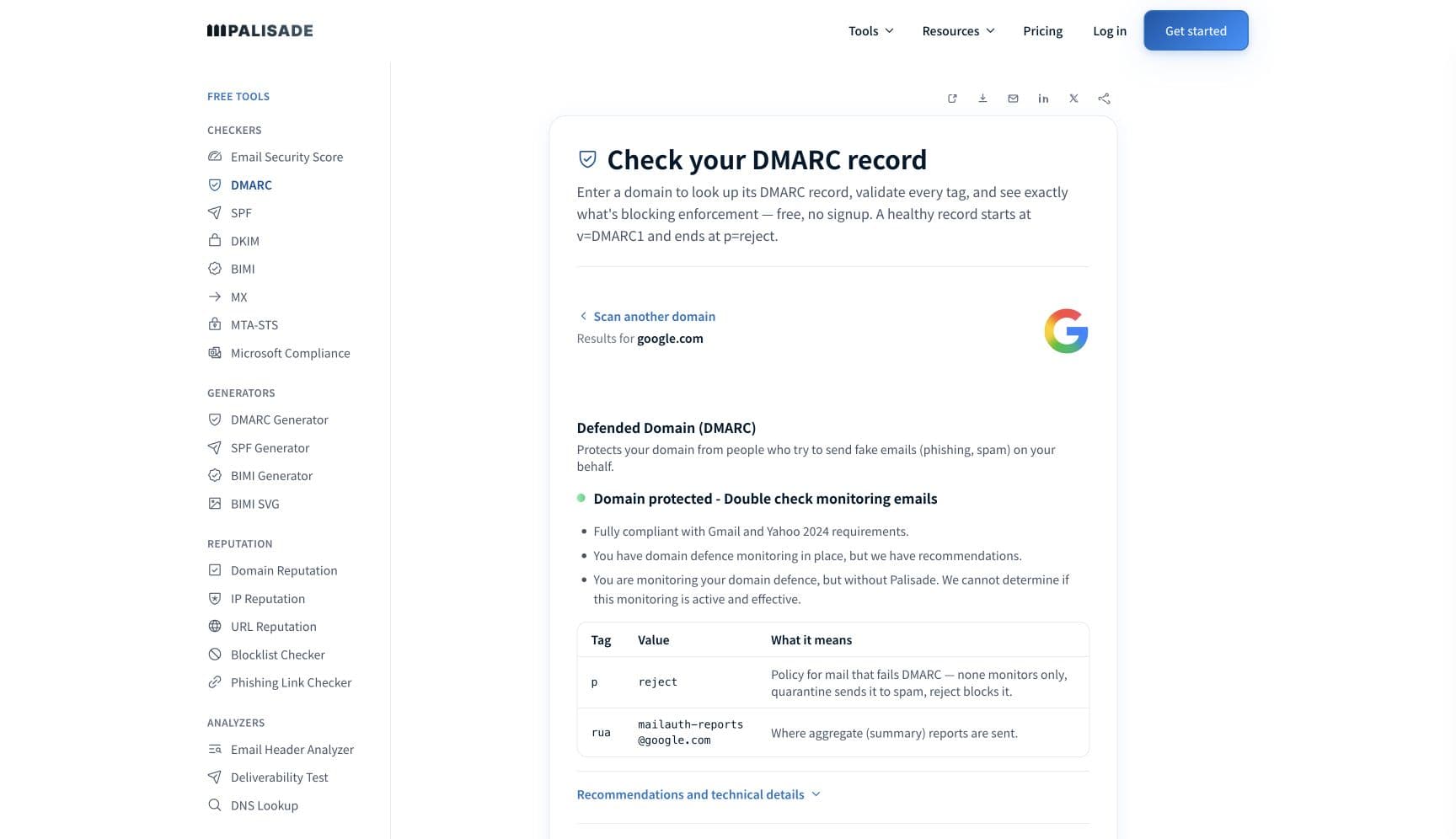
Start with authentication, because at Zoho it can be a hard bounce. The admin console lets each organization choose "Permanent reject: To directly bounce back the emails, if the SPF fails/ soft fails based on the option chosen" and the same for an invalid DKIM signature, with "Temporary reject" as a 4xx alternative where "The retries will be checked for SPF Again and will be accepted if the sender has corrected or updated the SPF records". The free checker below reads SPF, DKIM and DMARC for the domain you send from in about thirty seconds.
Check your domain now
Enter your sending domain and the check runs instantly on the next page. Free, no signup.
Why Zoho Mail is blocking your email
| Likely cause | What's happening |
|---|---|
| SPF failed or soft-failed and the recipient's admin chose to reject | Zoho validates inbound SPF "based on the sending domain's published SPF Record and the IP from which the emails are received", and the admin picks the action for both fail and soft fail: permanent reject, temporary reject, none, or quarantine. A ~all record does not protect you here, because Zoho lets the admin bounce on a soft fail too. |
| The DKIM signature did not verify | "When an incoming email has a DKIM signature in the header, the DKIM validation happens for the email." If it fails, the admin's chosen action applies: permanent reject to "directly bounce back the emails", temporary reject with a 4xx, none, or quarantine. A rotated key that was never published, or a signature broken by a forwarder, produces this. |
| DMARC failed under a quarantine policy | Zoho describes DMARC as "an email authentication protocol built on the widely deployed SPF and DKIM protocols", and where the sending domain's policy is quarantine the recipient admin chooses none, move to spam, or move to quarantine. A domain at p=quarantine with one misaligned sender therefore lands in the Zoho spam folder or an admin's quarantine queue. |
| The IP, domain or address is on Zoho's consolidated blocklist | "Zoho maintains a consolidated Blocklist based on User Spam Marking, Abuse patterns, and certain third-party Blocklists subscribed by us." The admin sets the action for a listed sending domain, address or IP: permanent reject, temporary reject, move to spam, or quarantine. Spam marks by Zoho users anywhere feed this list. |
| System-level spam rejection is switched on at the recipient | With system-level rejection enabled, "all emails classified as spam based on system level spam checks like sender reputation, previous spam email history, and system level blacklists at reception level, will be rejected from entering the system". With it disabled the same mail goes to the Spam folder, which is why one tenant bounces and another files. |
| The recipient organization blocked you by address, domain, IP, TLD or pattern | Zoho's Blocked List works on "specific email addresses, domains, IP addresses, TLDs, or recipient addresses at the organization level", and the admin decides whether blocked mail is marked as spam, quarantined, "rejected with a bounce message, or rejected silently without notifying the sender". Sender-address, subject and content patterns, and country-of-origin filters, can flag or quarantine mail the same way. |
| Content or attachments Zoho's filters classify as spam or a virus | Zoho's filters "check all the emails based on various criteria like IP reputation, SPF, DKIM, User Policy, etc.", and "Any unusual or virus-infected incoming and outgoing emails will be rejected at the server itself". Where the admin enables sender-based alerts, users are also warned when "emails do not pass SPF or DKIM validation", so an unauthenticated message that does get through can arrive with a warning. |
Check the public signals before changing settings
The free check above gives you a fast public baseline for how Zoho Mail sees your mail. It does not replace the provider's private reputation or placement data, but it tells you whether the problem is visible from outside before you edit a sending platform.
How to fix it, step by step
Check SPF, DKIM and DMARC on the domain in your From header
Use the free checker above, or open the DMARC checker page directly. Because a Zoho admin can bounce on an SPF soft fail or a bad DKIM signature, both need to pass cleanly, not merely exist. If a sending platform is missing from SPF or its DKIM key is unpublished, you have found the block.
Read the bounce to learn which rule fired
A permanent reject from Zoho comes back as a bounce; a temporary reject comes back as a 4xx your server will retry. Zoho's own guidance is that a retry "will be accepted if the sender has corrected or updated the SPF records", so fix the record first and let the queue drain rather than resending.
Add every sending service to SPF and keep it valid
List each platform that sends as your domain, include each one, and stay under the ten-lookup limit so the record does not fail outright. Re-check at the SPF checker. Remember Zoho lets admins treat
~allsoft fails the same as hard fails.Sign with DKIM on your own domain and verify the published key
Confirm the selector each service signs with is published and that the
d=domain is yours. Verify at the DKIM checker. A message that arrives with a signature that does not verify is worse at Zoho than one with no signature, because DKIM validation only runs when a signature is present.Clear public blocklists and check the IP's reverse DNS
Zoho's consolidated list draws on third-party blocklists, so run the blocklist checker and the IP reputation checker and clear any listing. Spam marks by Zoho users feed the list too, so stop mailing addresses that have complained.
Ask the recipient admin what their spam verification settings are
If one Zoho organization bounces you and others do not, ask its admin to check Security & Compliance, Spam Control, Spam Verification and the Blocked List. They can see whether the reject came from SPF, DKIM, DMARC, DNSBL or an organization rule, and can add you to the Allowed List while you fix the cause.
Fix DMARC alignment before asking anyone to relax a policy
If your domain is at quarantine or reject, find the misaligned sender in your aggregate reports and fix its authentication. Zoho applies your published policy through the recipient admin's choice of action, so the durable fix is on your side of the record, not theirs.
Related free tools: SPF checker · DKIM checker · Blocklist checker · IP reputation and reverse DNS
If you send in volume: what each Zoho Mail admin configures instead
Zoho publishes no bulk-sender programme, complaint-rate ceiling or volume threshold for inbound mail. What it publishes instead is the per-organization control panel: each Zoho Mail admin sets the action for SPF failure and soft failure, invalid DKIM, DMARC failure under a quarantine policy, and a Zoho blocklist hit, choosing among permanent reject, temporary reject, none, move to spam and quarantine, and can additionally block by address, domain, IP, TLD, sender pattern, subject pattern, content pattern and country of origin. Zoho's Trusted List is the only bypass, and it "completely bypasses all spam checks, including SPF, DKIM, and blocklist validations", so it is granted by the recipient, never requested by the sender. Bulk senders should therefore assume the strictest configuration: SPF passes for every sending IP, DKIM verifies on the From domain, DMARC aligns, and no listing anywhere. Checked 2026-09-15.
Check your standing with Zoho Mail
- Zoho Mail Admin Console: Spam Verification settings
The per-organization actions for SPF, DKIM, DMARC and DNSBL failures, system-level spam rejection, sender-based alerts and post-delivery checks. This is what a recipient admin sees; read it to understand which rule bounced you.
- Zoho Mail Admin Console: Spam Control lists
Allowed, Blocked, Trusted and Rejected lists, pattern filters and country filters. The Blocked List can reject silently without notifying the sender, which explains a disappearing message.
- Zoho Mail: Spam Control FAQ
Zoho's user-facing summary of what its filters check, how spam marks are learned, and its advice to configure SPF, DKIM and DMARC.
Bounce codes you may be seeing
A block from Zoho Mail surfaces as a specific SMTP code. Some lists below also carry codes returned by the systems receiving your mail; each line names its issuer. Match yours below; where a code has a full guide, it is linked.
- A permanent reject: the admin-chosen action that will "directly bounce back the emails" for an SPF failure or soft failure, an invalid DKIM signature, or a Zoho blocklist hit; Zoho publishes no enhanced status code for it
- A temporary reject with a 4xx: Zoho re-checks SPF or DKIM on the retry and accepts the message once the record is corrected; Zoho names only the 4xx family, not a specific code
- No bounce at all: a Blocked List entry can be set to reject silently without notifying the sender, or to quarantine for admin review
The real root cause: unenforced authentication
Zoho Mail makes the recipient's admin the judge, and hands that admin a panel with one switch per authentication check. Whatever they choose, the input is the same: did the message pass SPF, did its DKIM signature verify, and did the From domain align. A sender who passes all three is untouched by every setting on that panel except a deliberate block; a sender who fails one is at the mercy of a stranger's configuration, bounced here, quarantined there, delivered with a warning somewhere else. That is the general condition of unauthenticated mail, made visible. The fix is to remove the variable: use DMARC aggregate reports to find every service sending as your domain and which check it fails, authenticate and align each one, then move the policy from p=none to p=reject so that mail which cannot prove it is yours is refused everywhere before any admin has to decide what to do with it.
DMARC software that does the work
Palisade's AI agent takes domains all the way to enforcement: hosted SPF, DKIM, DMARC, and MTA-STS records on paid plans, DMARC reports monitored continuously, and every policy step drafted for your approval on the way to p=reject. The full product is open for a 15-day trial, and nothing is charged until it ends.
Audit any domain free, no card needed. A card starts the 15-day trial.
Fixing this across every client domain
Zoho Mail is common at small businesses and agencies, and because every Zoho organization filters differently, a client's complaint that "only some customers bounce us" is usually one unauthenticated sending service meeting a strict Zoho tenant. Palisade makes the fix one workflow across every client domain: hosted and managed SPF, DKIM, DMARC, and MTA-STS records, aggregate reports read so each unauthenticated sending service is named rather than guessed at, and a path to p=reject with your team approving every change. Native ConnectWise, HaloPSA, and Autotask integrations put it in your PSA, pricing is per client domain with rates that improve as the portfolio grows, and your own MSP domain is a free NFR domain to prove the process on first.
Questions readers ask
Frequently asked questions
Does Zoho Mail reject mail that fails SPF?
Why does one Zoho organization bounce my mail when others accept it?
What is the Zoho blocklist?
How do I get on a Zoho Mail allowlist?
Does Zoho enforce my DMARC policy?
p=quarantine policy is filed as spam or quarantined at Zoho by your instruction.Why did my message to a Zoho user disappear without a bounce?
Does Zoho warn users about unauthenticated mail?
Does Zoho Mail publish a postmaster page or complaint threshold?
Sources and last verified
Every claim about Zoho Mail on this page links to the source it came from, each with the date it was last checked. Provider policies change; if a detail looks off, the linked source is authoritative.
- Zoho Mail spam verification settings: spam process types (Complete, Content only, Sender only, Sender and header only, Configured Spam settings, Off); system-level spam email rejection, where if enabled "all emails classified as spam based on system level spam checks like sender reputation, previous spam email history, and system level blacklists at reception level, will be rejected from entering the system. If disabled, the emails classified as spam will be sent to the Spam folder"; sender-based alerts including "Unauthenticated emails - Org users will be alerted if emails do not pass SPF or DKIM validation"; post-delivery spam checks; SPF validation "based on the sending domain's published SPF Record and the IP from which the emails are received", with admin actions for fail and soft fail of "Permanent reject: To directly bounce back the emails", "Temporary reject: To temporarily reject emails with 4xx errors. The retries will be checked for SPF Again and will be accepted if the sender has corrected or updated the SPF records", "None" and "Move to quarantine"; "When an incoming email has a DKIM signature in the header, the DKIM validation happens for the email" with the same four actions; DMARC described as "an email authentication protocol built on the widely deployed SPF and DKIM protocols" with admin actions None, Move to Spam and Move to quarantine when the policy is quarantine; "Zoho maintains a consolidated Blocklist based on User Spam Marking, Abuse patterns, and certain third-party Blocklists subscribed by us" with DNSBL actions Permanent reject, Temporary reject, Move to Spam and Quarantinewww.zoho.com · checked 2026-09-15
- Zoho Mail spam control lists: Allowed, Blocked, Trusted and Rejected lists applied to "specific email addresses, domains, IP addresses, and even top-level domains (TLDs)"; the Allowed List makes mail "bypass spam checks", with the caveat that "in case there is an SPF failure, and there is no action set for SPF failure, the emails from allowed list domains or addresses will not be marked as 'Not Spam'"; the Blocked List covers "specific email addresses, domains, IP addresses, TLDs, or recipient addresses at the organization level" and blocked mail can be "marked as spam, moved to quarantine, rejected with a bounce message, or rejected silently without notifying the sender"; sender, subject and content patterns can mark as spam or quarantine; country-based filtering can mark as spam, quarantine or reject; the Trusted List "completely bypasses all spam checks, including SPF, DKIM, and blocklist validations" and admins should be "doubly cautious"; the Rejected List "Blocks all incoming emails addressed to specific users in the organization, regardless of who the sender is"www.zoho.com · checked 2026-09-15
- Zoho Mail spam control FAQ: filters "check all the emails based on various criteria like IP reputation, SPF, DKIM, User Policy, etc."; the system "is equipped to learn from user corrections" via Mark Spam; "Any unusual or virus-infected incoming and outgoing emails will be rejected at the server itself"; Zoho advises configuring SPF, DKIM and DMARC for the domainwww.zoho.com · checked 2026-09-15
Related guides
550 5.7.1421 4.7.0DKIM signature verification failure (550)-all vs ~alldkim=failp=quarantine