Provider deliverability · Mimecast (secure email gateway)
Why is Mimecast blocking my emails?

By Samuel Chenard · CEO & Co-Founder, Palisade · Reviewed September 19, 2026
Mimecast blocks mail at the recipient's gateway, not at yours, so the rejection is the receiving organization's policy rather than a verdict on your mailbox. The usual causes are their Anti-Spoofing policy, a Blocked Senders policy, an SPF hard fail their DNS Authentication policy rejects, and poor sending IP reputation. Mimecast's bounce text names the policy.
The 30-second check
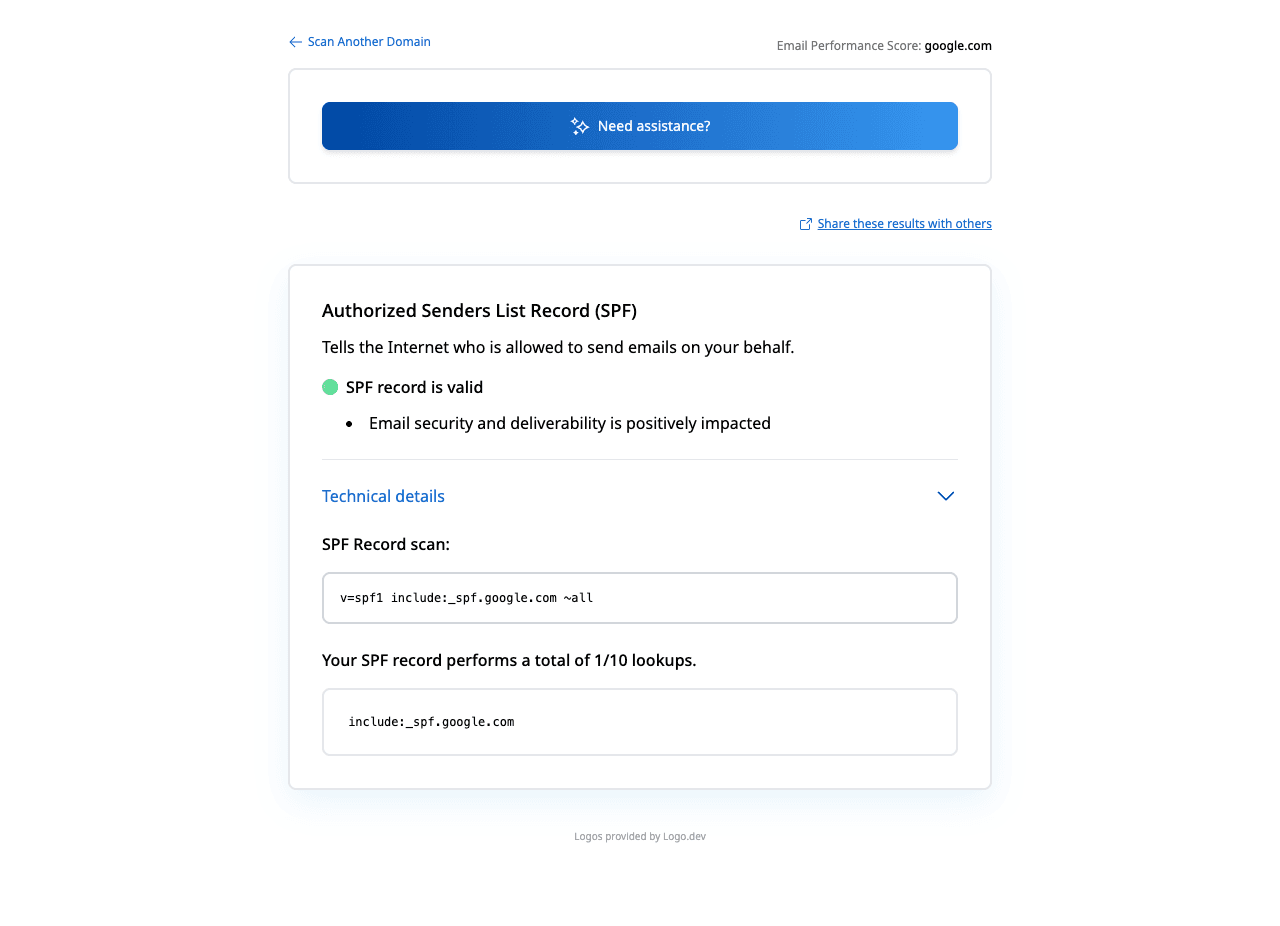
Mimecast returns a plain-language reason with every rejection, and two of the most common reasons come straight from your SPF record: an SPF hard fail is rejected outright under Mimecast's recommended inbound settings, and the anti-spoofing bypass a recipient's administrator would create for you is scoped by sending IP. Check what your SPF record actually authorizes before you ask anyone for an exception.
Check your domain now
Enter your sending domain and the check runs instantly on the next page. Free, no signup.
Why Mimecast is blocking your email
| Likely cause | What's happening |
|---|---|
| Their Anti-Spoofing policy caught you sending as their domain | Mimecast describes the purpose plainly: "Anti-Spoofing policies ensure that external messages appearing to come from an internal domain are blocked." If you send on behalf of the recipient's own domain from a marketing platform, a CRM, or an application server, your mail arrives from outside their gateway carrying their domain in the From address, which is exactly the pattern the policy exists to stop. The bounce reads "Anti-Spoofing policy - Inbound not allowed" or "Rejected by header-based Anti-Spoofing policy". |
| Your sending IP is not in your SPF record | Mimecast's recommended inbound DNS Authentication settings reject on SPF Hard Fail, with the note that "in these cases, the sender is not sending the message from an authorized IP address." The bounce is "SPF Sender Invalid - envelope rejected". Mimecast also documents that when several checks disagree, "the most restrictive action wins", so an SPF hard fail alone is enough to end the delivery. |
| A Blocked Senders policy or a Managed Senders entry names you | Mimecast has three separate layers that can list you: an administrator's Blocked Senders policy, a profile group holding a whole domain, and an individual recipient's own Managed Senders list. Mimecast states that "Blocked Sender policies are designed to take precedence over Permitted Sender policies", so being on somebody's permitted list does not save you. The bounce reads "Administrative prohibition envelope blocked", "Envelope blocked – User Entry", or "Rejected by header-based Blocked Senders - Block policy for Header From". |
| Greylisting, or a reputation check that has not cleared yet | Mimecast greylists unfamiliar sources with a 451 and the reason "Internal resources are temporarily unavailable." Its documentation says this "requires the server to retry the connection between one minute and 12 hours", and that the same code also appears when "the sender's IP address has a poor reputation". A sending server that does not retry inside that window never delivers at all. |
| Ongoing IP reputation checks turned the deferral into a rejection | Mimecast documents a separate permanent failure for reputation: "Local CT IP Reputation - (reject)", described as "ongoing reputation checks have resulted in the message being rejected due to poor IP reputation. This could occur after a 4xx error." That last sentence is the sequence to watch for. Deferrals that you ignore harden into rejections. |
| Your IP is on a blocklist Mimecast consults | Mimecast returns a 550 carrying "< details of RBL >", and says "the text displayed is specific to the RBL, which lists the sender's IP address." Its own recommended remedy is for the recipient to bypass the listing with an Auto Allow or Permitted Senders policy and for you to "request the associated IP address from the RBL", which means getting delisted at the source. |
| A Content Examination policy matched something in the message | Mimecast rejects with "Message bounced due to Content Examination Policy" when the recipient's content rules match. Mimecast notes that "multiple content examination policies can conflict and potentially remove legitimate emails, especially when policies are broadly applied without specific group targeting." Nothing on your side fixes this one. It is a rule in their tenant. |
| You opened too many connections or listed too many recipients | Mimecast defaults to 20 concurrent inbound connections per account and returns "Account service is temporarily unavailable" past that, with the IP automatically removed from the block list after five minutes. It also accepts 100 RCPT TO entries per message body by default and returns a 452 "Too many recipients" as a truncation request beyond that. |
Check the public signals before changing settings
The free check above gives you a fast public baseline for how Mimecast sees your mail. It does not replace the provider's private reputation or placement data, but it tells you whether the problem is visible from outside before you edit a sending platform.
How to fix it, step by step
Check what your SPF record authorizes
Use the free checker above, or open the SPF checker page directly. Mimecast rejects an SPF hard fail outright under its own recommended inbound settings, so a sending service missing from your record is a rejection you can fix without contacting anybody.
Read the reason string in the bounce, not just the number
Mimecast publishes its 4xx and 5xx reason strings with a cause for each, and the string is the diagnosis. "Anti-Spoofing policy - Inbound not allowed", "SPF Sender Invalid - envelope rejected", and "Envelope blocked – User Entry" are three completely different problems behind one 550.
If it names Anti-Spoofing, stop presenting as their domain
Either send from your own domain, or ask the recipient's Mimecast administrator to add a Take No Action anti-spoofing policy scoped to your sending IP range. Mimecast's own guidance for that bypass is to tighten it by entering "the sending server's public IP address or address range in CIDR format", so have that range ready.
If it names Blocked Senders, ask their administrator to permit you
Mimecast's documented path is Email Delivery | Managed Senders in the Administration Console, where an administrator searches for the sender and selects Delete or Permit Sender. For a domain-level block, Mimecast says a Take No Action policy has to be created for your specific address, because the domain block otherwise still applies.
Confirm your own server retries a 451 properly
Greylisting only works if your MTA comes back. Mimecast expects a retry between one minute and 12 hours; miss the window and the attempt is logged as "Sender Failed to Retry". Check your queue settings before assuming you were blocked.
Clear blocklist listings on your sending IPs
Run each sending IP through the free blocklist checker and delist at the source. Mimecast's RBL rejection carries the listing service's own text, so the bounce usually tells you which list to work on.
Publish DMARC and take it to enforcement
Anti-spoofing is the gateway's guess at whether mail claiming your domain is really yours. A DMARC record at
p=reject, with SPF and DKIM correct for every legitimate sender, turns that guess into a published instruction. Check the record at the DMARC checker.
Related free tools: DMARC checker · Blocklist checker · IP reputation · Email header analyzer
If you send in volume: what Mimecast publishes instead of sender rules
Mimecast is a secure email gateway sitting in front of a customer's mailboxes, not a mailbox provider, and it publishes no bulk-sender requirements the way Google, Yahoo and Microsoft do. The limits it does publish are per-connection and per-account rather than per-day: 20 concurrent inbound connections per customer account by default, after which the IP is temporarily blocked and automatically released five minutes later, and 100 RCPT TO entries per message body, after which Mimecast returns a 452 that most sending servers treat as a request to truncate and continue. Neither is a reputation judgement. The requirements that decide whether your mail reaches a Mimecast customer are that customer's own policies, plus the mailbox provider behind the gateway. Per Mimecast's SMTP error code documentation, checked 2026-09-02.
Bounce codes you may be seeing
A block from Mimecast surfaces as a specific SMTP code. Some lists below also carry codes returned by the systems receiving your mail; each line names its issuer. Match yours below; where a code has a full guide, it is linked.
- 550 Anti-Spoofing policy - Inbound not allowed, and 550 Rejected by header-based Anti-Spoofing policy: the message triggered the recipient's anti-spoofing policy
- 550 SPF Sender Invalid - envelope rejected: the sending IP is not listed in the published SPF record for the sending domain
- 550 Administrative prohibition envelope blocked: a Blocked Senders policy or an SPF hard rejection, per Mimecast's own description of the code
- 550 Local CT IP Reputation - (reject): Mimecast's permanent rejection for poor sending IP reputation, which its docs say can follow an earlier 4xx
- 451 Internal resources are temporarily unavailable: greylisting, or a poor-reputation sending IP; retry between one minute and 12 hours. Mimecast documents this reason string without an enhanced status code
The real root cause: unenforced authentication
Two of Mimecast's most common rejections are the same question asked twice: can this message be tied to the domain it claims? The anti-spoofing policy asks it about the header From address and blocks external mail wearing an internal domain. The DNS Authentication policy asks it about the envelope and rejects an SPF hard fail. Both are decided before a human sees anything, by records you publish and they read. That is why chasing exceptions is the slow path. Every bypass a recipient's administrator creates for you is scoped to an IP range, has to be maintained, and only helps at that one company. Complete SPF for every service that sends as your domain, DKIM signing with your own domain, and a DMARC record walked from p=none up to p=reject make the answer unambiguous at every gateway at once, Mimecast included. Aggregate reports are how you find the senders you forgot; enforcement is what stops the ambiguity coming back.
DMARC software that does the work
Palisade's AI agent takes domains all the way to enforcement: hosted SPF, DKIM, DMARC, and MTA-STS records on paid plans, DMARC reports monitored continuously, and every policy step drafted for your approval on the way to p=reject. The full product is open for a 15-day trial, and nothing is charged until it ends.
15-day full-product trial. Nothing is charged until it ends.
Fixing this across every client domain
Mimecast blocks land on your desk as a client ticket that is not actually about your client's tenant. It is about a recipient's gateway, a bounce string nobody has read carefully, and an SPF record that never listed the CRM. Palisade gives you the fleet view instead of the one-off: hosted and managed SPF, DKIM, DMARC and MTA-STS records for every client domain, aggregate reports read for you so every sending service is named rather than guessed, and a path to p=reject with your team approving each change. Native ConnectWise, HaloPSA and Autotask integrations put it in your PSA, pricing is per client domain with rates that improve as the portfolio grows, and your own MSP domain is a free NFR domain to run the process on before any client conversation.
Questions readers ask
Frequently asked questions
What does "550 Rejected by header-based Anti-Spoofing policy" mean?
How do I get whitelisted in Mimecast?
Why is Mimecast still blocking me when I am on the permitted senders list?
What is Mimecast greylisting and how long does it last?
Does Mimecast reject email on an SPF hard fail?
Does Mimecast honour my DMARC record?
p=reject while a legitimate sender is unauthenticated, a Mimecast customer will reject that mail because you told them to.Can I contact Mimecast directly to get my IP unblocked?
Why did Mimecast block my email when the recipient says they want it?
Sources and last verified
Every claim about Mimecast on this page links to the source it came from, each with the date it was last checked. Provider policies change; if a detail looks off, the linked source is authoritative.
- Mimecast's published 4xx and 5xx reason strings and their causes, including "Internal resources are temporarily unavailable" (greylisting, retry between one minute and 12 hours, or poor sending IP reputation), "Account service is temporarily unavailable" (default 20 concurrent inbound connections, IP released after five minutes), 452 "Too many recipients" (100 RCPT TO entries per DATA by default), "Administrative prohibition envelope blocked", "Anti-Spoofing policy - Inbound not allowed", "Rejected by header-based Anti-Spoofing policy", "Envelope blocked – User Entry", "Rejected by header-based Blocked Senders - Block policy for Header From", "< details of RBL >", "Local CT IP Reputation - (reject)" ("this could occur after a 4xx error"), "Message bounced due to Content Examination Policy", and "SPF Sender Invalid - envelope rejected"; senders hitting these errors are told to contact the recipient's Mimecast administrator because "Mimecast can only deal with designated customer contacts"mimecastsupport.zendesk.com · checked 2026-09-02
- Mimecast anti-spoofing: "Anti-Spoofing policies ensure that external messages appearing to come from an internal domain are blocked"; the bypass is a Take No Action policy scoped by "the sending server's public IP address or address range in CIDR format" or by hostname; "Anti-Spoofing policies override addresses or domains permitted by users. For example, messages from a Permitted Sender will still be rejected if detected as spoofing"mimecastsupport.zendesk.com · checked 2026-09-02
- Mimecast blocked senders: "Blocked Sender policies are designed to take precedence over Permitted Sender policies"; a domain-level block requires a Take No Action policy for a specific address to allow one sender; administrators resolve rejections at Message Center | Rejected and Deferred Messages and at Email Delivery | Managed Senders, where they select Delete or Permit Sender; user-level rejections occur when a recipient blocks a sender in their Managed Senders list or via Block All in a digest; Content Examination policies can delete legitimate mail when broadly appliedmimecastsupport.zendesk.com · checked 2026-09-02
- Mimecast inbound DNS Authentication recommended settings: SPF Hard Fail is set to Reject ("in these cases, the sender is not sending the message from an authorized IP address") while None, Neutral, Soft Fail, PermError and TempError are set to ignore permitted-sender entries and apply spam and reputation checks; DKIM Fail is set to apply spam and reputation checks; DMARC Fail is set to Honor DMARC Record; available inbound actions are Reject, Ignore Managed/Permitted Sender entries, and Take no action; "if your definition settings conflict with each other, the most restrictive action wins"mimecastsupport.zendesk.com · checked 2026-09-02
- The Google bulk-sender programme Mimecast has no equivalent of: Google defines a bulk sender as one who sends "more than 5,000 messages per day to Gmail accounts" and requires those senders to set up SPF and DKIM, publish DMARC, align the From domain with the SPF or DKIM domain, and support one-click unsubscribesupport.google.com · checked 2026-09-02
- The Yahoo sender requirements Mimecast has no equivalent of: Yahoo asks every sender for "SPF or DKIM at a minimum" and a spam rate "below 0.3%", and asks bulk senders for both SPF and DKIM, "a valid DMARC policy with at least p=none", one-click list-unsubscribe, and unsubscribes honoured within two days. Yahoo publishes no volume threshold of its ownsenders.yahooinc.com · checked 2026-09-02
- The Microsoft sender requirements Mimecast has no equivalent of: domains that "send 5,000 or more email messages to Microsoft consumer email services" per day must publish SPF and DKIM records that both pass and a DMARC record, and "must pass DMARC validation" with SPF or DKIM aligned to the 5322.From domain, or Outlook.com returns "550 5.7.515 Access denied, sending domain <domain> does not meet the required authentication level"support.microsoft.com · checked 2026-09-02
Related guides
451 4.3.0550 5.7.1-all vs ~allinclude:p=reject