Provider deliverability · Gmail (personal Gmail and Google Workspace inboxes)
Why does Gmail show 'this message seems dangerous'?

By Samuel Chenard · CEO & Co-Founder, Palisade · Reviewed September 19, 2026
Gmail shows "this message seems dangerous" when its filters score your message as a phishing risk. Google does not publish the exact trigger, but the documented causes are mail failing SPF and DKIM, a lookalike From name or domain, and links or attachments its scanners distrust. For a Google Workspace recipient their admin's setting decides whether it stays in the inbox or goes to Spam; for a personal Gmail recipient Gmail decides on its own.
The 30-second check
Start with authentication, because it is the one trigger Google documents as a default. In Google Workspace, the setting "Protect against any unauthenticated emails" requires a message to pass SPF or DKIM, and its default action is "Keep email in inbox and show warning". If your domain does not authenticate cleanly, every recipient on that default gets a banner. The free checker below reads your SPF, DKIM, and DMARC records the way Gmail's filters do.
Check your domain now
Enter your sending domain and the check runs instantly on the next page. Free, no signup.
What can trigger the 'this message seems dangerous' warning
| Likely cause | What's happening |
|---|---|
| Your mail is not authenticated with SPF or DKIM | Google Workspace ships a setting called "Protect against any unauthenticated emails", which requires messages to be authenticated by any domain with SPF or DKIM. Its default action is "Keep email in inbox and show warning", so unauthenticated mail earns a banner without anything else being wrong. Gmail's own SMTP reference uses the same language at the gateway: 550 5.7.26 This email has been blocked because the sender is unauthenticated. |
| Your From name or domain looks like someone the recipient trusts | Two more Workspace settings default to "Keep email in inbox and show warning": "Protect against domain spoofing based on similar domain names", which fires on domains that look visually similar to the recipient's own, and "Protect against spoofing of employee names", which fires when the sender name matches a name in the recipient's directory but the mail is not from their domain. A first name plus a lookalike sending domain will trip both. |
| A link in the message points somewhere Google distrusts | Google's link settings cover discovery of harmful links hidden behind shortened URLs, scanning of images referenced by links, and a warning prompt on clicks to untrusted domains. Gmail's SMTP reference carries the matching gateway verdict: 421 4.7.0 This message is suspicious due to the nature of the content or the links within. A shortener, a redirect chain, or a tracking domain with a bad history is enough. |
| The attachment is one Gmail treats as high risk | Google documents three attachment protections that also default to warn rather than block: encrypted attachments from untrusted senders, which cannot be scanned; attachments carrying scripts; and attachment types that are uncommon for the recipient's domain. A password-protected ZIP sent to a recipient who never receives them is the common legitimate case. |
| The sending domain or IP has a weak reputation | Google tells senders to keep spam rates in Postmaster Tools below 0.10% and to avoid ever reaching 0.30% or higher, and warns that a high spam rate leads to increased spam classification. Its SMTP reference includes 550 5.7.1 This message is likely suspicious due to the very low reputation of the sending domain, which is the same judgement expressed as a rejection instead of a banner. |
| The account really was compromised, or looks like it was | Google documents a separate banner, "This message could be a scam", shown above mail that looks like a scam but comes from an address in the recipient's own contacts. Reporting it marks the message as "sent from a compromised account". If your team's mail suddenly draws warnings from people who have corresponded with you for years, check for a compromised mailbox before you touch DNS. |
Confirm the pattern in Gmail's own sender data
Gmail publishes its own sender data separately from your DNS. Use it to confirm the provider-side symptom after you have checked the public authentication records below.
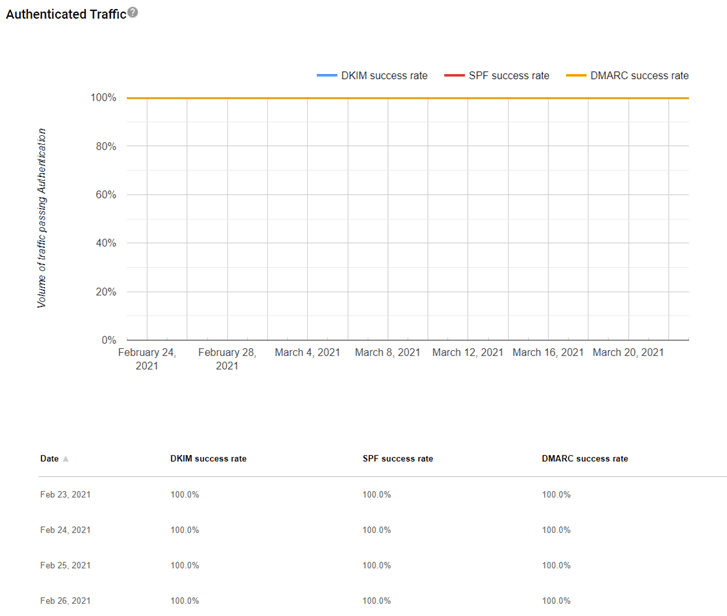
Check the public signals before changing settings
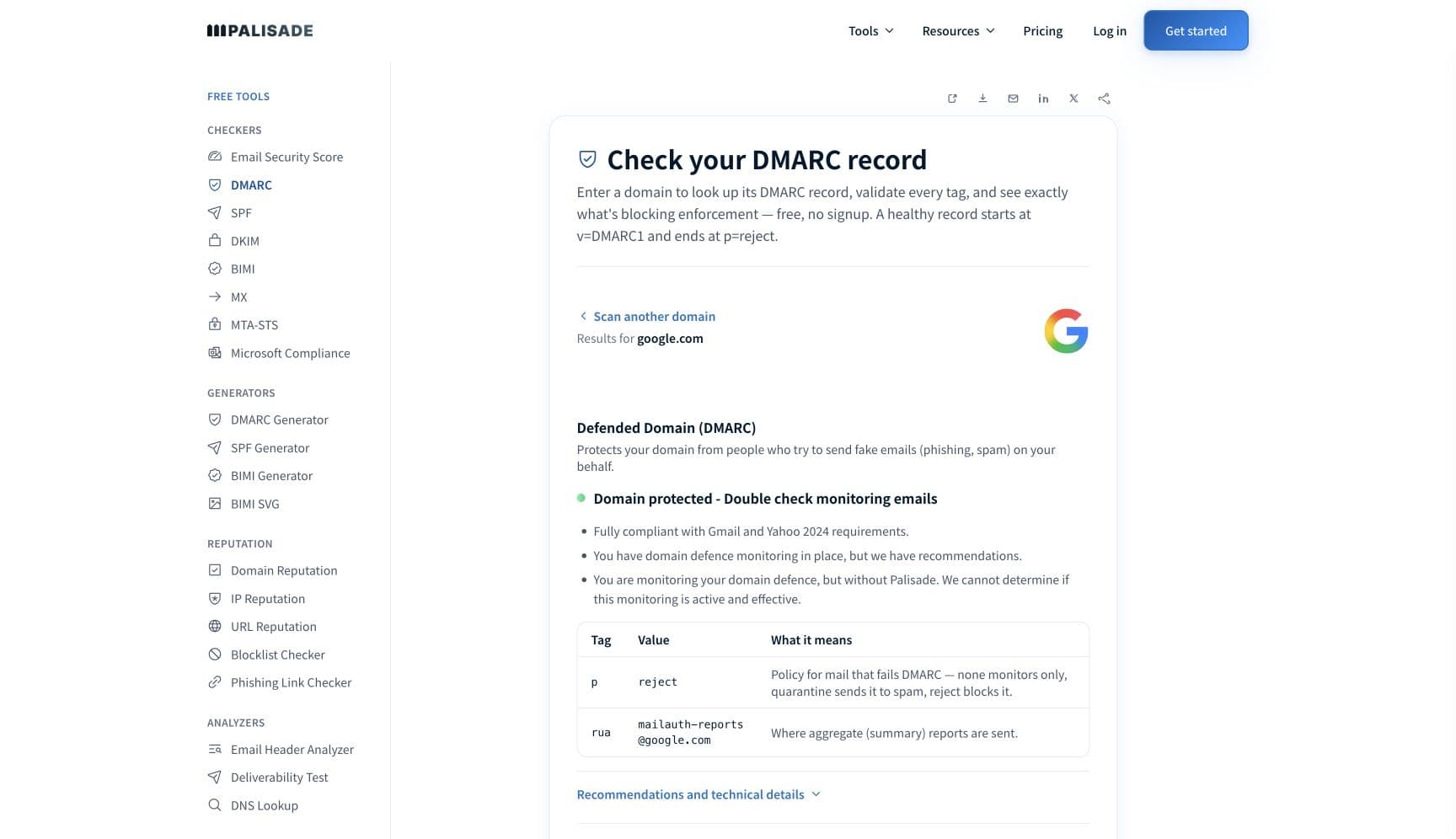
The free check above gives you a fast public baseline for how Gmail sees your mail. It does not replace the provider's private reputation or placement data, but it tells you whether the problem is visible from outside before you edit a sending platform.
How to fix it, step by step
Run the DMARC check on your sending domain
Use the free checker above, or open the DMARC checker page directly. It shows your SPF, DKIM, and DMARC records and whether alignment can succeed. This is the first step because unauthenticated mail is the one banner trigger Google publishes as a default, and it is the only one you can verify yourself in seconds.
Authenticate every service that sends as your domain
Add each platform to your SPF record and turn on DKIM signing with your own domain, then confirm both at the SPF checker and the DKIM checker. Google requires personal-Gmail mail to carry a DKIM key of 1024 bits or longer, and requires the From domain to align with either the SPF domain or the DKIM domain for senders above 5,000 messages a day.
Read the headers of a message that got the banner
Ask one warned recipient to forward the original message and paste the headers into the email header analyzer.
spf=,dkim=, anddmarc=in Authentication-Results tell you whether cause one applies. If all three pass, the banner is coming from the link, attachment, or lookalike checks instead, and the rest of these steps matter more than DNS.Audit the links you actually ship
Run your click-tracking domain and any shortened or redirected URLs through the URL reputation checker and the phishing link checker. If a domain of yours has been classified by Safe Browsing, the Security Issues report in Search Console names the pages and offers a review, and Google publishes a form for reporting an incorrect classification.
Stop sending the attachment shapes Google flags
Encrypted archives, files containing scripts, and file types the recipient's domain rarely receives all default to a warning. Publish the document behind a link on a domain you own, or send a plain PDF, rather than asking recipients to open a password-protected archive.
Watch spam rate and reputation in Postmaster Tools
Verify your domain at postmaster.google.com. Google says the dashboards cover spam rate, reputation, message authentication, and delivery errors, all calculated and updated daily, and that data applies only to mail sent to personal Gmail accounts. Hold spam rate under 0.10% and treat 0.30% as the line you never approach.
Related free tools: SPF checker · DKIM checker · URL reputation checker · Phishing link checker · Email header analyzer
If you send in volume: Gmail's published rules
Gmail's sender requirements took effect on 1 February 2024. Every sender must set up SPF or DKIM, publish valid forward and reverse DNS for sending IPs, use a TLS connection, format messages to RFC 5322, and keep spam rates reported in Postmaster Tools below 0.30%. Senders above 5,000 messages a day to Gmail accounts must additionally pass both SPF and DKIM, publish DMARC at a policy that may be set to none, align the From domain with either the SPF or the DKIM domain, and support one-click unsubscribe on marketing and subscribed messages. Google counts the 5,000 across a whole primary domain including its subdomains, and says bulk sender status has no expiration date. Google's FAQ also notes that from November 2025 it is ramping up enforcement on non-compliant traffic, with disruptions including temporary and permanent rejections. Per Google's Email sender guidelines and its sender guidelines FAQ, checked 2026-09-02.
Check your standing with Gmail
- Google Postmaster Tools
Google's own dashboards for spam rate, domain and IP reputation, authentication results, and delivery errors. Data covers mail sent to personal Gmail accounts only.
- Gmail SMTP error reference
The published list of Gmail's error strings, including the reputation, content, and authentication families. Useful when a warning has escalated into a bounce.
- Search Console Security Issues report
Where a Safe Browsing classification against a domain you own appears, with the example pages and the request-a-review action. Google says a review can take from a few days to a few weeks.
- Report an incorrect Safe Browsing classification
Google's form for a page it has classified in error. Search Console's social-engineering guidance points here for disputed classifications.
If it bounces instead: the codes Gmail returns
Nothing bounces when a provider is showing a warning banner instead of refusing the mail, but Gmail returns one of these readings and codes when it does refuse the mail outright. Match yours below; where a code has a full guide, it is linked.
- 421 4.7.0 This message is suspicious due to the nature of the content or the links within: the gateway version of the same content verdict Full guide →
- 550 5.7.26 This email has been blocked because the sender is unauthenticated: authentication has escalated from a banner to a rejection Full guide →
- 552 5.7.0 This message was blocked because its content presents a potential security issue: Gmail's attachment and content block
- 550 5.7.1 This message is likely suspicious due to the very low reputation of the sending domain Full guide →
The real root cause: unenforced authentication
The "this message seems dangerous" banner is a verdict about identity, not about writing. Gmail is telling the recipient it cannot establish who sent the message, and Google's own defaults say so plainly: the setting that requires SPF or DKIM ships with the action "Keep email in inbox and show warning", and the setting for mail pretending to come from the recipient's own domain does too. Once your mail authenticates and the From domain aligns with the passing domain, those two checks stop firing, the lookalike checks have a real identity to compare against, and the remaining triggers narrow to things you can inspect: a link, an attachment, a reputation number. Getting there means SPF and DKIM correct for every service that sends as you, DMARC aligned with the From header, and the policy walked from p=none through quarantine to p=reject so that nobody else can send mail wearing your domain and spend its reputation for you. Monitoring tells you which senders are failing; enforcement is what stops the impersonation that keeps the warning justified.
DMARC software that does the work
Palisade's AI agent takes domains all the way to enforcement: hosted SPF, DKIM, DMARC, and MTA-STS records on paid plans, DMARC reports monitored continuously, and every policy step drafted for your approval on the way to p=reject. The full product is open for a 15-day trial, and nothing is charged until it ends.
15-day full-product trial. Nothing is charged until it ends.
Fixing this across every client domain
Gmail evaluates each client domain on its own records and its own reputation, so a warning banner on one tenant tells you nothing about the other forty-nine, and a fix on one does not carry across. Palisade turns that into one workflow: hosted and managed SPF, DKIM, DMARC, and MTA-STS records for every client domain, DMARC aggregate reports read for you so failing senders surface before a client's prospects start seeing warnings, and each domain carried to p=reject with your team approving every step. It plugs into ConnectWise, HaloPSA, and Autotask, pricing is per client domain with rates that improve as the portfolio grows, and your own MSP domain runs free as an NFR domain so you can prove the process before the first client conversation.
Questions readers ask
Frequently asked questions
Why do my emails say 'this message seems dangerous' in Gmail?
How do I remove the Gmail dangerous message warning from my emails?
Why does the warning appear in the browser but not in my phone's mail app?
Is 'this message seems dangerous' the same as 'this message could be a scam'?
Will fixing SPF and DKIM stop the Gmail warning immediately?
Does a link shortener cause the Gmail dangerous warning?
Sources and last verified
Every claim about Gmail on this page links to the source it came from, each with the date it was last checked. Provider policies change; if a detail looks off, the linked source is authoritative.
- Google Workspace advanced phishing and malware protection: "Protect against any unauthenticated emails" requires SPF or DKIM and defaults to "Keep email in inbox and show warning"; the same default applies to domain spoofing based on similar domain names, spoofing of employee names, inbound mail spoofing the recipient's domain, encrypted attachments from untrusted senders, attachments with scripts, and anomalous attachment types; link settings cover harmful links behind shortened URLs, scanning of linked images, and warning prompts on clicks to untrusted domains; "Warning banners (yellow box) appear only in Gmail web. Third-party apps do not display a warning banner"; two spam options ("Bypass spam filters and hide warnings for messages from senders or domains in selected lists" and "Bypass spam filters and hide warnings for all messages from internal and external senders") stop Gmail displaying warning bannerssupport.google.com · checked 2026-09-02
- Gmail's "This message could be a scam" warning is shown above email that looks like a scam but comes from an address in the recipient's Gmail contacts; the reporting action marks the message as "sent from a compromised account"support.google.com · checked 2026-09-02
- Gmail's "This message may not have been sent by..." warning appears when a message lacks authentication data confirming it was sent through Gmail; Google names it as a separate documented banner from the scam warningsupport.google.com · checked 2026-09-02
- Gmail email sender guidelines, effective 1 February 2024: SPF or DKIM for all senders; valid forward and reverse DNS (PTR) records; TLS connection required; "Keep spam rates reported in Postmaster Tools below 0.10% and avoid ever reaching a spam rate of 0.30% or higher"; RFC 5322 formatting; senders above 5,000 messages a day need SPF and DKIM both passing, a DMARC record whose policy may be none, From alignment with the SPF or DKIM domain, and one-click unsubscribe on marketing and subscribed messages; DKIM keys of 1024 bits or longer for personal Gmail accounts; "Maintaining a high spam rate leads to increased spam classification. It can take time for improvements in spam rate to reflect positively on spam classification"; "Don't mix different types of content in the same message"support.google.com · checked 2026-09-02
- Gmail sender guidelines FAQ: the 5,000-message limit is counted across all messages sent from the same primary domain, including subdomains; "Bulk sender status doesn't have an expiration date"; from November 2025 Gmail is ramping up enforcement on non-compliant traffic with temporary and permanent rejectionssupport.google.com · checked 2026-09-02
- Gmail SMTP error reference: "421 4.7.0 This message is suspicious due to the nature of the content or the links within"; "550 5.7.26 This email has been blocked because the sender is unauthenticated"; "552 5.7.0 This message was blocked because its content presents a potential security issue"; "550 5.7.1 This message is likely suspicious due to the very low reputation of the sending domain"support.google.com · checked 2026-09-02
- Google Postmaster Tools dashboards cover spam rate, reputation, message authentication, and delivery errors; data applies only to messages sent to personal Gmail accountssupport.google.com · checked 2026-09-02
- Search Console Security Issues report: social engineering is content that tricks visitors into doing something dangerous; the fix is to correct the pages and request a security review, which "can take from a few days to a few weeks to complete"; Google links a form for pages it has classified in errorsupport.google.com · checked 2026-09-02
- RFC 5322, Internet Message Format, is the standard behind Google's "Format messages according to RFC 5322" requirement: it "specifies the Internet Message Format (IMF), a syntax for text messages that are sent between computer users"; "The only required header fields are the origination date field and the originator address field(s)" (Date and From), and "every message SHOULD have a 'Message-ID:' field"www.rfc-editor.org · checked 2026-09-02
Related guides
550 5.7.26421 4.7.0550 5.7.1adkim / aspfp=rejectdkim=fail