Email deliverability Q&A
How to authenticate email for marketing

By Samuel Chenard · CEO & Co-Founder, Palisade · Reviewed July 20, 2026
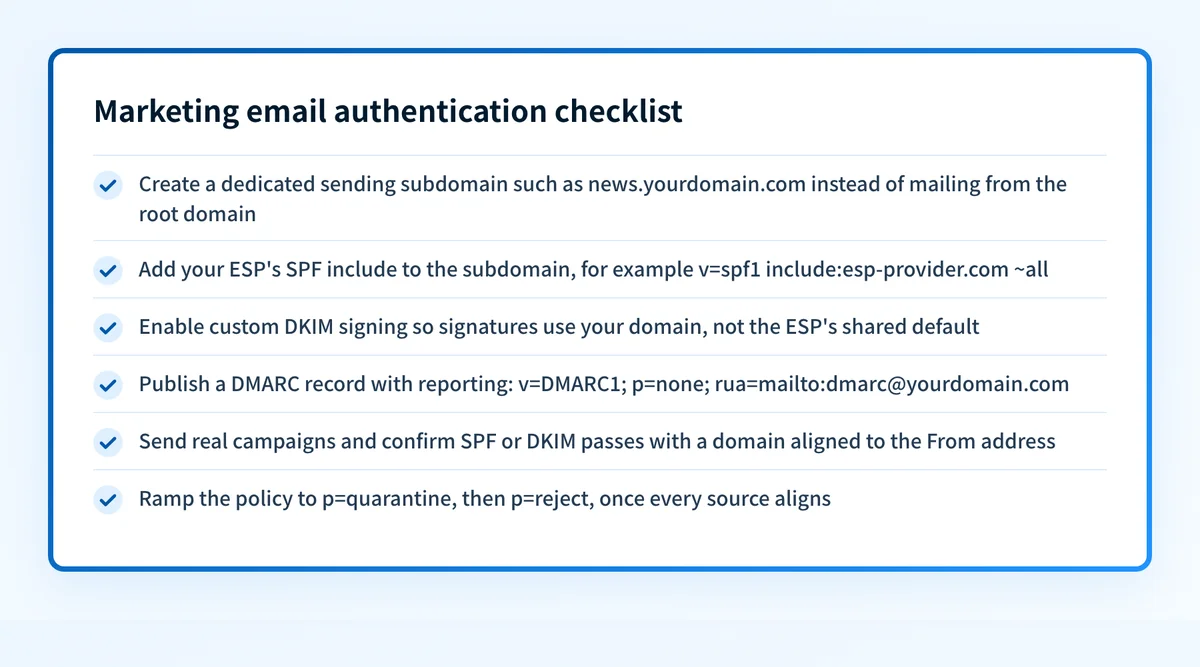
Authenticating marketing email means publishing SPF, DKIM, and DMARC records that align with your From domain. The order that works on every platform: pick a dedicated sending subdomain, add your ESP's SPF include, enable DKIM signing on your own domain, publish a DMARC record with a rua reporting address, confirm alignment in the reports, then tighten the policy toward p=reject.
| At a glance | |
|---|---|
| Records involved | SPF (TXT), DKIM (usually CNAMEs), DMARC (TXT at _dmarc) |
| Where they live | Your DNS, not your ESP's dashboard |
| Sending identity | A dedicated subdomain such as send.yourdomain.com |
| The test that matters | Alignment: SPF or DKIM must pass FOR your From domain, not just pass |
| Why it is mandatory | Gmail and Yahoo require a DMARC record above 5,000 messages a day (per Mailchimp's setup doc) |
| Time to done | About an hour of DNS work, plus propagation and a few weeks of report-watching |
Every ESP has its own wizard, its own record names, and its own vocabulary for the same three protocols. Strip the branding away and the job is identical everywhere: prove to receiving mailbox providers that mail carrying your domain in the From header was really sent by you. SPF does it by listing permitted sending servers, DKIM by cryptographic signature, and DMARC by telling receivers what to do when both fail.
The part the wizards undersell is alignment. Your ESP's shared infrastructure can pass SPF and DKIM all day using the ESP's own domain; that satisfies the protocol and does nothing for yours. Authentication only counts for DMARC when the passing identity matches your From domain, which is why every step below pushes toward custom domain signing rather than platform defaults. The mechanics of that gap have their own page at /learning/email-questions/why-is-dmarc-failing-but-spf-passes.
This page is the how. If you are still deciding whether DMARC is worth the effort for a marketing program, the why lives at /learning/email-questions/does-dmarc-affect-email-marketing. And if you are here because Mailchimp campaigns are already landing in spam, the troubleshooting path is /learning/email-questions/mailchimp-emails-going-to-spam.
Where the major ESPs document authentication setup
| ESP | What their doc has you do | Setup doc (checked 2026-07-20) |
|---|---|---|
| Mailchimp | Verify the domain first, then add 2 CNAME records for DKIM and 1 TXT record at _dmarc for DMARC; an automatic option via Entri exists | mailchimp.com/help/set-up-email-domain-authentication/ |
| Klaviyo | Set up a branded sending domain on a subdomain (send. is the most common); static routing adds up to 3 CNAMEs plus a verification TXT, dynamic routing delegates via 4 NS records | help.klaviyo.com/hc/en-us/articles/115000357752 |
| HubSpot | Connect an email sending domain (a subdomain like info.domain.com) with four record types: MX, DKIM, SPF, and DMARC; append the include to an existing SPF record rather than adding a second one | knowledge.hubspot.com/domains-and-urls/connect-your-email-sending-domain |
| Braze | Braze provisions SPF and DKIM when configuring your IPs and domains; you add the DNS records they hand you, and publishing the DMARC record stays your job | braze.com/docs/user_guide/message_building_by_channel/email/email_setup/authentication |
Four vendors, four wizards, one shape: DKIM via CNAMEs pointing into the ESP, SPF via an include or provisioned record, DMARC always yours to publish. Braze is the outlier worth naming; its doc states plainly that Braze sets up SPF and DKIM during onboarding, so self-serve DNS instructions do not exist there. All four docs fetched live 2026-07-20; full URLs in Sources.
Why a sending subdomain, not your root domain
Marketing mail is your highest-volume, highest-complaint stream. Putting it on a subdomain such as send.yourdomain.com or mail.yourdomain.com keeps its reputation ledger separate from the corporate mail your team sends person-to-person, so a rough campaign week cannot drag payroll notifications into spam. Klaviyo's branded sending domain flow is built around exactly this, and its doc names send. as the most commonly used choice; HubSpot's connection flow likewise expects a subdomain like info.domain.com.
The subdomain also simplifies SPF. Your root domain's SPF record already carries your mail provider and whatever else accumulated over the years, and SPF's 10-DNS-lookup ceiling is closer than most teams think. A fresh subdomain starts with one include and stays readable. If your root record is already bumping the limit, that problem has its own page at /learning/email-questions/what-is-spf-flattening.
One thing a subdomain does not do is exempt you from DMARC. By default the organizational domain's policy covers subdomains (the sp= tag can split them; see /learning/glossary/dmarc-sp), and receivers evaluate alignment against the From domain your recipients actually see. Treat the subdomain as reputation isolation, not policy escape.
Custom DKIM signing is the step that actually moves the needle
Most ESPs sign every message with DKIM out of the box, using their own domain as the signing identity (d= tag). That signature is valid and completely useless for your DMARC, because the signing domain does not match your From domain. Custom domain signing, which is what those CNAME records in each wizard exist for, moves the signature onto your domain so DKIM passes aligned.
Aligned DKIM matters more than aligned SPF for marketing mail for one practical reason: forwarding. When a recipient's mail is auto-forwarded, SPF breaks (the forwarder's server is not in your record) but a DKIM signature survives intact. A domain with aligned DKIM keeps passing DMARC through forwarders; a domain leaning on SPF alone does not. Get DKIM aligned first, treat aligned SPF as the second witness.
The CNAME pattern also handles key rotation for you. The record in your DNS points at a host the ESP controls, so the ESP can rotate the underlying keys (Klaviyo's marketing selectors are km1 and km2, per its setup doc) without you touching DNS again. What a selector is, and how receivers use it to find the key, is covered at /learning/glossary/dkim-selector.
The DMARC record: start at p=none, but never stay there
Publish a TXT record at _dmarc.yourdomain.com reading v=DMARC1; p=none; rua=mailto:reports@yourdomain.com. The p=none policy changes nothing about delivery yet; the rua address is the whole point at this stage, because it makes every major receiver send you aggregate reports listing which sources sent as your domain and whether they aligned. Reading those XML files is its own skill; the walkthrough lives at /learning/email-questions/what-are-dmarc-aggregate-reports.
Give the reports two to four weeks. Marketing domains almost always surface surprises: the ESP you knew about, plus a survey tool, a billing system, and a sales-engagement platform someone connected in 2023. Each legitimate source needs SPF or DKIM aligned before you tighten policy, or its mail starts failing when you do.
Then advance to full p=quarantine on a lower-risk subdomain or simpler domain, hold until reports remain clean, and move to p=reject. RFC 9989 removed the old pct sampling tag, so reports and whole-policy stage gates now control the rollout. The complete sequence and rollback triggers are at /learning/email-questions/how-to-move-from-dmarc-p-none-to-p-reject.
How to fix it
Baseline the domain before touching DNS
Run your marketing From domain through the free email security score below. It checks SPF, DKIM, DMARC, and blocklist status in one pass, so you start with a list of what exists, what is missing, and what is misaligned instead of guessing.
Run the check now
Enter your sending domain and the check runs instantly on the next page. Free, no signup.
Pick and create the sending subdomain
Choose a subdomain for marketing mail (
send.,mail., andinfo.are the common picks) and set it as the sending or branded domain inside your ESP. Your From address becomes something like hello@send.yourdomain.com, and every record in the next steps attaches to that subdomain.Add the SPF include for your ESP
Publish the TXT record your ESP specifies on the sending subdomain, or append its
include:mechanism to an existing record; one SPF record per name, never two. Validate the result at /tools/spf, and keep an eye on the 10-lookup limit (/learning/glossary/spf-lookup-limit).Enable DKIM with custom domain signing
Add the DKIM CNAME records from your ESP's wizard (Mailchimp hands you 2, Klaviyo the km1/km2 pair among its 3 static-routing CNAMEs, HubSpot 2). This moves the signature's
d=domain from the ESP's name to yours, which is the difference between DKIM passing and DKIM passing aligned. Confirm at /tools/dkim.Publish DMARC with a rua address
Create the TXT record at
_dmarcon your organizational domain:v=DMARC1; p=none; rua=mailto:reports@yourdomain.com. The free generator at /tools/dmarc-generator builds the record; the checker at /tools/dmarc verifies it resolved.Send real campaigns and verify alignment
Let normal sending run, then read the aggregate reports (and your own message headers) for the verdict that matters: SPF or DKIM passing with an identifier that matches your From domain. Strictness is tunable via the
adkim/aspftags (/learning/glossary/dmarc-adkim-aspf), but relaxed alignment is the default and fine for marketing.Ramp the policy once every source aligns
When the reports show only aligned sources for two to four clean weeks, move to
p=quarantine, thenp=reject. Watch one report cycle at each stage; a legitimate source failing shows up in the reports before your audience notices.
Related free tools: SPF checker · DKIM checker · DMARC checker · DMARC record generator
Setup is a day; keeping it aligned is the actual job
The records you published today describe today's stack. Marketing stacks churn: a new landing-page tool starts sending, an agency connects its own platform, an ESP migration changes selectors. Each change is a fresh chance for unaligned mail, and a p=none record will report the drift without ever stopping it.
The end state worth reaching is DMARC at p=reject with every legitimate sender aligned, and something watching the reports so the next tool someone connects becomes a task instead of a deliverability incident. Palisade's AI agent does that walk for you: hosted SPF, DKIM, and DMARC records, continuous report analysis, and enforcement to p=reject executed rather than recommended.
DMARC software that does the work
Palisade's AI agent carries every domain to p=reject, with you approving each step. The agent's fixes and hosted SPF, DKIM and DMARC records are part of the full product, which you can try before any charge.
Audit any domain free, no card needed. A card starts the 15-day trial.
Why it matters for MSPs
Marketing domains are the tenant domains most likely to have senders you were never told about, because marketing teams connect tools without opening tickets. Standardize the pattern across clients: one sending subdomain per tenant, custom DKIM per ESP, DMARC with rua on every organizational domain, and a policy ramp you can show in the QBR. Palisade hosts and manages the SPF, DKIM, and DMARC records per client domain, reads the aggregate reports continuously, and carries each domain to p=reject (each step approved by your team), with ConnectWise, HaloPSA, and Autotask integrations so new-sender alerts land in your PSA queue. MSP client domains are priced per domain, with rates that improve as the portfolio grows and no email metering on client domains; your own MSP domain is included as a free NFR domain.
Questions readers ask
Frequently asked questions
Do I need SPF, DKIM, and DMARC for marketing email, or is one enough?
Should marketing email come from a subdomain or my main domain?
My ESP already signs my email with DKIM. Am I done?
How long does email authentication setup take for a marketing domain?
Does authenticating my domain stop my campaigns going to spam?
Do I need a separate DMARC record for my sending subdomain?
Sources
Every benchmark above was verified against the vendor's own documentation on the date shown.
- Mailchimp domain authentication uses 2 CNAME records for DKIM and 1 TXT record at _dmarc for DMARC, after domain verification; Gmail and Yahoo require a published DMARC record for senders above 5,000 emails in 24 hours. Mailchimp Help (checked 2026-07-20)
- Klaviyo branded sending domains use a subdomain (send. is the most common), with up to 3 CNAME records on static routing or 4 NS records on dynamic routing plus a verification TXT; marketing DKIM selectors are km1/km2. Klaviyo Help Center (checked 2026-07-20)
- HubSpot email sending domain connection sets up four DNS record types (MX, DKIM, SPF, DMARC) on a subdomain, appends the include to an existing SPF record, and cites 10 to 70 minute typical propagation (up to 48 hours). HubSpot Knowledge Base (checked 2026-07-20)
- Braze sets up your SPF and DKIM records when configuring your IPs and domains; publishing the DMARC record to DNS remains the customer's responsibility. Braze Documentation (checked 2026-07-20)