Email deliverability Q&A
What is SPF flattening?

By Samuel Chenard · CEO & Co-Founder, Palisade · Reviewed July 20, 2026
SPF flattening replaces the include: mechanisms in your SPF record with the IP addresses they resolve to, so evaluation stays under the 10-DNS-lookup limit in RFC 7208. The trade: providers rotate their sending ranges, flattened IPs go stale, and legitimate mail starts failing SPF. Treat it as a last resort with a maintenance schedule attached.
| At a glance | |
|---|---|
| What it is | Replacing include: mechanisms with the ip4:/ip6: addresses they currently resolve to |
| Why it exists | RFC 7208 section 4.6.4 caps DNS-querying terms at 10 per SPF evaluation |
| Over the limit | The check returns permerror, and DMARC treats that as an SPF failure |
| The risk | Providers rotate sending IPs; a flattened record goes stale with no warning |
| Microsoft's position | Do not flatten include:spf.protection.outlook.com; its IPs change frequently |
| Alternatives | Prune dead mechanisms, segment senders onto subdomains, macro-based SPF, hosted SPF |
SPF records delegate trust through include: mechanisms: include:_spf.google.com means "whatever IPs Google lists are allowed to send as my domain." Every include costs a DNS query at check time, and RFC 7208 puts a hard cap on those queries. Section 4.6.4 states: "SPF implementations MUST limit the total number of those terms to 10 during SPF evaluation, to avoid unreasonable load on the DNS." Exceed it and the RFC is equally blunt: "If this limit is exceeded, the implementation MUST return 'permerror'." The full mechanics live in the glossary entry for the SPF lookup limit at /learning/glossary/spf-lookup-limit; this page is about the workaround everyone reaches for.
Flattening is that workaround. You resolve each include: down to the raw addresses behind it, publish those as ip4: and ip6: terms, and delete the include. Since IP terms cost zero lookups, a record that blew past the limit at 14 lookups can flatten to one that needs none. Your mail passes SPF again, and every checker goes green.
The catch is that an include is a live pointer and a flattened IP list is a snapshot. The provider keeps updating what sits behind their include; your snapshot does not update itself. Flattening trades a visible, immediate problem (permerror today) for an invisible, deferred one (valid mail failing SPF whenever a provider shuffles ranges). That trade can still be worth making, but only deliberately, and only for the right senders.
What counts against the 10-lookup limit (RFC 7208, section 4.6.4)
| SPF term | Costs a DNS lookup? | Why |
|---|---|---|
| include: | Yes, plus every lookup inside the included record | Fetches and evaluates another domain's SPF record; nesting compounds |
| a | Yes | Resolves a hostname's A/AAAA records at check time |
| mx | Yes, plus one per MX host returned | Resolves the MX set, then each MX host's addresses |
| ptr | Yes (and the RFC says do not use it) | Reverse-DNS lookup on the connecting IP; slow and deprecated |
| exists: | Yes | An A lookup on a constructed name, usually macro-driven |
| redirect= | Yes | Hands evaluation to another record, lookups included |
| ip4: / ip6: | No | Literal addresses; nothing to resolve. This is why flattening works. |
| all / exp= | No | No query at evaluation time (exp only fires after a fail) |
The RFC's own wording, verbatim: "The following terms cause DNS queries: the 'include', 'a', 'mx', 'ptr', and 'exists' mechanisms, and the 'redirect' modifier." And: "The other terms -- the 'all', 'ip4', and 'ip6' mechanisms, and the 'exp' modifier -- do not cause DNS queries at the time of SPF evaluation, and they are not subject to this limit." Checked 2026-07-20; link in Sources.
What flattening actually does
Take a record that authorizes Microsoft 365, a marketing platform, a helpdesk, and a billing tool through four includes. Each include costs at least one lookup, and includes nest: a vendor's include often contains further includes, and every layer counts against your 10. Fewer than ten include: statements in your record does not guarantee fewer than ten lookups. The glossary entry at /learning/glossary/spf-include covers the nesting mechanics.
A flattening pass resolves that whole tree. include:spf.protection.outlook.com currently expands to six ip4: ranges and five ip6: ranges (checked 2026-07-20 via live DNS); the marketing platform expands to a dozen more. You publish the union as literal IP terms and your lookup count drops to zero. The record gets long (often past the 255-character single-string limit, so it gets split into multiple quoted strings) but it evaluates instantly.
Note what did not change: the set of servers allowed to send as your domain is identical the moment you flatten. Flattening is not a security change. It is a caching decision, and like all caches, the interesting question is what happens on invalidation.
The risks: stale IPs and silent failure
Providers treat their include as the contract and everything behind it as an implementation detail they can change without notice. Microsoft is explicit about its own service in its SPF documentation: do not flatten include:spf.protection.outlook.com, because "Microsoft's sending infrastructure uses dynamic IP addresses that change frequently." The same page allows flattening only for vendors with "stable, documented IP address ranges" and tells you to "review and update the flattened entries at least quarterly." That is the vendor selling you the mail service telling you the workaround needs a recurring calendar entry.
The failure mode is nasty because it is quiet. When a provider adds a range your snapshot lacks, mail from the new IPs fails SPF while mail from the old IPs keeps passing, so delivery degrades partially and intermittently instead of all at once. Nobody gets paged. The evidence shows up in DMARC aggregate reports as authorized senders failing SPF, and, once receivers enforce, as bounced campaigns. If you are at p=reject with no DKIM backstop for that sender, a stale flattened record turns provider maintenance into your outage.
The other cost is ownership. An include meant the provider maintained the record; a flattened record means you do, for every vendor, forever. Multiply that by each domain you run and flattening quietly becomes a standing operational chore with an SLA nobody agreed to.
Alternatives that age better
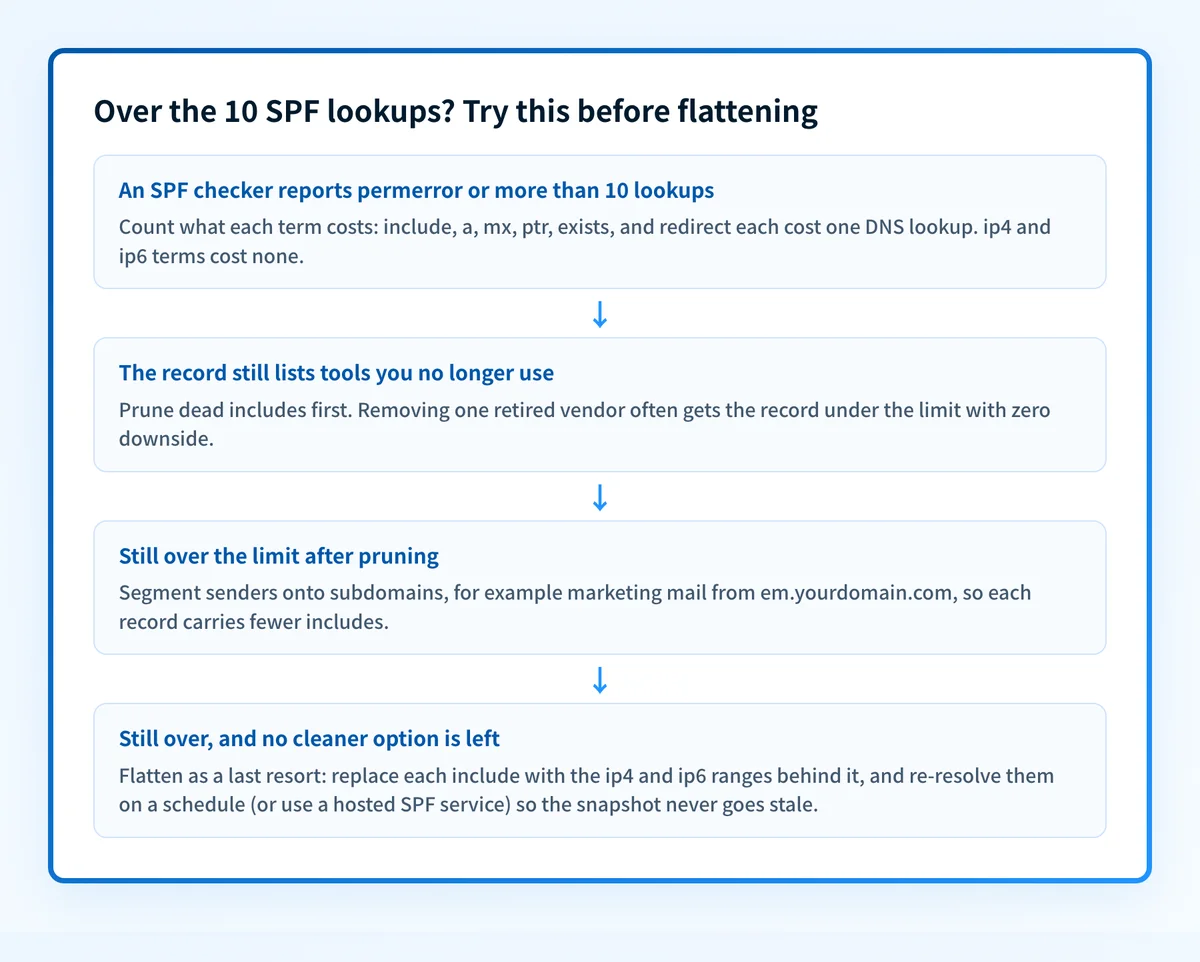
Prune before you flatten. Most over-limit records carry dead weight: includes for tools the company dropped two years ago, an mx mechanism for a host that no longer sends, a stray ptr. Deleting a defunct include recovers its whole nested lookup cost and removes an authorized sender you no longer trust. Plenty of records get back under 10 on pruning alone.
Segment senders onto subdomains. Point marketing at marketing.example.com and billing at billing.example.com, each with its own SPF record. Every subdomain gets its own 10-lookup budget, and Microsoft's documentation recommends the split for an independent reason: a bulk sender's reputation problem stops bleeding into the domain your employees mail from.
Macro-based (dynamic) SPF. A single exists: mechanism with a macro, like exists:%{i}.spf.example.com, turns each check into one per-IP DNS query against a zone you control, replacing any number of includes with one counted lookup. It is the most elegant answer and the easiest to get wrong, since your DNS zone becomes the authorization engine. See the glossary entry at /learning/glossary/spf-exists for the pattern.
Hosted SPF. A managed service publishes and continuously re-resolves your record, so provider IP rotations propagate without you touching DNS. This is flattening with the maintenance burden moved to software that actually runs on a schedule, and it is the practical choice once the record protects revenue mail. Palisade hosts SPF records this way, alongside hosted DKIM, DMARC, and MTA-STS, on redundant managed DNS.
SPF lookup-limit triage
| Symptom | Likely cause | The fix |
|---|---|---|
| Checker reports more than 10 lookups | Include nesting: vendors' records pull in further includes | Prune dead senders first, then segment subdomains before flattening |
| permerror in DMARC reports or checkers | Over the lookup limit, or an include pointing at a dead domain | Count lookups, remove or repair the offending mechanism |
| Valid mail failing SPF weeks after you flattened | Provider rotated ranges; your snapshot is stale | Re-resolve every flattened include; restore the include for dynamic providers |
| Record rejected or truncated by your DNS host | Flattened record exceeds 255 characters in one string | Split into multiple quoted strings, or cut the record back down |
| One provider's mail failing, others fine | That provider's new IPs are missing from the flattened list | Check their published ranges against your record, update, and calendar the review |
permerror is the SPF result name, not a bounce code; receivers translate it into their own rejections. The glossary entry at /learning/glossary/spf-permerror covers how each DMARC receiver treats it, and the walkthrough at /learning/how-do-i-fix-spf-permerror-too-many-dns-lookups goes mechanism by mechanism.
How to fix it
Count your lookups before touching anything
Run your domain through the free SPF checker below. It resolves the full include tree and shows the real lookup count, which is routinely higher than the number of includes you can see in the record.
Run the check now
Enter your sending domain and the check runs instantly on the next page. Free, no signup.
Prune dead mechanisms
Match every include against the tools you actually pay for. Defunct services, duplicate includes, and any
ptrmechanism go first; each deletion recovers its whole nested lookup cost and shrinks your attack surface at the same time.Move bulk senders onto subdomains
Give marketing and other high-volume tools their own subdomain with its own SPF record and its own 10-lookup budget. This also keeps a campaign tool's reputation trouble away from your primary domain.
Flatten only stable ranges, and calendar the review
If you still need headroom, flatten only vendors that publish stable, documented ranges, never dynamic clouds like Microsoft 365. Record what you replaced and re-verify at least quarterly, which is Microsoft's own documented interval.
Or move the record to a host that re-resolves it
Hosted SPF keeps the record current automatically as providers rotate ranges, which is the durable version of flattening. Then confirm alignment end to end, since a passing SPF record only helps DMARC when the domains align.
Related free tools: SPF record generator · DMARC checker · Email security score
The lookup limit is a detour; enforcement is the destination
Nobody flattens SPF for fun. You are fixing lookups because SPF has to pass, aligned, for DMARC to move to enforcement without dropping your own mail. A record that validates today but decays as providers rotate ranges is exactly the kind of landmine that stalls domains at p=none forever, or worse, detonates after you reach p=reject.
Palisade's agent hosts the SPF record, keeps it current as providers change ranges, reads the DMARC aggregate reports to confirm every legitimate sender authenticates, and proposes the move to p=reject when the data says it is safe, for your team to approve. Monitoring tells you the record broke; enforcement with a maintained record is the point.
DMARC software that does the work
Palisade's AI agent carries every domain to p=reject, with you approving each step. The agent's fixes and hosted SPF, DKIM and DMARC records are part of the full product, which you can try before any charge.
Audit any domain free, no card needed. A card starts the 15-day trial.
Why it matters for MSPs
Flattening is barely defensible on one domain and indefensible on two hundred. Every tenant that stacks Microsoft 365 plus a PSA-linked mail tool plus a marketing platform is flirting with the limit, and hand-flattened records across a client book means every provider IP rotation becomes a fleet-wide stale-record hunt. Standardize instead: prune at onboarding, segment bulk senders onto subdomains as policy, and put client records on hosted SPF so rotations propagate without a ticket. Palisade hosts SPF, DKIM, and DMARC records per client domain with published per-client-domain pricing for MSPs, carries each domain to p=reject with your team approving each step, and files the alerts through native ConnectWise, HaloPSA, and Autotask integrations. Your own MSP domain is a free NFR domain to test the pattern on.
Questions readers ask
Frequently asked questions
Is SPF flattening a good idea?
How many DNS lookups is an SPF record allowed?
What happens if my SPF record exceeds 10 lookups?
Should I flatten Microsoft 365's SPF include?
How often does a flattened SPF record need updating?
What is dynamic or macro-based SPF?
Does SPF flattening affect DMARC?
Sources
Every benchmark above was verified against the vendor's own documentation on the date shown.
- SPF implementations MUST limit DNS-querying terms to 10 and MUST return permerror when the limit is exceeded; include, a, mx, ptr, exists, and redirect cause DNS queries, while ip4, ip6, all, and exp do not. RFC 7208, section 4.6.4 (IETF Datatracker) (checked 2026-07-20)
- Do not flatten include:spf.protection.outlook.com because Microsoft's sending infrastructure uses dynamic IP addresses that change frequently; flatten only vendors with stable, documented ranges and review flattened entries at least quarterly. Microsoft Learn, Defender for Office 365 SPF setup (checked 2026-07-20)
- Nested include statements add lookups beyond the visible record, so fewer than 10 include statements does not guarantee fewer than 10 DNS lookups; subdomain segmentation is a recommended way to reduce lookups. Microsoft Learn, Defender for Office 365 SPF setup (checked 2026-07-20)
- Google's recommended Workspace SPF record is v=spf1 include:_spf.google.com ~all; the setup page publishes no SPF flattening guidance. Google Workspace Knowledge Center (checked 2026-07-20)