SPF record format: version, mechanisms, and qualifiers
 ChatGPT
 Claude
 Gemini
 Perplexity
 Grok
GrokIn brief
SPF record format starts with v=spf1 in one DNS TXT record. Learn how mechanisms, qualifiers, modifiers, and the final all term are evaluated.
SPF record format is one DNS TXT policy that starts with v=spf1, continues with space-separated mechanisms and modifiers, and normally ends with an all mechanism. A qualifier immediately before a mechanism sets the result when that mechanism matches. RFC 7208 requires receivers to evaluate the terms in order against the SMTP MAIL FROM or HELO identity, not the visible From address.
At a glance
Quick takeaways
- An SPF record begins with the version token
v=spf1. - Mechanisms are evaluated left to right until one produces a match.
- A missing qualifier means
+, which produces an SPF Pass when the mechanism matches. includeevaluates another domain's SPF policy as part of the current record, whileredirectdelegates evaluation only when no mechanism matched.- SPF evaluation has a limit of ten DNS-querying terms, including relevant
includeandredirectterms. - SPF authorizes the SMTP MAIL FROM or HELO identity, which can differ from the address a recipient sees in the From header.
Who is affected?
This syntax applies to domain owners who publish SPF records and to receivers that evaluate SMTP senders under RFC 7208, an IETF Standards Track RFC published in April 2014 that obsoletes RFC 4408. It matters whenever a domain appears in the SMTP MAIL FROM command or in the sending server's HELO or EHLO command.
The relevant record is published at the exact SPF identity being evaluated. For most outbound mail, that is the domain in the SMTP MAIL FROM address. A receiver can also evaluate the HELO identity. RFC 7208 recommends checking HELO separately and requires a receiver to check MAIL FROM when the HELO check was not performed or did not reach a definitive policy result.
SPF does not authenticate the visible From address directly. That distinction matters for DMARC alignment, which compares authenticated identifiers with the visible From domain.
What are the requirements?
The record starts with an SPF version and uses one TXT record
RFC 7208 defines SPF version 1 records as DNS TXT records beginning with v=spf1. The rest of the record contains terms separated by spaces. A domain must not publish multiple SPF records that claim to be SPF version 1 records. A receiver that finds multiple records returns Permerror.
v=spf1 ip4:192.0.2.0/24 include:spf.sender.example ~allThis is illustrative only. Replace the example IP range and included domain with values generated or documented for your own authorized senders. Do not copy another organization's SPF record.
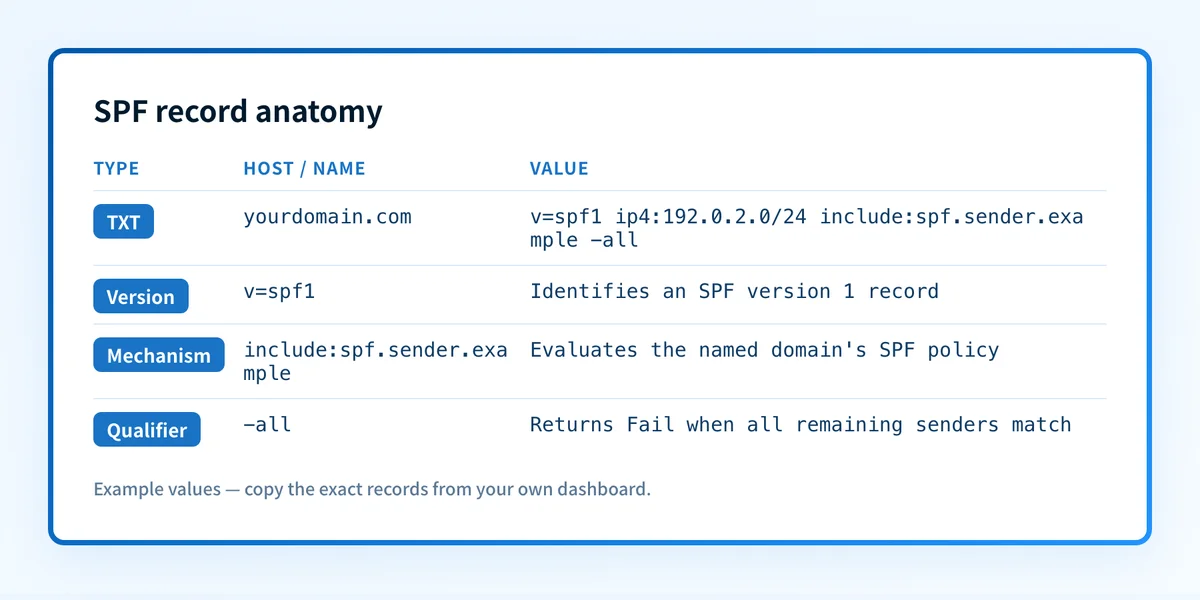
This article focuses on the grammar and evaluation behavior of the record itself.
Mechanisms test the connecting sender
An SPF mechanism tests the SMTP client IP address or evaluates another SPF policy. RFC 7208 defines these mechanisms:
allmatches every sender. It normally appears at the end because terms afterallcannot be reached.include:evaluates the named domain's SPF record.atests addresses returned for a domain's A or AAAA records.mxtests addresses associated with a domain's MX hosts. See what the SPF MX mechanism does for its narrower behavior.ip4:andip6:test a literal IPv4 or IPv6 address range.exists:performs a DNS lookup whose result determines whether the mechanism matches.ptruses reverse-DNS processing. RFC 7208 says it is not recommended and publishers should not use it.
ip4 range placed before a narrow exception can match first.
Qualifiers set the result of a match
A qualifier is one character immediately before a mechanism. If no qualifier appears, the default is +.
+ip4:192.0.2.10 -ip4:198.51.100.10 ~all ?allThis is illustrative only. These addresses are documentation ranges, not sending infrastructure.
RFC 7208 defines four qualifiers:
+produces Pass when the mechanism matches.-produces Fail when the mechanism matches.~produces Softfail when the mechanism matches.?produces Neutral when the mechanism matches.
The all mechanism is often used as the final term because it always matches. The SPF all mechanism guide explains why -all, ~all, and ?all communicate different policy results.
Include and redirect have different jobs
include: is a mechanism inside the current record. The included domain is evaluated using the original SMTP client IP address. If that evaluation returns Pass, the include mechanism matches and its qualifier controls the result. If the included policy returns Fail, Softfail, or Neutral, include does not match and evaluation continues. Temperror and Permerror are returned as errors.
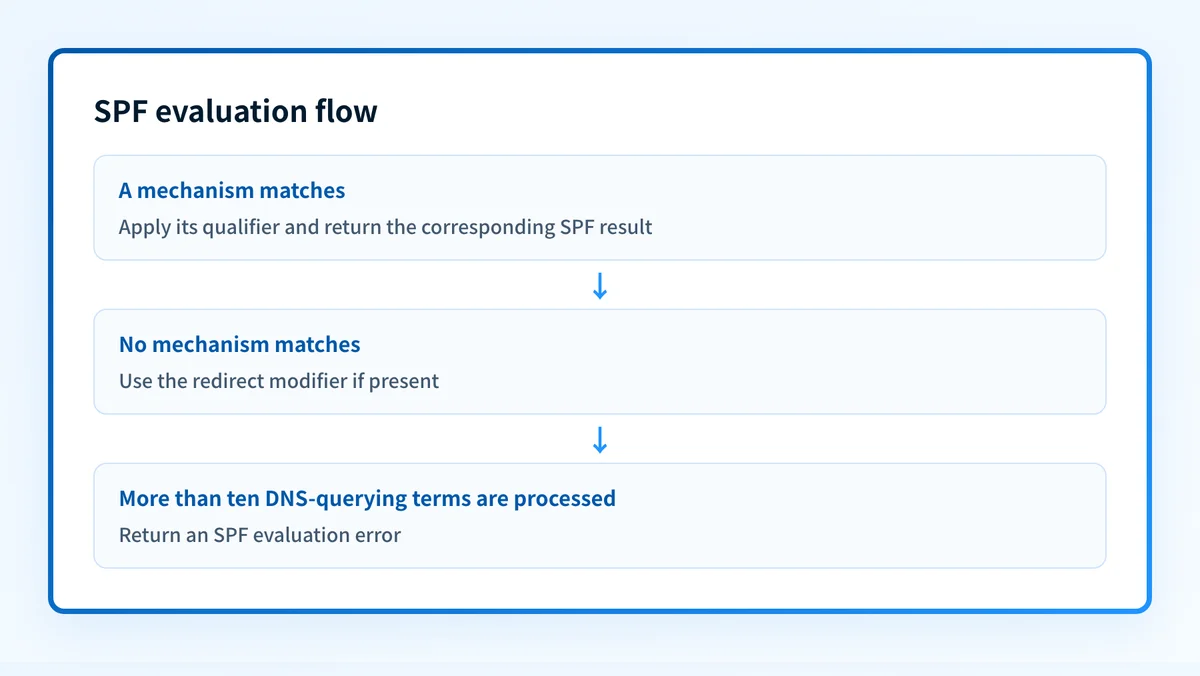
redirect= is a modifier, not a mechanism. It is used only when no mechanism matched. It delegates the final evaluation to the named domain's SPF record. A record cannot contain more than one redirect modifier, and a redirect is ignored when a mechanism already matched.
v=spf1 include:spf.sender.example ~all
v=spf1 ip4:192.0.2.10 redirect=spf.policy.example
These examples are illustrative only. An include lets the current record continue evaluating after a non-Pass result from the included policy. A redirect hands off only after the current record has no match. Do not replace one with the other without tracing the expected result for each authorized sender.
The exp modifier is also defined by RFC 7208. It supplies an explanation string for an SPF Fail result. It does not authorize a sender and it does not change the result.
How a receiver evaluates the format
Consider this illustrative record:
v=spf1 ip4:192.0.2.0/24 include:spf.sender.example ~allThe receiver first recognizes v=spf1 as the version. It then tests whether the connecting IP falls within 192.0.2.0/24. If that does not match, it evaluates the included policy. If neither authorization matches, the final ~all produces SPF SoftFail. Evaluation stops as soon as a mechanism matches.
The address range and included domain are examples, not production values. Use the mechanism supplied for each approved sender. If you find two complete SPF policies at one owner name, follow the multiple SPF records repair guide instead of treating them as one long record.
DNS-querying terms have a ten-term limit
RFC 7208 requires SPF evaluators to limit processing to ten DNS-querying terms during an SPF check. The applicable mechanisms are include, a, mx, ptr, and exists, plus the redirect modifier. Each time one of these terms causes DNS queries, it counts toward the evaluation budget.
Literal ip4, ip6, and all terms do not perform DNS lookups. However, an apparently short record can still exceed the limit when an include expands into more DNS-querying terms.
Treat the ten-query limit as an evaluation limit, not a count of visible include tokens. Adding a sender's include can break SPF for every source that reaches that part of the record.
When this does not apply
Do not merge SPF examples into the visible From domain merely because a service sends messages that display that domain. SPF evaluates the SMTP MAIL FROM or HELO identity. If the service uses its own envelope domain, the SPF policy at your visible From domain may not participate in that message's SPF result at all.
Keep policies separate when approved senders use different envelope subdomains. A policy for bounce.example.com belongs at that identity; it does not have to be folded into the record at example.com. Confirm the actual domain shown as smtp.mailfrom or smtp.helo before deciding which DNS owner needs a record.
An SPF sample cannot replace sender inventory or delivered-message validation. It does not tell you whether a platform signs with aligned DKIM, whether DMARC passes, or whether a receiver will accept the message. If the proposed include would take an evaluation path over ten DNS-querying terms, adding it to the combined record is not a safe repair. Trace the path and choose a supported authorization design before publishing.
How do I implement the requirement?
1. Identify the SMTP identities your sources use
Inventory each legitimate sending service and determine its actual MAIL FROM domain and HELO identity. Do not infer the SPF identity from the visible From address.
If an ESP sends with a provider-owned MAIL FROM domain, its SPF result may apply to that provider domain rather than yours. Check the service's documented sending-domain configuration before adding an SPF term.
2. Publish one v=spf1 TXT record at the right domain
Publish one SPF version 1 TXT record at each domain that needs a policy. Confirm the record exists at the precise MAIL FROM or HELO domain used by the sender.
Keep the record as one logical SPF policy even if DNS tooling displays long TXT data in multiple quoted strings. Multiple strings within one TXT record are permitted. Multiple SPF version 1 records are not.
3. Put specific authorization before the final policy
Place literal IP ranges and service-provided include terms before all. Use only mechanisms that match a known sending path.
Start with terms that authorize real sources. Then select the final all qualifier that reflects the policy you can support. -all makes a definitive authorization statement, which suits a domain that sends no mail; a domain that does send should end in ~all. SPF hard fail versus softfail covers that choice.
4. Trace include and redirect paths
Follow every include path and count DNS-querying terms across the possible evaluation path. Check the service's current documentation before changing an include value.
Use redirect only when the intent is to use another domain's SPF policy as the fallback after no local mechanism matches. It is not a general replacement for an include.
5. Recheck changes before publishing a restrictive policy
Compare the proposed record with the sending sources that use the domain. Send test messages through each production path after DNS propagation.
A DNS syntax check is useful, but it cannot reveal a sender that was omitted from the inventory or prove how a specific receiver will apply its local policy.
How do I validate compliance?
First, inspect authoritative DNS and at least one public resolver for one SPF TXT record that begins with v=spf1. Confirm that it is published at the exact SMTP identity, not only at the organizational domain.
Next, trace every applicable evaluation path and count DNS-querying terms. The Palisade SPF checker can inspect a published SPF record and help identify syntax and lookup-budget issues. A public lookup cannot prove the production sending path, continuous DNS state, a receiver's private decision, or future message placement.
Then send a real message from each authorized production source and inspect its delivered headers. RFC 8601 defines how a receiver can record SPF results in Authentication-Results, including smtp.mailfrom and smtp.helo properties. Confirm that the property identifies the expected SMTP domain and that the evaluated result matches the intended sender.
Finally, review DMARC aggregate reports after data accumulates. SPF Pass alone does not establish DMARC alignment. Aggregate-report evidence can show whether the SPF-authenticated domain aligns with the visible From domain for real traffic.
Check the SPF record before you change its policy
Use the SPF checker to inspect the record published for the domain that appears in the SMTP MAIL FROM or HELO identity. Compare its syntax and lookup path with a delivered message's Authentication-Results header before adding an include or changing the final all policy.
For an IT team or MSP, Palisade's DMARC Agent investigates sources observed in aggregate DMARC reports, drafts SPF fixes, and proposes each policy step. You approve before anything ships. When you approve a DNS change, Smart DNS Deployment writes the record into your own zone at your own provider. The agent does not discover every sender, prove every future message will authenticate, or guarantee a receiver delivery decision.
Evidence
Sources and further reading
Questions readers ask
Frequently asked questions
What is the correct first term in an SPF record?
Only v=spf1 is the correct first term. It identifies the TXT value as an SPF version 1 record under RFC 7208.
Does SPF check the visible From address?
No. SPF evaluates the SMTP MAIL FROM identity or the SMTP HELO identity. The visible From address is relevant to DMARC alignment, not the SPF identity by itself.
What does -all mean in an SPF record?
No sender that reaches the final -all mechanism is authorized; it returns an SPF Fail result. It is appropriate on a domain that sends no mail. On a domain that does send, ~all is the ending to publish, because an enforcing DMARC policy already treats both results as a non-pass while hard fail additionally risks losing forwarded mail.
Is include the same as redirect in SPF?
No. include is a mechanism that matches only when the included policy returns Pass. redirect is a modifier that delegates evaluation only if no mechanism in the current record matched.
How many DNS lookups can an SPF record use?
Only ten DNS-querying terms may be used during an SPF evaluation under RFC 7208. The limit includes applicable include, a, mx, ptr, exists, and redirect terms across the evaluation path.
Does a passing SPF result guarantee delivery?
No. SPF Pass means the evaluated SMTP client was authorized for the checked SPF identity. Each receiver applies its own delivery policy and can consider other authentication, reputation, and message signals.

Written by
Dominic LandryDeliverability & DNS
Dominic Landry works on email deliverability and DNS configuration at Palisade, from SPF and DKIM records through to DMARC enforcement.
More from Dominic →