How do you manage multiple DKIM records for one domain?
 ChatGPT
 Claude
 Gemini
 Perplexity
 Grok
GrokIn brief
How to manage multiple DKIM records: use unique selectors, publish each key safely, rotate without breaking mail, and validate delivered messages.
You can publish multiple DKIM records for one domain by giving each sending system its own DKIM selector. DKIM looks up the public key at
At a glance
Quick takeaways
- A DKIM selector identifies which public key a receiver retrieves for a signed message.
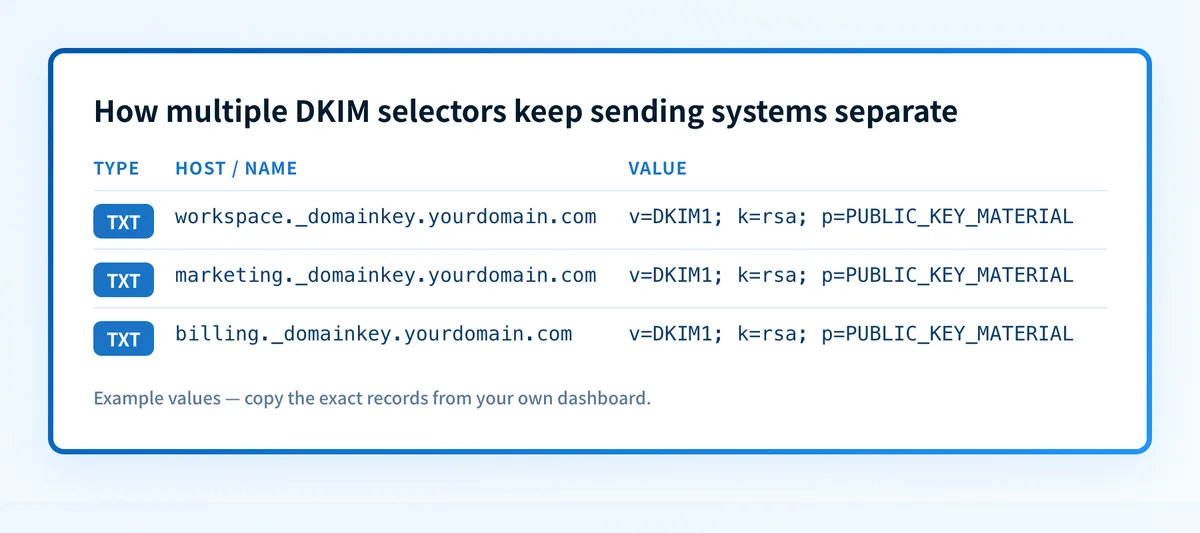
- One domain can publish multiple DKIM public keys because each selector has a separate DNS name.
- Each sending platform should use the selector and signing domain that its configuration generates.
- Publish a replacement selector before changing a sender to use it.
- A public DNS lookup confirms a record is visible, but it does not prove that a production sender is signing with that record.
- DMARC needs a passing, aligned DKIM signature or a passing, aligned SPF result.
Who is affected?
Multiple DKIM records affect any organization that sends mail through more than one system while using the same organizational domain. Common examples include employee mail, marketing mail, customer notifications, support platforms, and billing systems.
The controlling protocol is RFC 6376, DomainKeys Identified Mail Signatures, a Standards Track RFC that obsoletes RFC 4871. RFC 6376 defines the selector as part of the DKIM signature's s= tag. The receiver combines that selector with the signing domain in the d= tag to find the public key in DNS.
A domain does not need a DKIM record for a system that never sends mail. A system that sends with a different signing domain also does not use a selector under your primary domain. Check the delivered message before adding DNS records, because the message's d= and s= values identify the lookup name that matters.
For a broader explanation of signing domains, selectors, and verification, see the email authentication learning hub. Multiple records are normal. Multiple records at the same selector name are not a safe way to publish unrelated keys.
What are the requirements?
Each DKIM key is identified by a selector
RFC 6376 requires a signer to include the signing domain with d= and the selector with s= in its DKIM-Signature header. A verifier queries the DNS name formed from those values.
DKIM-Signature: v=1; d=yourdomain.com; s=marketing2026; ...
DNS lookup name:
marketing2026._domainkey.yourdomain.com
The selector is not a display name. It is a DNS label that points a receiver to the correct public key. If the marketing platform signs with s=marketing2026, publishing a key only at default._domainkey.yourdomain.com does not help that message.
Use a distinct selector for each independently managed sending service. That makes ownership clear and allows one service to rotate keys without changing the DNS record used by another. The selector itself can be provider-generated, so do not substitute a convenient label unless the sending platform supports that change.
The public key record must match the sender's configuration
RFC 6376 defines the DKIM key record as a DNS TXT record at the selector name. The record contains DKIM tags, including v=DKIM1 and the public-key value in p=.
Illustrative only. Do not publish this example as a production key.
marketing2026._domainkey.yourdomain.com. IN TXT
"v=DKIM1; k=rsa; p=PUBLIC_KEY_MATERIAL"
The sender's platform generates the real selector and public-key material. Copy the provider's exact hostname and value into the authoritative DNS zone. Do not combine two providers' keys into one made-up record, and do not copy a key from another tenant.
Some providers instruct customers to publish CNAME records rather than a raw TXT record. Follow that provider's documented hostname and target exactly. The purpose is still the same: the selector used by the message must resolve to the public key the receiver verifies.
DKIM key sizes have current protocol limits
RFC 8301 updates DKIM's cryptographic requirements. It says signers MUST use RSA keys of at least 1024 bits and SHOULD use keys of at least 2048 bits. Verifiers MUST be able to validate RSA keys from 1024 through 4096 bits and MUST treat keys under 1024 bits as invalid.
Use the key type and length your sender supports, then confirm that the public key in DNS is complete. Long RSA keys can be split into quoted DNS character strings by a DNS provider. That can be valid DNS presentation when the resulting TXT value is preserved. A missing character in p= is not valid and will prevent verification.
DMARC evaluates domain alignment separately
A valid DKIM signature does not by itself satisfy the DMARC policy. RFC 9989 says DKIM passes DMARC only when the signature is valid and the signing domain aligns with the domain in the visible From: header.
This is why selector inventory should record both the selector and the DKIM d= domain. A message may have a public key that resolves and a DKIM signature that passes, yet fail DMARC when the signing domain is not aligned.
When does the requirement take effect?
There is no single mailbox-provider date on which a domain becomes required to publish multiple DKIM records. RFC 6376 was published in September 2011 as the current Standards Track specification for DKIM signatures and key retrieval. RFC 8301, published in January 2018, updates its cryptographic requirements.
The requirement takes effect for each sending path when that path starts signing with a selector. Before that sender delivers mail, its generated DNS record must be published and available through the authoritative DNS service. Mailbox-provider sender rules can add separate requirements, but those rules do not change the basic selector lookup defined by RFC 6376.
How do I implement the requirement?
1. List every production sending path
Identify every system that sends mail using your domain in the visible From: header. Include employee mail, campaigns, receipts, support notifications, and any platform that sends on your behalf.
For each system, obtain its documented DKIM setup values from that provider, such as Google Workspace's DKIM instructions or Microsoft's DKIM configuration guide. Record the sender name, the DKIM d= domain, selector, DNS record type, record value or CNAME target, owner, and change date.
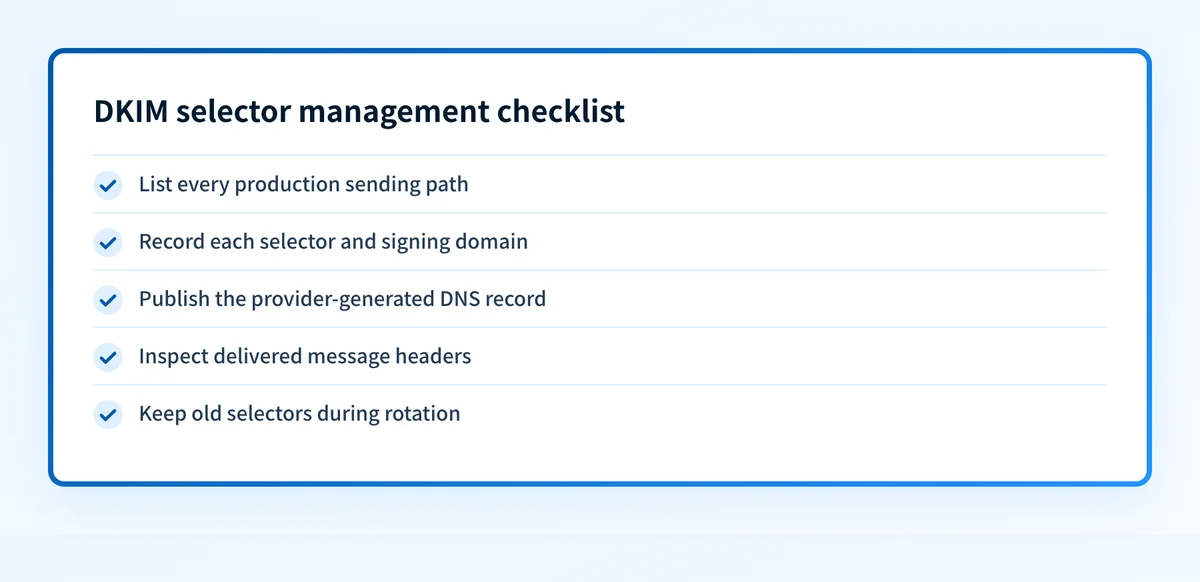
2. Publish the provider-generated record
Create the TXT or CNAME record at the exact hostname the sender provides. Publish it in the authoritative DNS zone for the signing domain.
Do not remove an old selector during this step. Messages already sent with that selector can remain in transit, and an active sender may still be configured to use it.
Query the published hostname after DNS propagation. A DKIM lookup is useful when you know the selector and signing domain. It checks the public DNS evidence before you switch or troubleshoot a sender.
3. Enable or confirm DKIM signing in the sending platform
Use the provider's current configuration process to enable signing or confirm its verification state. A provider dashboard can confirm that it recognizes the DNS record, but that status does not prove a message was signed on the production route.
Send a controlled message through the exact sending path. Inspect the delivered raw headers for a DKIM-Signature with the expected d= and s= values, then inspect the receiver's authentication result.
4. Rotate one selector at a time
Create and publish the replacement selector first. Change only the sender being rotated after its replacement record is visible. Then send and inspect a real message signed with the replacement selector.
Keep the older selector published until evidence shows that the sender has stopped using it and normal delivery has cleared. This sequence avoids a lookup failure caused by deleting a key that active messages still reference.
5. Keep the selector inventory current
Update the inventory after every sender onboarding, DNS change, ownership change, or key rotation. Include the actual delivered-message evidence used to validate the change.
This record helps distinguish a DNS issue from a sender configuration issue. It also prevents two teams from attempting to use the same selector for unrelated services.
How do I validate compliance?
Validate multiple DKIM records at four layers.
First, query the selector record from the authoritative DNS service and at least one public resolver. Confirm that the TXT or CNAME record is present at the exact hostname derived from the sender's d= and s= values.
Second, check the sending provider's current verification or authentication status. This confirms whether the provider recognizes the intended DNS configuration.
Third, send a real message from each production path and inspect its raw headers. Confirm the message contains the expected selector and signing domain. Confirm the receiver reports a passing DKIM result. RFC 8601's Authentication-Results header field records the authentication assessment made by the receiving system, so it is message evidence, not a general statement about every receiver.
Fourth, review DMARC aggregate reports after they accumulate. They show which sending sources authenticate and whether the DKIM domain aligned with the visible From: domain. If you also need to rule out a policy-record problem, compare the result with the separate guidance on whether a domain can have multiple DMARC records.
A DNS lookup does not prove the sender holds the matching private key, that every production path uses the selector, or that a receiver will make a particular delivery decision. A passing delivered-message result is stronger evidence for that one path and message, but it does not guarantee future mail will authenticate.
Inspect the DKIM records before you manage them at scale
Start by looking up each selector and signing domain that appears in your sender inventory. This establishes which public keys are visible before you make a provider-side or DNS change.
A public DKIM lookup cannot identify every system that sends for your domain, prove the production private key matches, or monitor later sender changes. For the ongoing operational gap, Palisade is agentic DMARC software that analyzes DMARC aggregate-report data, identifies sending sources and authentication or alignment issues, and creates prioritized remediation tickets. It proposes the next policy step for human review. It does not change your DMARC policy or guarantee delivery.
Evidence
Sources and further reading
- RFC 6376: DomainKeys Identified Mail Signatures
- RFC 8301: Cryptographic Algorithm and Key Usage Update to DKIM
- RFC 9989: Domain-based Message Authentication, Reporting, and Conformance
- RFC 8601: Message Header Field for Indicating Message Authentication Status
- Google Workspace: Turn on DKIM for your domain - the selector and key Google Workspace generates
- Microsoft: Use DKIM to validate outbound email - the CNAME selectors Microsoft 365 publishes
- How to add a DKIM record in GoDaddy DNS
Questions readers ask
Frequently asked questions
Can a domain have multiple DKIM records?
Yes. A domain can have multiple DKIM records when each key uses a different selector. Each selector creates a separate DNS lookup name under _domainkey.
Can two sending services use the same DKIM selector?
Only if both services are intentionally configured to use the same key material and signing setup. In normal operations, give independently managed services different selectors so their records and rotations remain separate.
Does a DKIM lookup prove that mail is signing correctly?
No. A DKIM lookup proves that the public DNS record is visible for the selector and domain supplied. Inspect a real delivered message to confirm that the sender used that selector and that a receiver verified the signature.
Should I delete an old DKIM selector after rotating a key?
Not immediately. Publish and validate the replacement selector first, switch the sender, then keep the old record until the sender no longer uses it and in-flight messages have cleared.
Can DKIM pass while DMARC fails?
Yes. DKIM can pass cryptographically while DMARC fails if the DKIM signing domain does not align with the domain in the visible From: header. RFC 9989 requires both DKIM validation and alignment for DKIM to satisfy DMARC.

Written by
Dominic LandryDeliverability & DNS
Dominic Landry works on email deliverability and DNS configuration at Palisade, from SPF and DKIM records through to DMARC enforcement.
More from Dominic →