What is a DKIM CNAME record and how do you set it up?
 ChatGPT
 Claude
 Gemini
 Perplexity
 Grok
GrokIn brief
DKIM CNAME records delegate a DKIM public-key lookup to a provider. Learn how they work, how to publish them, and how to validate DKIM safely.
A DKIM CNAME record is a DNS alias at selector._domainkey.yourdomain.com that directs receivers to a DKIM public key hosted by your email provider. It affects organizations that send through a provider offering delegated DKIM. You publish the provider's CNAME values in your domain's DNS, then confirm both the provider and a real delivered message recognize the configured key.
At a glance
Quick takeaways
- A DKIM verifier looks up a public key using the selector in the message's DKIM signature.
- A DKIM CNAME record aliases that selector hostname to a provider-controlled hostname.
- The provider gives you the exact CNAME names and targets. Do not invent or reuse values from another account.
- A CNAME node should not contain other DNS data, so an existing DKIM TXT record at the same hostname must be assessed before migration.
- Provider verification confirms DNS visibility, but a delivered message is required to confirm the production path signs with the expected domain and selector.
- Learn the surrounding protocol in the email authentication learning hub.
Who is affected?
A DKIM CNAME setup applies when the system that sends mail for your domain gives you CNAME records for DKIM domain authentication. This is common when a sending platform hosts the DKIM public key and expects your domain to delegate the selector hostname to it.
DKIM itself defines a signing domain in the d= tag and a selector in the s= tag. A verifier combines those values to find the public key at a DNS name shaped like selector._domainkey.example.com, as described in RFC 6376. The key record can be reached after following a CNAME. The receiver still evaluates the resulting DKIM key and signature under DKIM rules.
This setup does not apply when a provider instructs you to publish a DKIM TXT record directly. In that case, publish the TXT record at the hostname the provider specifies. Do not replace a provider-required TXT record with a CNAME because another service uses delegation.
A domain can use several selectors at once. Different sending services may each use their own selector names, and a provider may issue more than one selector during a key rotation. Treat each selector as part of a specific sending path.
What are the requirements?
The DKIM signature identifies the lookup name
RFC 6376 defines d= as the signing domain and s= as the selector. The verifier constructs the key query from those values. In ordinary use, that query is the selector followed by ._domainkey. and the signing domain.
DKIM-Signature: v=1; d=yourdomain.com; s=selector1; ...
DNS lookup name:
selector1._domainkey.yourdomain.com
The values above are illustrative only. Your provider generates the actual selector and DNS target. Do not publish a selector, key, or target copied from another tenant.
A CNAME changes where the DNS lookup is resolved. It does not change the signature fields on the message. The provider must sign mail using the selector and signing domain that correspond to the published DNS path.
The selector hostname aliases the provider target
A provider using delegated DKIM supplies a CNAME record name under your domain and a target hostname under its DNS zone. Publish the alias exactly as supplied.
selector1._domainkey.yourdomain.com. CNAME selector1.dkim.provider.example.This is an illustrative structural example only. Use the exact hostname and target generated in your provider's domain-authentication settings.
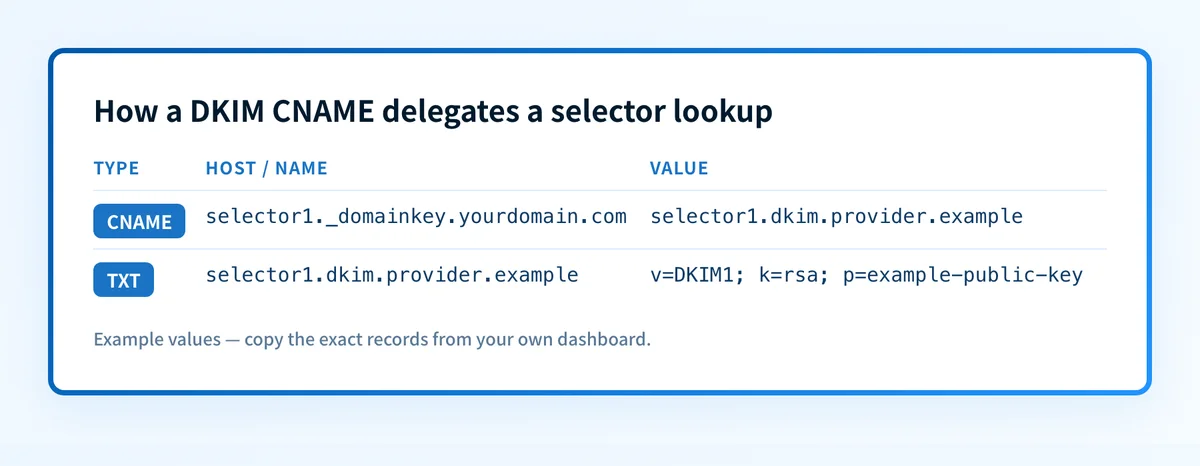
The DNS architecture matters. Under RFC 1034's CNAME rules, if a CNAME resource record is present at a node, no other data should be present there. In practice, do not leave a TXT record at the same selector hostname when you publish a CNAME. Check the existing DNS record set before changing it.
Replacing a live DKIM TXT record can interrupt verification for mail that still signs with that selector. Confirm which system uses the selector and retain a working validation path before removing an existing record.
The provider values must match the production sender
The CNAME record only delegates a DNS lookup. It does not prove that every message sent with your visible From: domain uses the provider, the configured selector, or a valid DKIM signature.
Follow the provider's official setup instructions for its values, verification process, and supported domain type. Provider labels and steps vary. Some services call this domain authentication, domain setup, or DKIM configuration. Use the current provider interface or its official documentation rather than a record example from another platform.
For subdomain traffic, confirm the domain in the message's d= value and the domain the provider asks you to authenticate. A subdomain can have its own DKIM configuration. See whether a subdomain needs its own DKIM setup before publishing records for a separate sending domain.
When does the requirement take effect?
There is no single industry-wide effective date for DKIM CNAME records. A CNAME is a DNS mechanism, and DKIM is an IETF standard. Whether you must use a CNAME, a direct TXT record, or another provider-specific method depends on the sending service you selected.
RFC 6376 is the controlling DKIM specification and is an IETF Standards Track RFC. It specifies how DKIM signatures and public-key retrieval work. It does not require every sender to publish a CNAME.
Provider domain-authentication requirements take effect when you enable the provider's sending feature or when that provider changes its documented process. Check the provider's current documentation before an implementation or migration. A previously verified domain status is not evidence that current DNS records still match the provider's active configuration.
How do I implement the requirement?
1. Identify the actual sending platform
List the platform that sends the mail, the domain in the visible From: address, and the domain or subdomain the platform says it will sign. Open that platform's official domain-authentication instructions.
If you use Cloudflare DNS, the Cloudflare DKIM setup guide can help with entering the provider-issued record at the DNS host. It does not replace the sending provider's DKIM instructions.
2. Generate the provider's DKIM records
Enable DKIM or domain authentication in the sending provider's current interface. Copy every record name and target exactly as generated.
Record values are account-specific. Do not substitute a generic selector such as selector1 or a target from a tutorial for the provider-generated values.
3. Inspect the existing selector hostname
Before adding a CNAME, look for an existing record at the exact selector hostname. Determine whether it is an active DKIM TXT record used by another sender.
If a TXT record exists at the same hostname, do not add a CNAME beside it. Plan a selector migration with the sender owner. A new selector is often safer than replacing a selector that may still sign production traffic.
4. Publish each CNAME in authoritative DNS
Create each provider-issued record as type CNAME. Enter the record name and target according to your DNS host's field conventions. Some DNS interfaces append the zone name automatically, so verify the fully qualified name after saving.
Do not add quotation marks around a CNAME target. Do not add a DKIM TXT key at the same hostname.
5. Complete provider verification
Use the provider's verification status after the DNS records are visible. If verification fails, compare the published fully qualified name and target against the generated values character by character.
The provider status checks its expected DNS condition. It does not prove that mail has been sent through the configured production path.
How do I validate compliance?
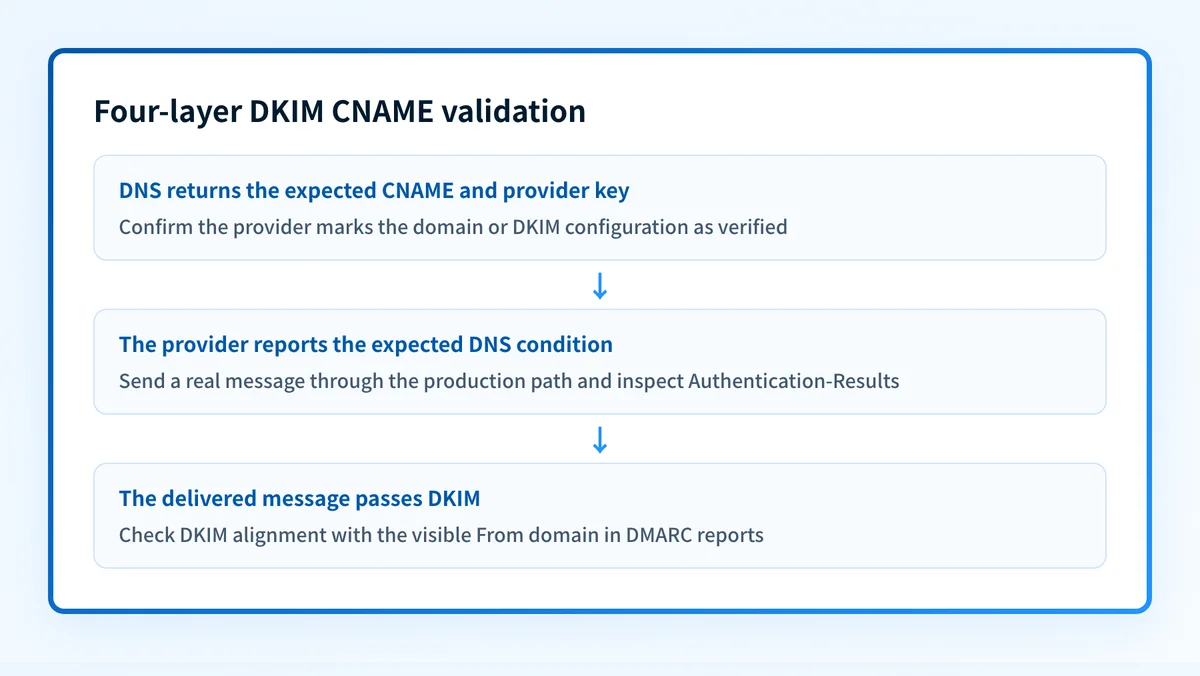
Validate DKIM CNAME setup at four layers.
- DNS: Query the exact selector hostname through the authoritative DNS service and a public resolver. Confirm it returns the expected CNAME target, then follow the alias to the provider-hosted DKIM key. The DKIM lookup tool is appropriate when you have the selector and sending domain. A public lookup cannot prove the production sender uses that selector, monitor later DNS changes, or predict a receiver's inbox decision.
- Vendor: Confirm the sending provider marks the authenticated domain or DKIM configuration as verified. Record the selector names the provider expects.
- Message: Send a real message through the exact production path to a mailbox you control. Inspect its raw headers. Under RFC 8601,
Authentication-Resultscommunicates authentication assessment results. Look for the DKIM result, the signing domain, and the selector where available.
Authentication-Results: receiver.example;
  dkim=pass header.d=yourdomain.com header.s=selector1
This header is illustrative only. Receiver formatting and available properties can vary. A provider dashboard is not a substitute for this delivered-message check.
- DMARC: Once aggregate reports accumulate, inspect which sources sign for the domain and whether their DKIM results align with the visible
From:domain. A DKIM pass by itself may not satisfy DMARC alignment requirements.
For a single DNS question, use the DKIM lookup tool. For an ongoing estate with multiple sending platforms, Palisade can analyze DMARC aggregate-report data, identify sending sources and authentication or alignment issues, and create prioritized remediation tickets. It can propose the next policy step when evidence supports it, but a human reviews the evidence and applies any DNS or DMARC policy change.
Inspect the delegated DKIM record, then track the sources behind it
Start by checking the exact selector and signing domain the provider gave you.
A successful public lookup confirms the published DNS path at that moment. It cannot prove that every production sender signs with the selector, that every signature aligns with the visible From: domain, or how receivers will handle future messages.
If your organization uses several sending services, that remaining gap is source inventory and repeated evidence from DMARC reports. Palisade is agentic DMARC software for teams that need to identify sources, investigate authentication and alignment issues, and work through prioritized remediation. It does not autonomously change your DNS or DMARC policy.
Trace a DKIM CNAME from a delivered message
A DKIM CNAME check starts with the signing domain and selector in a real message, not a guessed list of common selectors. In this illustrative signature fragment, d=example.com and s=mail1 identify the lookup name:
DKIM-Signature: v=1; d=example.com; s=mail1; ...
dig CNAME mail1._domainkey.example.com +short
dig TXT mail1._domainkey.example.com +short
The first command checks for an alias. The second asks for the public key and can follow the alias. RFC 6376's key-retrieval rules define the selector-based DNS lookup. These commands are diagnostic examples, not provider-generated record values.
| Evidence | Interpretation | Next action |
|---|---|---|
| CNAME target differs from the provider's current value | DNS delegation does not match the intended setup | Compare the exact account-issued name and target before proposing a change |
| CNAME exists, but the target returns no usable key | An alias alone is not a working key lookup | Check the full DNS response and provider status; do not fabricate a key |
Key resolves, but the receiver reports dkim=fail | Public DNS visibility does not prove signature validation | Inspect the same message's signature result and sending route |
A domain-only DKIM scan may probe common selectors and miss this exact key. After the domain scan, enter the selector from the message in the DKIM checker's selector box, or use the DNS lookup tool for the CNAME itself. A missing guessed selector is not a reason to replace working DKIM records.
Investigate DKIM delegation with Palisade MCP
Palisade MCP can help review the available domain evidence and any matching task. Use the MCP setup guide, then provide only the signing domain, selector and relevant authentication result. You do not need to paste private message bodies or private signing keys.
Palisade MCP
Fix this with Palisade MCP
Connect Palisade to your assistant, then copy this prompt to investigate the findings and review a proposed fix.
View the prepared prompt
Investigate DKIM delegation for signing domain [d= domain] and selector [s= selector] using Palisade's available tools. Verify what evidence the tools can retrieve for this exact selector; if they cannot query it, give me the precise DNS lookup to run and ask for the result. Compare any observed CNAME target with the sending provider's current account-issued value that I supply. Review available monitored-domain reports and matching remediation tasks without assuming they cover every selector. Explain missing evidence and the proposed fix. Do not delete a live selector, invent a key, or publish changes without my approval. After approved DNS changes, require a new message from the same sender and verify its receiver-authentication result separately.Set up Palisade MCP · See the worked example
Review changes before publication. External DNS publishing uses approved DNS access or Smart DNS Deployment in the Palisade app. After DNS verification, test the same sending stream.
Questions readers ask
Frequently asked questions
Is a DKIM CNAME record the DKIM public key?
No. The CNAME record is an alias. It directs the DKIM selector lookup to another hostname where the provider publishes the DKIM public key.
Can a DKIM selector have both a CNAME and TXT record?
No. RFC 1034 says that when a CNAME record is present at a node, no other data should be present there. Do not publish a CNAME and DKIM TXT record at the same selector hostname.
Does a verified provider status prove DKIM passes on live mail?
No. It proves the provider found the DNS condition it expects. Send a message through the exact production path and inspect its authentication results to confirm the signature is present and passes.
Does a DKIM CNAME record guarantee DMARC passes?
No. DKIM validation and DMARC evaluation are separate checks. A delivered message also needs the applicable DMARC alignment condition for DKIM to satisfy DMARC.
Can different email platforms use different DKIM selectors?
Yes. Different sending platforms can use distinct selectors under the same domain. Validate each platform's DNS records and send a test message through each production path.

Written by
Dominic LandryDeliverability & DNS
Dominic Landry works on email deliverability and DNS configuration at Palisade, from SPF and DKIM records through to DMARC enforcement.
More from Dominic →