How often should you rotate DKIM keys?
 ChatGPT
 Claude
 Gemini
 Perplexity
 Grok
GrokIn brief
How often should you rotate DKIM keys? DKIM sets no universal interval. Use a documented risk-based schedule and rotate immediately after exposure.
DKIM does not require one universal key-rotation interval. Set a documented schedule that fits your risk, key custody, provider capabilities, and change process, then rotate immediately if a private key may be exposed. Use a new selector for each replacement, publish its public key before switching production signing, retain the old public key during the transition, and remove it only after the old signatures no longer need verification.
At a glance
Quick takeaways
- RFC 6376 does not prescribe a fixed number of days or months for DKIM key rotation.
- A new DKIM key should use a new selector rather than replacing key material behind an existing selector.
- Old and new public keys can coexist in DNS while mail systems move to the new signing key.
- RFC 8301 requires DKIM RSA keys to be at least 1024 bits and recommends at least 2048 bits.
- Suspected private-key exposure calls for an incident response, not waiting for the normal rotation date.
- A DNS lookup confirms publication, but a delivered message confirms that the intended production path is signing successfully.
How DKIM key rotation works
A DKIM signature includes a selector in its s= tag. A receiving system combines that selector with the signing domain in the d= tag to find the public key in DNS. For example, a signature with d=yourdomain.com and s=selector2 directs the receiver to selector2._domainkey.yourdomain.com.
RFC 6376 explains the selector transition model: publish the replacement public key under a new selector, switch the signer to that selector, then remove the old public key after messages signed with it have had a reasonable opportunity to be verified. The RFC advises against reusing a selector with new key material. After replacement, a verifier could otherwise have difficulty distinguishing a valid old signature from a forged one using the replaced key.
DKIM key strength and rotation timing are separate decisions. RFC 8301's DKIM key requirements set a minimum RSA key length of 1024 bits and recommend 2048 bits or more. They do not establish a key lifetime. Your organization must set that lifetime through its own security policy and operational limits.
For the protocol context behind selectors and signatures, see the Palisade learning center.
When the rotation answer changes
A routine schedule is appropriate when you know which system controls the private key, who can change DNS, and which applications use the signing domain. The schedule should be short enough to limit the lifetime of a key and long enough that your team can perform a complete, verified transition without breaking mail.
The answer changes immediately when the private key may be compromised. Treat suspected exposure, unauthorized access to the signing system, or an unapproved transfer of key material as a reason to stop using the affected key and begin a controlled replacement. The protocol does not define an incident timetable, but waiting for a scheduled date leaves the potentially exposed key usable for longer.
Provider-managed DKIM can change the work you perform. Some providers ask you to publish account-generated TXT or CNAME records and control the private key themselves. Others require you to generate, activate, or rotate keys in their interface. Follow the provider's current documentation for that platform, and do not replace a provider-managed record with a value copied from another account.
Use this decision rule:
- If the current key is trusted and ownership is known, rotate on your documented schedule with a new selector.
- If the private key may be exposed, rotate immediately under an incident process.
- If the sending provider manages the key, confirm its documented rotation model before changing DNS.
- If you cannot identify the sender or selector owner, inventory the path before removing any key.
Do not delete an old selector as soon as the new record appears in DNS. Messages already signed with the old selector can still need the old public key for verification.
A worked DKIM selector transition
This illustrative DNS shape shows two public keys during a planned transition. The actual selector names and public-key values must come from your signing platform or controlled key-generation process. Do not publish example values as production records.
selector1._domainkey.yourdomain.com  TXT  "v=DKIM1; k=rsa; p=<current-public-key>"
selector2._domainkey.yourdomain.com  TXT  "v=DKIM1; k=rsa; p=<replacement-public-key>"
The first record remains available while existing production traffic may still carry s=selector1. After the outbound signer uses s=selector2, inspect real delivered messages from each sending path. When the old selector no longer appears in the agreed observation window and your rollback window has ended, remove or revoke the old public key according to the platform's procedure.
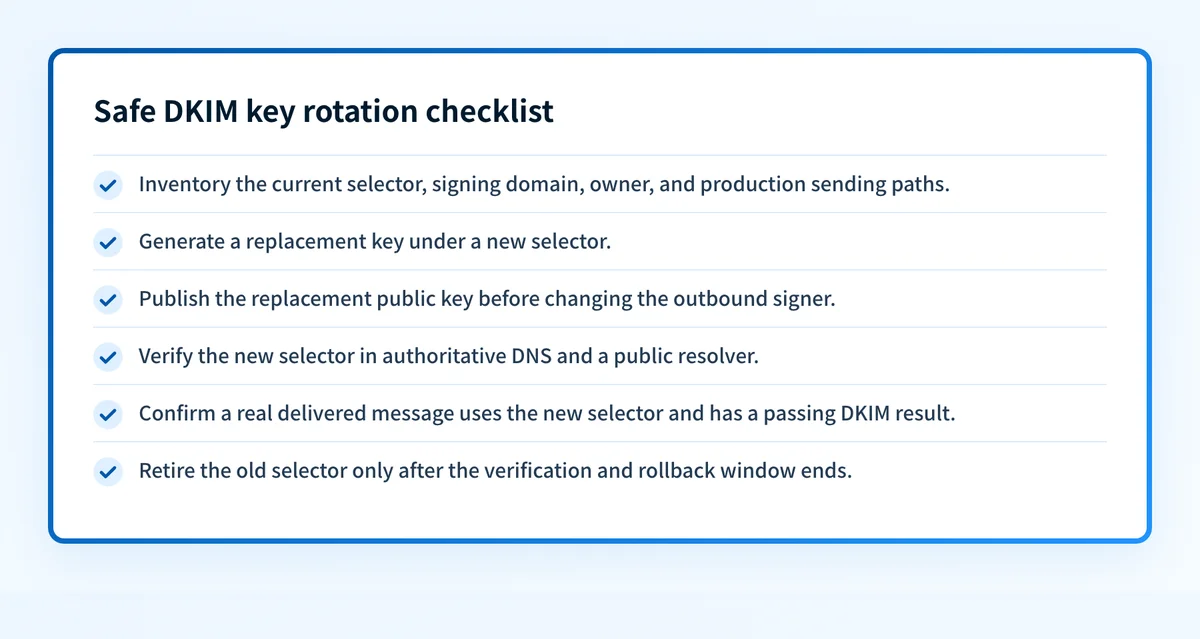
This sequence separates four kinds of evidence:
- DNS: Query the exact new selector through authoritative DNS and at least one public resolver.
- Vendor: Confirm the sending platform reports the new DKIM configuration as active, if it provides that status.
- Message: Send a real message through each production path and inspect its
Authentication-Resultsheader. RFC 8601 defines the Authentication-Results field. - DMARC: Review aggregate-report data after it accumulates to see whether the expected sending paths authenticate and align.
Check the evidence you have
If you have a selector and domain, use the DKIM checker to inspect the public DKIM record. Compare the returned record with the selector your platform says it is using. This check can reveal a missing or malformed public record, but it cannot show whether a particular application is currently signing with that key.
If you have access to the sending platform, verify its current DKIM status and send a test message through the exact production route. Inspect the delivered message headers for the signing domain and selector. A passing DKIM result does not by itself prove DMARC alignment, because DMARC compares the DKIM signing domain with the visible From domain.
If you manage a provider-specific configuration, retain the provider's generated values and change history. For example, the Salesforce DKIM key setup guide covers the provider-specific DNS pattern used for Salesforce-managed keys.
For teams responsible for several domains or sending platforms, the ongoing gap is source inventory. A public check can show the record published today, but it cannot identify every production sender that still uses an old selector or show later authentication failures. Palisade analyzes DMARC aggregate-report data to identify sending sources and authentication or alignment issues, then proposes prioritized remediation work for human review.
Palisade does not change the DKIM key, alter your DNS, or prove every future message will authenticate. Review the evidence and apply any change through your approved process.
Evidence
Sources and further reading
Questions readers ask
Frequently asked questions
Is rotating DKIM keys every 90 days required?
No. The DKIM RFCs do not require a universal 90-day interval. An organization may choose that interval in its own policy if its providers, DNS process, and verification workflow can support safe rotation.
Can I replace a DKIM key while keeping the same selector?
No. RFC 6376 advises against using the same selector with replacement key material. Publish the replacement key under a new selector so receivers can verify both old and new signatures during the transition.
How long should an old DKIM key remain published?
Only until messages signed with the old selector have had a reasonable opportunity to be verified, plus your approved rollback window. DKIM does not specify one duration that applies to every sender or receiver.
Does a DKIM DNS record prove that mail is signing correctly?
No. A DNS record proves only that a public key is available at that selector. Confirm correct signing by inspecting a real delivered message from the exact production route and checking its authentication results.
Should I remove a DKIM key after suspected exposure?
Yes. Replace the key under a new selector, switch signing away from the affected private key, and remove or revoke the old public key after the transition evidence supports retirement. Investigate how the private key may have been exposed.

Written by
Ian BussieresCTO & Co-Founder, Palisade
Ian Bussieres is the CTO and co-founder of Palisade, agentic DMARC software for IT teams and MSPs.
More from Ian →