How do you set up DKIM on Postfix with OpenDKIM?
 ChatGPT
 Claude
 Gemini
 Perplexity
 Grok
GrokIn brief
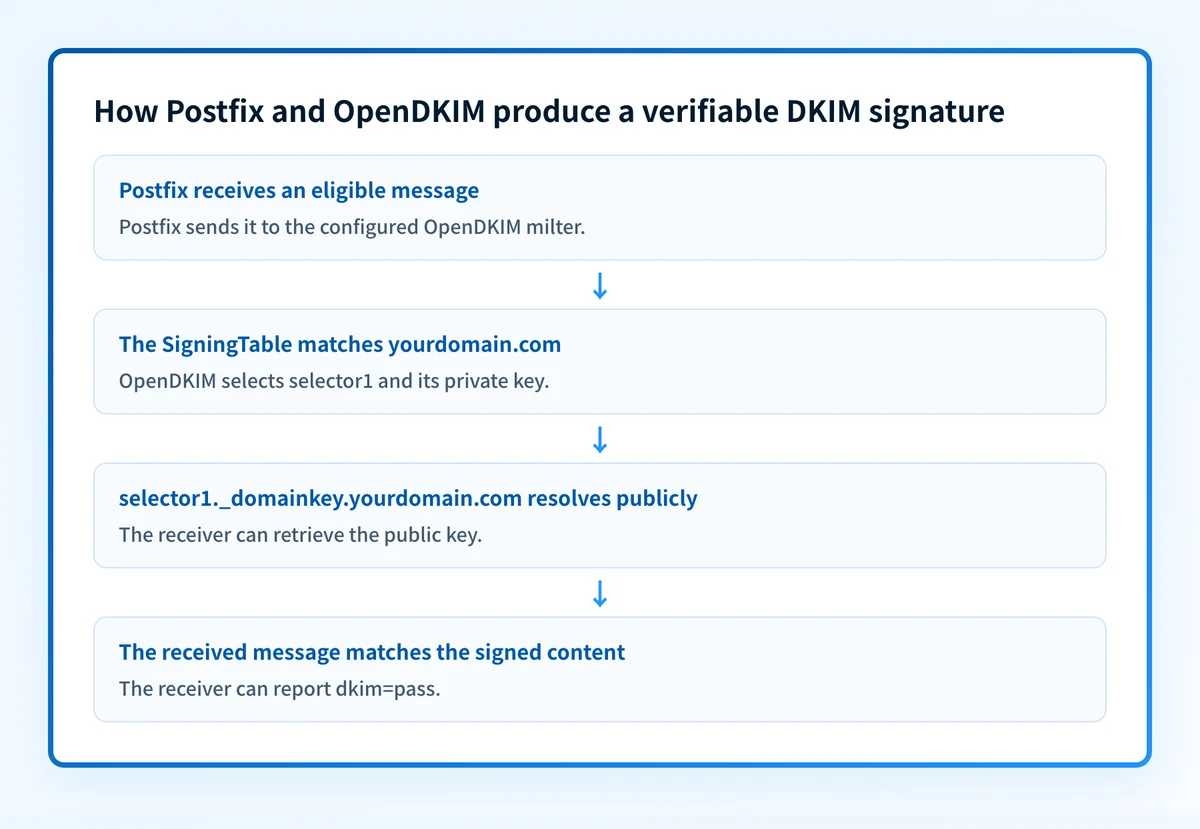
DKIM on Postfix with OpenDKIM requires a matching milter, signing-table mapping, DNS key, and same-path message validation for every sending route.

To set up DKIM on Postfix with OpenDKIM, connect Postfix to the OpenDKIM milter, map the actual sending domain to a private signing key, publish that selector's public key in DNS, and validate a newly delivered message. The setup is incomplete if mail leaves unsigned, the receiver cannot find the selector record, or the receiver reports dkim=fail.
At a glance
Quick takeaways
- Postfix submits eligible mail to OpenDKIM through a configured milter endpoint.
- OpenDKIM needs a SigningTable rule that matches the domain used by the message.
- The public key DNS name comes from the
s=selector andd=domain inDKIM-Signature. - A visible
DKIM-Signatureheader shows that a signer added a signature, but receiver-addeddkim=passverifies it. - A public DKIM record does not prove that the local Postfix path reached OpenDKIM or selected the intended private key.
- A DKIM pass supports DMARC only when the DKIM signing domain aligns with the visible From domain.
What does the failure mean?
A Postfix and OpenDKIM setup has failed when a test message has no DKIM-Signature header, or when the receiving system reports a DKIM failure. RFC 6376 defines DKIM's selector-based public-key lookup and signature verification process. Start with the received message because it shows what the production path actually delivered.
A receiver may report this exact evidence:
Authentication-Results: receiver.example;
  dkim=fail (body hash did not verify) header.d=example.com
The result means the receiver calculated a different canonicalized body hash from the value in bh=. It does not prove that DNS is wrong. If no DKIM-Signature header exists, the strongest initial inference is that Postfix did not reach OpenDKIM, OpenDKIM did not select a signing key, or the message did not match a signing rule.
RFC 8601 defines Authentication-Results as the header field used to report message-authentication assessments. Treat receiver-added results as the useful verification evidence. Preserve the full raw source because a mail-client view can omit headers and cannot show the exact body bytes that were verified.
What usually causes it?
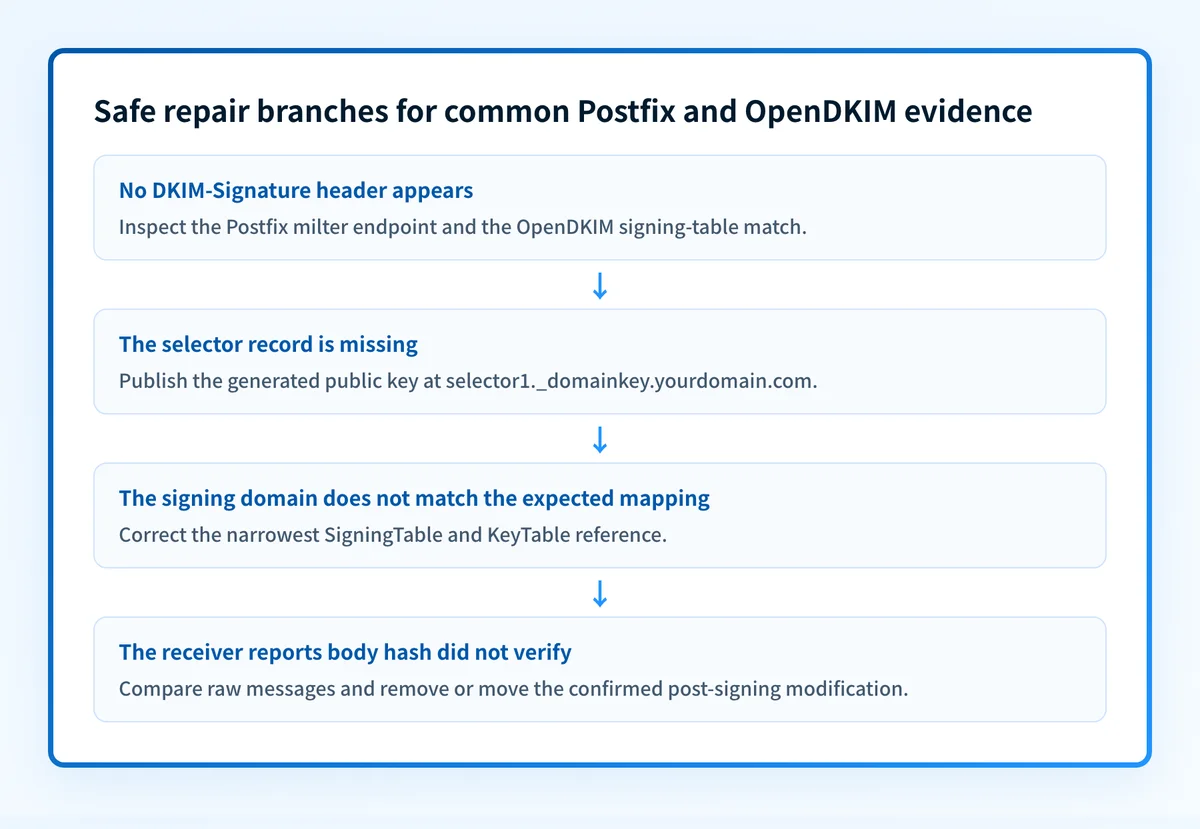
The Postfix milter and OpenDKIM listener do not match
Postfix documents smtpd_milters and non_smtpd_milters as Milter connection settings. Postfix must use the same reachable Unix socket or TCP listener that OpenDKIM is configured to accept.
Compare endpoint type, host, port, path, permissions, and any Postfix chroot implications. A connection error can indicate a stopped service, an incorrect endpoint, or socket permissions. It does not identify the precise local cause by itself.
Locally submitted mail bypasses the configured milter
smtpd_milters applies to mail received through SMTP. non_smtpd_milters applies to locally submitted mail, such as messages from an application, cron, or the local sendmail interface. A successful SMTP test does not prove that application-generated mail is signed.
This is an inference from the submission path and Postfix configuration. Confirm it with a fresh message sent through the same path that normally produces the failed result.
The SigningTable does not match the sending identity
OpenDKIM documents KeyTable and SigningTable as the mechanism for associating messages with keys. A rule that matches *@yourdomain.com will not select a key for a different sending domain.
Check the visible From domain and the message's actual signing identity. Do not assume the envelope sender, application domain, and visible From domain are identical.
The selector record is absent, malformed, or published at the wrong DNS owner name
The receiver looks up the key at s= and d= from the signature under RFC 6376's key-query rules. A DNS control panel may append the zone name automatically, so entering a complete name can create an unintended owner name.
A public lookup can confirm what public DNS currently returns. It cannot inspect the private key, prove OpenDKIM signed the message, or prove that Postfix reached the milter.
A later system changed the message after signing
A dkim=fail (body hash did not verify) result means the verifier's canonicalized body hash differs from bh=. A footer service, mailing list, gateway, or content-rewriting system may have changed signed content after OpenDKIM ran. That attribution remains an inference until raw messages from both sides of the suspected hop are compared.
Changing the DMARC policy does not repair a DKIM body-hash failure. That changes requested enforcement, not the signed message content.
How do I diagnose the failure?
1. Preserve the receiver's raw message and build a signing evidence packet
Send a fresh message through the exact application, Postfix route, recipient provider, and content path that exposes the problem. Save the complete raw source in an access-controlled location.
Collect this labelled signing evidence packet:
- MTA context: the Postfix and OpenDKIM host names, versions, service status, and the submission path used for the test.
- Signature identity: the
d=domain ands=selector fromDKIM-Signature. - Mapping reference: the exact redacted KeyTable entry and SigningTable rule expected to select that key.
- DNS result: the owner name queried and the public result for
._domainkey. - Receiver result: the receiver-added
Authentication-Resultsfield and the DKIM outcome. - Delivery correlation: queue or message ID, sending time, recipient test mailbox, and relevant redacted service-log lines.
- Controlled test outcome: whether the same message passed or failed when one suspected route, modifier, or submission method was changed.
2. Compare the configured milter endpoint
The following fragment is illustrative only. It is a redacted configuration-to-header example, not a universal Postfix or OpenDKIM path.
# /etc/postfix/main.cf, illustrative only
smtpd_milters = inet:localhost:8891
non_smtpd_milters = inet:localhost:8891
# OpenDKIM signing mapping, illustrative only
KeyTable:
selector1._domainkey.yourdomain.com yourdomain.com:selector1:/path/to/selector1.private
SigningTable:
*@yourdomain.com selector1._domainkey.yourdomain.com
# Expected evidence from a fresh delivered message
DKIM-Signature: v=1; d=yourdomain.com; s=selector1; ...
Authentication-Results: receiver.example; dkim=pass header.d=yourdomain.com
Do not copy a socket, private-key path, selector, or DNS value from another server. Use the values created for the host and domain you operate. The OpenDKIM service account needs access to its key without making that key broadly readable.
Inspect both Postfix milter settings and the OpenDKIM listener. Then send a test while checking the relevant logs for a connection attempt and a signing decision.
3. Confirm the signing-table match
Compare the actual sender identity from the received message with the applicable SigningTable rule. If OpenDKIM signs yourdomain.com but the application sends as mail.yourdomain.com or another domain, the expected rule may not match.
The KeyTable reference must identify the selector, signing domain, and private-key location that OpenDKIM can read. This local mapping is evidence about the signer. It is separate from the public DNS record.
4. Query the exact selector record
Copy s= and d= from the received signature, then look up the resulting public owner name. Use the DKIM checker to inspect the publicly visible selector record.
For selector naming and CNAME-based publishing, see what a DKIM CNAME record is and how to set it up. A passing public result does not prove that this Postfix instance selected the matching private key, that the milter signed locally submitted mail, or that a receiver accepted a particular message.
5. Distinguish DKIM verification from DMARC alignment
If the receiver reports dkim=pass but DMARC fails, compare header.d= with the visible From domain. DMARC requires an aligned authenticated identifier, not merely any valid DKIM signature. Keep that investigation separate from a missing signature or selector-record failure.
How do I fix it?
Repair a missing selector record
When the exact
This repair changes DNS publication. It does not prove which local key OpenDKIM used. Retest with a newly signed message after public DNS returns the intended record.
Repair a mapping or signing-domain mismatch
When the message domain does not match the SigningTable rule, update the narrowest applicable mapping so the intended sending domain selects the expected KeyTable entry. Confirm that the key-table domain and selector match the intended d= and s= values.
Make one mapping change at a time and retain the previous configuration for rollback. Do not relax DMARC policy to conceal an unsigned or misaligned path.
Repair message mutation after signing
When controlled raw-message comparison identifies a post-signing body change, remove the confirmed transformation or move signing after that trusted modification. Verify that every intended outbound path reaches the new signing position.
A changed footer, encoding, MIME boundary, or rewritten content can affect DKIM verification even when the message looks unchanged in a mail client. Do not regenerate a key as the first response to a confirmed body-hash mismatch.
Investigate this with your coding agent
Use this when the production path remains unresolved after you have collected redacted configuration, DNS, log, and same-path message evidence. Prepare only the variables needed to trace the repository-owned configuration.
Agent handoff
Copy the prepared prompt
Give this to a coding agent that can inspect the relevant repository or configuration source of truth.
Problem: Postfix with OpenDKIM leaves the affected production message unsigned or the receiver reports a DKIM failure for the stated selector and signing domain.
Evidence: Redacted sending domain, selector, d= domain, Authentication-Results result, queue or message ID and time, public DNS lookup result, KeyTable and SigningTable references, milter endpoint, and controlled test outcome.
Repository scope: Repository-owned mail configuration, infrastructure-as-code, deployment manifests, runbooks, and tests at the supplied repository location.
Constraints: Inspect before editing. Do not apply changes until I approve the proposed diff. Exclude private keys, tokens, unredacted headers, customer data, and production credentials. Limit recommendations to the affected Postfix route, OpenDKIM mapping, or DNS declaration.
Requested output: Evidence-linked diagnosis, smallest proposed change, rollback notes, and unresolved assumptions.
Verification: Run the relevant repository checks, inspect the public DKIM result, and repeat the same message path used to expose the issue.
Stop if: Credentials, private data, production mutation, a source of truth outside the repository scope, or missing evidence is required.
Human approval required: Review the proposed diff and verification plan before allowing changes. Do not paste secrets, private keys, API tokens, unredacted headers, or customer data.
How do I validate the repair?
Repeat the original sending path with a new message. Check all four applicable layers:
- DNS: query the exact selector record through the authoritative DNS source and at least one public resolver.
- Vendor and service state: confirm that Postfix can reach the configured OpenDKIM listener and that OpenDKIM selected the intended signing identity.
- Message: inspect the receiver-added
Authentication-Resultsfordkim=passand confirm the expectedheader.d=value. - DMARC: after aggregate data accumulates, check that the source appears with the expected authentication and alignment outcome.
dkim=pass on a minimal test is not proof that every production template, application, or route will pass. Repeat any content and routing cases that were part of the original failure.
Check the public DKIM record behind this Postfix result
After collecting the d= and s= values from the failed or passing message, inspect the selector record with the Palisade DKIM checker. Compare the visible DNS answer with the signing evidence packet before changing local configuration.
Check the public DKIM selector
A public record check cannot access the private key, repair a Postfix or OpenDKIM mapping, monitor every sending path, or prove why an individual receiver accepted or rejected a message. If you need ongoing evidence across domains and sources, Start with Palisade. Palisade analyzes DMARC aggregate-report data, identifies sources and authentication or alignment issues, and proposes next policy steps for human review. It does not change your DMARC policy or guarantee delivery.
Evidence
Sources and further reading
Questions readers ask
Frequently asked questions
Does Postfix sign DKIM messages by itself?
No. Postfix can send mail to a Milter, but OpenDKIM or another configured signing service applies the DKIM signature. The message must pass through the configured milter path.
Can a public DKIM record prove OpenDKIM is working?
No. A public lookup confirms what DNS returns for a selector. It cannot prove that Postfix reached OpenDKIM, that OpenDKIM selected a private key, or that the tested message was signed.
Does dkim=pass mean DMARC passes?
Not always. The DKIM signing domain must align with the visible From domain for DKIM to satisfy DMARC. A valid signature from an unrelated domain can still leave DMARC failing.
Should I change DMARC to p=none when Postfix mail is unsigned?
No. Changing p= changes the domain's requested DMARC handling. It does not connect Postfix to OpenDKIM, select a signing key, or publish the required selector record.

Written by
Dominic LandryDeliverability & DNS
Dominic Landry works on email deliverability and DNS configuration at Palisade, from SPF and DKIM records through to DMARC enforcement.
More from Dominic →