SPF Softfail (~all) vs Hardfail (-all): Which to Use
 ChatGPT
 Claude
 Gemini
 Perplexity
 Grok
Grok
Use ~all (softfail) on domains that actively send email, and -all (hardfail) only on domains that send no email at all. Hardfail sounds more secure, but once DMARC is enforcing your policy, softfail provides the same protection against spoofing — without bouncing legitimate forwarded mail. Here's how every SPF all qualifier compares:
| Qualifier | Name | Meaning | Typical receiver behavior |
|---|---|---|---|
-all | Hardfail | Unlisted senders are not authorized | May reject the message during delivery |
~all | Softfail | Unlisted senders are probably not authorized | Accept but treat as suspicious; often routed to spam |
?all | Neutral | No assertion about unlisted senders | Treated much like having no SPF policy |
+all | Pass | Every server is authorized | Never use this — it authorizes the entire internet |
The rest of this article explains what's behind that verdict: how mail servers actually interpret each qualifier, why forwarding breaks hardfail, and how DMARC changes the calculation entirely.
What do ~all and -all mean in an SPF record?
The all mechanism sits at the end of an SPF record and tells receiving servers what to do with mail from senders that aren't listed earlier in the record. The qualifier in front of all sets the verdict:
v=spf1 include:_spf.google.com ~all— mail from anywhere other than Google's servers gets a softfail: "probably not authorized, but don't block it outright."v=spf1 include:_spf.google.com -all— the same unlisted mail gets a hardfail: "not authorized, reject it."
How do mail servers treat softfail vs hardfail?
SPF produces a signal; the receiving server decides the outcome. RFC 7208 defines the results this way:
- Fail (
-all) is an explicit statement that the sender is not authorized. Receivers are entitled to reject the message outright during the SMTP transaction. - Softfail (
~all) sits between neutral and fail: the domain believes the mail is probably unauthorized but isn't certain. The standard says receivers should not reject a message solely on softfail — instead it's accepted and subjected to closer scrutiny, which often means the spam folder.
-all as a red light and ~all as a yellow light: one stops the message, the other says proceed with caution.
What about ?all and +all?
Two other qualifiers exist, and neither belongs on a production sending domain:
?all(neutral) makes no assertion at all — unlisted senders are neither authorized nor unauthorized. Receivers treat it roughly like having no SPF policy, so it adds almost no protection. Its legitimate use is short-lived testing while you inventory senders.+all(pass) declares that every server on the internet is authorized to send as your domain. It actively helps spoofers and is treated by many filters as a spam signal in itself. There is no good reason to publish it.
all mechanism (and has no redirect), unmatched senders default to neutral — which is why a proper record should always end with an explicit ~all or -all.
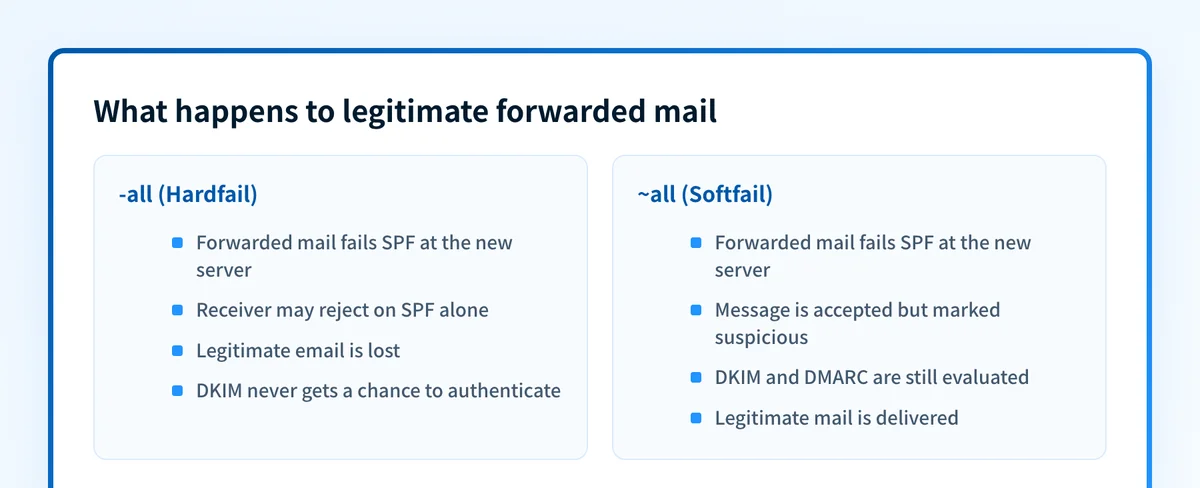
Why does forwarding break SPF hardfail?
Forwarding is SPF's structural weakness:
- When a recipient auto-forwards your email (say, from a work address to Gmail), the forwarding server becomes the new sending server.
- That forwarding server is not in your SPF record, so SPF fails.
- With
-all, the receiver may reject the forwarded message on SPF alone — a legitimate email, lost. - With
~all, the message is accepted with suspicion, giving DKIM and DMARC the chance to authenticate it properly.
-all before DMARC processing ever runs — meaning a message can be rejected even though its valid DKIM signature would have passed DMARC.
Is ~all less secure than -all if you have DMARC?
No — with DMARC enforcing your policy, softfail and hardfail provide equivalent protection against spoofing. DMARC evaluates SPF as pass or fail (plus alignment with the visible From domain) and doesn't distinguish between soft and hard failure:
- If either SPF or DKIM passes and aligns, the message passes DMARC.
- If both fail, your DMARC policy — quarantine or reject — is applied.
~all still gets blocked or quarantined by DMARC enforcement, exactly as it would with -all. Meanwhile legitimate forwarded mail keeps its chance to pass via DKIM. The real security backbone of modern email authentication is DMARC plus DKIM; SPF is a supporting signal, not the sole gatekeeper.
Which should you use: ~all or -all?
Decide by what the domain does:
- Domain sends email (your primary domain): use
~all, enable DKIM on every sending service, and enforce DMARC (p=quarantine, thenp=reject). This blocks spoofing without sacrificing forwarded mail. - Domain sends no email (parked domains, web-only domains): use the bare record
v=spf1 -allplus DMARCp=reject. Nothing legitimate can be lost, and spoofing is shut down completely. - Still inventorying senders: use
~allwhile you find every service that sends on your behalf; a premature-allturns every missed sender into bounced mail.
How do you implement ~all plus DMARC safely?
- Publish SPF with softfail, listing every legitimate sending service:
v=spf1 include:_spf.google.com include:sendgrid.net ~all- Enable DKIM signing for every service that sends as your domain.
- Publish a DMARC record starting at
p=none— our DMARC record generator builds one correctly. - Monitor aggregate reports until every legitimate source passes with alignment.
- Move DMARC to
p=quarantine, thenp=reject. This is where the real anti-spoofing enforcement happens. - Keep the record current as you add new tools, and stay under SPF's 10-DNS-lookup limit.
Frequently asked questions
What is an SPF softfail?
An SPF softfail is the ~all result: the sending server isn't listed in the domain's SPF record, so the domain is signalling that the mail is probably not authorized — but stops short of telling receivers to reject it. The message is still delivered, usually with extra scrutiny (often the spam folder). That "deliver but distrust" behavior is exactly why softfail pairs well with DMARC — legitimate forwarded mail keeps flowing while DMARC handles real enforcement.
What does spf=softfail in an email header mean?
It means the sending server wasn't listed in the domain's SPF record, and the record ends in ~all. The receiver accepted the message but flagged it as suspect. If it's your own mail, add the sending service to your SPF record.
Does ~all hurt deliverability compared to -all?
No. Mailbox providers judge your mail on authentication results, domain reputation, and engagement — not on which qualifier your SPF record ends with. Google's own Workspace setup guide, for example, uses ~all in its recommended record.
Can I start with -all and loosen it later if problems appear?
You can, but it's backwards: the problems appear as silently bounced legitimate mail, which you discover only after damage is done. Starting with ~all and tightening enforcement at the DMARC layer gives you the same end-state security with visibility at every step.
Do I still need DKIM if my SPF is set up correctly?
Yes. SPF alone breaks on forwarding and doesn't survive mailing lists well, and DMARC needs at least one aligned pass. DKIM signatures travel with the message, making them the more resilient half of the pair — set up both.
By choosing softfail and layering DMARC and DKIM on top, you protect your domain from spoofing and ensure legitimate email keeps flowing. Want to see how your current setup measures up? Run your domain through our free Email Security Score.
Keep going with AI
Ask AI how this applies to you
Take this guide to your assistant — each question opens pre-filled, with a link back to this page so it can read the details.
- What do ~all and -all mean in an SPF record?


- How does this apply to my domain?
- What should I do about it, step by step?

Written by
Samuel ChenardCEO & Co-Founder, Palisade
Samuel Chenard is the CEO and co-founder of Palisade, AI-first DMARC software for MSPs and teams managing 10 or more domains.
More from Samuel →