What is email authentication and why does it matter?
 ChatGPT
 Claude
 Gemini
 Perplexity
 Grok
GrokIn brief
Email authentication lets receivers verify domain use. Learn how SPF, DKIM, and DMARC work together, then follow the sender implementation path.
Email authentication is a set of protocols that let receiving mail servers verify that a message claiming to come from your domain is actually authorized to send on its behalf. By checking SPF, DKIM, and DMARC records published in your DNS, the receiver can decide whether to deliver, quarantine, or reject the message. Closing the gap that lets attackers impersonate your brand.
What is email authentication?
Email authentication is a modern fix to the original design flaw of email: the protocol was never built to prove who a message is from. Anyone can write your domain into the From: field. Authentication records give receivers a way to check that claim against something you control, your DNS, so genuine mail can be verified and forged mail can be spotted.
Why is email authentication important for businesses?
Without authentication, attackers can spoof your brand to send phishing, malware, and fraudulent payment requests that appear to come from you. The FBI's Internet Crime Complaint Center reports that business email compromise caused more than $55 billion in combined losses worldwide between October 2013 and December 2023, one of the costliest categories of cybercrime it tracks. Authenticating your domain protects your reputation, your customers, and your bottom line.
Which three core standards should I implement?
- SPF: authorizes which IP addresses can send mail for your domain.
-all or ~all. The choice states how an unmatched SMTP client should be classified, while the receiving system still makes its own delivery decision.
- DKIM: adds a cryptographic signature that proves a message wasn't altered in transit.
- DMARC: combines SPF and DKIM results, requires alignment with the visible
From:domain, and tells receivers how to handle failures.
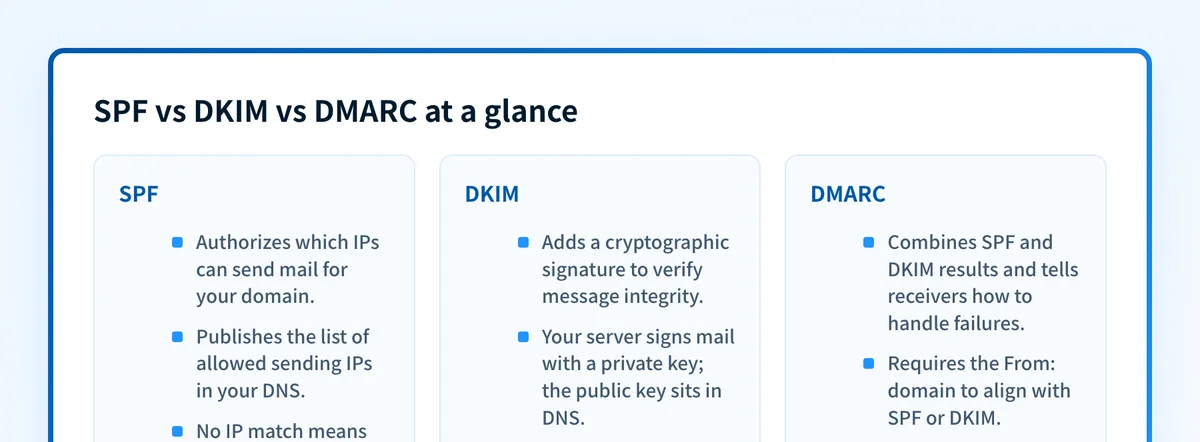 The three core standards and the role each plays in authenticating your email.
How does SPF protect my domain?
SPF (Sender Policy Framework) publishes a list of authorized sending IP addresses in your DNS. When a message arrives, the receiver checks the sending IP against that list. A match passes SPF; anything else reaches the qualifier at the end of the record and can be flagged or rejected. SPF's weakness is that it breaks when mail is forwarded, which is why it's never used alone.
What does DKIM do and how does it work?
DKIM (DomainKeys Identified Mail) uses public-key cryptography. Your mail server signs outgoing messages with a private key, and the matching public key is published in DNS. Receivers verify the signature to confirm the message wasn't tampered with and genuinely originates from your domain. Because the signature travels with the message, DKIM survives forwarding better than SPF.
How does DMARC combine SPF and DKIM?
DMARC (Domain-based Message Authentication, Reporting & Conformance) builds on the other two by requiring alignment, the domain in the From: header must match the domain validated by SPF or DKIM. It also sets a policy (none, quarantine, or reject) and returns aggregate reports that give you visibility into who is sending as your domain.
What happens when an email fails DMARC?
The receiving server follows the policy you published. Under quarantine, failing mail lands in spam; under reject, it's blocked outright during delivery. Either way, you receive aggregate reports showing which sources attempted to send unauthenticated mail on your behalf. The data you need to find and fix gaps.
Use the email authentication checker workflow when you need to connect domain-level results to focused protocol and message evidence. If a receiver already reports a failure, start with the email authentication failure diagnostic and follow the exact failed identity.
For a current provider-specific rollout, the SendGrid SPF and DKIM setup guide applies the same evidence model to Domain Authentication and its account-generated DNS records.
If the error appears before the message is accepted, such as a mailbox sign-in prompt or SMTP AUTH rejection, use the mailbox and SMTP login troubleshooting guide instead. It covers account and submission evidence rather than receiver-side DMARC results.
What are the common challenges when deploying it?
Publishing SPF and DKIM is straightforward; moving to DMARC enforcement is where teams stall. Enforcement requires coordinating with every legitimate sender (marketing platforms, help desks, invoicing tools) because a service that isn't covered by your SPF record or set up for DKIM signing will start failing the moment you tighten the policy. The fix is a staged rollout, not a big-bang switch.
How does BIMI build on authentication?
Once DMARC is enforced, BIMI lets you display your verified logo next to authenticated messages in supporting inboxes. It's the visible payoff for finishing the authentication journey. Recipients get an at-a-glance trust signal, and you get stronger brand recognition.
What steps move me to DMARC enforcement?
- Publish SPF and DKIM records for every legitimate sending service.
- Set a DMARC policy of
p=noneand review the aggregate reports. - Fix each failing legitimate source, then tighten to
quarantineand finallyreject. - Keep the sender inventory current. Authenticate each new tool before it sends.
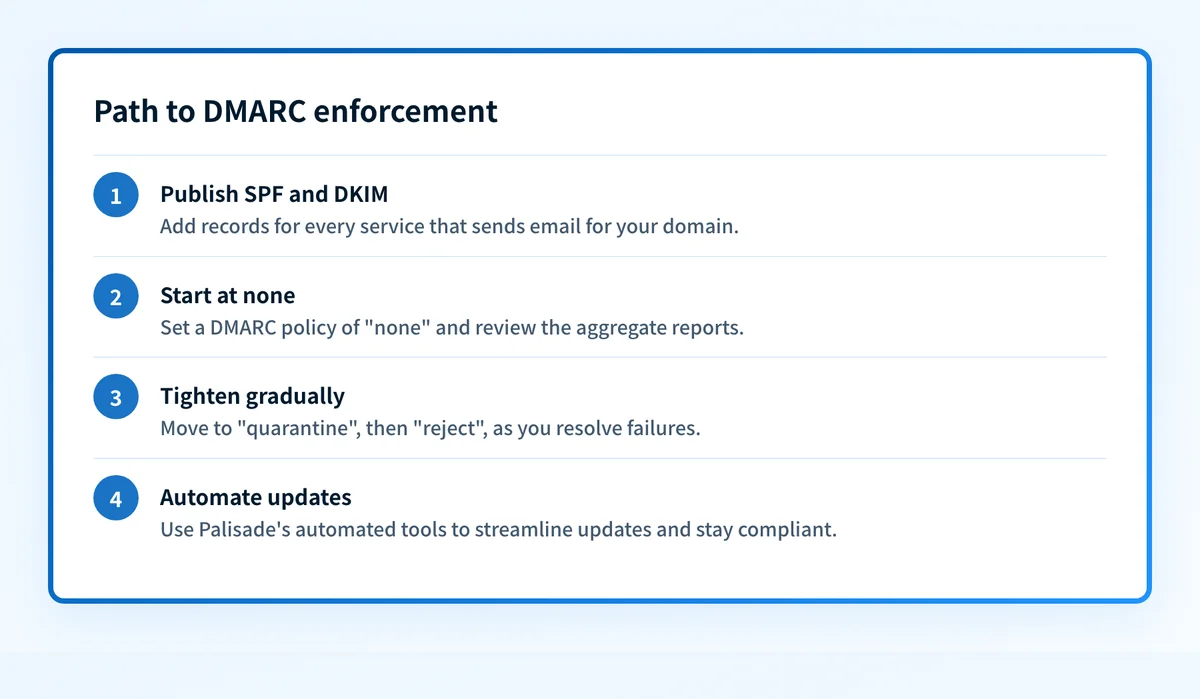 Tighten your DMARC policy step by step as you resolve failures.
At a glance
Quick takeaways
- Email authentication prevents domain spoofing and phishing.
- Implement SPF, DKIM, and DMARC together so receivers can authenticate the visible sending domain.
- DMARC enforcement gives you control over unauthenticated mail.
- Regular sender-inventory reviews catch new sources and configuration drift.
- BIMI adds brand recognition once DMARC is enforced.
For a provider-specific implementation of these authentication checks, see How do I set up SPF and DKIM for Zoho Campaigns?.
For a provider-specific implementation of these authentication checks, see How do I configure SPF and DKIM for Chargebee?.
For a provider-specific implementation of these authentication checks, see How do I set up SPF and DKIM for Customer.io?.
For a provider-specific implementation of these authentication checks, see How do I set up SPF and DKIM for HubSpot?.
For a provider-specific implementation of these authentication checks, see How do I set up SPF and DKIM for Mailchimp?.
For a provider-specific implementation of these authentication checks, see Cloudflare DMARC.
Related reading
Questions readers ask
Frequently asked questions
Can I use DMARC without SPF or DKIM?
Not effectively. DMARC needs at least one of SPF or DKIM to pass and align with the From: domain, so you must have at least one configured. In practice you should deploy both, because SPF breaks on forwarding while DKIM survives it. Together they give your mail two independent paths to authenticate.
How often should I review my authentication records?
Review at least quarterly, and any time you add or remove an email service. New SaaS tools that send on your behalf are the most common cause of sudden DMARC failures, so audit your sender inventory whenever your stack changes.
Is BIMI mandatory?
No. BIMI is optional and only affects logo display in supporting inboxes. It requires DMARC enforcement first, so treat it as a reward for completing authentication rather than a starting point.
Will authentication hurt my deliverability?
Correctly configured records improve deliverability by building sender reputation with mailbox providers. Deliverability problems come from misconfiguration (for example, moving to reject before every legitimate sender passes) which is exactly what a staged, report-driven rollout avoids.
How can I tell if my domain is properly authenticated?
Send a test message to a personal inbox and open the full headers to see the SPF, DKIM, and DMARC results, or run an automated check with the Email Security Score for an instant view of your posture.

Written by
Samuel ChenardCEO & Co-Founder, Palisade
Samuel Chenard is the CEO and co-founder of Palisade, agentic DMARC software for IT teams and MSPs, from one domain to thousands.
More from Samuel →