DMARC Quarantine vs Reject: What's the Difference?
 ChatGPT
 Claude
 Gemini
 Perplexity
 Grok
GrokIn brief
DMARC quarantine vs reject: compare what each policy asks receivers to do, when reject can cause interoperability problems, and how to choose safely.
DMARC p=quarantine asks receivers to treat messages that fail DMARC as suspicious, while p=reject says the domain owner considers those failures an invalid use of the domain and asks for rejection. (RFC 9989, policy values) The receiver still controls the final result, and the right policy depends on legitimate sending paths and interoperability risk, not on a rule that every domain must finish at reject. (RFC 9989, receiver discretion)
| Question | p=quarantine | p=reject |
|---|---|---|
| What does the domain owner request? | Treat DMARC failures as suspicious | Treat DMARC failures as invalid use of the domain |
| What may a receiver do? | Put the message in junk, hold it, tag it, or apply another local rule | Reject during SMTP, discard after acceptance, accept under an override, or apply another local rule |
| Is the result guaranteed? | No; receiver policy remains final | No; receiver policy remains final |
| When is it usually considered? | After legitimate senders are understood, when the owner wants a stronger signal without requesting outright rejection | After legitimate senders are understood, for domains whose mail patterns make rejection an acceptable request |
| Main operational risk | Legitimate failing mail may be hidden or delayed | Legitimate failing mail may be rejected or discarded |
Both policies matter only after a message produces a DMARC failure. A message passes DMARC when at least one authenticated SPF or DKIM identifier both passes and aligns with the visible From domain; passing DMARC still does not guarantee inbox delivery. (RFC 9989, identifier alignment and final handling)
What does a DMARC quarantine policy do?
DMARC p=quarantine expresses that the domain owner considers a DMARC failure suspicious. A participating receiver can use that preference in its own filtering, but DMARC does not require every provider to put the message in a recoverable spam folder. (RFC 9989, quarantine definition)
That distinction matters during rollout. Quarantine can reduce the chance that a failing message reaches the inbox, but a legitimate message can still be delayed, hidden, or handled in a way the sender cannot reverse. Use aggregate reports and representative message tests to find legitimate failures before requesting quarantine; do not treat the policy as a lossless test mode.
What does a DMARC reject policy do?
DMARC p=reject expresses that the domain owner considers DMARC failures to be invalid use of the domain. RFC 9989 describes SMTP rejection as the preferred mechanism when a receiver rejects, but it also documents silent discard and permits receivers to override the published preference. (RFC 9989, rejecting messages)
Reject is therefore the stronger domain-owner signal, not a guarantee that every failing message bounces or disappears. It also does not repair authentication. If a legitimate invoicing platform, support system, or newsletter service still fails alignment, publishing p=reject can cause that mail to be rejected at receivers that honor the request.
Is DMARC reject more secure than quarantine?
DMARC reject is a stronger requested treatment for direct-domain spoofing, but it is not automatically the safer choice for every domain. The benefit is greater resistance to failed messages reaching users; the cost is greater disruption when legitimate mail fails DMARC or when mailing-list behavior breaks alignment.
RFC 9989 adds an important limit that older rollout advice often misses: domains with general-purpose users who send routine mail to mailing lists should not normally publish p=reject because rejection can create interoperability problems. The RFC says those domains should collect reports at p=none, then use p=quarantine, and evaluate the remaining failures and mailing-list impact before considering a stricter request. (RFC 9989, general-purpose email domains)
What should a DMARC policy be set to?
Set DMARC to p=none while the domain owner is still discovering legitimate sending paths or cannot predict the interoperability impact of enforcement. Once important senders pass with aligned SPF or DKIM, choose p=quarantine when suspicious treatment fits the evidence, or p=reject when rejecting or discarding the remaining failures is an acceptable request. General-purpose domains whose users routinely send to mailing lists should normally remain at quarantine rather than publish reject unless their evidence shows the interoperability risk is acceptable. (RFC 9989, general-purpose email domains)
How should you choose between quarantine and reject?
Choose between DMARC quarantine and reject from evidence about the domain's real mail streams:
- Inventory the domain's mail. Use DMARC aggregate reports to identify every service that sends with the domain in the visible From address.
- Validate alignment on real messages. Use the email header analyzer to inspect the authentication results recorded for a representative message from each important stream; a public DNS record alone cannot prove alignment.
- Identify interoperability risk. Check whether general-purpose users send through mailing lists, forwarders, or other paths that can alter messages or authentication results.
- Choose the handling request. Use quarantine when suspicious treatment fits the evidence and reject only when the domain's use case and remaining failures make rejection acceptable.
- Keep monitoring after the change. New vendors and configuration changes can introduce legitimate failures under either policy.
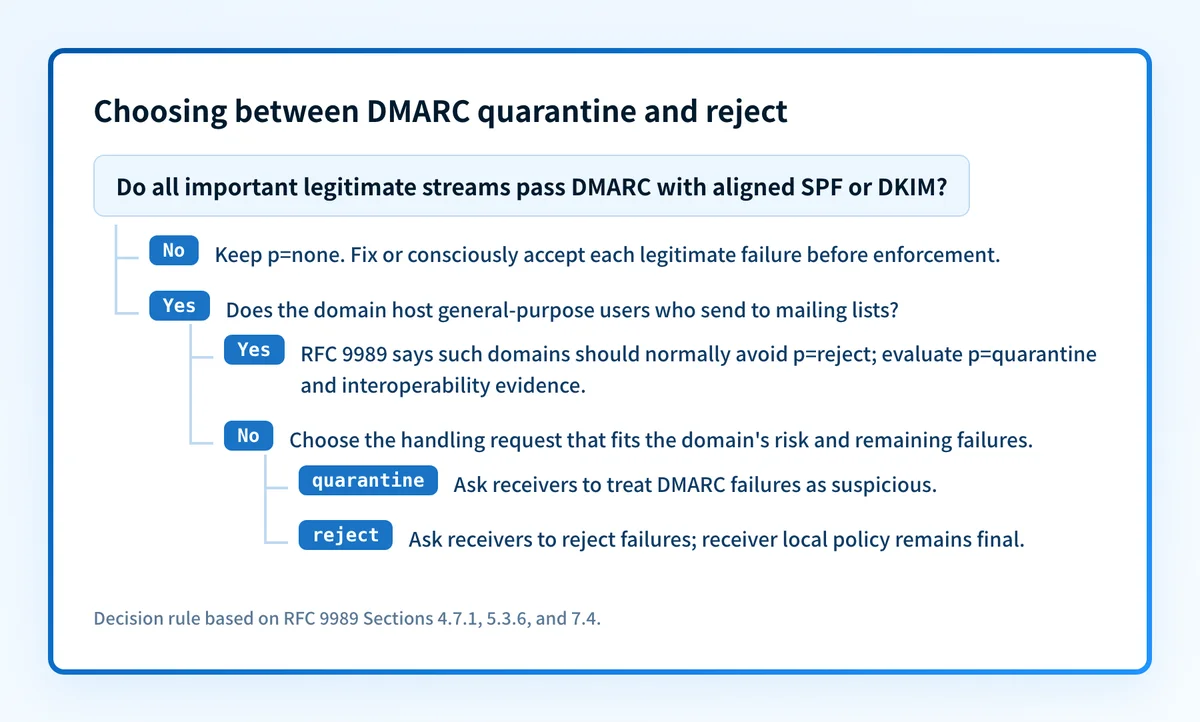
For example, suppose a domain sends through its mailbox provider, support platform, and invoicing application. If the first two have aligned DKIM passes but the invoicing application has only a non-aligned SPF pass, the domain is not ready to request a stronger policy without risking that invoicing stream, unless the owner accepts or retires it. Keep monitoring while the invoicing path is corrected or deliberately retired. If the domain also hosts users who send to mailing lists, evaluate the RFC 9989 interoperability warning before deciding that reject is an acceptable request.
How does the RFC 9989 testing flag change a rollout?
The RFC 9989 t=y flag asks receivers not to apply the published policy while the domain owner tests it. The expected one-level fallback is p=quarantine; t=y to none, or p=reject; t=y to quarantine; DMARC reports are still generated, and receivers retain local discretion. (RFC 9989, t testing flag)
The testing flag replaces some of the old pct tag's rollout purpose, but it is not percentage sampling. RFC 9989 removed pct, so do not publish a stricter policy with pct=10 and assume every receiver will apply that percentage consistently. (RFC 9989, removal of pct)
Use the DMARC record generator to check current syntax and the DMARC checker to verify what DNS publishes. Neither tool can prove that every production sender aligns or predict a receiver's final handling.
Check the record, then check real mail
Start with the free DMARC checker to confirm which policy the domain publishes. Then compare aggregate-report evidence with headers from each important production stream before changing the record; the public record alone cannot establish enforcement readiness.
Palisade’s DMARC Agent turns DMARC aggregate-report data into a prioritized workflow for identifying senders, investigating authentication and alignment issues, and managing a safer path to enforcement. Receivers still make the final handling decision, and Palisade does not guarantee delivery or block messages itself.
Evidence
Sources and further reading
Questions readers ask
Frequently asked questions
Does p=quarantine always put failed mail in spam?
No. DMARC p=quarantine asks a receiver to treat failed mail as suspicious, but the receiver chooses the final handling. Junk placement is one possibility; administrative quarantine, tagging, filtering, or another local action are also possible. (RFC 9989, policy and receiver handling)
Does p=reject guarantee a bounce?
No. DMARC p=reject is a domain-owner preference, not a guaranteed bounce. RFC 9989 describes SMTP rejection and silent discard, and it allows receivers to accept a failing message under a local override. (RFC 9989, rejecting messages)
Can forwarded mail pass DMARC under reject?
Forwarded mail can pass DMARC if an aligned DKIM signature survives the forwarding path. Forwarding commonly breaks SPF, and a forwarder or mailing list that modifies signed content can also break DKIM, so test the actual path instead of assuming forwarding always passes or always fails. (RFC 9989, indirect mail flows)
Is p=quarantine required before p=reject?
DMARC does not make quarantine a universal prerequisite for reject. RFC 9989 does, however, recommend a monitored and quarantined period for general-purpose domains whose users may send to mailing lists, and evidence-led staging reduces the chance of disrupting legitimate mail. (RFC 9989, mailing-list interoperability)

Written by
Samuel ChenardCEO & Co-Founder, Palisade
Samuel Chenard is the CEO and co-founder of Palisade, agentic DMARC software for IT teams and MSPs, from one domain to thousands.
More from Samuel →