How do I read and understand DMARC reports?
 ChatGPT
 Claude
 Gemini
 Perplexity
 Grok
GrokIn brief
Learn how to read DMARC aggregate reports, interpret SPF and DKIM alignment, investigate unknown senders, and prepare safely for enforcement.
DMARC aggregate reports show which IP addresses participating receivers observed sending mail with your domain in the visible From: address, along with SPF, DKIM, alignment, and policy results. Use those rows to find sender candidates and authentication problems, but do not treat a familiar provider name, passing result, or quiet reporting period as proof that a sender is approved or that the inventory is complete.
DMARC (Domain-based Message Authentication, Reporting, and Conformance) is an email authentication protocol that builds on SPF and DKIM. Its reporting channel is what turns authentication from a guess into a measurable process.
That visibility is often missing: the State of DMARC 2026 research found that 21.0% of domains with a valid DMARC record published no aggregate-reporting address at all.
The two DMARC report types
DMARC reports come in two forms, and they answer different questions.
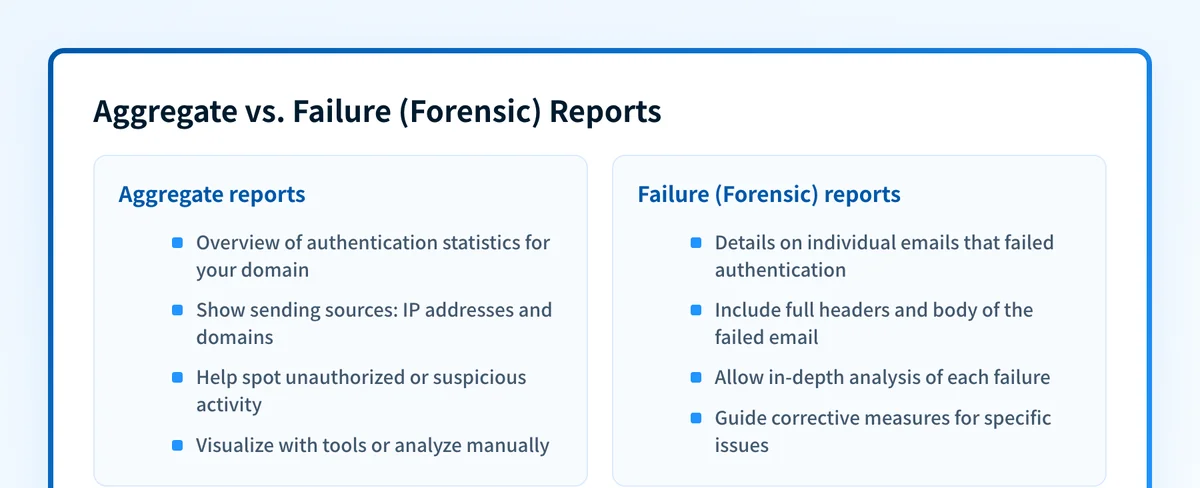 The two DMARC report types and what each tells you about your domain's email.
- Aggregate reports (RUA) are XML summaries that participating receivers can send daily or more often. They group messages into rows by source IP, evaluated identities, authentication results, alignment, and policy disposition. Aggregate reports are the main evidence for discovering sender candidates such as a billing platform, helpdesk, marketing tool, or forged source before enforcement. RFC 9990 defines the fields and reporting behavior.
- Failure reports (RUF), sometimes called forensic reports, concern individual authentication failures and can expose message-level data. Availability depends on the receiver, and privacy concerns limit their usefulness as a dependable inventory source. Build the operating process around aggregate reports; treat any failure report as sensitive supplemental evidence.
ruf= if you have a dedicated, privacy-aware processor ready to receive the occasional sample.
If you want to keep aggregate-report processing in infrastructure you control, compare open-source DMARC analyzer operating models before choosing a parser.
Understanding the DMARC tags behind reporting
Your DMARC record (a TXT record at _dmarc.yourdomain.com) controls both policy and where reports go. Three tags matter most when you are reading reports:
prequests the assessment policy for mail that fails DMARC:none,quarantine, orreject. The receiving system retains discretion, so a published policy is not a guarantee that every receiver will handle a message identically. This is the value you will see echoed in the report's policy published section.ruanames the address that should receive aggregate reports, written as amailto:URI (for example,rua=mailto:dmarc@yourdomain.com). This is the tag that actually produces the data you will read day to day.rufnames the address for failure reports. Because those reports can expose message-level data, only request them when a dedicated, privacy-aware processor is ready to receive and protect them.
Reading a DMARC aggregate report
Aggregate reports arrive as XML, which is meant for a machine, not your eyes. The fastest path is to feed the file to a report reader that renders it as a sender table. But it helps to know what the underlying sections mean so the rendered view makes sense.
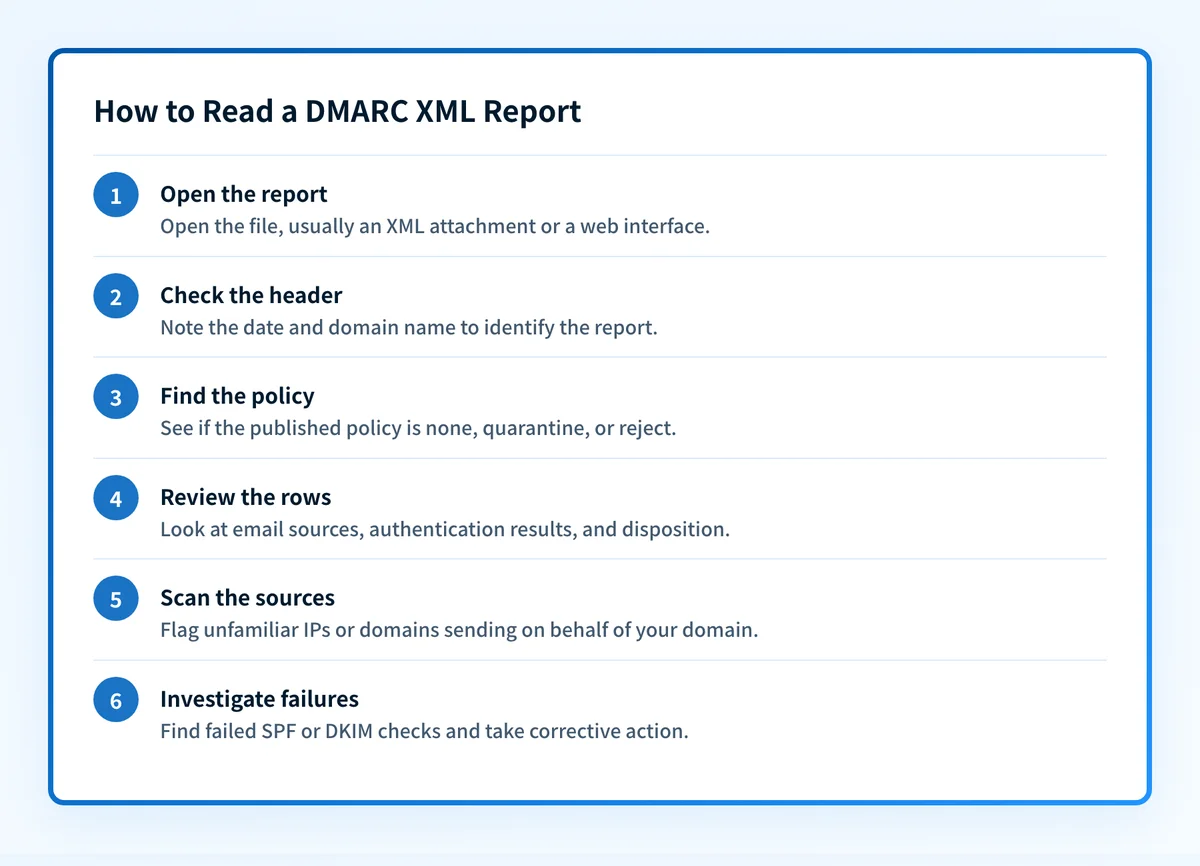 Follow these steps each time you review a DMARC XML report.
- Open the report. It usually arrives as an XML attachment (often gzipped) or through a monitoring dashboard.
- Read the report metadata. The header names the reporting organization, the date range covered, and your domain. Context that tells you which report you are looking at.
- Check the policy published. This section shows the DMARC policy the receiver saw for your domain (
none,quarantine, orreject) and any subdomain policy, confirming your record was read as you intended. - Work through the record rows. Each row is a sending source: its IP address, the message count, the SPF and DKIM results, whether each aligned with your
From:domain, and the disposition (what the receiver did). - Identify sender candidates. Correlate the source IP and authentication domains with a possible sending service, then find the accountable business owner. A recognizable network or vendor name is a lead, not an authorization decision.
- Investigate the evidence. For each material source, preserve the report period and inspect a newly delivered message from the claimed production path. Confirm the visible
From:domain, SPF identity, DKIMd=domain, alignment, business purpose, and owner before authorizing, remediating, retiring, or escalating it.
From: domain, not both. A source showing SPF fail but an aligned DKIM pass can still pass DMARC. Authentication success still does not prove that the business approved the sender.
What a DMARC report row proves and what it does not
DMARC aggregate evidence is deliberately narrow. Keep the technical result separate from the organization's authorization decision.
| Evidence in the report | What it supports | What it does not prove |
|---|---|---|
| Source IP and message count | A participating receiver observed that source using the author domain during the report period | Which application or team owns it, or whether every receiver saw the same traffic |
| SPF result and evaluated domain | How the reported SPF identity authenticated | That SPF aligned with the visible From: domain, or that the business approved the service |
DKIM result, d= domain, and selector | How a reported signature validated | That the signed domain aligned, or that every production path uses the same signature |
| DMARC-aligned SPF or DKIM pass | The messages in that row satisfied DMARC through at least one aligned mechanism | That the sender is legitimate, still needed, or safe to add to another authentication record |
none, quarantine, or reject disposition | The receiver's reported DMARC disposition for that row | A universal delivery outcome; local policy and other filtering can change handling |
RFC 9990 separates raw authentication results from the DMARC alignment results and reported disposition. That separation is why an IP lookup or SPF pass alone is insufficient for a sender decision.
What the disposition and policy values tell you
Every report echoes the policy the receiver discovered, and each row includes the DMARC disposition it reported after evaluation. none, quarantine, and reject express progressively stronger requested handling, while receiver overrides and other filtering can produce a different final outcome. The common rollout path is none → quarantine → reject, tightening only after the organization has identified material senders, resolved alignment gaps, recorded exceptions, and prepared a rollback. For choosing between the last two stages, see DMARC reject vs quarantine.
Common issues when reading DMARC reports
Most of the trouble people hit with reports comes from a handful of predictable causes. Here is how to recognize and fix them.
I'm not receiving any reports
Three things cause silence. First, check rua syntax: the address must be a full mailto: URI, and a typo means no delivery. Second, if reports go to an address on a different domain than the one being reported on, that receiving domain must publish an authorization record (a TXT record at yourdomain._report._dmarc.receiver.com with v=DMARC1) or receivers will refuse to send. Third, give it time. Many participating receivers send reports daily, while RFC 9990 permits more frequent reporting; a brand-new record or a domain that simply sends very little may take a day or two to produce anything. Confirm your record is live and correct with the DMARC checker.
The XML is unreadable
That is expected. Aggregate reports are structured for a parser, not a person, so raw XML full of
A legitimate sender shows SPF fail but DKIM pass. Is that a problem?
The affected messages can pass DMARC through an aligned DKIM signature even when SPF fails. Investigate an unexpected SPF failure anyway: it can reveal a changed or misconfigured production path, and maintaining aligned SPF and DKIM gives the sender more resilience if one mechanism later breaks.
Forwarded mail shows as failing
Forwarding often breaks the original SPF path because the forwarding server is evaluated instead of the original sender. DKIM can survive simple forwarding, but a forwarder or mailing list that modifies signed content can also invalidate the signature. Inspect the message's trusted receiver-added Authentication-Results, the aligned DKIM signature, and any ARC evidence before choosing a fix; RFC 8601 explains why authentication results are only trustworthy inside a defined receiving boundary.
Reports show a source I don't recognize
Treat an unknown source as unresolved until evidence and an accountable owner support a decision. Start with a DNS lookup and provider correlation, but do not classify the source from the hostname, country, or network owner alone. Ask the teams responsible for billing, HR, marketing, support, and transactional applications whether they use the service, and request a newly delivered message from the claimed production path.
Then compare four things:
- Report evidence: source IP, volume, report period, evaluated domains, and alignment.
- Message evidence: visible
From:, envelope domain, DKIMd=domain and selector, plus trusted receiver-added authentication results. - Business evidence: named owner, purpose, expected volume, and confirmation that the service should continue sending as the domain.
- Configuration evidence: the sender platform's current domain-verification state and the exact SPF or DKIM change it requires.
authorized, pending confirmation, unauthorized, retired, or exception. Only an authorized sender with a verified authentication gap should move into remediation. A service name, SPF include, passing DKIM signature, or use by another team does not authorize it. If no owner can confirm the source, preserve the evidence and escalate it instead of expanding SPF or changing policy.
If repeated unknown-source investigations are prompting a software purchase, use the DMARC software evaluation checklist to compare how vendors handle the evidence. Once you have a shortlist, use the DMARC proof-of-concept plan to test that workflow with a representative sender.
How reports fit into email authentication
DMARC does not authenticate anything on its own. A receiver evaluates the results of SPF and DKIM against the From: domain, then chooses local handling informed by the domain owner's requested policy. Reports record, source by source, whether those checks passed and aligned, which is why fixing a failing sender always comes back to correcting its SPF or DKIM setup. You can see all three mechanisms for your domain at once with the Email Security Score, or check a single record with the SPF and DKIM tools.
Reviewed on a regular cadence, DMARC reports surface new sender candidates and authentication changes. Combined with owner confirmation and production-message evidence, they support a safer decision about remediation and enforcement.
A note on the standard: for its first decade DMARC was defined by RFC 7489. In 2026 the IETF published RFC 9989 for the core protocol, RFC 9990 for aggregate reporting, and RFC 9991 for failure reporting. Together they obsolete RFC 7489. Use the current documents when interpreting fields and policy behavior.
For sender-specific authentication failures after classification, see Why DMARC Fails and How to Fix It.
Evidence
Sources and further reading
- RFC 9989: Domain-based Message Authentication, Reporting, and Conformance: the current core DMARC specification, including the
p,rua, andruftags. - RFC 9990: DMARC Aggregate Reporting: the aggregate report format and how receivers send it.
- RFC 9991: DMARC Failure Reporting: the failure-report format and privacy considerations.
- RFC 8601: Message Header Field for Indicating Message Authentication Status: authentication-result fields and their trust boundary.
Related reading
Questions readers ask
Frequently asked questions
How often do DMARC reports arrive?
Participating receivers commonly send aggregate reports daily, and RFC 9990 also permits more frequent reporting. A domain may receive separate reports from multiple organizations, but the absence of a report does not prove the absence of mail. Plan review around the reporting organizations and periods you actually receive.
Do I need a paid tool to read DMARC reports, or can I use the raw XML?
You can technically open the XML yourself, but it does not scale past a couple of sources and is easy to misread. A report reader or monitoring service aggregates the reports actually received from participating receivers into one sender view, tracks changes over time, and flags failures. That makes ongoing review more practical, but the resulting view still needs owner confirmation and delivered-message evidence before an enforcement decision. The raw file is fine for a one-off spot check, not for ongoing management.
Should I turn on RUF (failure) reports?
Only if you have a specific reason and a privacy-aware place to send them. Because failure reports can expose message-level data, many operators restrict or disable them. Aggregate reports are the primary evidence for most enforcement work, but reconcile them with accountable owners and newly delivered production messages before changing policy.
My reports are clean but mail still lands in spam, why?
DMARC reports only tell you about reported authentication, alignment, and disposition; they say nothing about content, sending reputation, list hygiene, or blocklist status. A DMARC pass rules out DMARC failure for the affected messages, but unreported paths, other provider-specific authentication requirements, reputation, engagement, and infrastructure still need separate checks.
How long should I read reports before moving to enforcement?
Review reports for at least one full sending cycle, including known monthly, quarterly, seasonal, and exception paths. Do not assume the window discovered every sender: reconcile the observed rows with application owners and newly delivered messages, document unresolved sources and rollback conditions, then make each policy-stage decision through the organization's change process.

Written by
Samuel ChenardCEO & Co-Founder, Palisade
Samuel Chenard is the CEO and co-founder of Palisade, agentic DMARC software for IT teams and MSPs, from one domain to thousands.
More from Samuel →