What is SPF? Sender Policy Framework explained
 ChatGPT
 Claude
 Gemini
 Perplexity
 Grok
GrokIn brief
What is SPF? Sender Policy Framework is a DNS record that authorizes mail servers for a domain's envelope sender or HELO identity for a domain.
SPF, or Sender Policy Framework, is an email-authentication method that lets a domain publish the mail servers authorized to use that domain in an SMTP envelope sender (MAIL FROM) or HELO identity. Receiving servers compare the connecting sender against that DNS policy. An SPF pass does not, by itself, prove that the domain shown in the visible From address is authorized for DMARC.
At a glance
Quick takeaways
- SPF publishes sender authorization in a DNS TXT record.
- SPF evaluates the SMTP
MAIL FROMidentity when it is available, otherwise the HELO identity. - A passing SPF result can use a different domain than the visible From address.
- DMARC requires an SPF pass with an identity aligned to the visible From domain, or an aligned DKIM pass.
- SPF records can cause a permanent error if evaluation needs more than 10 DNS lookups.
- A public SPF lookup shows the record currently published in DNS, not the exact path a production message used.
How SPF authorization works
RFC 7208 defines SPF as a way for a domain owner to publish which hosts may send mail using a particular identity. The policy is normally a DNS TXT record. A receiving mail system evaluates that record against the IP address that connected to it.
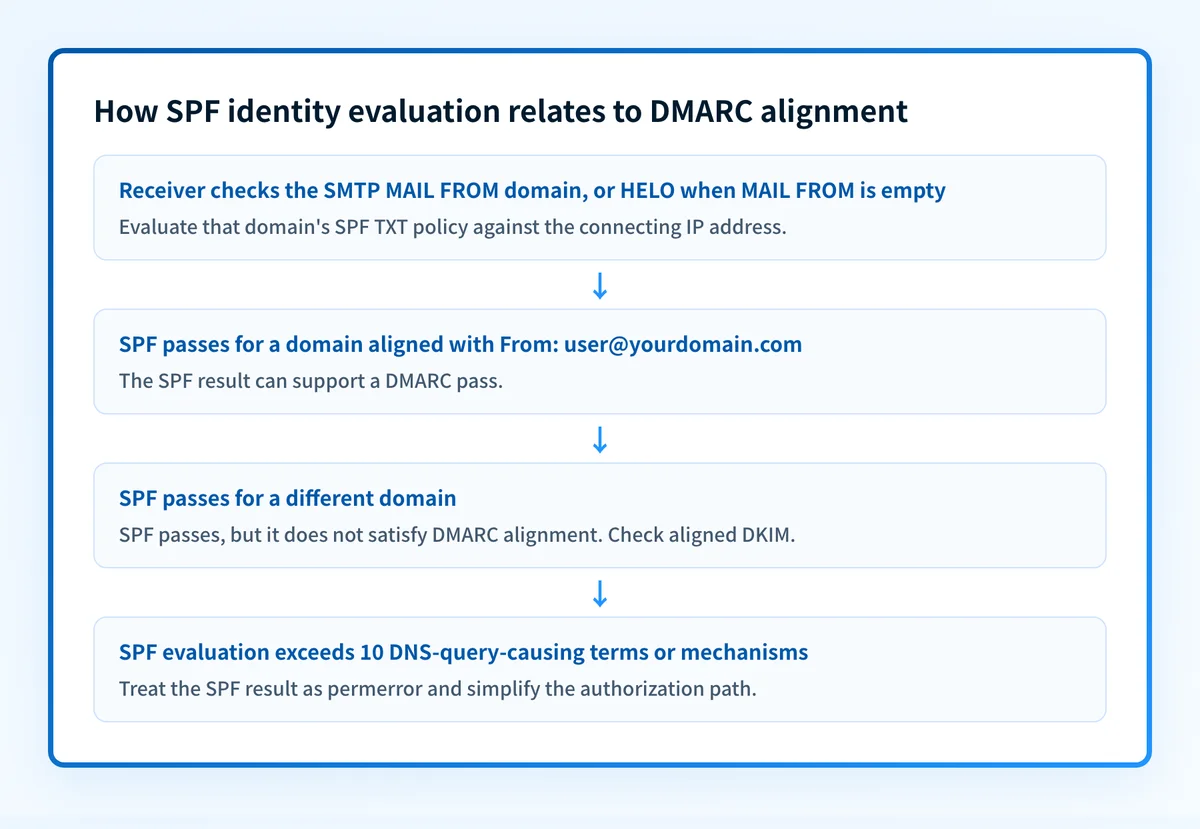
The identity SPF checks is important. For normal SMTP mail, SPF checks the domain in the envelope sender, also called MAIL FROM. If the message has an empty envelope sender, such as a delivery-status notification, SPF uses the HELO or EHLO domain instead. SPF does not authenticate the domain a person sees in the message's From header.
A receiving system can record this result in the Authentication-Results header. RFC 8601 defines that header field, including SPF result properties such as smtp.mailfrom and smtp.helo. Those properties show the identity the receiver evaluated. They are more useful than assuming SPF checked the visible From domain.
An SPF record can authorize sources directly with mechanisms such as ip4 and ip6, or delegate evaluation to another domain with include. The SPF all mechanism determines what happens when no earlier mechanism matches. For a term-by-term walkthrough, read SPF record syntax, mechanisms, and qualifiers.
When an SPF pass counts for DMARC
An SPF pass is an authorization result. DMARC adds an alignment test.
The DMARC specification requires the domain that passed SPF to align with the visible From domain before SPF can produce a DMARC pass. In relaxed alignment, related organizational domains can align. In strict alignment, the domains must match exactly.
Use this decision rule:
- If SPF passes for
bounce.mailer.example.netand the visible From domain isexample.net, SPF may be DMARC-aligned under relaxed alignment. - If SPF passes for
mailer.example.netand the visible From domain isyourdomain.com, SPF passes but does not align for DMARC. - If SPF fails, DMARC can still pass through an aligned DKIM result.
- If neither SPF nor DKIM produces an aligned pass, the message fails DMARC.
smtp.mailfrom, then compare it with the visible From domain.
Worked SPF identity example
This illustrative record authorizes one IPv4 address and delegates another set of authorized senders to a provider-managed policy.
yourdomain.com. TXT "v=spf1 ip4:192.0.2.25 include:spf.sender.example ~all"Do not copy this record into production. Your email providers generate or document the real include domains, IP addresses, and required mechanisms.
If a message arrives from 192.0.2.25 with these identities:
From: Billing <billing@yourdomain.com>
MAIL FROM:<bounce@yourdomain.com>
SPF can pass because the envelope sender domain is yourdomain.com and the connecting IP matches ip4:192.0.2.25. SPF also aligns with the visible From domain, so it can support a DMARC pass.
Now change only the envelope sender:
From: Billing <billing@yourdomain.com>
MAIL FROM:<bounce@sender.example>
SPF may pass for sender.example, depending on that domain's record. It does not align with yourdomain.com, so SPF cannot satisfy DMARC for this message. An aligned DKIM pass could still satisfy DMARC.
SPF evaluation also has a hard DNS-query limit. RFC 7208 section 4.6.4 requires SPF evaluators to stop and return permerror after more than 10 DNS-query-causing terms or mechanisms. Nested include, redirect, a, mx, exists, and ptr mechanisms can contribute to that limit. A record that looks short can still exceed it through nested includes.
Check SPF with the evidence you have
Start with the evidence closest to the question you need answered.
- If you have a domain name, inspect its public TXT record and identify every
include, IP range, and finalallmechanism. The SPF learning hub covers the related concepts in more depth. - If you have a delivered message, inspect its
Authentication-Resultsheader. Confirm whether the receiver reportedspf=pass,spf=fail, or another result, and read thesmtp.mailfromorsmtp.heloproperty. - If you are changing a sender, test mail from that exact production path after DNS is published. A correct record alone does not prove the application uses the envelope sender you expected.
- If you operate DMARC, use aggregate reports after mail has flowed to identify sources and alignment outcomes over time.
Inspect the SPF record your domain publishes
Run the sending domain through Palisade's SPF checker to inspect the public record before you edit its syntax or add another include. If the record is becoming difficult to maintain, the remaining operational question is whether every authorized source is still intentional and aligned with your visible From domains.
Check the published SPF record
A public-record check cannot prove the envelope sender used by an individual message, identify every production sender, monitor later changes, or guarantee delivery or inbox placement.
For teams that need to review SPF and DMARC evidence across active domains, Start with Palisade. Palisade's DMARC Agent analyzes aggregate-report data, identifies authentication and alignment issues, and proposes prioritized remediation work for human review. It does not automatically change your DNS or DMARC policy, and it cannot guarantee that future messages will authenticate or reach the inbox. Palisade documentation describes the managed workflow.
Evidence
Sources and further reading
Questions readers ask
Frequently asked questions
Is SPF the same as DMARC?
No. SPF authorizes sending hosts for an envelope sender or HELO identity. DMARC evaluates whether SPF or DKIM passed with a domain aligned to the visible From domain, then applies the domain owner's requested policy when DMARC fails.
Does SPF check the visible From address?
No. SPF checks the SMTP MAIL FROM identity when present, or the HELO identity for mail with an empty envelope sender. The visible From address is evaluated separately by DMARC alignment.
Can a message pass SPF and fail DMARC?
Yes. SPF can pass for a domain that does not align with the visible From domain. The message can still pass DMARC if DKIM passes with an aligned domain. Otherwise, it fails DMARC.
What does -all mean in an SPF record?
It means the domain owner states that senders not matched by an earlier mechanism are unauthorized. It does not guarantee that every receiver will make the same final delivery decision. Publish it on a domain that sends no mail; a domain that does send should end in ~all, which SPF hard fail versus softfail explains.
How many DNS lookups can SPF use?
RFC 7208 limits SPF evaluation to 10 DNS-query-causing terms or mechanisms. Exceeding that limit produces a permanent SPF error, often shown as permerror.
Does an SPF pass guarantee inbox placement?
No. An SPF pass only reports authorization for the SPF identity. Receiving systems can also consider DMARC, DKIM, reputation, content, user signals, and local policy.

Written by
Samuel ChenardCEO & Co-Founder, Palisade
Samuel Chenard is the CEO and co-founder of Palisade, agentic DMARC software for IT teams and MSPs, from one domain to thousands.
More from Samuel →