Email rejected per DMARC policy: how to fix the bounce
 ChatGPT
 Claude
 Gemini
 Perplexity
 Grok
GrokIn brief
Email rejected per DMARC policy? Identify an alignment failure or policy-evaluation error, check the sender, and validate the repair with a new message.
An email rejected per DMARC policy bounce usually means the receiver rejected a message because neither SPF nor DKIM passed with a domain aligned to the visible From address. If the response instead says "permanent error evaluating DMARC policy," investigate policy evaluation before assuming the sender failed alignment. Preserve the full bounce and identify the sending application before changing DNS.
At a glance
Quick takeaways
- DMARC passes when SPF or DKIM passes and the passing domain aligns with the visible From domain.
- A DMARC
p=rejectrecord requests rejection, but the receiving system makes the final handling decision. - One returned bounce identifies one rejected message, not every application that sends using the domain.
- An SPF pass for a third-party return-path domain can still leave DMARC failing.
- A controlled delivered message with trusted authentication results is stronger evidence than a public DNS lookup.
- A
550 5.7.0response alone does not prove DMARC caused the rejection.
Where should I start with a DMARC rejection?
Start a DMARC rejection investigation with the complete response and the service that actually sent the message. Choose the next check from the evidence you have:
- The bounce says DMARC failed or names a reject policy: compare the visible From domain with the passing SPF and DKIM domains in trusted receiver-added headers. Use the email header analyzer to make a delivered test's results easier to read.
- The bounce says permanent error evaluating DMARC policy: check the published DMARC record, then follow the policy-evaluation checks below. The wording alone does not identify a particular broken DNS record.
- You only have a status such as
550 5.7.1: save the full diagnostic text and reporting host. The 550 5.7.1 response guide separates authentication failures from other policy refusals.
What does the failure mean?
DMARC, defined in RFC 9989, evaluates the domain in the visible From address, called the Author Domain. DMARC passes when SPF or DKIM passes for a domain that aligns with that Author Domain. One aligned pass is sufficient. The p=reject value is a domain owner's requested disposition, and a receiver can apply local policy when deciding how to handle a failing message.
The bounce proves that one receiver rejected one message. It does not prove that every receiver will reject it, identify the application responsible, or show that the published DMARC record is wrong. The DMARC learning hub explains the full evaluation model.
These are illustrative, redacted examples. The returned bounce is rejection evidence. The Authentication-Results block is from a separate controlled message delivered to a mailbox.
Returned bounce:
550 5.7.1 Unauthenticated email from example.com is not accepted due to domain's DMARC policy.
Controlled delivered test:
Authentication-Results: mx.receiver.example;
  spf=fail smtp.mailfrom=bounce.marketing-tool.example;
  dkim=none;
  dmarc=fail (p=REJECT) header.from=example.com
The spf, dkim, and dmarc result tokens, plus properties such as smtp.mailfrom, header.d, and header.from, use the Authentication-Results format in RFC 8601. Read this field only when you trust the receiving authentication service that added it. A message can carry an untrusted or forged copy.

A 550 5.7.0 response alone does not identify DMARC as the cause. RFC 3463 defines X.7.0 as an undefined security status, while RFC 7372 defines more specific email-authentication status codes. Keep the complete diagnostic text and reporting host.
Google documents 550-5.7.26 as an unauthenticated-mail rejection example in its Gmail sender guidelines. Microsoft documents that Exchange Online can apply a sender's published DMARC policy during SMTP in its DMARC configuration guidance. These examples do not predict every receiver's response.
What usually causes it?
A legitimate sender has no aligned authentication pass
A marketing platform, CRM, help desk, or transactional service can use your visible From domain while using its own envelope sender and DKIM signing domain. In the illustrative header, SPF fails for bounce.marketing-tool.example and DKIM is absent. Neither result supplies an aligned pass for example.com.
Confirm the application and outbound route before changing DNS. Why DMARC fails and how to fix it explains why a passing authentication result can still fail DMARC alignment.
DKIM passes for an unaligned signing domain
A dkim=pass result is insufficient by itself. The passing header.d domain must align with the visible From domain under the domain's DMARC alignment mode. This follows from the DMARC alignment rules in RFC 9989. It does not prove that a particular sending service lacks support for domain authentication.
SPF passes for an unaligned envelope sender
SPF evaluates the SMTP envelope sender domain, exposed as smtp.mailfrom in a trusted Authentication-Results field. A service can pass SPF for its own return-path domain while the visible From address uses your domain. DMARC still fails unless DKIM supplies an aligned pass.
Do not add a service to SPF based on a bounce alone. Confirm that the service sent the rejected production path, then use that provider's current account-specific instructions for an authenticated return path or DKIM domain.
An indirect mail flow changed the message path
Forwarding can break SPF because the receiver evaluates the forwarding server's IP address. An aligned DKIM signature can preserve DMARC through an unmodified indirect flow, but message changes by a list or intermediary can invalidate that signature. RFC 7960 explains these indirect-mail limitations.
This remains an inference until you compare the original route with the forwarded or list-processed route.
The rejected message was spoofed
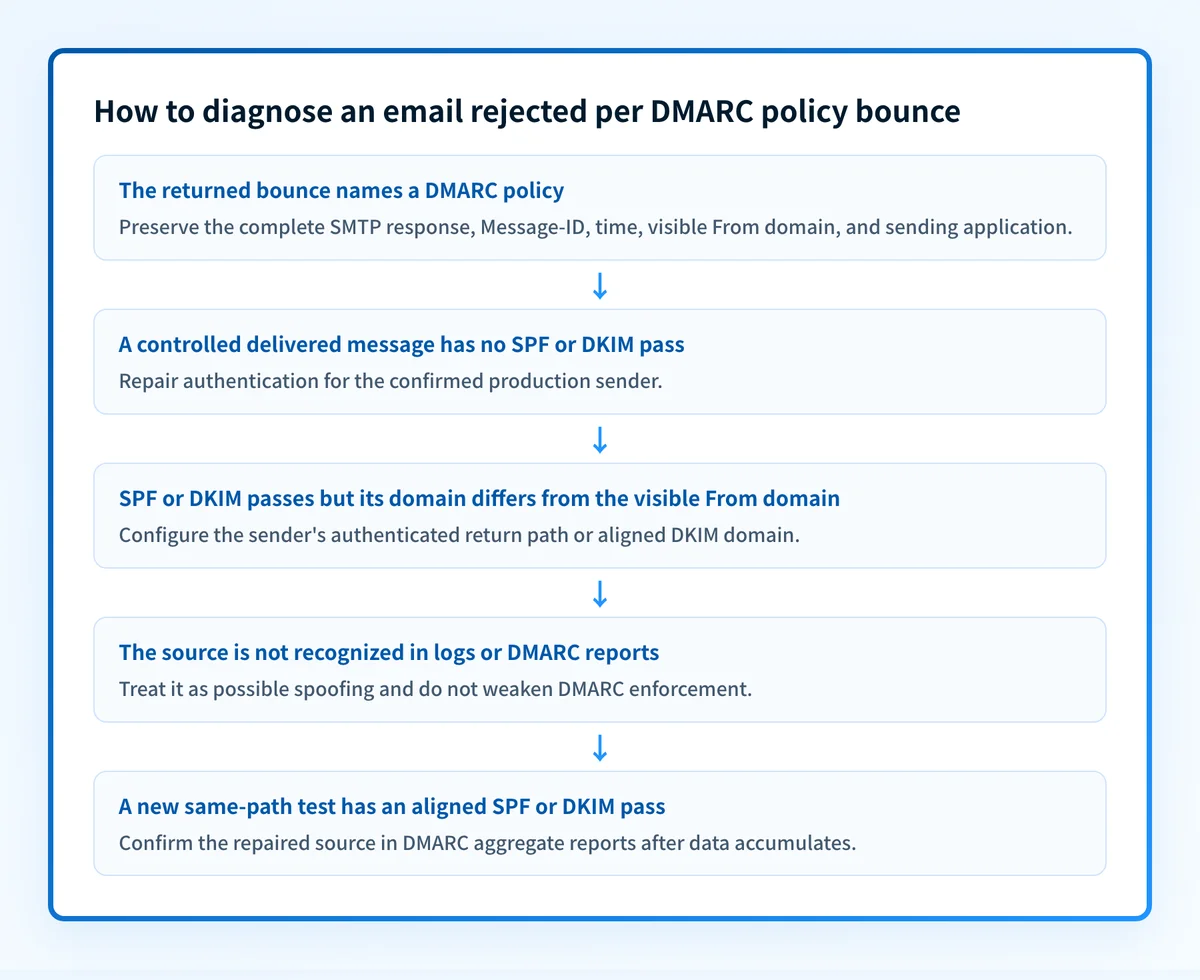
If sender logs and DMARC reports do not identify the IP, application, or platform as an authorized source, the rejected message may be spoofed. In that case, rejection can be the expected result of enforcement. Changing policy reduces the domain's requested protection without repairing a legitimate sender.
For help interpreting other returned-mail symptoms, see Bounce-back email: how to read the error and fix the cause.
What about "554 5.7.5 Permanent Error Evaluating DMARC Policy"?
554 5.7.5 Permanent Error Evaluating DMARC Policy reports a permanent rejection that the receiving system describes as a DMARC evaluation problem. The complete wording matters: RFC 3463 defines X.7.5 as a cryptographic failure, not a universal DMARC DNS-error code. Do not conclude from this response alone that two records exist or that SPF and DKIM passed.
Check the policy record without guessing the cause
For a policy-evaluation error, inspect the published record for the visible From domain. Replace example.com with that domain:
dig +short TXT _dmarc.example.comRead the DNS answer as records, not as a count of quoted strings. A single TXT resource record can contain multiple strings that are joined for evaluation. RFC 7489 section 6.1 describes this representation; RFC 9989 section 4.10.1 specifies current policy discovery.
- Multiple DMARC records at one name: reconcile the duplicate records with the domain owner. Do not add a second policy beside the existing one.
- No answer at the exact name: check the applicable parent-domain policy and DNS resolution. An empty answer for a subdomain does not establish that the message is outside DMARC.
- A record is present: validate the version and recognized policy values. Compare the result with the authoritative DNS configuration before changing a legitimate policy.
Ask the rejecting receiver for its evaluation evidence
If DNS checks do not explain a policy-evaluation error, give the recipient's administrator the exact response, reporting host, timestamp, sender and recipient domains, and the DNS answers you obtained. Ask which policy lookup or validation step failed. Preserve any available authentication results; do not assume SPF or DKIM cannot be involved merely because the response begins with 554.
A permanent 5xx reply is a failed delivery attempt, not a request to keep retrying unchanged mail. RFC 5321 section 4.2.1 defines reply classes. Send a new controlled test after the identified problem is repaired.
How do Gmail and Microsoft 365 identify DMARC rejection?
Gmail and Microsoft 365 publish specific DMARC response text. Match the receiver and full explanation before selecting a repair; the mailbox you send from may be hosted by a different provider.
Gmail: read the explanation after 550 5.7.26
Gmail's SMTP error reference includes this DMARC-specific diagnostic, with a placeholder domain:
550 5.7.26 Unauthenticated email from domain-name is not accepted due to domain's DMARC policy.Gmail also uses 5.7.26 for other authentication failures. When the text names the domain's DMARC policy, check for an aligned SPF or DKIM pass. For other wording, use the 550 5.7.26 troubleshooting guide to select the right branch.
Microsoft 365: match the 5.7.509 DMARC response
Microsoft's Exchange Online NDR reference maps 5.7.509 to:
Access denied, sending domain [$SenderDomain] does not pass DMARC verification and has a DMARC policy of reject.This response identifies a DMARC failure at the Microsoft receiver. Find the sending application and repair its aligned authentication. Receiving a Microsoft bounce does not mean the message was sent through Microsoft 365. The 550 5.7.509 guide covers that specific NDR.
What does "DMARC unauthenticated mail is prohibited" mean?
"DMARC unauthenticated mail is prohibited" names DMARC in the refusal, but the phrase alone does not identify the provider or the exact failed check. Keep the reporting host and the rest of the response, then inspect the sender's authentication and alignment. Avoid assigning that phrase to Microsoft or another vendor without matching its documented diagnostic.
How do I diagnose the failure?
1. Preserve the complete returned bounce
Save the complete bounce, reporting host, SMTP status, timestamp, visible From domain, recipient domain, and diagnostic text. Match it to sender logs using the Message-ID, recipient, and sending time where available.
Build a labelled evidence packet before editing DNS or vendor settings:
Illustrative redacted rejection evidence packet
Visible From domain: example.com
SPF envelope domain/result: bounce.marketing-tool.example / fail
DKIM d=/selector/result: not present / not present / none
DMARC result/disposition: fail / p=REJECT
Exact recipient response: 550 5.7.1 Unauthenticated email from example.com is not accepted due to domain's DMARC policy.
Message ID/time: <redacted-message-id> / 2026-08-12T10:15:00Z
Sender application: marketing platform
If the response says 550 5.7.1, retain its exact wording. The broad 550 5.7.1 variant guide shows how to distinguish DMARC wording from relay, blocklist, recipient-policy, and content-policy refusals.
2. Identify the exact production sender
Determine which application, ESP, gateway, or user submitted the message. Record the visible From domain, envelope sender, outbound relay or IP, DKIM selector, and branded-domain configuration.
Do not identify the application from the display name. One domain can be used by several independent systems with separate SPF, DKIM, and return-path settings.
3. Read a controlled delivered message
Send a controlled message through the same application, authenticated domain, template type, outbound route, and recipient provider where practical. Deliver it to a mailbox you control that exposes full headers.
Open the email header analyzer if you need help locating authentication results in the raw headers. Treat only results added by a trusted receiving service as evidence.
Compare the visible From domain with the SPF smtp.mailfrom domain and any passing DKIM header.d domain in the trusted receiver-added Authentication-Results field. This identifies the branch to repair:
- Authentication failure: SPF and DKIM both fail or are absent. Repair the confirmed sender's authentication setup.
- Alignment failure: SPF or DKIM passes, but its passing domain does not align with the visible From domain. Configure the sender's authenticated return path or DKIM signing domain.
- Receiver decision: DMARC fails and the receiver rejects, quarantines, or accepts the test. The domain policy is a request, not a guarantee of identical treatment across receivers.
4. Check the published DMARC policy separately
Look up the From domain's DMARC record after you preserve the message evidence. Confirm the domain being checked is the exact visible From domain or its applicable organizational domain. Record p=, adkim=, and aspf= if they are present.
A public record result shows current DNS publication. It does not prove that the application signs mail, uses the configured return path, or produced the rejected message.
How do I fix it?
Configure the confirmed sender's aligned DKIM domain
When the application supports custom DKIM signing, configure the domain it provides in its account settings and publish the account-generated DNS records. Then complete the provider's verification process.
Do not publish selectors, CNAME targets, tokens, or hostnames copied from another account. Use only values generated for your own domain and tenant.
This repair changes authentication and alignment. It does not alter DMARC enforcement.
Which sending provider needs the repair?
Repair DKIM in the service that sent the failing message, not automatically in the provider that hosts your inbox.
- Sent through Google Workspace: generate the domain's DKIM key in the Admin console, publish Google's supplied TXT record at your DNS provider, then start authentication in the Admin console. Publishing the record alone does not enable signing. Follow Google's DKIM setup instructions.
- Sent through Microsoft 365: use the custom domain's DKIM settings in Microsoft Defender, publish the tenant-generated CNAME records, and enable signing after the records are detected. Follow Microsoft's custom-domain DKIM instructions; do not construct selector targets from an example.
- Sent through a CRM, help desk, or marketing service: authenticate the domain inside that service. Enabling DKIM for your Google Workspace or Microsoft 365 mailbox does not configure a separate sending platform. Check the service's generated records and confirm the signing domain on a new message.
Configure an authenticated return path when SPF is the aligned path
When the sender supports a custom return path, publish its account-generated DNS records and confirm that the envelope sender uses the authenticated subdomain. Then send a new message and compare the resulting smtp.mailfrom domain with the visible From domain.
An SPF include can authorize infrastructure, but it does not by itself make a third-party envelope domain align with your visible From domain.
Repair the signing or routing order for indirect mail
If a forwarder, list, or gateway changes the message after signing, determine whether the change can occur before aligned DKIM signing or whether the route can avoid the modification. Test one controlled route at a time.
Do not treat forwarding as proof that the sender configuration is correct. Forwarding and message modification are separate conditions under RFC 7960's indirect-mail guidance.
Keep an enforcement change separate from the repair
Do not lower p=reject as the technical fix. Changing p= changes the domain's requested DMARC handling, not the sender's SPF result, DKIM signature, or domain alignment. If an incident requires a temporary policy decision, document it separately, limit its duration, and continue repairing the identified sender.
How do I validate the repair?
To validate a DMARC rejection repair, repeat the same production path: the same application, visible From domain, template, recipient provider, and routing conditions. A successful DNS lookup is only the first validation layer.
Check each applicable layer:
- DNS: query the domain's published records through the authoritative DNS provider and at least one public resolver.
- Vendor: confirm the sender's current domain-authentication or verification status in its own interface.
- Message: send a new message and inspect the trusted receiver-added Authentication-Results field for an SPF or DKIM pass aligned with the visible From domain.
- DMARC: after reports accumulate, confirm that the repaired source appears as expected in DMARC aggregate-report data.
From: billing@example.com
Authentication-Results: mx.receiver.example;
  spf=pass smtp.mailfrom=bounce.marketing-tool.example;
  dkim=pass header.d=example.com;
  dmarc=pass header.from=example.com
The passing header.d=example.com aligns with the visible From domain. The SPF pass for bounce.marketing-tool.example does not supply that alignment. This is the either-mechanism rule in RFC 9989 section 4.4.
Keep the passing raw message and the previous failed evidence together. A green vendor status is not proof that the exact production route produced an aligned pass.
Find every sender that still fails DMARC alignment
Check the domain's published policy before making another change.
Check your domain's DMARC record
The checker inspects the domain's published DMARC record. It cannot prove why one specific receiver rejected one specific message, does not monitor continuously, and does not guarantee future inbox placement.
After one sender is aligned, the remaining question is which other production sources still fail alignment. Palisade's DMARC Agent analyzes incoming DMARC aggregate-report data, identifies sending sources and authentication or alignment issues, and creates prioritized remediation tickets. Your team reviews the evidence and applies the fix. Palisade does not change your DNS or DMARC policy automatically, does not control receiver-side handling, and does not guarantee delivery.
Evidence
Sources and further reading
- RFC 9989: Domain-based Message Authentication, Reporting, and Conformance
- RFC 5321: SMTP reply classes
- RFC 7489: TXT record representation
- Gmail SMTP error reference
- Google Workspace DKIM setup
- Exchange Online NDR reference
- Microsoft 365 custom-domain DKIM setup
- RFC 8601: Authentication-Results header field
- RFC 7960: Interoperability issues between DMARC and indirect email flows
- RFC 3463: Enhanced mail system status codes
- Gmail sender guidelines
- Microsoft Exchange Online DMARC configuration guidance
Questions readers ask
Frequently asked questions
What does "554 5.7.5 Permanent Error Evaluating DMARC Policy" mean?
554 5.7.5 Permanent Error Evaluating DMARC Policy is a permanent rejection whose diagnostic names a DMARC evaluation problem. Check the published policy and DNS resolution, then ask the rejecting administrator which evaluation failed if the record checks do not explain it. The code alone does not prove duplicate records, successful SPF or DKIM, or a specific provider's behavior.
Does p=reject mean every receiver will reject my email?
No. p=reject requests rejection for DMARC-failing mail, but RFC 9989 allows each receiver to apply its own local handling. A receiver can accept, reject, quarantine, or filter a message using its own policy.
Can SPF pass while DMARC fails?
Yes. SPF can pass for the envelope sender domain while the visible From address uses a different domain. DMARC requires the passing SPF domain to align with the visible From domain, unless aligned DKIM supplies the DMARC pass.
Does 550 5.7.0 prove a DMARC rejection?
A 550 5.7.0 response does not by itself prove a DMARC rejection. RFC 3463 defines X.7.0 as an undefined security status. Keep the full SMTP response and inspect a controlled delivered test before attributing the rejection to DMARC.
Should I change my DMARC policy to p=none?
No. Changing to p=none removes the domain's DMARC-specific enforcement request but does not repair SPF, DKIM, alignment, or the sender configuration that caused the rejection.
Can forwarding cause email to be rejected per DMARC policy?
Yes. Forwarding can cause SPF to fail because the forwarding server's IP is evaluated. An aligned DKIM signature can preserve DMARC only while the message remains unmodified, so compare the original and forwarded paths before changing the sender configuration.

Written by
Dominic LandryDeliverability & DNS
Dominic Landry works on email deliverability and DNS configuration at Palisade, from SPF and DKIM records through to DMARC enforcement.
More from Dominic →