Bounce-back email: how to read the error and fix the cause
 ChatGPT
 Claude
 Gemini
 Perplexity
 Grok
GrokIn brief
Bounce-back email errors identify a delivery failure. Read the SMTP status, repair the confirmed cause, and retest the same sending path now.
A bounce-back email is a delivery-status notification that reports an SMTP delivery failure or delay. Read the original notification before changing DNS, sender settings, or recipient data. Its status code, diagnostic text, recipient, and remote mail server show whether the next action belongs with the recipient address, sending system, DNS, authentication, or the receiving provider.
When the immediate question is which envelope return path receives the delivery notice, see how to identify a bounce email address before changing a sender configuration.
At a glance
Quick takeaways
- A bounce-back email can report either a temporary delivery problem or a permanent failure.
- The SMTP reply class matters:
4xxindicates a transient condition, while5xxindicates a permanent failure for that delivery attempt. - A
5.1.1status commonly points to a recipient-address problem, but the full diagnostic text and recipient system still matter. - A public DNS or authentication check cannot validate a private recipient mailbox or explain every receiver rejection.
- Retest with a new message through the same application, sender domain, route, and recipient provider after a repair.
- Do not loosen a DMARC policy to hide a bounce. A policy change affects requested enforcement, not the underlying delivery failure.
What does the failure mean?
A delivery-status notification, sometimes called an NDR, is evidence from a mail system about one message attempt. RFC 3463 defines enhanced mail-system status codes, while RFC 5321 defines SMTP reply classes. The first digit distinguishes transient4xx responses from permanent 5xx responses.
This redacted delivery-status notification has a permanent reply and an enhanced recipient-address status:
Final-Recipient: rfc822; recipient@example.net
Action: failed
Status: 5.1.1
Remote-MTA: dns; mx.example.net
Diagnostic-Code: smtp; 550 5.1.1 Recipient address rejected
The notification proves that the reporting system recorded a failed attempt to recipient@example.net and received the stated SMTP diagnostic from mx.example.net. It does not, by itself, prove why that recipient address was rejected. The recipient organization, its mail provider, or its mailbox configuration may hold details that are not exposed in the notification.
A useful first classification is:
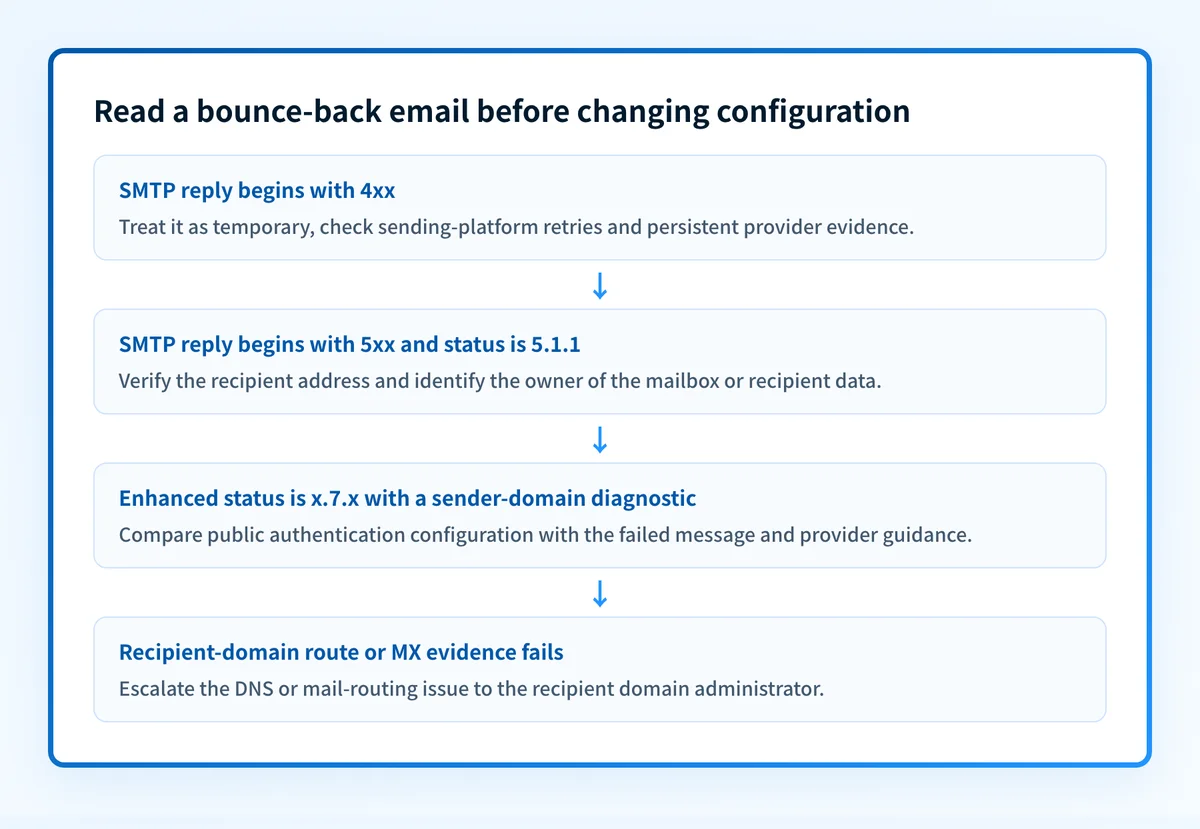
4xx: the receiving system says the condition may be temporary. Preserve the notification and retry only within your normal sending controls.5xx: the receiving system rejected that attempt as permanent. Inspect the enhanced status and diagnostic text before retrying.x.1.x: the status category concerns addressing or mailbox status.x.7.x: the status category concerns security or policy status. The exact mapping still depends on the receiving system's diagnostic text.
For a focused explanation of temporary and permanent outcomes, see soft bounce vs hard bounce email.
What usually causes it?
The recipient address or mailbox cannot accept mail
A 5.1.1 enhanced status identifies an addressing or mailbox-status category under RFC 3463. The recipient address may be misspelled, removed, disabled, or unavailable under the recipient organization's rules. The exact string Recipient address rejected does not disclose which of those conditions applies.
Treat any conclusion beyond the displayed evidence as an inference. Confirm the address through an approved recipient contact or the recipient organization's directory, not by repeated automated retries.
The sending application used the wrong recipient data
The application, CRM, form, or list source may contain an old address, an unintended alias, or a malformed address. This is more likely when the same recipient fails from one application but succeeds from another approved sender.
Compare the Final-Recipient field in the delivery-status notification with the address stored in the sending application. Do not use a displayed name as evidence that the SMTP envelope recipient was correct.
The recipient domain has a DNS or MX delivery problem
If the notification identifies a recipient domain that cannot be resolved or lacks a usable mail route, the failure belongs to domain DNS or recipient mail routing. A missing MX record can affect delivery, though SMTP permits a sender to use an address record when no MX record exists. An MX lookup on the recipient domain shows which mail hosts, if any, it publishes.
This differs from a mailbox rejection. The sending system may have reached the recipient domain's mail server before that server rejected the address.
A receiving provider rejected sender authentication or policy
An x.7.x enhanced status can indicate a security or policy condition. The receiver's diagnostic text may point to sender authentication, message policy, reputation, or another local rule. Gmail's bounced and rejected email guidance directs senders to use the returned error details when identifying the reason for rejection.
Do not infer that every x.7.x response is a DMARC failure. Use the actual diagnostic text, the delivered-message headers when available, and the receiving provider's documented guidance.
A temporary receiving-system condition delayed delivery
A 4xx response may result from a temporary recipient-system condition, rate limit, or other transient constraint. RFC 5321 distinguishes these temporary failures from permanent 5xx failures. Your sending service's retry behavior and logs are the evidence for whether later attempts succeeded.
Do not convert a temporary response into a permanent recipient-data repair unless later evidence supports it.
How do I diagnose the failure?
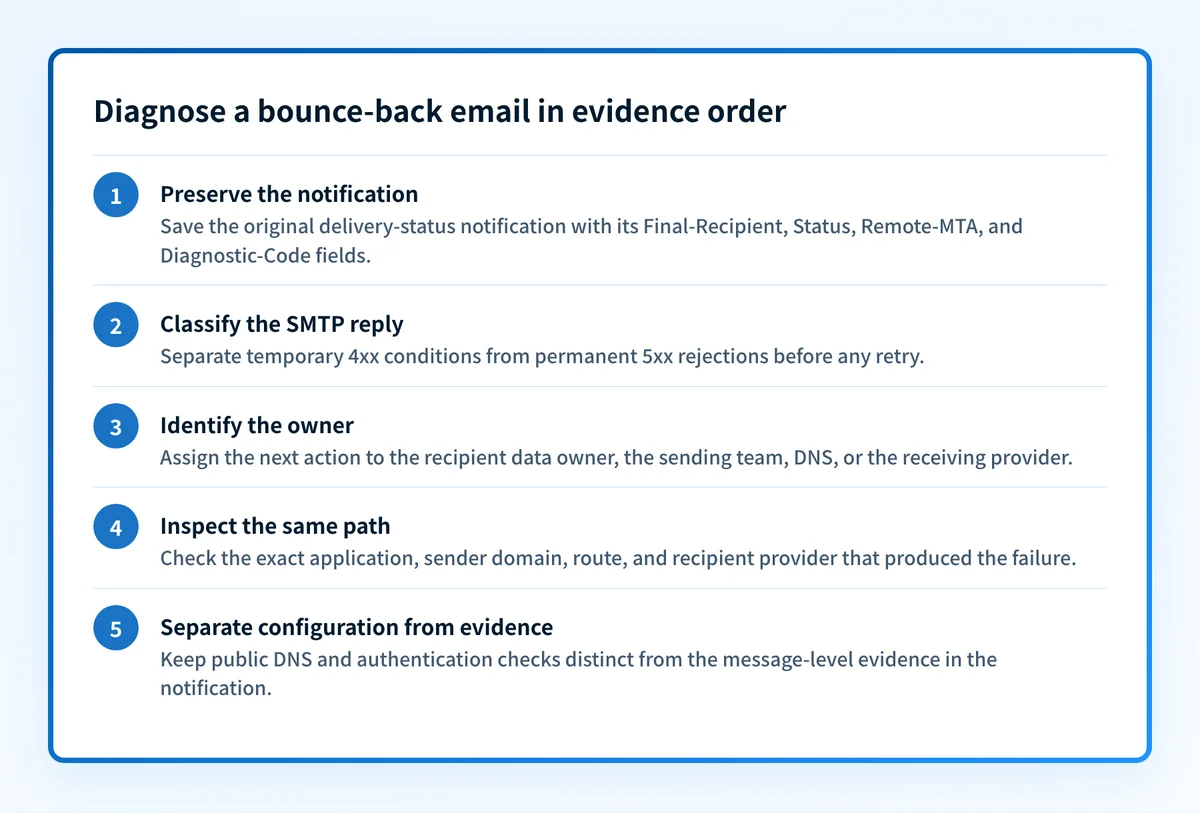
1. Preserve the original delivery-status notification
Save the unaltered notification and the original message identifier before editing recipient data or changing sender settings. Record these four fields:
Final-RecipientStatusRemote-MTADiagnostic-Code
2. Classify the SMTP reply before retrying
Read the first digit in the SMTP code. A 4xx response calls for controlled retry behavior and provider-specific investigation. A 5xx response calls for a targeted repair before another production attempt.
Then read the enhanced status as a category, not as a complete diagnosis. For example, 5.1.1 narrows the issue toward recipient addressing. It does not establish whether the sender typed the address incorrectly or the recipient organization disabled the mailbox.
3. Identify who controls the next action
Use the notification to assign ownership:
- A recipient-address error belongs first with the recipient data owner or recipient organization.
- A sender application or routing error belongs with the team operating that sending path.
- A recipient-domain DNS or MX problem belongs with the recipient domain's DNS or mail administrator.
- A sender authentication or policy diagnostic belongs with the sender-domain owner and the receiving provider's documented requirements.
- A temporary
4xxresponse belongs with the sending service's retry process and, when necessary, the receiving provider.
4. Inspect the same production path
A test from a personal mailbox does not validate a failure from an application, CRM, transactional service, or corporate relay. Send a controlled message from the same application, using the same sender domain, route, and content type.
For a possible recipient-address issue, use one approved corrected address or confirm the existing address through the recipient. For a suspected sender-domain issue, preserve the received message source and its trusted Authentication-Results fields. RFC 8601 describes the header field that reports message-authentication results and its trust boundary.
5. Separate public configuration from message evidence
A public check can help only after the delivery-status notification points to a sender-domain authentication or configuration question. It cannot replace the original SMTP diagnostic or recipient-provider evidence.
A sender-domain failure is different from a recipient-routing failure. For example, an email rejected per DMARC policy requires message-authentication and alignment evidence, not only a generic bounce classification.
How do I fix it?
Correct confirmed recipient data
When the notification and an approved source confirm that the address is wrong, update the address in the system that sent the message. Remove or suppress a known-invalid address from future automated sends according to your organization's retention and consent rules.
Do not repeatedly send to a rejected recipient address to test whether it has recovered. Repeated attempts can create unnecessary traffic and do not prove that the address is valid.
This repair changes recipient data. It does not change DNS, authentication, or DMARC enforcement.
Repair the sending application's route or envelope data
When logs show that the application constructed the wrong envelope recipient or used an unintended outbound route, correct that specific configuration. Retain the previous setting and record a rollback path before deploying the change.
Confirm the repair with a new message from the affected application. A test from a different mail client does not prove that the application now uses the corrected route.
Escalate recipient-domain DNS and MX failures to the domain owner
When the evidence shows a recipient-domain routing issue, provide the recipient administrator with the exact domain, timestamp, remote-server result, and diagnostic text. Avoid publishing or guessing replacement MX hosts.
The recipient administrator must repair its own DNS or mail-routing condition. Changing your sender's DMARC policy does not repair the recipient domain's route.
Repair confirmed sender-domain authentication or public configuration issues
When the DSN and provider guidance identify a sender-domain authentication or public-configuration question, inspect the published SPF, DKIM, and DMARC posture before changing records.
Check sender-domain email security evidence
If the bounce points to a sender-domain authentication or public-configuration issue, use the Email Security Score to inspect published domain evidence before proposing a DNS change. Compare the result with the failed message's trusted authentication results and the receiving provider's diagnostic.
Check sender-domain email security
A public score cannot validate a recipient address, reproduce a receiver's private policy, inspect the exact production message path, or explain every individual rejection. Palisade does not change DNS, authorize a sender, override a recipient policy, or guarantee delivery or inbox placement.
Leave temporary failures to controlled retry handling
For confirmed 4xx conditions, use the retry behavior configured in the sending platform and investigate persistent failures with the receiving provider or recipient administrator. Do not recast a transient condition as a permanent hard bounce until later attempts or provider evidence establish that outcome.
This action affects delivery attempts. It does not repair recipient data or sender authentication by itself.
How do I validate the repair?
Send a new test through the same production application, with the same sender domain, outbound route, recipient-provider type, and relevant content. Confirm that the sending platform records acceptance or delivery according to its normal telemetry.Validate each applicable layer:
- DNS: for a sender-domain repair, check the published record through the authoritative DNS path and a public resolver.
- Vendor: confirm the sending platform or provider shows the intended authentication or route status.
- Message: inspect the newly delivered message's trusted
Authentication-Resultswhen the repair involved authentication. - DMARC: after aggregate reports accumulate, confirm that the relevant sending source authenticates and aligns as expected.
Evidence
Sources and further reading
Questions readers ask
Frequently asked questions
What is a bounce back email?
A bounce-back email is a delivery-status notification reporting that a mail system could not deliver a message or has delayed delivery. It usually includes an SMTP reply, enhanced status code, recipient information, and diagnostic text that help identify the failure.
How do you say an email bounced back?
You can say, "The email bounced," "The message was rejected," or "We received a delivery-status notification." Use the actual SMTP diagnostic in an incident ticket because "bounced" alone does not identify whether the issue was temporary, recipient-specific, routing-related, or policy-related.
How do I send a bounce back email?
Only a mail system should generate a delivery-status notification in response to a delivery attempt. If you need to notify someone manually, send a normal message that includes the relevant redacted error details. Do not imitate a delivery-status notification or use it to contact an unintended recipient.
How long until an email bounces back?
It depends on the SMTP response and the sending provider's retry policy. A 5xx rejection can be reported immediately for that attempt, while a 4xx temporary failure may be retried before the sender reports final non-delivery. Check the sending provider's logs for the actual retry timeline.
Can a DMARC record cause a bounce back email?
Yes, if the receiving provider rejects a message because it fails the sender domain's published DMARC policy or the provider's authentication requirements. Confirm that cause with the full diagnostic text and the received message's trusted authentication results. A bounce alone does not prove DMARC caused it.

Written by
Dominic LandryDeliverability & DNS
Dominic Landry works on email deliverability and DNS configuration at Palisade, from SPF and DKIM records through to DMARC enforcement.
More from Dominic →