What causes an email to bounce?
 ChatGPT
 Claude
 Gemini
 Perplexity
 Grok
GrokIn brief
What causes an email to bounce? Preserve the bounce evidence, validate undeliverable addresses, correct list data, and retest the same path.
An email can bounce when the sending list includes an address that is invalid or undeliverable. Start with the returned message and preserve its exact text, then determine whether the recipient address exists and is suitable for sending. Address validation can prevent avoidable list-data failures, but it cannot prove that a receiver will accept a particular future message or place it in the inbox. For broader incidents, use the delivery errors learning hub.
At a glance
Quick takeaways
- A bounce is evidence from a delivery attempt, so retain the original return or rejection text before changing data.
- An address-validation service can identify addresses it classifies as invalid, undeliverable, risky, or unknown.
- Validation workflows may check syntax, the domain, MX and DNS records, and mailbox availability.
- Remove addresses identified as invalid or high risk before sending another campaign.
- A validation result does not prove receiver acceptance, inbox placement, or the cause of every bounce.
- Retest with the same sending path after correcting the recipient data.
What does the failure mean?
For this article's address-related diagnostic path, the observable failure is a message sent to an address that does not exist or cannot be classified as deliverable. Mailgun identifies this as a list-quality problem when organizations are sending to addresses that don't exist.
sending to addresses that don't exist.That phrase identifies an address-related risk. It does not identify the meaning of every SMTP response, whether a receiver treated the failure as temporary or permanent, or whether the domain's authentication settings caused a separate rejection.
Keep the original non-delivery report, SMTP response, or ESP event with the affected recipient record. Do not rewrite the provider's wording in an incident ticket. The exact text, timestamp, sending application, recipient domain, and sending list identify the delivery attempt that needs investigation.
An address-validation result is useful before a resend because Verifalia classifies addresses as Deliverable, Undeliverable, Risky, or Unknown. That classification is not a receiver promise. A mailbox can change after a check, and the available validation evidence does not establish why a receiver accepted or rejected one specific message.
What usually causes it?
The recipient address is invalid or undeliverable
An invalid or undeliverable address is the clearest documented cause in the available evidence. Verifalia states that its service identifies "invalid and undeliverable emails" and returns an address classification. If the affected contact is classified as undeliverable, do not keep sending to that address until the contact supplies a corrected one.
This conclusion applies to the recipient address. It does not establish that every bounced message has an invalid recipient, because receiver responses can reflect other conditions that require their own authoritative documentation.
The sending list contains stale contact data
A list can retain an address after a person changes jobs, an organization retires a mailbox, or a form captures a typo. The evidence supports checking the actual address before the next send, rather than assuming the rest of the list has the same problem.
Mailgun describes validation as a way to remove invalid and high-risk addresses. Treat that as a targeted list-hygiene action. Do not infer that one invalid result proves the whole list is poor quality.
The address has a risky or unknown validation result
A validation result is not always a clear yes or no. Verifalia documents classifications that include Risky and Unknown alongside Deliverable and Undeliverable. Those outcomes call for a sending decision that matches the organization's consent, risk, and contact-management policy.
Do not relabel a risky or unknown result as a bounce cause. It is a classification that needs review. The available evidence does not support a universal rule for suppressing every risky or unknown address.
The validation check has not covered the address before sending
A list may be sent without recent validation, leaving invalid and high-risk addresses in the audience. Verifalia describes a workflow with:
Syntax validation, domain / MX / DNS check, mailbox availability checkThose checks can identify address problems before a campaign goes out. They do not inspect a specific received bounce message, prove the production sender configuration, or guarantee delivery.
For issues beyond recipient data, compare the original evidence with the related guidance on bounce email address diagnosis. Do not assign a general cause from the address alone.
How do I diagnose the failure?
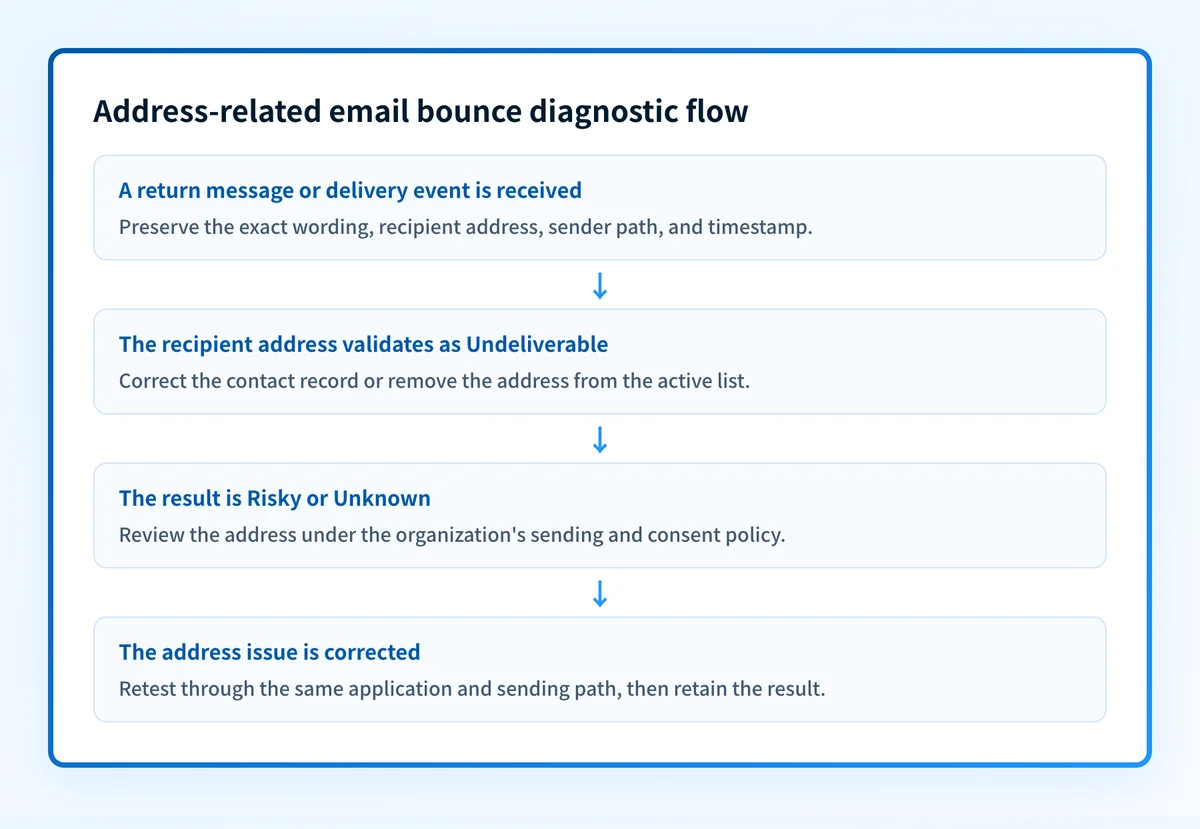
1. Preserve the returned-message evidence
Save the full bounce message, non-delivery report, or event record before editing the contact. Record the affected recipient address, the date and time, the sending application, and the list or workflow that used the address.
Keep the original wording intact. A return message may contain receiver-specific information, and the available evidence does not provide a standard mapping from bounce strings to causes. The email deliverability guide provides broader context, but list validation remains a separate check.
2. Confirm the exact address that was sent
Compare the address in the sending event with the address stored in the CRM, ESP, form submission, or source system. Look for data-entry errors and accidental changes to the contact record.
Do not replace the address based on a guess. Ask the contact for a corrected address when practical, or use an approved validation workflow to classify the existing address.
3. Validate the address before another send
Use an email-address validation service that checks the address before it re-enters a campaign. Verifalia describes checks for syntax, domain, MX and DNS, and mailbox availability, then returns an address classification.
Record the outcome alongside the original bounce evidence. A useful incident note distinguishes the observed return message from the later validation result. They are related evidence, but neither one automatically explains every possible receiver decision.
4. Separate recipient-data findings from sender-configuration questions
If validation identifies the address as invalid or undeliverable, the narrow repair is to correct or remove that address from the sending list. If validation does not establish an address problem, do not force the incident into this category.
Authentication and sender-domain configuration can affect the broader security posture of a sending domain. They still do not explain a single receiver's bounce text without message and receiver evidence. Use a provider's own logs or dashboard for a receiver-controlled decision.
5. Record the retest path
Before resending, record the application, sending domain, recipient address, list segment, and message version. This makes the retest comparable with the failed attempt.
A different campaign, different recipient, or different sender route cannot prove that the original failure is resolved. Use the same approved production path when possible.
How do I fix it?
Correct an invalid recipient address
When validation identifies an address as invalid or undeliverable, replace it only with an address obtained through an approved contact update. If no corrected address is available, remove the invalid address from the active sending list.
This repair changes contact data. It does not change DMARC, SPF, DKIM, receiver policy, or the receiver's inbox decision.
Do not repeatedly resend to an address classified as invalid or undeliverable while waiting for a different result. Repeated attempts do not correct the stored contact data.
Remove invalid and high-risk addresses before the next send
Mailgun states that validation can remove invalid and high-risk addresses. Apply that action to the affected list under the organization's retention and consent rules. Keep an audit record of why the contact was removed or suppressed.
Do not delete every bounced contact automatically. The available evidence supports removing invalid and high-risk addresses after validation, not a universal deletion rule for all bounce events.
Recollect the address through a controlled update
If the address came from a form, import, or manual entry, correct the source process after confirming the data issue. Use confirmation or validation controls appropriate to that intake path.
This repair reduces recurrence from the same data source. It does not prove that other contacts, domains, or campaigns will not bounce for unrelated reasons.
Escalate evidence that is not address-related
When the address is not classified as invalid or undeliverable, preserve the original evidence and investigate through the sending platform or receiving provider's documented path. The Outlook bounce-back email guide can help when the returned message is specific to Outlook.
Do not loosen a DMARC policy as a response to an unclassified bounce. A DMARC policy changes requested authentication enforcement. It does not correct recipient data or explain an individual receiver response.
How do I validate the repair?
Send a new message through the same application and sender path to the corrected, confirmed recipient address. Retain the resulting event record with the original incident.
Validate each applicable layer:
- Check the recipient data in the source system and confirm that the address was corrected or removed.
- Check the validation result and retain its Deliverable, Undeliverable, Risky, or Unknown classification.
- Check the delivered message or returned message from the same sending path.
- Check DMARC aggregate-report data after it accumulates if the sending domain also needs authentication monitoring.
Check the sending domain after fixing list data
After correcting an address-related bounce, inspect the sending domain's broader email-security posture with the email security score tool. This can help identify domain-level authentication configuration worth reviewing alongside list hygiene.
Check the sending domain's email security score
An email-security score cannot interpret one receiver's bounce text, validate an individual mailbox, prove the production sending path, or guarantee future delivery. For ongoing DMARC aggregate-report analysis, Palisade can identify sending sources and authentication or alignment issues, then create prioritized remediation tickets. A human reviews the evidence and applies any change.
Evidence
Sources and further reading
Questions readers ask
Frequently asked questions
How do I stop my emails from bouncing?
Validate your mailing list before each send and remove every address classified as invalid, undeliverable, or high risk. A validation service checks syntax, the domain, MX and DNS records, and mailbox availability, which catches the list-data problems behind avoidable bounces. It will not stop a bounce that comes from a receiver's own filtering or policy decision.
How do you fix a bounced email?
Preserve the exact return message, then validate the recipient address that failed. If the address is classified as invalid or undeliverable, correct it through an approved contact update or remove it from the active list. If the bounce text points at something other than the address, keep the original message and investigate through the sending platform or the receiving provider.
Why am I getting bounced emails that I didn't send?
There is no single cause you can read off the situation, so the returned message is where the answer lives. Keep the original bounce with its full headers, then investigate through the provider that generated it. Do not change your sender settings or contact records until that evidence shows which system sent the original mail.
Should you delete bounced emails?
Do not delete every bounced contact automatically. Remove the addresses that validation classifies as invalid or high risk, and keep an audit record of why each one was removed or suppressed. A single bounce event is not by itself a reason to delete a contact.
Can email validation guarantee delivery?
No, because validation tells you about the address, not about the receiver. It classifies the address and can check syntax, the domain, MX and DNS records, and mailbox availability. It cannot promise that a receiver will accept a future message or place it in the inbox.

Written by
Dominic LandryDeliverability & DNS
Dominic Landry works on email deliverability and DNS configuration at Palisade, from SPF and DKIM records through to DMARC enforcement.
More from Dominic →