Why would an email bounce?
 ChatGPT
 Claude
 Gemini
 Perplexity
 Grok
GrokIn brief
Why would an email bounce? Preserve the original delivery notice, identify the sending path and provider, then use provider evidence to choose a repair.
An email can appear to bounce when a delivery attempt produces a non-delivery notice, but the notice itself is the evidence needed to determine what happened. Do not guess from the word "bounce" alone. Preserve the original notice, identify the sending account and provider, and use the exact diagnostic text with that provider's current documentation before changing DNS, authentication, or recipient data.
At a glance
Quick takeaways
- A bounce notice without its original diagnostic details does not establish a cause.
- Preserve the complete notice and the message details before attempting a repair.
- Do not treat an address-validation result as proof of what happened to an already sent message.
- A public DNS or security check cannot prove a receiver's private delivery decision.
- Unexpected notices for mail you did not send require evidence from the affected mail provider before you can distinguish possible causes.
- Broader email deliverability guidance can help after the delivery notice identifies a deliverability-related issue.
What does the failure mean?
The supplied evidence does not include an official definition of a bounced email, a delivery-status notification, an SMTP response, or a provider bounce guide. It therefore cannot establish whether a particular notice is a delivery failure, what the failure means, or which system made the decision.The available address-validation source uses these result categories:
Deliverable, Undeliverable, Risky, or UnknownThose categories are not a received bounce message. They describe verification outcomes, not the reason a specific sent message was not delivered. The same source lists the checks that may be involved in verification:
Syntax validation, domain / MX / DNS check, mailbox availability checkVerifalia's email verification documentation supports using address verification before sending when that fits the sending workflow. It does not provide a diagnosis or repair for an already bounced message.
What usually causes it?
The original delivery notice is missing or incomplete
Without the received notice and its diagnostic information, the cause is unknown. The supplied materials do not provide an approved mapping between generic bounce labels and a particular delivery failure.
Start by locating the original notice in the mailbox that received it. Keep the full message available to the person handling the incident. A screenshot or a copied subject line may omit details that the sending provider needs to investigate.
The sending path has not been identified
A delivery notice may relate to a particular account, application, mail service, recipient, or message path. The supplied evidence does not document how any provider classifies these outcomes, so it is not safe to infer the cause from the sender name, recipient domain, or timing alone.
Record which account sent the original message, which service submitted it, the approximate send time, and the intended recipient. These are incident details to provide to the relevant provider. They are not proof of a cause by themselves.
A pre-send address result is being confused with delivery evidence
Address verification can report an address as deliverable, undeliverable, risky, or unknown, according to Verifalia's published result categories. That does not establish why an already sent message produced a non-delivery notice.
Use a verification result only for the purpose documented by the service. Do not use it to override the evidence in the original delivery notice.
A temporary provider problem may be suspected but is not established
Google's supplied Help Center guidance says:
You can check for outages and downtime on the Google Workspace Status Dashboard
That guidance supports checking the Google Workspace Status Dashboard for possible temporary Google-product problems. It does not diagnose a particular bounce, identify a repair, or show that Google caused the notice.
How do I diagnose the failure?
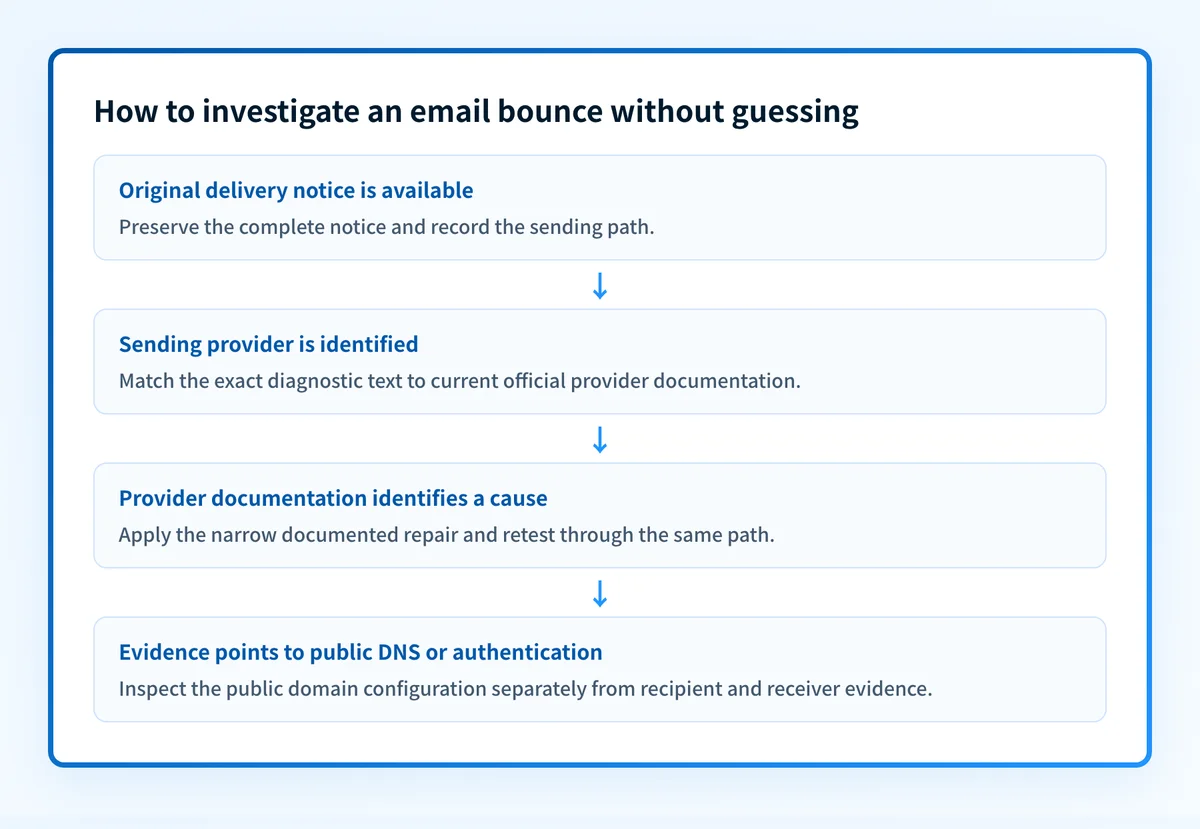
1. Preserve the original delivery notice
Save the complete notice before changing the recipient address, sender configuration, DNS, or message content. Keep the notice associated with the message that triggered it.
Record the sending account, sending service, intended recipient, approximate timestamp, and whether the message was sent by a person or an application. Redact private addresses and message content before sharing evidence outside the authorized team.
2. Identify the provider responsible for the sending path
Determine which service submitted the original message. Use the account's sent-mail history, the application's delivery logs, or the provider's own delivery view where available.
Do not assume that the visible From address identifies the sending provider. The supplied evidence does not support a universal method for identifying the responsible system, so use the records available for the exact message.
3. Match the notice to the provider's current documentation
Search the sending provider's official documentation using the exact diagnostic text from the original notice. If the provider documents that exact message, follow only the repair and validation steps it specifies.
If no provider documentation exists for the exact notice, treat the cause as unresolved. Escalate it through the provider's support or mail-trace process with the redacted original evidence rather than applying a generic bounce remedy.
4. Separate recipient data from public domain configuration
If the provider's documented evidence points to recipient-address quality before a new send, an address-verification service may be relevant. Verifalia describes syntax, domain, MX, DNS, and mailbox-availability checks, but its published material does not diagnose the earlier message.
If evidence instead points to public DNS or email-authentication configuration, keep that branch separate from recipient validation. Do not change a DMARC policy to suppress an unresolved delivery symptom. A policy change affects requested enforcement, not the underlying provider decision.
5. Keep the diagnostic boundary clear
A public check can inspect public information, but it cannot prove the exact production sending path, continuous state, a receiver's private decision, or future placement. The related guide on common email bounce messages may be useful only when you have an exact message to compare against supported documentation.
How do I fix it?
Apply only the sending provider's documented repair
The supplied evidence does not support a general repair sequence for bounced messages. Once the sending provider's official documentation identifies the observed diagnostic message, apply the narrowest repair it documents.
Do not change DNS records, authentication policy, recipient data, or sending configuration merely to test an unsupported theory. An unrelated change can interrupt legitimate mail and make the original evidence harder to interpret.
Keep the repair scoped to the confirmed path. If the provider documentation does not identify the exact notice, do not present a guessed change as a fix.
Use address verification before a future send when appropriate
When the documented issue is limited to recipient-address quality and the sending workflow permits a pre-send check, address verification may help screen addresses before another attempt. Verifalia's published checks include syntax, domain, MX, DNS, and mailbox availability.
This action does not repair the original message or prove why it was not delivered. It changes pre-send validation only.
Treat provider availability as a separate branch
If the affected service is Google Workspace and there is reason to investigate a possible temporary Google-product problem, check the Google Workspace Status Dashboard. The supplied guidance does not establish a connection between a status event and the notice in hand.
Do not treat a status check as confirmation of a bounce cause. Retain the original notice and use the provider's incident or support process if the exact issue remains unresolved.
How do I validate the repair?
Repeat the same approved sending path only after the responsible provider's documentation identifies a repair. Use a newly sent test message and preserve the resulting delivery evidence.Check the applicable layers independently:
- DNS: confirm any documented public DNS change through the authoritative server and at least one public resolver.
- Vendor: confirm the sending provider's current status or verification result for the relevant configuration.
- Message: inspect the delivered or returned evidence from the same production path.
- DMARC: review aggregate reports after data accumulates when the confirmed issue involves DMARC authentication or alignment.
Check public domain posture only when the evidence points there
If provider evidence identifies a possible public DNS or email-authentication configuration issue, inspect the domain with the email security score tool before making a DNS change.
Inspect the domain's public email-security posture
A public domain check cannot diagnose a recipient-address issue, prove why one receiver returned a notice, repair the message path, or guarantee future delivery.
Evidence
Sources and further reading
Questions readers ask
Frequently asked questions
How do I fix a bounced email?
Only after the original delivery notice and the sending provider's documentation identify the exact issue. The supplied evidence supports pre-send address verification, but it does not support diagnosing or repairing an already bounced message.
What are the signs that your email has been hacked?
The supplied evidence does not document account-compromise indicators or a way to distinguish compromise from spoofing. Preserve the unexpected notice and investigate through the affected provider's security and mail-trace processes.
Why am I getting bounced emails that I didn't send?
The supplied evidence does not establish a cause for unexpected non-delivery notices. Do not infer account compromise, spoofing, forwarding, or a recipient-side issue without the original notice and provider-specific evidence.
What does it mean when an email is bounced?
The supplied evidence does not provide an official bounce or delivery-status definition. It means the notice needs to be examined with the sending provider's documentation before a cause can be stated.
Can email validation explain a bounced message?
No. Address verification can provide pre-send results such as Deliverable, Undeliverable, Risky, or Unknown, but it does not explain why a specific earlier message produced a notice.

Written by
Dominic LandryDeliverability & DNS
Dominic Landry works on email deliverability and DNS configuration at Palisade, from SPF and DKIM records through to DMARC enforcement.
More from Dominic →