Bounce email address: what it is and how to find it
 ChatGPT
 Claude
 Gemini
 Perplexity
 Grok
GrokIn brief
Bounce email address explained: identify the envelope return path, read delivery-status evidence, repair the confirmed cause, and retest the same route.
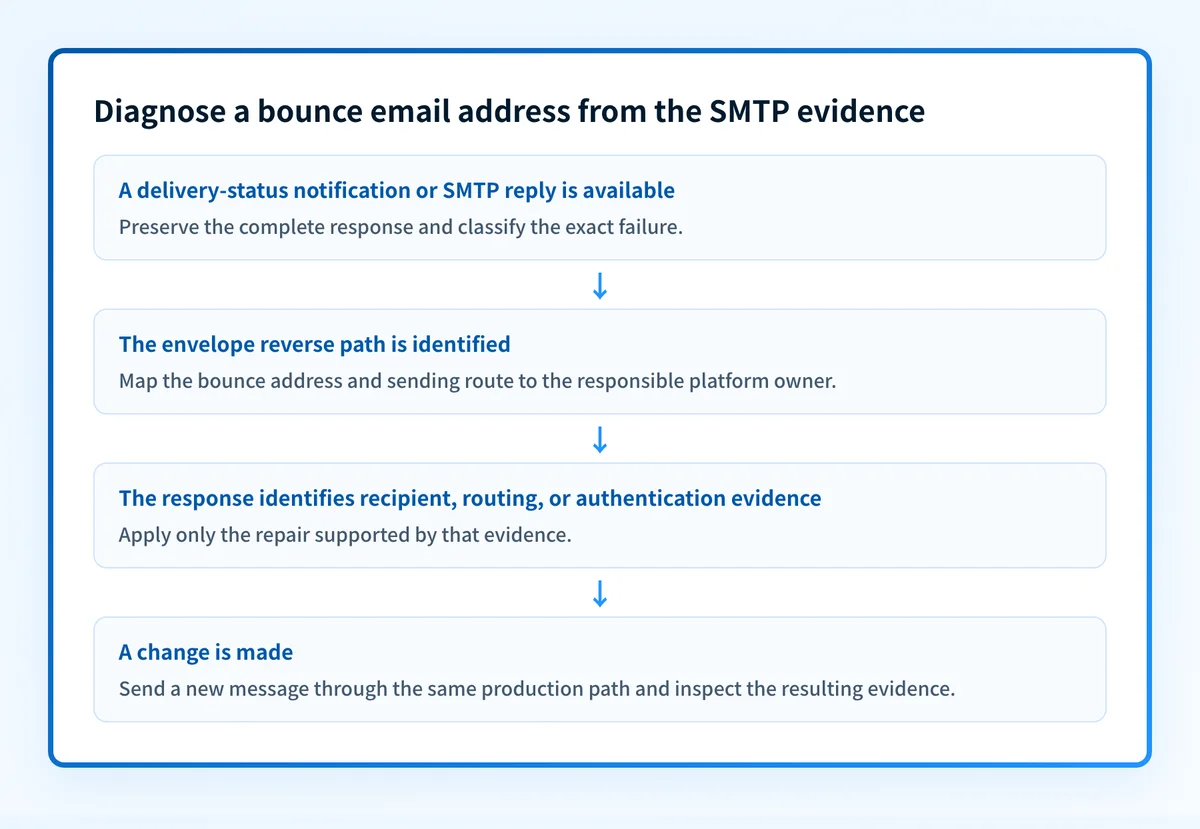
A bounce email address is usually the sender address used for delivery failures, rather than the address visible in the message's From field. Start with the complete SMTP response or delivery-status notification, then identify the envelope return path and the system that owns it. Repair the specific failure shown in that evidence and resend through the same production path.
At a glance
Quick takeaways
- A visible From address and a bounce email address can be different addresses.
- The SMTP envelope reverse path is the return address for delivery failures in SMTP.
- A delivery-status notification can identify the failed recipient, action, status, and diagnostic code.
- A bounce does not by itself prove a DNS, authentication, mailbox, or reputation problem.
- Do not create or change a bounce address until the sending platform and the observed failure are known.
- Retest with a new message sent through the same application and outbound route.
What does the failure mean?
In SMTP, the MAIL FROM command supplies the envelope reverse path. RFC 5321 defines the reverse path as the address used when the receiving SMTP server needs to report delivery errors. Many sending platforms call that address a bounce address, return path, envelope sender, or MAIL FROM address.
A delivery-status notification, or DSN, is separate from the original message. RFC 3464 defines DSN fields including Final-Recipient, Action, Status, and Diagnostic-Code. The recipient's SMTP reply and the DSN identify the actual failure. The bounce address identifies where a failure report can be sent.
This is the evidence shape to preserve from a delivery-status notification:
Final-Recipient: rfc822; recipient@yourdomain.com
Action: failed
Status: 5.1.1
Diagnostic-Code: smtp; <recipient@yourdomain.com> ... User unknown
The address after Final-Recipient is the recipient that failed. The bounce email address may appear in the original message's envelope data or its delivered Return-Path field. Do not assume the visible From address is the address that receives the notification.
SMTP enhanced status codes classify the status value by class, subject, and detail. A 5.x.x result indicates a permanent failure for that transaction, but the exact x.x values and diagnostic text are what narrow the cause. Preserve the entire response before changing DNS, authentication, or the recipient list.
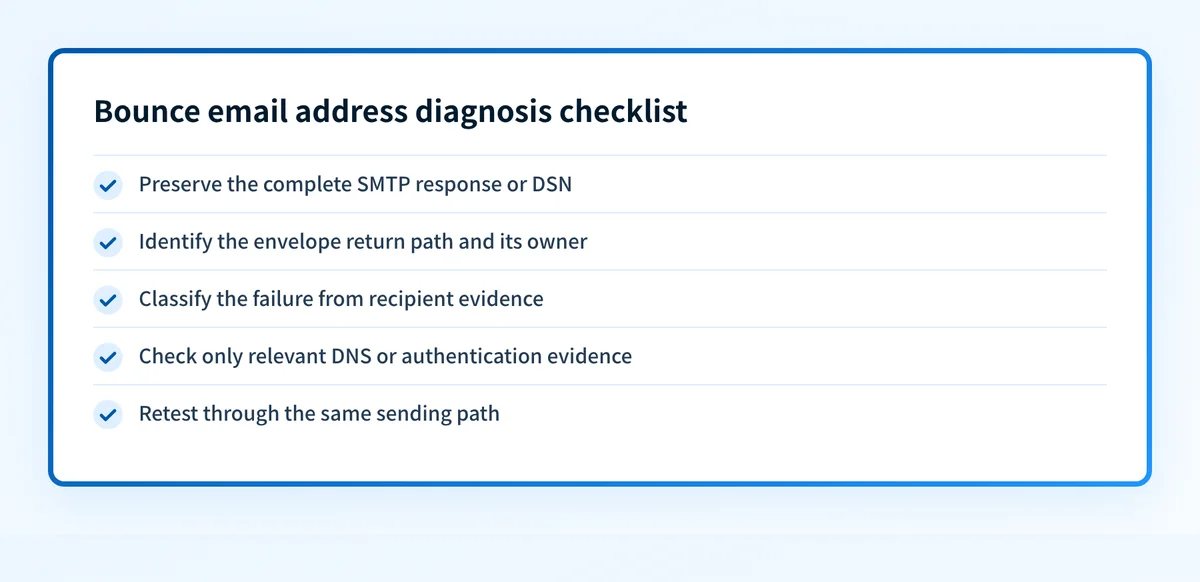
Use this checklist to keep the return path, recipient, and response evidence separate before changing a configuration.
What usually causes it?
The bounce email address was confused with the visible From address
This is common when an operator searches message headers only for the address shown to the recipient. SMTP treats the reverse path and message header addresses as different fields with different purposes. Inspect the transaction evidence, Return-Path on the delivered copy when present, and the sending platform's configured envelope-sender setting.
This distinction does not prove that either address caused the failure. It identifies which owner and configuration path should receive investigation.
The recipient address or mailbox is invalid
A DSN with recipient-specific evidence, such as a 5.1.1 status and an "User unknown" diagnostic, points first to the recipient address or mailbox. RFC 3463 defines the 5.1.1 enhanced status code as a bad destination mailbox address.
Remove or correct the confirmed invalid recipient in the sender's approved contact process. Do not alter the bounce address to work around a recipient failure.
The recipient domain cannot accept mail
A failure can concern the recipient domain's mail routing rather than the bounce email address. The receiving system's diagnostic text and status code determine that branch. A public MX lookup can inspect published routing records, but it cannot prove that a recipient mailbox exists or explain a private receiver decision.
For a recipient-domain routing failure, use the broader delivery errors guide to keep DNS evidence separate from mailbox and receiver-policy evidence.
The sending platform has an incorrect envelope-sender configuration
This is an inference when the original message has an unexpected reverse path, a platform-generated bounce mailbox, or a DSN cannot be returned to the intended owner. The exact setup and repair are provider-specific. A CRM, ESP, or MTA may generate the envelope sender automatically, require a verified domain, or use a provider-managed return path.
Use the sending platform's current documentation for the exact configuration path. Do not copy another tenant's selector, CNAME target, token, or bounce-domain value into DNS.
Authentication evidence is being treated as the bounce cause
SPF, DKIM, and DMARC results can matter to a receiver's handling, but a bounce notice alone does not establish an authentication failure. Inspect trusted receiver-added Authentication-Results from the affected message. RFC 8601 defines this header field and its authentication result methods.
A passing authentication result does not guarantee delivery or inbox placement. A failing result requires message-path and domain evidence before it supports a repair.
How do I diagnose the failure?
1. Preserve the full SMTP response or delivery-status notification
Save the raw DSN or the sending platform's complete delivery event. Record the recipient, timestamp, sending application, outbound route, SMTP reply, enhanced status code, and diagnostic text.
Keep the original in access-controlled incident records. Redact recipient addresses and message content before sharing the evidence in tickets. A shortened dashboard label can hide the response that distinguishes an invalid recipient from a routing or policy failure.
2. Identify the envelope return path
Locate the MAIL FROM value in sending logs where available. In a delivered message, inspect Return-Path as supporting evidence. Map that address or domain to the team and platform that control it.
Do not rely on a user-facing From address. It may be a different domain or mailbox.
Visible From: updates@yourdomain.com
Envelope reverse path: bounces@bounce.yourdomain.com
Failed recipient: recipient@example.net
This is illustrative only. Use addresses from the actual failed path, and do not publish customer addresses or platform-generated identifiers.
3. Classify the failure from the recipient's evidence
Read the exact SMTP status and diagnostic code before opening DNS records or changing authentication. A recipient-specific permanent failure needs recipient-list remediation. A routing-related failure needs recipient-domain DNS evidence. An authentication-related response needs the corresponding header and DNS evidence.
If the message has a specific receiver response, the bounce-back email guide can help distinguish a notification from the system that generated it.
4. Confirm the owner of the sending path
Identify which application created the message, which service submitted it, and which MTA or ESP delivered it. Then determine whether that path is expected to use the observed bounce address.
A provider-managed bounce mailbox may be correct even when it differs from the branded From address. Treat an unexpected address as a configuration lead, not proof of a fault.
5. Check only the DNS or authentication evidence relevant to the response
If the evidence identifies a sending-domain authentication issue, inspect the published domain records and compare them with the received message headers. If the evidence identifies recipient-domain routing, inspect the recipient domain's MX records.
Do not use a public DNS result as proof of a mailbox, a production sending route, continuous state, a receiver's private decision, or future placement. For the difference between a delivery failure and wider inbox outcomes, see what email deliverability means.
How do I fix it?
Correct the confirmed recipient data
When the DSN identifies an invalid recipient or mailbox, correct the address at its approved source or suppress it from future sends. This repair changes recipient data. It does not change authentication, alignment, reporting, or DMARC enforcement.
Do not resend repeatedly to a recipient after a permanent failure without correcting the confirmed cause. Repeated attempts can obscure the incident record and create unnecessary traffic.
Restore the intended envelope-sender configuration
When the sending platform's documentation and logs show that the wrong bounce address is configured, restore the expected provider-supported setting. Confirm that the address or domain is controlled by the responsible team and that failure notifications can be received and reviewed.
This repair changes the sending configuration. It does not establish why a specific recipient server rejected the original message.
Repair the confirmed authentication or routing condition
If the exact response and message evidence identify authentication failure, repair the affected SPF, DKIM, or DMARC configuration through the owner of that sending path. If the evidence identifies recipient-domain routing, repair only the published routing condition that the recipient domain owner controls.
Do not loosen the DMARC policy as a bounce-address fix. A p= change changes requested DMARC enforcement. It does not correct an invalid recipient, restore an envelope sender, or repair a documented SMTP failure.
Escalate an unpublished receiver decision with complete evidence
When the receiver gives only a generic or unpublished rejection, provide its support channel with the complete SMTP response, timestamp, sending IP where appropriate, message identifiers, and redacted raw headers. Do not claim an internal receiver decision has a known DNS or reputation cause without documentation from that receiver.
How do I validate the repair?
Send a new message through the same application, sender identity, outbound service, and recipient path that produced the failure. Confirm the sending platform records the expected envelope reverse path and that any resulting DSN reaches the intended operational mailbox.
Validate each applicable layer:
- Check the authoritative DNS record and at least one public resolver when the repair changed DNS.
- Confirm the sender platform shows the current verified or authenticated state when its configuration changed.
- Inspect a newly delivered message's trusted
Authentication-Resultswhen authentication is part of the failure. - Review DMARC aggregate reports after data accumulates to identify whether the same production source is aligned.
Inspect the domain evidence behind the bounce path
After the SMTP response identifies a possible authentication or DNS branch, inspect the sending domain's published security posture before changing records.
Check the email security score
A public score can inspect published domain evidence. It cannot read a delivery-status notification, confirm that a recipient mailbox exists, prove the production sending path, or explain one receiver's private rejection decision.
If recurring delivery failures expose unknown senders or alignment issues across several domains, Start with Palisade. Palisade's documented DMARC Agent workflow analyzes DMARC aggregate-report data, identifies sending sources and authentication or alignment issues, and creates prioritized remediation tickets. It does not repair a recipient mailbox, change a receiver's decision, or guarantee delivery.
Evidence
Sources and further reading
Questions readers ask
Frequently asked questions
What is bounce email address?
A bounce email address is usually the SMTP envelope reverse path used to receive delivery failures. It can differ from the visible From address. Confirm the actual address from sending logs, the delivered message's Return-Path when available, or the sending platform's configuration.
How to create a bounce email?
Only create or configure a bounce email address through the documentation for the specific ESP, CRM, or MTA that sends the message. The correct setting, verification method, and DNS requirements are provider-specific. Start by identifying the platform that owns the envelope reverse path.
What is the most hacked email provider?
No authoritative, stable ranking identifies one email provider as "the most hacked." Security incidents, account compromise reports, and provider populations change over time. This question also does not identify the SMTP evidence needed to diagnose a bounce email address.
What is bounce back email?
A bounce-back email is a delivery failure notification, often a DSN, sent after an SMTP delivery problem. It should contain recipient and status evidence that helps identify the cause. A bounce email address is the return-path address that can receive that notification.
Does a bounce email address prove why a message failed?
No. The bounce email address identifies the return path for delivery failures. The complete SMTP response, DSN fields, message headers, and the sending path identify the actual failure branch.
Can changing DMARC fix a bounce email address problem?
No. Changing the DMARC policy changes requested enforcement. It does not correct an invalid recipient address, configure an envelope sender, or resolve an SMTP routing failure.

Written by
Dominic LandryDeliverability & DNS
Dominic Landry works on email deliverability and DNS configuration at Palisade, from SPF and DKIM records through to DMARC enforcement.
More from Dominic →