Email list bounce checker: how to interpret and act on results
 ChatGPT
 Claude
 Gemini
 Perplexity
 Grok
GrokIn brief
Email list bounce checker results help separate bad, deliverable, and uncertain addresses before sending, then guide list cleanup and retesting.
An email list bounce checker helps you sort addresses into likely deliverable, confirmed bad, and uncertain groups before a campaign. Use its result as list-hygiene evidence, then suppress confirmed undeliverable addresses and make a separate policy decision for risky or unknown results. A clean list can reduce one source of delivery trouble, but it does not prove that your sending domain, message, or recipient server will accept every message.
At a glance
Quick takeaways
- Email verification services can inspect address syntax, domain and MX records, and other signals without sending a message.
- A confirmed bad or undeliverable result should usually be removed or suppressed before the campaign.
- Risky, unknown, catch-all, and unverifiable results are not confirmed deliverable addresses.
- A hard bounce is generally permanent, while a soft bounce may be temporary or fixable.
- Retest a list before an important send because an address can become invalid after a contact leaves an organization.
- List quality is only one part of email deliverability.
What this tool checks
An email list bounce checker is a verification service that evaluates recipient addresses before you send to them. The exact checks and labels differ by provider.
For example, Email Hippo describes its verification process as checking address formatting, the domain's MX records, a non-delivering connection to the receiving mailbox, disposable providers, and bounce history. It says this process identifies "fake emails and possible bounces without ever sending an email."
Other services use more detailed categories. Verifalia lists validation checks that include syntax, domain, MX, DNS, mailbox availability, spam-trap, catch-all-server, international-address, and disposable-email checks. These are vendor-specific capability descriptions, not a universal standard for every checker.
A verification result is useful evidence about the address and its public or service-observable signals at the time of the run. It cannot prove that:
- A person actively reads the mailbox.
- A future campaign will reach the inbox.
- Your production sender will authenticate correctly.
- A recipient server will make the same private decision for every future message.
- An address marked uncertain will definitely bounce.
How to run the check
1. Export only the addresses needed for the check
Export the intended recipient addresses from the system that will send the campaign. Remove fields that the checker does not need, such as names, message content, notes, account identifiers, and other customer data.
Confirm the service's minimum-list rule before preparing a bulk job. For example, ZeroBounce says bulk list verification requires at least 100 email addresses. That requirement applies to its service and should not be assumed for another provider.
Do not upload a mailing list to a service until your organization has approved that processor and the data-sharing scope. Recipient addresses can be personal data.
2. Submit the list using the checker's supported input
Use the input format documented by the checker you selected. Some services offer a single-address check, while bulk tools may use an upload workflow. Keep the original list unchanged so you can match results back to the source system.
For a public domain-level sanity check before a list run, inspect whether the domain named after @ has MX records. This does not verify a specific mailbox.
dig +short MX yourdomain.comAn MX answer only shows that DNS publishes mail-exchange information for the example domain. It does not prove that person@yourdomain.com exists, that the mailbox accepts mail, or that a future campaign will be delivered.
3. Save the result categories with the source address
Download or retain the completed result with each source address and its returned status. Do not reduce every status to a yes-or-no field before reviewing what the provider means.
Email Hippo describes its free verifier outcome as "The result is OK, Bad, or Unverifiable." Verifalia uses "Deliverable, Undeliverable, Risky, or Unknown." The labels are not interchangeable unless the service documents the mapping.
4. Separate confirmed failures from uncertain addresses
Create distinct segments for confirmed bad or undeliverable addresses and for uncertain outcomes. Preserve the original returned label, check date, and provider result detail. This keeps a later campaign bounce from being mistaken for a list-verification finding.
How to interpret the results
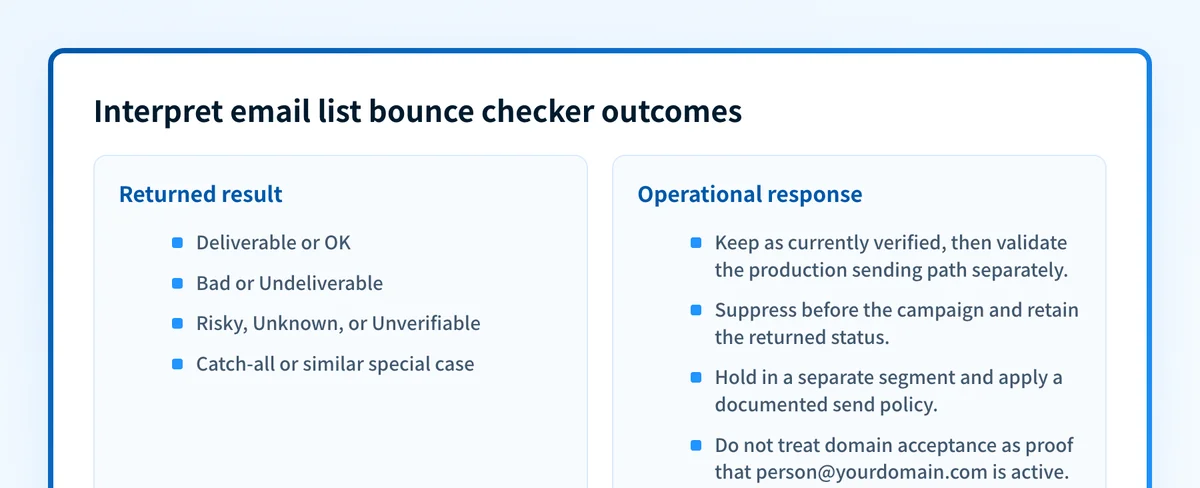
Deliverable or OK
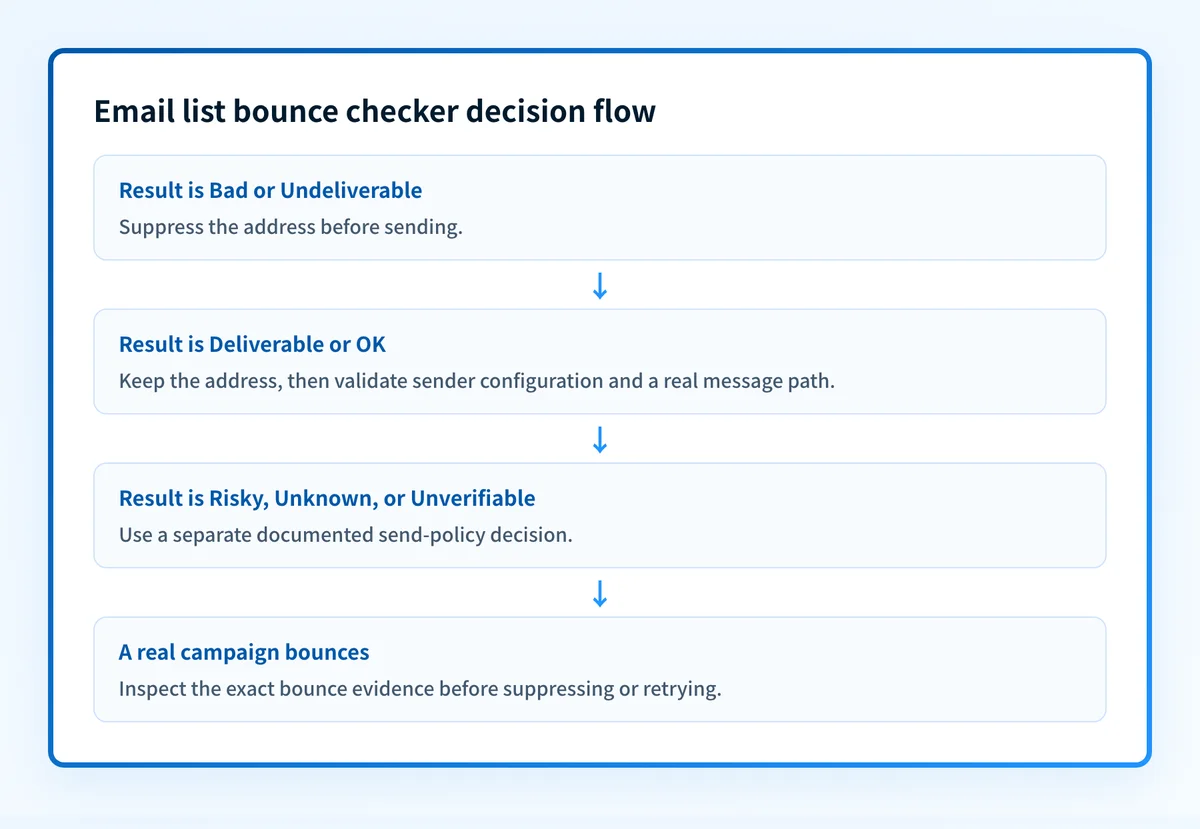
A deliverable or OK result means the checker found enough evidence under its own rules to classify the address positively. Treat this as a current verification result, not a delivery guarantee.
Before sending, also confirm the sending system is configured correctly. A recipient list checker cannot inspect SPF, DKIM, DMARC alignment, message content, or the reputation associated with your production sending path.
Bad or undeliverable
A bad or undeliverable result is the clearest cleanup action. The practical interpretation is to remove or suppress that address before the campaign, then retain the result as the reason for suppression.
Email Hippo describes a hard bounce as a permanent failure. Its examples include a nonexistent address or domain, and a receiving mail server configured to reject incoming email. Those examples explain why a confirmed bad result should not remain in an active campaign segment.
Do not assume every failed delivery is a list-quality failure. If a sender receives a real bounce message, compare its exact text with the common email bounce messages guide and inspect the sending path.
Risky, unknown, or unverifiable
Risky, unknown, and unverifiable outcomes need a separate send-policy decision. They are not confirmed deliverable, but they are also not the same as a confirmed bad address.
This interpretation is an operational inference from the category systems described by Email Hippo and Verifalia. A cautious policy can hold these addresses out of a high-volume campaign, request an updated address through an approved channel, or send only where your organization accepts the risk. The best choice depends on consent, campaign importance, and the meaning documented by the specific checker.
Catch-all and similar special cases
Some verification services identify catch-all behavior. ZeroBounce lists catch-alls among the address conditions its validation identifies, and Verifalia lists catch-all-server checks. A catch-all domain can accept mail for many local parts, so domain acceptance does not necessarily establish that a named recipient mailbox is active.
Keep this category separate from confirmed deliverable addresses. Do not convert a catch-all result into a promise that a person will receive or read the campaign.
Hard bounces and soft bounces after sending
Email Hippo describes a soft bounce as more likely fixable, with examples such as a full inbox or temporary mail-server issue. That distinction is useful after a real send, but a list verification result does not replace the SMTP evidence from the failed message.
A soft bounce may call for a retry policy in the sending platform. A hard bounce may require suppression. Use the provider's documented bounce classification and the real error message before changing either rule.
How to act on the result
Start with the evidence that supports the lowest-risk action:
- Suppress confirmed bad or undeliverable addresses from the upcoming campaign.
- Keep risky, unknown, unverifiable, and catch-all results in separate segments. Document the policy used for each segment instead of treating them as verified.
- Correct obvious formatting problems in the source system only when the intended address is known from reliable evidence. Do not guess a recipient's address.
- For a real hard or soft bounce, inspect the exact SMTP or provider error before deciding whether to suppress, retry, or escalate.
- If cleaned-list campaigns still fail, investigate sender authentication, domain configuration, and delivery-path evidence. A public list check cannot diagnose all of those conditions.
How to retest
Run the same list through the same checker again before a material campaign, especially when the list has aged, been imported, or collected over a long period. Email Hippo notes that contact validity can change over time, including when someone leaves a job and an inbox closes.
Compare the new result with the prior one by address and status. Confirmed bad addresses should remain suppressed unless reliable new evidence supports an update. Review any address whose category changed, rather than assuming the newest label explains why it changed.
After the list check, validate the production sending path separately:
- Check that the sending domain resolves as expected through authoritative DNS and a public resolver.
- Confirm the sending provider's current authentication or verification status.
- Send a real message through the exact production path and inspect its delivered headers.
- Review DMARC aggregate-report data once it accumulates.
Check sender configuration after list cleanup
Once confirmed bad addresses are suppressed, use the Email Security Score tool to inspect public sender-domain security and delivery-related configuration. This follows list cleanup because recipient quality and sender configuration are separate causes of campaign problems.
Check your sender domain's security score
A public domain check does not verify an email list, inspect a production message, monitor future delivery, or guarantee inbox placement. For ongoing DMARC work, Palisade analyzes aggregate-report data, identifies sending sources and authentication or alignment issues, and proposes the next policy step for human review. Start with Palisade.
Evidence
Sources and further reading
Questions readers ask
Frequently asked questions
What is email verification?
Email verification is a process that evaluates whether an address appears usable without sending an email to it. Email Hippo describes checks that range from address syntax to mailbox-related verification signals.
How does an email list bounce checker work?
An email list bounce checker can evaluate address formatting, the recipient domain's MX records, and other provider-specific signals. Email Hippo says its process also makes a non-delivering connection to the receiving mailbox and checks disposable providers and bounce history.
Can an email list checker identify uncertain results?
Yes, most checkers label the results they could not settle. Verifalia uses Risky and Unknown, and Email Hippo uses Unverifiable. Keep those addresses in their own segment, because they are neither confirmed deliverable nor confirmed bad, and they need a send-policy decision rather than automatic deletion.
How often should I check an email list?
Recheck the list before any campaign that matters, and especially when it has aged, been imported, or been collected over a long period. No verification vendor publishes a fixed interval, because list decay depends on how the addresses were gathered. Email Hippo notes that contact validity changes over time, since a valid work inbox closes when someone leaves the organization.
What is the difference between a hard bounce and a soft bounce?
A hard bounce is a permanent failure, such as an address or domain that does not exist. A soft bounce is a temporary or fixable one, such as a full inbox or a mail server having a bad day. Suppress hard bounces before the next campaign and retry soft bounces later.
Does a clean email list guarantee inbox placement?
No, a clean list does not guarantee inbox placement, because list checking only evaluates the recipient addresses. Placement also depends on your sending path, authentication, message content, sender reputation, and each recipient provider's own filtering decision. Clean lists remove one common cause of trouble rather than all of them.

Written by
Dominic LandryDeliverability & DNS
Dominic Landry works on email deliverability and DNS configuration at Palisade, from SPF and DKIM records through to DMARC enforcement.
More from Dominic →