DMARC authentication failure: how to diagnose and fix it
 ChatGPT
 Claude
 Gemini
 Perplexity
 Grok
GrokIn brief
DMARC authentication failure means a message did not meet DMARC checks. Inspect the received headers, repair the failed SPF or DKIM path, and retest.
A DMARC authentication failure means the receiving system could not find an aligned SPF or DKIM result that passed for the message's visible From domain. Start with the received message's authentication evidence, then trace the failing SPF or DKIM path to the system that sends the message. Repair that path and send a new test through the same production route.
At a glance
Quick takeaways
- DMARC evaluates the visible From domain against authenticated SPF or DKIM identifiers.
- A DMARC failure is message evidence, not proof that a DNS record alone is wrong.
- The received message's trusted
Authentication-Resultsfield is the strongest place to start. - Repair the failing SPF or DKIM path before considering a DMARC policy change.
- A public DNS check can show the published record, but cannot prove a receiver's decision for one message.
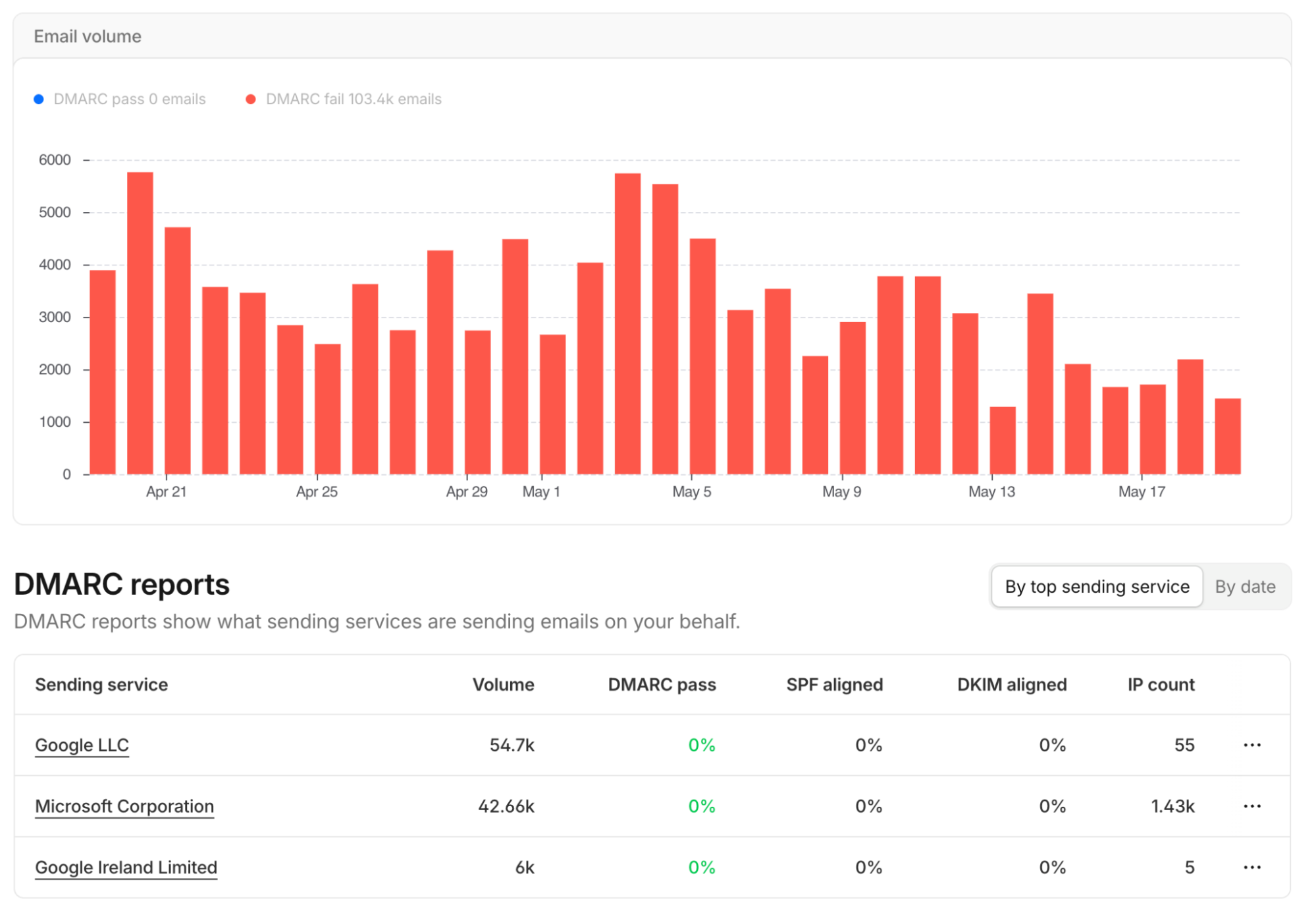
- DMARC reports can help identify sending services and IP addresses after report data accumulates.
What does the failure mean?
A DMARC authentication failure occurs when a receiver evaluates a message and cannot use an aligned SPF or DKIM result to satisfy DMARC. RFC 7489 defines DMARC identifier alignment and evaluation, while RFC 8601 defines the Authentication-Results message header that receivers can use to record authentication results.
The evidence to preserve is the receiver-added authentication result from the exact message that failed. This is an illustrative shape, not a provider error string:
Authentication-Results: receiver.example;
  spf=fail smtp.mailfrom=mail.yourdomain.com;
  dkim=fail header.d=mail.yourdomain.com;
  dmarc=fail header.from=yourdomain.com
A result like this identifies the domains and mechanisms the receiver evaluated. It does not by itself identify why a sending application selected that envelope domain, why a DKIM signature failed, or what action a particular receiver took.
DMARC is separate from SPF and DKIM, but it depends on them. SPF evaluates the SMTP envelope sender or HELO identity. DKIM evaluates a signature attached to the message. DMARC checks whether a passing SPF or DKIM identity aligns with the domain shown to the recipient in the From field. For broader context, see the DMARC learning hub and what DMARC is.
What usually causes it?
SPF did not pass for the production sending path
An SPF result can fail when the sender uses an envelope domain whose published SPF authorization does not cover the IP address or service used for that message. The failure may also be limited to one application, region, relay, or fallback route.
Treat the header's smtp.mailfrom= value as the identity to investigate. The visible From domain is not enough to establish what SPF evaluated. The DMARC specification's SPF alignment rules explain why a passing SPF result still needs an aligned identifier for DMARC.
DKIM did not pass on the received message
A DKIM result can fail because the receiver cannot retrieve a usable public key, the signature is invalid, or a later system changed signed message content. The header's header.d= and DKIM selector identify the signing domain and selector to inspect.
A DNS record check can help confirm that a public key is published, but it cannot prove that the sending application used the matching private key or that the message remained unchanged after signing. Keep the full raw message source because rendered email hides relevant headers and MIME details.
SPF or DKIM passed but did not align
A message can show a passing SPF or DKIM result and still fail DMARC if the authenticated domain does not align with the visible From domain. This is common when an application sends with a provider-owned envelope domain or signs with a domain unrelated to the brand shown in From.
Alignment is a protocol result, not a cosmetic comparison. Confirm the actual values in smtp.mailfrom=, header.d=, and header.from= before changing DNS or sender settings.
The wrong message path was tested
A successful test from a marketing platform does not validate transactional mail, a helpdesk, a CRM, a forwarding service, or an employee mail route. Different applications can use different return paths, DKIM selectors, relays, and signing behavior.
This is an inference from the message path, not a receiver-specific diagnosis. Compare the failed message's headers with a passing message from the same application and recipient route.
A forwarding or intermediary path changed the evidence
Forwarding and intermediary handling can affect SPF results because the receiver sees the forwarding server's connection rather than the original sender's. DKIM may remain useful when the signature survives the path, but the received headers determine what happened for that message. Do not assume an original outbound test represents the forwarded copy.
How do I diagnose the failure?
1. Preserve the received message evidence
Export the raw source of the failed message before making changes. Record the visible From domain, Authentication-Results, Return-Path, DKIM-Signature, relevant Received fields, Message-ID, sending application, recipient provider, and timestamp.
Use authentication results added by the receiving system you trust. A forwarded copy may contain authentication results written by another server for a different point in the route.
2. Identify the DMARC identity and failed mechanism
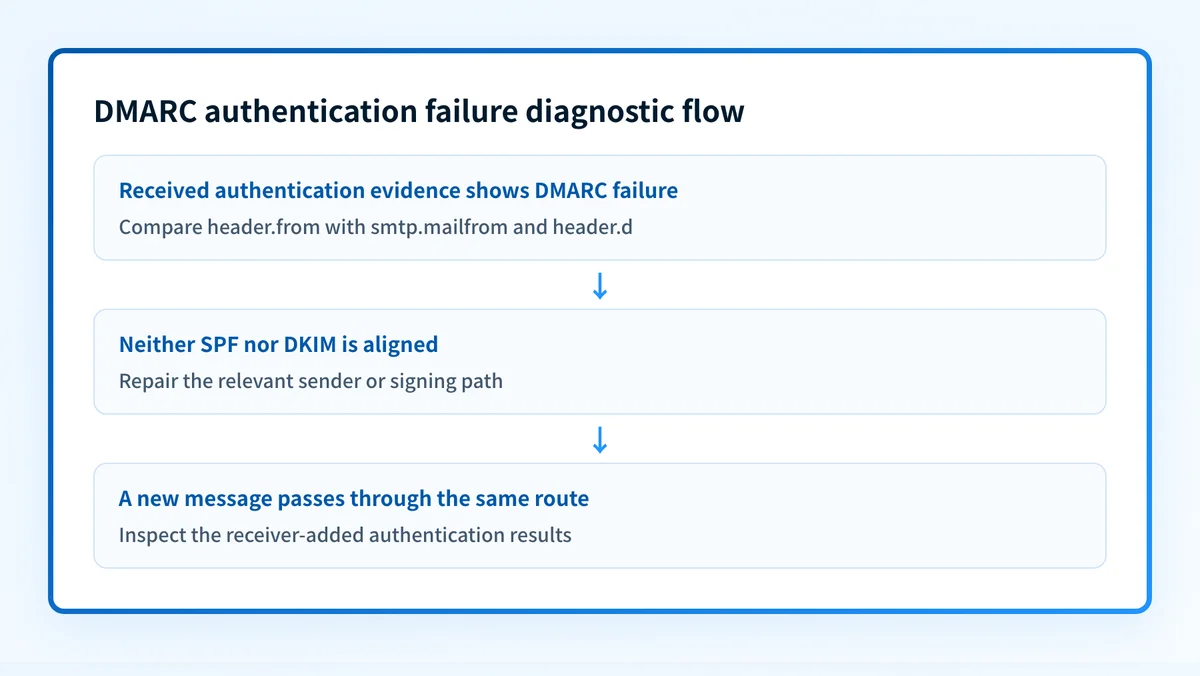
Read header.from= in the DMARC result first. Then compare it with the SPF identity in smtp.mailfrom= and the DKIM signing identity in header.d=.
Use this decision rule:
DMARC result: fail
  SPF pass and aligned: investigate DKIM only if another requirement needs it
  DKIM pass and aligned: investigate SPF only if another requirement needs it
  Neither aligned result: repair the SPF path, the DKIM path, or both
Do not decide from a DNS record name alone. The received message establishes which identifiers the receiver evaluated.
3. Map the sender that produced the failed message
Name the application, service account, relay, gateway, and final outbound provider that handled the message. Then identify where the envelope sender is selected and where DKIM signing happens.
If the message comes from a platform you do not administer directly, use its documented domain-authentication workflow and its current status page or configuration screen. A green vendor status is useful vendor evidence, but it is not a delivered-message check.
4. Inspect the relevant DNS record
For the DMARC policy, look up the TXT record at _dmarc.yourdomain.com. For SPF, inspect the TXT record for the envelope domain. For DKIM, inspect the selector named in the received DKIM-Signature.
Use a public check to inspect the published DMARC record:
Check the published DMARC record
A public record check cannot prove which production source sent the failed message, why a receiver evaluated that message as failed, or whether future messages will authenticate.
5. Compare a passing and failing message from the same service
Send a controlled new message from the same application and compare its raw headers with the failed message. Look for changes in the From domain, envelope sender, DKIM d= domain, selector, relay, or intermediary path.
Redact addresses, message content, identifiers, and tenant-specific DNS values before sharing the evidence with others.
How do I fix it?
Repair the SPF authorization for the actual envelope domain
When SPF fails, update the sending service configuration or the SPF record for the envelope domain that appears in smtp.mailfrom=. Use the provider-generated values for that account. Do not copy another organization's include mechanism, return-path host, or DNS target.
This repair changes SPF authentication. It does not automatically establish DMARC alignment if the envelope domain remains unrelated to the visible From domain.
Do not remove SPF mechanisms or replace a production record without mapping every authorized sender. An incomplete SPF change can interrupt legitimate mail.
Configure aligned DKIM signing for the sender
When DKIM fails or uses a non-aligned signing domain, configure the sending platform to sign with a domain aligned with the visible From domain where its documentation supports that setup. Publish the vendor-generated selector record, then confirm the new message shows the expected header.d= value and a passing DKIM result.
This repair changes DKIM authentication and can establish DMARC alignment. It does not repair an unrelated SPF failure.
Correct the application-specific From or return-path setup
When SPF or DKIM passes but does not align, correct the application setting that chooses the visible From domain, return-path domain, or DKIM signing domain. Make one change at a time, then resend from that application.
Do not loosen p= as a repair. Changing the DMARC policy changes requested enforcement or reporting behavior. It does not make SPF pass, validate a DKIM signature, or align an identifier.
Isolate a post-signing message change
When a signature fails only after a gateway, disclaimer service, mailing list, or security product handles the message, identify the first post-signing modification. Remove the confirmed modification if it is unnecessary, or place DKIM signing after the required transformation.
This repair addresses DKIM verification. Keep a rollback path for routing or signing changes, and test each outbound route that depends on the changed stage.
How do I validate the repair?
Send a new message through the same application, sender identity, gateway path, content type, and recipient provider that produced the failure. Inspect the new raw source and confirm the receiver reports an aligned passing SPF or DKIM result for the visible From domain.
Validate at four layers:
- Check authoritative DNS and at least one public resolver for the intended DMARC, SPF, or DKIM record.
- Confirm the sending vendor reports the domain or authentication configuration as verified where that status exists.
- Inspect
Authentication-Resultsin a newly delivered message from the exact production path. - Review DMARC aggregate reports after data accumulates to see whether the source continues to appear and how it authenticates.
Keep the published policy separate from the message failure
Check the current DMARC record before changing DNS, then compare it with the failed message's authentication identifiers.
A record inspection can reveal the public policy syntax, but it cannot repair a failed sender configuration or determine a receiver's private disposition for one message.
If repeated reports show that multiple production senders need authentication or alignment work, Start with Palisade. Palisade autonomously analyzes DMARC aggregate-report data, identifies sending sources and authentication or alignment issues, and creates prioritized remediation tickets. It can propose the next policy step, while your team reviews the evidence and applies the change. Palisade does not change the DMARC policy itself or guarantee how a receiver will handle a future message.
Evidence
Sources and further reading
Questions readers ask
Frequently asked questions
What causes DMARC failure?
DMARC failure occurs when the receiver cannot find a passing SPF or DKIM result that aligns with the message's visible From domain. The received Authentication-Results field shows which SPF, DKIM, and DMARC identifiers the receiver evaluated.
How to solve DMARC issue?
Start with the failed message's raw headers, identify whether SPF, DKIM, or alignment failed, and repair the configuration for the sending application that produced it. Then resend through the same path and inspect the new receiver-added authentication results.
What is DMARC authentication?
DMARC authentication is the evaluation of whether a message has an aligned passing SPF or DKIM result for the visible From domain. RFC 7489 describes the DMARC evaluation and alignment model.
How do I fix authentication failed on my email?
Open the recipient's raw message headers and find which check actually failed: SPF, DKIM, or alignment with the visible From domain. Repair the narrowest thing that result names, which is usually the sending application's envelope domain, its DKIM signing setup, or one DNS record. Then send a new message from the same application and read the fresh authentication results the receiver adds.
Does a passing DMARC record check prove email will pass DMARC?
No, a passing record check does not prove your mail will pass DMARC, because it only reads the policy published in DNS. It cannot show whether an application uses an aligned envelope sender or an aligned DKIM signature, and it cannot predict how a receiver will judge the next message. A delivered message's Authentication-Results header is the evidence that settles it.

Written by
Samuel ChenardCEO & Co-Founder, Palisade
Samuel Chenard is the CEO and co-founder of Palisade, agentic DMARC software for IT teams and MSPs, from one domain to thousands.
More from Samuel →