DMARC alignment failure
 ChatGPT
 Claude
 Gemini
 Perplexity
 Grok
GrokIn brief
DMARC alignment failure means a delivered message lacks an aligned authentication result. Inspect the message path, isolate the sender, repair it, and.
A DMARC alignment failure means the receiving system did not accept an authentication result as aligned with the visible From domain for that delivered message. Start with the received message and the exact production sender that created it. Then isolate whether the sender's SPF path, DKIM signing identity, or both need correction. Do not change the DMARC policy to hide the failure.
At a glance
Quick takeaways
- A DMARC alignment failure must be investigated from evidence tied to the failed message and sending path.
- A public DNS record can confirm what is published, but it cannot prove how one message was authenticated by a receiver.
- Treat each application, ESP, CRM, and relay as a separate sending source until evidence shows otherwise.
- A passing test from a different route does not validate the production route that failed.
- Keep technical repair separate from DMARC enforcement policy changes.
- Recheck DNS, vendor status, delivered-message evidence, and DMARC reporting after the repair.
What does the failure mean?
DMARC gives domain owners control over how their domains are used in email, according to dmarcian's overview of DMARC. In an operational investigation, an alignment failure is a message-specific signal: the visible From domain and the authentication evidence available to the receiver did not produce the result the receiver required for DMARC.
The exact error text and trusted received-message header determine the next step. Preserve them before editing DNS or sender settings. A rendered mail client view is not enough because it can omit the authentication evidence and delivery path details needed for diagnosis.
The available evidence establishes the intended outcome, but it does not establish a universal error string or a provider-specific mapping. Record the receiver's wording exactly in the incident ticket:
DMARC alignment failureThis label identifies the incident category. It does not prove whether the issue is SPF, DKIM, a sender configuration, forwarding, a subdomain, or a receiver-specific decision.
Use the DMARC learning hub for the broader protocol and policy context. For a focused diagnosis, keep the question narrow: which production source sent the message, what domain appeared in From, and what authentication evidence did the receiving system report?
What usually causes it?
A third-party sender uses a different authentication identity
A marketing platform, CRM, help desk, billing service, or transactional sender can send mail using your visible From domain while relying on its own sending infrastructure. The narrowest investigation is to identify the specific platform and compare its documented domain-authentication setup with the message that failed.
Do not assume every vendor behaves the same way. The supplied SendGrid support landing page identifies troubleshooting as a support category, but it does not document an alignment-specific cause or repair. Use the documentation for the exact sender in your route before changing its configuration.
The SPF path for the production sender does not match the intended domain
SPF-related alignment issues are often route-specific. A message sent directly by one platform can differ from a message relayed through another system, even when both use the same visible From address.
This is an inference until you inspect the received message and the sender's documented configuration. Check the exact return-path or envelope-sender setting generated for that sender. Do not replace an SPF record based on a generic example because that can remove authorization for another legitimate source.
The Brevo SPF alignment guide is useful when Brevo is the identified source. It is not evidence for another sender's setup.
The DKIM signing identity for the production sender is not the intended domain
A sender may be configured to sign with a vendor-managed domain instead of a domain you control. Another common operational issue is that the sender has generated DNS records, but the records were not published correctly or the sender has not verified them.
The available material supports that publishing SPF, DKIM, and DMARC records is part of a DMARC implementation workflow, as described by dmarcian's DMARC implementation overview. It does not establish the correct record values for your vendor. Obtain the current values from that vendor's authenticated setup screen or official documentation.
A subdomain or alternate sending path was overlooked
Production mail can leave through a subdomain, regional service, separate business unit, or fallback relay. A test sent from the main domain may pass while a less common route still fails.
This is a common investigation branch, not a documented provider conclusion. Compare the exact sender identity, application, route, and visible From domain across both passing and failing messages before making a domain-wide change.
The team changed policy instead of fixing the sender
Changing the DMARC policy affects enforcement and reporting. It does not repair the sender configuration that produced the failed result. Keep the incident focused on the authentication and identity evidence first.
Do not loosen the DMARC policy as a first response to an alignment failure. A policy change can alter how receivers handle mail while leaving the underlying sender configuration unresolved.
How do I diagnose the failure?
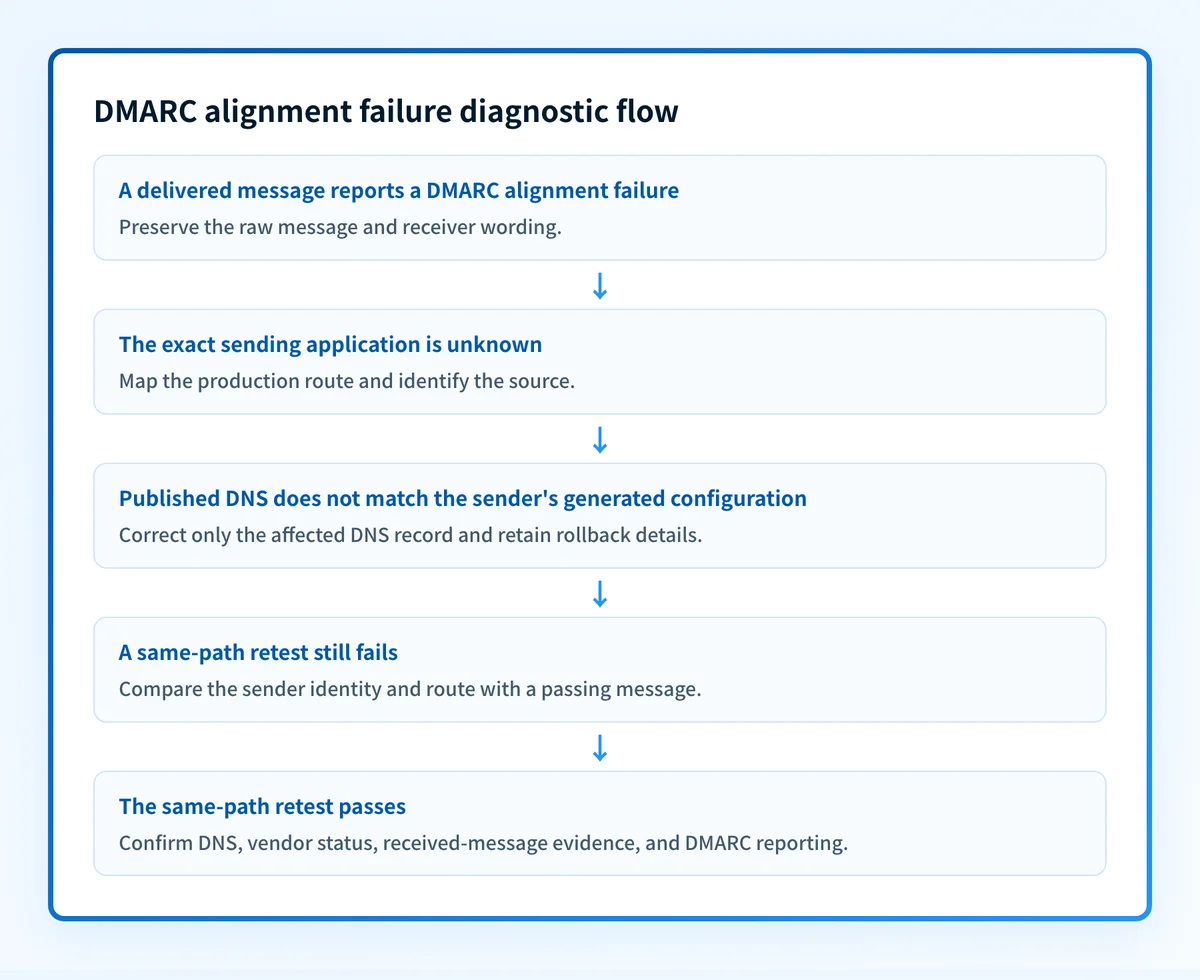
1. Preserve the received message and receiver evidence
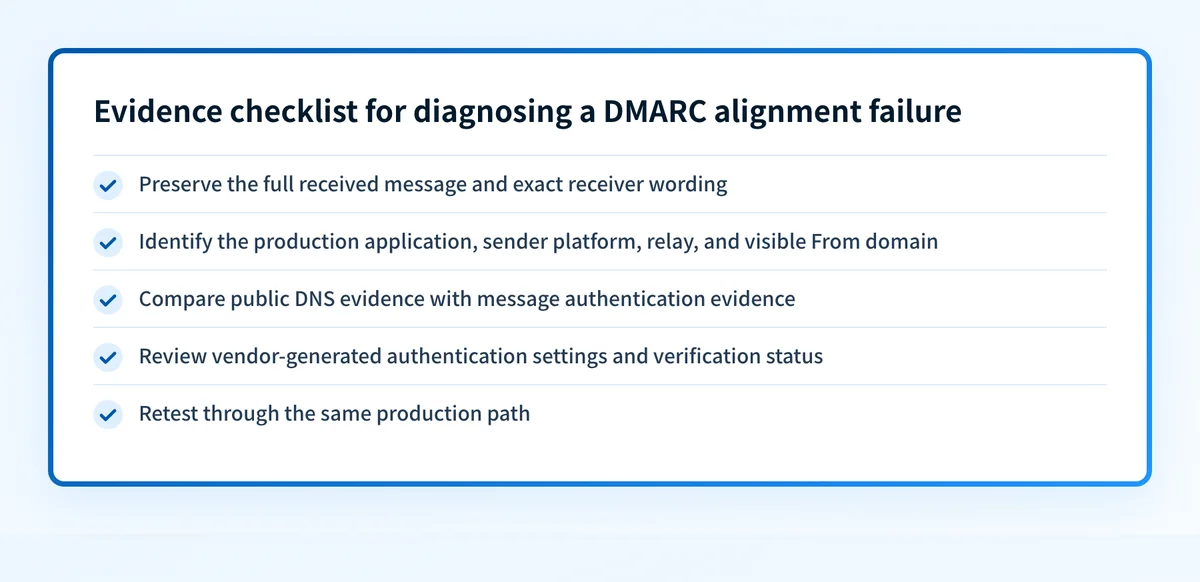
Save the full raw source of the failed message from the receiving mailbox or security system. Keep the original in an access-controlled location. In the investigation record, capture the visible From address, sender application, timestamp, recipient provider, Message-ID, and the receiver's exact failure wording.
Redact recipient addresses, customer data, tokens, and message content before sharing evidence outside the incident team. Do not rely on a screenshot of the inbox because it may not show the information required to connect the failure to a sender.
2. Identify the exact production sending source
Map the message to one sending application or service. Start with the business event that sent it, such as a campaign, support notification, invoice, password reset, or application alert.
Write down each handoff in the route:
application -> sender platform -> outbound relay -> recipient providerFor each stage, identify the owner and whether that stage can set the visible From address, send the message, or apply authentication. This prevents a team from editing the DNS record for one platform when the failed mail came from another.
3. Separate public DNS evidence from message evidence
Check the published DMARC record for the visible From domain with the Palisade DMARC checker. Record the result alongside the timestamp of the failed message.
A public check can show the record available to the checker. It cannot prove the exact production sending path, the receiver's private decision, whether a sender used the expected identity, or whether future messages will pass. Compare the public result with the preserved received-message evidence before changing anything.
4. Review the identified sender's current domain-authentication setup
Open the official setup documentation or authenticated settings for the platform that sent the failed message. Confirm the configuration against the platform's own generated values and verification status.
Do not copy DNS values from another account, online example, or old ticket. DKIM selectors, CNAME targets, and verification values can be tenant-specific. If the vendor shows a DNS record to publish, use the value generated for your account and retain the prior DNS state for rollback.
5. Test one controlled message through the same path
Send a small controlled test from the same application, same sender configuration, and same visible From domain. Use the same recipient provider when possible.
Avoid validating with a mail client that takes a different route or applies a different sender identity. The useful result is a comparable delivered message, not a generic claim that the domain has a record.
6. Compare passing and failing sources
If one message passes and another fails, compare the sending applications, configured domains, return paths, DKIM settings, relays, and subdomains. The first meaningful difference is a lead for investigation, not proof by itself.
The guide to checking DMARC alignment in a delivered message can help keep this comparison centered on message evidence instead of DNS assumptions.
How do I fix it?
Repair the identified sender's domain-authentication setup
When the failed source is a third-party platform, use that platform's current official setup instructions to configure the domain-authentication option it provides. Publish only the DNS values generated for your own account, then wait for the vendor to show its own verification result.
This repair changes sender authentication configuration and DNS. It does not change DMARC enforcement by itself.
Correct the sender identity used by the affected application
When the failed message comes from an application with multiple From-domain or sending-domain choices, set the affected production path to use the approved domain configuration. Make the smallest change that affects the confirmed sender and retain the old configuration until the same-path retest succeeds.
Do not apply the change to unrelated applications without evidence. A shared visible From domain does not prove that all applications use the same authentication setup.
Publish the vendor-generated DNS records accurately
If the sender's setup identifies missing or incorrect records, correct only the affected record set. Confirm the hostname, record type, and value against the sender's current account-generated instructions.
The following is illustrative only. Do not publish this example as a production record. Your sender generates the real values:
TXT
example._domainkey.yourdomain.com
v=DKIM1; k=rsa; p=example-public-key-from-your-sender
A DNS correction changes published authentication data. It does not prove that the sender is signing messages or that every sending path now uses the corrected configuration.
Keep enforcement changes out of the repair
Do not present a more permissive DMARC policy as the solution. If business continuity requires a temporary policy decision, document it separately from the technical repair, the owner approving it, and the conditions for reversing it.
A temporary policy decision affects requested enforcement. It does not establish that the sender now has aligned authentication.
How do I validate the repair?
Repeat the original delivery path after the sender configuration or DNS correction is complete. Send a new message from the same application, through the same platform and relay, with the same visible From domain. Preserve the new raw message and compare it with the failed copy.
Validate at four layers:
- Check the affected DNS record through the authoritative DNS path and at least one public resolver.
- Confirm the sender platform's current verification or authentication status, using its own account-generated configuration.
- Inspect the new delivered message from the same route and retain the receiver's authentication evidence.
- Review DMARC aggregate reporting after data has had time to accumulate for that sender.
Check the DMARC record behind this alignment failure
Use the Palisade DMARC checker to inspect the published DMARC record for the visible From domain before changing policy. Compare that public DNS result with the received message and the affected sender's verified configuration.
A DMARC record check cannot prove why one receiver rejected one message, repair a third-party sender, monitor every production source, or guarantee future delivery.
If the same domain has multiple sending sources or the failure returns after one repair, Palisade is agentic DMARC software that analyzes DMARC aggregate-report data, identifies sending sources and authentication or alignment issues, and creates prioritized remediation tickets. It can propose the next policy step from the evidence, while your team reviews and applies changes.
Palisade does not autonomously change your DMARC policy, repair every sender, or guarantee a receiver's delivery decision.
Evidence
Sources and further reading
Questions readers ask
Frequently asked questions
Does a DMARC alignment failure mean the DMARC record is missing?
No. A domain can publish a DMARC record and still have a failed message path. Check the received message, the exact sender configuration, and the published record separately.
Can a DMARC checker prove why a receiver rejected a message?
No. A public DMARC check can inspect the published record, but it cannot inspect the receiver's private decision or replace the raw message evidence from the failed delivery.
Should I change DMARC to p=none to fix alignment?
No. Changing the DMARC policy changes requested enforcement. It does not correct the sender identity, sender authentication setup, or message path that produced the alignment failure.
Can one sender pass while another sender using the same From domain fails?
Yes. Different applications and third-party platforms can use different sending paths and domain-authentication configurations. Validate each production source with a delivered message from that source.
Is a vendor's verified status enough to close the incident?
No. Vendor verification is one validation layer. Send a new message through the same route, inspect the received evidence, and then review DMARC reporting after it accumulates.

Written by
Samuel ChenardCEO & Co-Founder, Palisade
Samuel Chenard is the CEO and co-founder of Palisade, agentic DMARC software for IT teams and MSPs, from one domain to thousands.
More from Samuel →