Bulk DMARC checker
 ChatGPT
 Claude
 Gemini
 Perplexity
 Grok
GrokIn brief
Bulk DMARC checker workflow: check domain records in batches, sort DMARC and SPF findings, investigate failures, and retest DNS changes now.
A bulk DMARC checker helps you collect public DMARC and SPF record information for many domains, then sort the list into domains that need investigation first. Treat the batch as DNS inventory, not proof that every production sender authenticates or that a mailbox provider will accept a message. Confirm material findings with the exact DNS record, delivered-message headers, and DMARC aggregate reports.
At a glance
Quick takeaways
- A bulk DMARC check can compare public DMARC, SPF, and policy fields across a domain list.
- Record presence is not the same as a working production sending path.
- Sort domains by missing or unclear DMARC and SPF results before changing records.
- A published DMARC policy does not show which sending services are authorized.
- Retest the same domains after DNS changes, then validate a real delivered message.
- DMARC aggregate reports provide evidence about sources after mail has been sent.
What this tool checks
A bulk checker accepts a list of domains and returns public DNS information in a result set. The dmarc.cc bulk checker displays fields labelled "Domain", "DMARC", "SPF", and "Policy". Its results are limited to the first 50 domains submitted in a list. The site also states: "Verify your email to scan up to 200 at once."
The DMARC Generator bulk checker similarly describes its feature as checking DMARC and SPF records for dozens of domains and exporting the results. These outputs are useful for organizing an inventory because they expose public record status at the domain level.
A public lookup cannot see which application sent a message, whether that application applies DKIM signing, whether SPF aligns with the visible From domain, or how a receiving mailbox provider handled an individual delivery. Use the DMARC learning hub for the protocol context behind the record.
A DMARC record is a DNS TXT record published at _dmarc.. RFC 7489 defines DMARC record discovery and policy processing. The record can express a requested policy, but the public record alone does not prove that all mail streams will pass DMARC.
How to run the check
1. Prepare a clean domain list
Use one organizational or sending domain per line. Remove URLs, mailbox addresses, IP addresses, and duplicate domains before submitting the list. Keep a separate note of the system owner for each domain, such as a corporate mail platform or marketing sender, because the DNS result does not identify the operational owner.
If your list exceeds the tool's supported batch size, split it into named batches. Preserve the original domain list so that you can run the same check after remediation.
2. Submit a batch to a bulk checker
Open a checker that explicitly supports multiple domains and submit one batch. Read the displayed result scope before acting on it. For example, dmarc.cc says it shows results only for the first 50 submitted domains, so a larger list needs more than one run or an email-verified scan tier.
Do not assume a result is absent because the domain has no record. First confirm that the tool actually evaluated that domain in the submitted batch.
3. Confirm a finding with a direct DNS lookup
For a domain that needs follow-up, query the DMARC owner directly. Replace the example domain with the domain under review.
dig +short TXT _dmarc.yourdomain.comThis command returns the public DNS answer visible through the resolver you use. It does not prove that the authoritative server has the same answer, that DNS has fully propagated everywhere, or that a sender uses the domain correctly.
Do not replace a DMARC record based only on a batch summary. First capture the existing TXT answer and identify the team or service that owns mail for the domain.
How to interpret the results
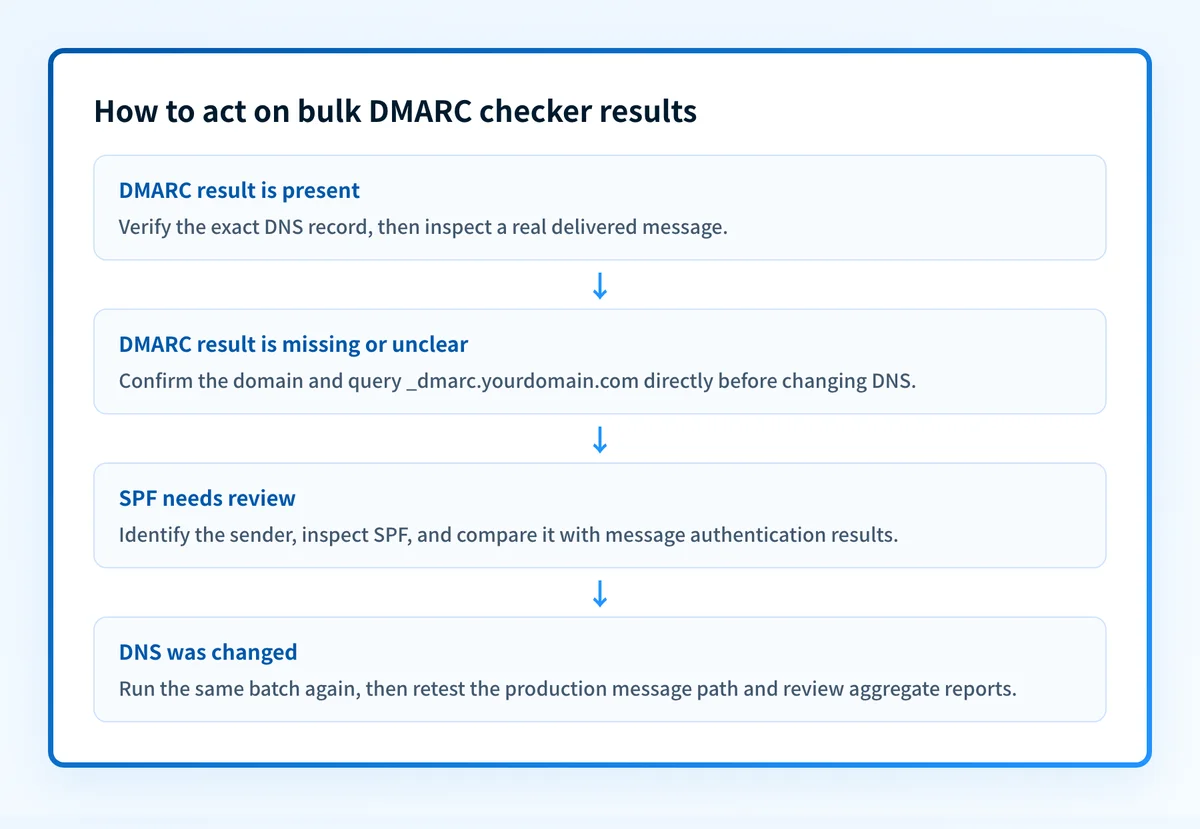
A DMARC result is present
A present DMARC result means the checker found a public record at the DMARC DNS owner for that domain. Review the returned policy field as an inventory attribute, then move to message and report evidence before deciding whether the policy is appropriate.
Under RFC 7489, DMARC evaluation uses identifier alignment and authentication results. A visible record does not establish that SPF or DKIM will authenticate and align for every sender.
A DMARC result is missing or unclear
A missing or unclear result is a priority for direct verification. Check the submitted domain spelling, query _dmarc.yourdomain.com, and inspect the authoritative DNS provider if the public resolver answer is unexpected.
Do not infer the correct record value from another domain in the batch. DMARC reporting destinations, policy choices, and authorized sending paths are domain-specific.
An SPF result needs review
A bulk result that identifies an SPF issue narrows the next task, but it does not identify the sender that caused it. Use the Palisade SPF checker to inspect the public SPF record for one domain, then inspect a delivered message from the sender under investigation.
SPF can pass while DMARC still fails if the SPF-authenticated domain does not align with the visible From domain. The email authentication guidance for Gmail explains why authentication needs to be checked in the context of the actual sending path.
The policy field needs review
A policy field is an attribute of the published DMARC record. It is not a remediation threshold by itself. A domain with a policy value still needs evidence that legitimate mail streams authenticate and align. A domain without a useful result needs DNS verification and an ownership decision before a record is created or changed.
Keep the batch output and the direct DNS response separate from message evidence. Each answers a different question.
How to act on the result
Start with domains where the batch result is missing, unclear, or points to an SPF concern. For each domain, collect four layers of evidence before treating a change as complete:
- DNS: query the DMARC owner through the authoritative DNS provider and at least one public resolver.
- Vendor: check the sending service's current domain-authentication or verification status.
- Message: send a real message through the exact production path and inspect its
Authentication-Resultsheader. - DMARC: review aggregate-report data after mail has accumulated.
When the batch points to an SPF issue, identify the sender first. When it points to a DMARC record issue, preserve the existing record and verify ownership before editing DNS. When a sender's DKIM status is uncertain, use the Palisade DKIM checker for public-key evidence, then compare the result with the d= and s= values from a real message.
How to retest
Run the same batch again after the DNS answer changes. Compare only the domains that were included in the original run, and record the time of each check. Confirm the direct DNS query separately.
Then send a new message through the same application, sender address, and recipient path that exposed the issue. Inspect the resulting Authentication-Results header. After aggregate reports accumulate, use them to determine whether other sources still send mail for the domain.
A changed public record is a DNS result. A passing delivered message is message-path evidence. Aggregate reports add evidence about observed sources over time.
Check individual domains after the bulk inventory
Use the Palisade DMARC checker to inspect the public DMARC record for a domain that needs follow-up after the batch review. Compare the result with your direct DNS lookup and a delivered message before changing policy.
Start with Palisade when you need ongoing analysis of DMARC aggregate-report data across domains. Palisade identifies sending sources and authentication or alignment issues, creates prioritized remediation tickets, and can propose the next policy step for human review. It does not change the DMARC policy for you, prove every future message will authenticate, or replace message-level investigation.
Evidence
Sources and further reading
Questions readers ask
Frequently asked questions
Does a DMARC record in a bulk result mean DMARC is working?
No, a record in the results only means the checker found a published DMARC record at _dmarc for that domain. DMARC is working when real messages carry a passing SPF or DKIM result that aligns with the visible From domain. Confirm that with a delivered message, then use aggregate reports to see the sending sources.
Should I fix every domain with a missing DMARC result immediately?
Confirm DNS ownership and the domain's sending role before you publish anything. Run a direct dig +short TXT _dmarc.yourdomain.com lookup to check that the batch result is accurate, and ask the responsible team which services send mail for the domain. A parked domain and an active sending domain need different records.
Can I use a bulk result to change the DMARC policy?
No, a batch result is not enough to change a policy, because it only tells you which domains to investigate first. A policy decision needs DNS, vendor, delivered-message, and aggregate-report evidence together. Moving to p=quarantine or p=reject before you know the legitimate senders can stop real mail.
Why should I retest with the same domain list?
Using the same list makes the before-and-after comparison meaningful. It also helps distinguish a corrected public DNS answer from domains that were not included because of a batch limit.
Check the published DMARC record before changing policy
Enter your domain.

Written by
Samuel ChenardCEO & Co-Founder, Palisade
Samuel Chenard is the CEO and co-founder of Palisade, agentic DMARC software for IT teams and MSPs, from one domain to thousands.
More from Samuel →