Agari DMARC checker: what to verify before you rely on a result
 ChatGPT
 Claude
 Gemini
 Perplexity
 Grok
GrokIn brief
Agari DMARC checker guidance: check a domain's public DMARC record, understand the evidence limit, and identify what still needs validation.
An Agari DMARC checker search should begin with the public DMARC record for the domain you need to assess. A record lookup can show whether a DNS-published DMARC record is visible, but it cannot confirm the production sending path, message authentication, a receiver's decision, or ongoing domain state. If you need the basics first, see Palisade's DMARC learning hub.
At a glance
Quick takeaways
- A DMARC check can mean checking whether a domain publishes a public DMARC record.
- A public record lookup is useful evidence, but it is only one part of a DMARC assessment.
- The available material does not verify a current public Agari DMARC checker or its result states.
- A DNS result cannot prove that a production sender signs messages correctly.
- A receiver's inbox, spam, rejection, or quarantine decision needs message and receiver-specific evidence.
- A DMARC program needs evidence from DNS, the sending service, delivered messages, and aggregate reports.
What this tool checks
A DMARC checker is intended to inspect a domain's publicly available DMARC record. DMARC Report describes its free tools as tools that verify DMARC, SPF, DKIM, BIMI, and MTA-STS records without signup. That describes a public DNS-checking task.
Use the Palisade DMARC checker when the evidence you have is a domain name and you want to inspect its public DMARC record. Treat the result as a point-in-time DNS observation.
A public lookup cannot see:
- Which applications, ESPs, gateways, or services actually send mail for the domain.
- Whether those systems use the domain's intended authentication configuration.
- The
Authentication-Resultsadded to a delivered message. - A mailbox provider's private filtering or reputation decision.
- Later DNS changes, new senders, or future message outcomes.
How to run the check
1. Start with the visible From-domain
Use the domain that appears after the @ sign in the visible From address of the mail you are assessing. Record the domain exactly. Do not substitute a sending service's domain unless the question is specifically about that service's own DMARC record.
If the issue concerns one failed message, preserve a redacted copy of the raw headers before changing DNS. A domain lookup and a message header answer different questions.
2. Check the public DMARC record
Open the Palisade DMARC checker and submit the domain you need to inspect. Keep a timestamp with the result because public DNS data can change.
You can also repeat the public lookup from a command line with an example domain:
dig +short TXT _dmarc.yourdomain.comThis command queries for TXT data at the standard DMARC record owner name for the example domain. It is a public-DNS observation. It does not show whether a specific email platform sent a message, which authentication result a recipient recorded, or why a recipient handled one message in a particular way.
3. Preserve the result as one evidence layer
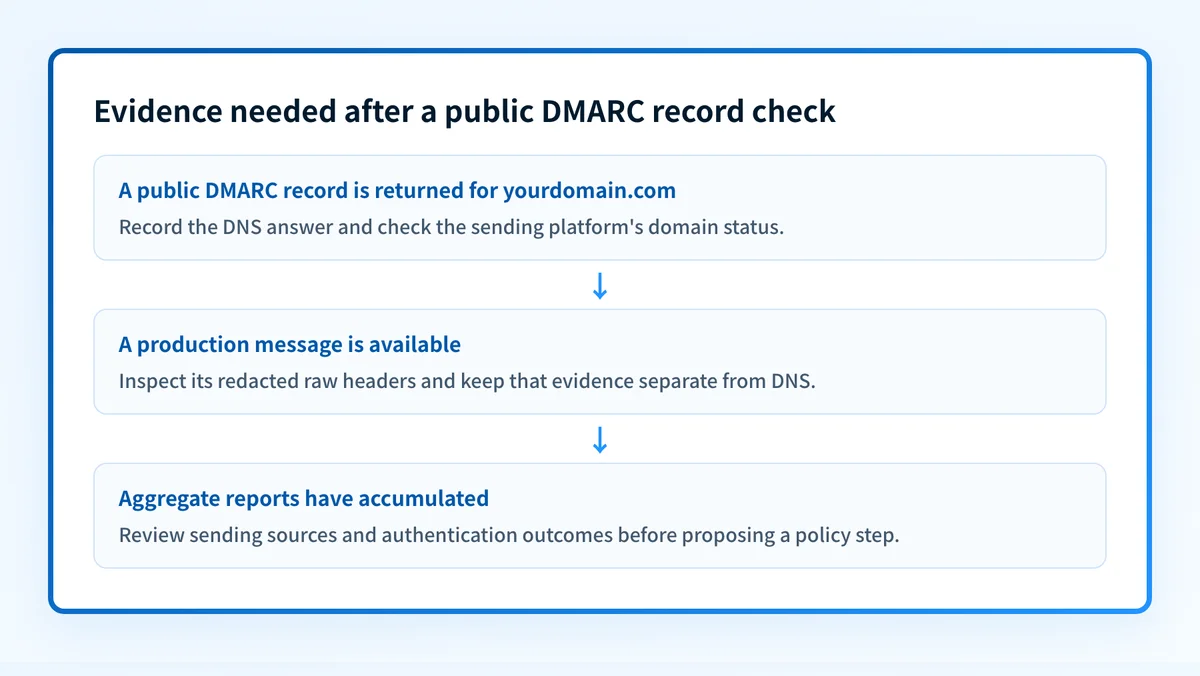
Save the exact returned text and the time of the lookup. Then separate the next questions:
- DNS question: is a public DMARC record visible for the domain?
- Vendor question: does the sending platform show the domain as configured and verified?
- Message question: what authentication results appear on a newly delivered message from the same production path?
- DMARC-program question: what do aggregate reports show after data accumulates?
How to interpret the results
The available public material does not document current Agari result labels, a current Agari user-interface path, or the exact result states of the Palisade DMARC checker. Do not infer a product-specific diagnosis from an unverified label or from a generic product image.
A public record is returned
A returned DNS value is evidence that the queried public DNS name has an answer at the time of the check. It is appropriate to record the returned value and move to the sender configuration and delivered-message layers.
It is not enough to conclude that every sender using the visible From-domain passes DMARC. The record does not expose the configuration of every application that may send mail for the domain.
No usable record is visible
A missing or unusable public result is a reason to investigate the domain, the queried DNS owner, and the authoritative DNS configuration. Before publishing or changing a record, compare the authoritative answer with at least one public resolver result.
Do not copy a record, host name, token, selector, or target from another organization. DNS values generated by an email provider are specific to the relevant account and domain.
The record is visible but the mail issue continues
A public result cannot explain a recipient-specific delivery problem by itself. Move to a message sent through the exact production path, then inspect the recipient's raw message source and the sender platform's current status. If the recipient has provided a rejection message, retain that exact text and use the recipient's documentation or dashboard where available.
The result is unclear or differs across lookups
Treat differing observations as a DNS investigation, not proof that a mail platform is broken. Record the domain, lookup time, resolver used, returned answer, and whether the authoritative DNS server agrees. Do not change a DMARC policy based solely on a single ambiguous public lookup.
How to act on the result
Use the evidence in order so that a public record check does not become a premature production change.
- Confirm the domain. Check that the domain belongs to the visible From address or the stated operational question.
- Record the public DNS answer. Keep the exact output and timestamp from the checker or command.
- Check the domain in the relevant sending platform. Confirm the current domain-verification or authentication status using that provider's own interface and documentation.
- Send a fresh test message through the same application, account, sender identity, and route used in production.
- Inspect the delivered message's raw source. Retain only redacted headers when sharing evidence externally.
- Review DMARC aggregate-report data after reports have accumulated. DMARC Report describes report processing as a way to see sending sources and whether messages pass SPF, DKIM, and DMARC checks, as well as authentication failures or unauthorized senders (DMARC Report product description).
- Escalate a receiver-specific decision to the receiver's own dashboard, documentation, or support channel when that is the only source that can explain it.
Do not raise or change a DMARC policy from a public lookup alone. A DNS check does not inventory every production sender or prove the result of a delivered message.
Investigate this with your coding agent
Use this when you have a redacted checker result and need to document the application's actual input handling or deterministic public-DNS result states before proposing a website or DNS-related change.
Agent handoff
Copy the prepared prompt
Give this to a coding agent that can inspect the relevant repository or configuration source of truth.
Problem: Determine what the DMARC checker returns for a redacted test domain and whether the public result matches the DNS lookup.
Evidence: Redacted checker output, queried example domain, lookup timestamp, and redacted DNS response. Exclude private keys, tokens, unredacted headers, and customer data.
Repository scope: Inspect the DMARC checker route and DNS lookup implementation only.
Constraints: Inspect before editing. Do not apply changes until I approve the proposed diff. Do not alter DNS, production configuration, or tool behavior.
Requested output: Diagnosis, minimal proposed change, rollback, and unknowns.
Verification: Retest the same example domain through the same checker path and compare it with a fresh public DNS lookup.
Stop if: Credentials, private data, production mutation, or missing evidence is required.
Human approval required: Review the proposed diff and verification plan before allowing changes. Do not paste secrets, private keys, API tokens, unredacted headers, or customer data.
How to retest
Repeat the same domain lookup after the authoritative DNS answer has changed or after you have clarified the domain under investigation. Use the same domain spelling and record the time of the retest.
Then repeat the production-path test separately:
- Send a new message through the same sender and application.
- Inspect the new delivered message rather than relying on an earlier message.
- Confirm the relevant vendor's current domain status in its interface.
- Review aggregate-report data when available.
Check the public record, then close the production evidence gap
If you are assessing a domain after an Agari DMARC checker search, inspect the domain's public DMARC record first. Then compare that DNS observation with sender configuration, a real delivered message, and aggregate-report evidence before making a policy decision.
A public record check cannot prove a specific production sender's authentication result, repair sender configuration, monitor later DNS changes, or guarantee how a receiver will handle a message. For teams that need to work through recurring sender and alignment evidence, Start with Palisade. Palisade analyzes DMARC aggregate-report data, identifies sending sources and authentication or alignment issues, and creates prioritized remediation tickets. A human reviews the evidence and applies any DNS or policy change.
Evidence
Sources and further reading
Questions readers ask
Frequently asked questions
What is Agari DMARC protection?
"Agari DMARC protection" is a vendor product name rather than a standard term, so what it covers depends on Agari's own current documentation. Confirm the product name, the checker it offers, and the workflow it supports there before you follow product-specific guidance. To inspect a domain's public DMARC record right now, use the Palisade DMARC checker.
How to check DMARC status?
Check the domain's public DMARC record with a DNS-based checker such as the Palisade DMARC checker, then record the result and timestamp. A complete status assessment also needs the sending platform's status, a real delivered message from the production path, and DMARC aggregate-report evidence.
What is a DMARC check?
A DMARC check is a DNS lookup that reads the DMARC record a domain publishes at _dmarc.yourdomain.com. DMARC Report describes its free tools as verifying DMARC records, alongside SPF, DKIM, BIMI, and MTA-STS records (DMARC Report). The lookup shows the published record, not how a specific message authenticated.
How to check if DMARC is enforced?
Read the policy the domain publishes in its DMARC record, which is the p= tag returned by a lookup such as the Palisade DMARC checker. That tells you what the domain asks receivers to do, not whether your production senders pass. Before you treat enforcement as safe, review the sending sources, a delivered message from the production path, and aggregate-report data.
Can a DNS result explain why one recipient rejected a message?
No, because a DNS result only shows the record published at the time of the check. A rejection is explained by the raw headers, the exact rejection text the receiver returned, the receiver's own documentation, and the sending platform's record of that message.
Check the published DMARC record before changing policy
Enter your domain.

Written by
Taylor TabusaCo-Founder & Head of Business Development, Palisade
Taylor Tabusa is the co-founder and Head of Business Development at Palisade, helping managed service providers turn email security into a practical, valuable service.
More from Taylor →