ActiveCampaign DMARC checker
 ChatGPT
 Claude
 Gemini
 Perplexity
 Grok
GrokIn brief
ActiveCampaign DMARC checker guide: inspect a published DMARC record, interpret its policy, validate sending evidence, and retest safely with confidence.
An ActiveCampaign DMARC check should start with the domain shown in the visible From address of the marketing message. Use the Palisade DMARC checker to inspect the public DMARC TXT record, then compare that DNS evidence with a real delivered message and, later, DMARC aggregate reports. A published record can show the policy a domain asks receivers to apply. It cannot prove that ActiveCampaign sent, signed, or aligned a particular message.
At a glance
Quick takeaways
- A DMARC checker inspects the public DNS record for the domain in the visible From address.
- DMARC evaluates aligned SPF or aligned DKIM, not the presence of a DMARC record alone.
p=nonerequests monitoring treatment, whilep=quarantineandp=rejectrequest stronger handling for failing mail.- A public DNS result does not prove a production ActiveCampaign message passed DMARC at a recipient.
- Check a delivered message's authentication results before changing a DMARC policy.
- DMARC aggregate reports show sources and outcomes after mail has been sent.
What this tool checks
The Palisade DMARC checker is the appropriate first check when you have a domain and need to inspect its public DMARC record. DMARC records are DNS TXT records published at _dmarc.. RFC 7489 defines the DMARC record format and receiver evaluation model.
For an ActiveCampaign sender, use the organizational domain from the message's visible From address. ActiveCampaign describes its platform as providing "Personalized email marketing," and its Help Center includes an Email Marketing category with deliverability material. Those facts establish the email-marketing context. They do not establish how a particular ActiveCampaign account signs messages or which DNS values it requires.
A public check can answer whether a resolver can retrieve a DMARC record and what tags that record publishes. It cannot see:
- The sending application or account that generated a message.
- The envelope sender used on the production path.
- DKIM signatures on a delivered message.
- A recipient's private spam, rejection, or reputation decision.
- Future DNS changes, new sending sources, or continuous mail flow.
How to run the check
1. Identify the visible From domain
Send a test campaign through the same ActiveCampaign configuration used for production, if doing so is appropriate for your sending process. Record the domain after the @ in the visible From address.
Do not substitute a tracking domain, a return-path domain, or a domain copied from another account. DMARC uses the RFC 5322.From domain as its identifier, subject to organizational-domain rules in RFC 7489.
2. Inspect the published DMARC record
Submit that visible From domain to the Palisade DMARC checker. Keep the result with a timestamp and the exact domain queried. This is useful DNS evidence before a DNS edit or an escalation to the team that controls the domain.
You can independently query public DNS with an example domain:
dig +short TXT _dmarc.yourdomain.comIf the command returns more than one DMARC-looking TXT string, stop before editing. RFC 7489 says a receiver must treat multiple DMARC records at the same owner name as a permanent error. Determine which DNS system is authoritative and remove the conflict through the domain's approved change process.
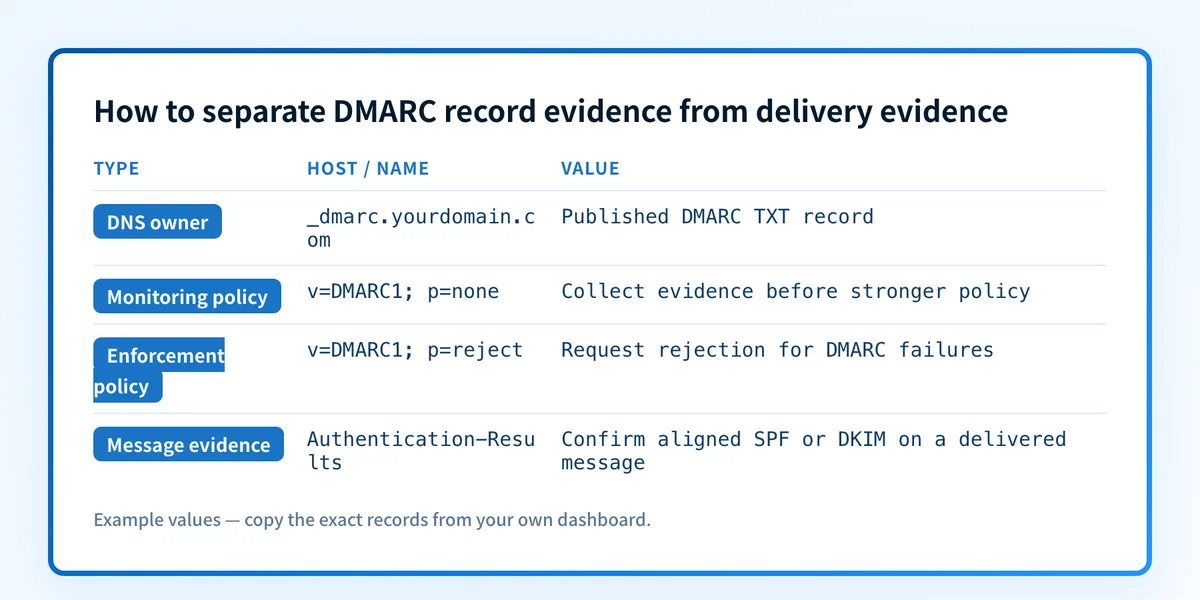
3. Keep the DNS result separate from message evidence
A record such as the following is illustrative only. Do not publish or copy another organization's reporting addresses, tags, or domains into your own DNS.
_dmarc.yourdomain.com. IN TXT "v=DMARC1; p=none; rua=mailto:dmarc-reports@yourdomain.com"The record shows a requested DMARC policy and optional reporting destination. It does not show whether a real ActiveCampaign message has aligned SPF or DKIM. For that, inspect the raw source of a delivered test message and retain the recipient-added authentication results.
4. Confirm ownership before changing DNS
If a record is missing, malformed, or too strict for the evidence you have, identify the person or system that manages DNS. The sending service's setup instructions, DNS configuration, and delivered-message headers are separate evidence layers. The vendor email authentication guide explains why a vendor's sending setup should be checked alongside the domain's public authentication records.
Do not weaken an enforcing DMARC policy solely because one campaign had a delivery problem. First determine whether the message failed aligned SPF and DKIM, whether the visible From domain was correct, and whether the recipient's decision was actually a DMARC failure.
How to interpret the results
No DMARC record is published
If _dmarc.yourdomain.com has no usable DMARC TXT record, receivers have no DMARC policy published for that domain. This does not prove that every message fails SPF or DKIM. It means the domain has not published the DMARC policy record that receivers use for DMARC evaluation.
Before publishing a record, inventory every legitimate sender that uses the visible From domain. Test actual message paths, including marketing mail, transactional mail, support systems, and forwarding scenarios that matter to the organization. A record should follow evidence, not replace it.
The record has p=none
p=none asks receivers to take no specific action based on a DMARC failure, subject to receiver policy. It is commonly used while a domain collects evidence through aggregate reporting. It does not make an unauthenticated message pass, and it does not guarantee inbox placement.
Use this state to verify the exact sources sending as the domain and identify where SPF or DKIM alignment fails. RFC 7489's DMARC policy tags define none, quarantine, and reject.
The record has p=quarantine or p=reject
p=quarantine requests that failing mail be treated as suspicious. p=reject requests that failing mail be rejected. Receivers can apply local policy, so the record does not guarantee a uniform recipient outcome.
Treat an enforcing policy as a change-control issue. Confirm that the production message path has an aligned SPF pass or an aligned DKIM pass before making the policy stricter. A green vendor status indicator is not a delivered-message check.
The record is malformed or has conflicting values
A malformed record can prevent reliable DMARC evaluation. Check the record against RFC 7489 before editing. Common protocol questions include whether v=DMARC1 is present, whether p= has a valid value, and whether there is exactly one DMARC record at the queried owner name.
Do not assume that a DNS response from one resolver explains every recipient result. Confirm the authoritative DNS answer, then check at least one public resolver after a change.
How to act on the result
Start with the narrowest repair supported by evidence.
- If no record exists, determine whether the domain has a complete inventory of legitimate senders. Publish only a record approved by the DNS owner after that inventory and reporting plan are in place.
- If the record is malformed, correct the syntax at the exact
_dmarcowner name. Preserve unrelated DNS records. - If the record is valid but a message failed, inspect the delivered message's
Authentication-Resultsheader. RFC 8601 defines this receiver-added authentication status field. Check the visible From domain, the SPF authenticated identity, the DKIMd=domain, and whether either passing identity aligns. - If the recipient accepted or filtered mail unexpectedly, use that recipient's message evidence or provider dashboard. A public DMARC lookup cannot identify a receiver's private filtering decision.
Investigate this with your coding agent
Use this when the domain's DNS is managed in a repository or infrastructure-as-code system and you have a redacted DMARC lookup result. Remove report addresses, account identifiers, tokens, private keys, unredacted headers, and customer data before sharing evidence.
Agent handoff
Copy the prepared prompt
Give this to a coding agent that can inspect the relevant repository or configuration source of truth.
Problem: The ActiveCampaign visible From domain has a missing, malformed, conflicting, or policy-inappropriate public DMARC TXT record.
Evidence: Redacted Palisade DMARC checker result, exact queried domain, intended DMARC policy, and a redacted delivered-message authentication summary if available.
Repository scope: DNS infrastructure or configuration files that manage the queried domain's _dmarc TXT record.
Constraints: Inspect before editing. Do not apply changes until I approve the proposed diff. Do not expose or add report addresses, tokens, private keys, account-specific hostnames, or unrelated DNS changes.
Requested output: File location, diagnosis, minimal proposed change, rollback, and unknowns.
Verification: Run the same Palisade DMARC checker against the exact queried domain, confirm the authoritative TXT answer, and compare a new delivered message from the same sending path.
Stop if: Credentials, private data, production mutation, or missing evidence is required.
Human approval required: Review the proposed diff and verification plan before allowing changes. Do not paste secrets, private keys, API tokens, unredacted headers, or customer data.
How to retest
After an approved DNS correction, query the same _dmarc owner through the same checker and retain the new timestamped result. Then verify DNS through the authoritative provider and at least one public resolver.
Send a new message through the same ActiveCampaign campaign configuration, sender identity, recipient path, and visible From domain. Inspect the new message's authentication results. Finally, review DMARC aggregate reports once they accumulate. These four layers answer different questions:
- DNS confirms the record published for the domain.
- Vendor configuration confirms the intended sending setup.
- A delivered message confirms what the exact production path used.
- DMARC aggregate reports reveal observed source and authentication patterns over time.
Track the senders behind the record
A public DMARC check is useful for the first DNS question: what policy does the domain publish today? It does not show which production sending sources remain unauthenticated or unaligned after an ActiveCampaign change.
Palisade is agentic DMARC software that analyzes DMARC aggregate-report data, identifies sending sources and authentication or alignment issues, and creates prioritized remediation tickets. It can propose the next DMARC policy step when the evidence supports it, while a human reviews the evidence and applies the DNS change.
Palisade does not autonomously change the DMARC policy, prove every future message will authenticate, or control a receiver's private delivery decision.
Evidence
Sources and further reading
Questions readers ask
Frequently asked questions
Does a published DMARC record prove ActiveCampaign mail passes DMARC?
No. A published record shows the policy and tags visible in public DNS. A delivered message is required to confirm the SPF and DKIM identities that the production sending path used and whether either one aligned with the visible From domain.
Should I use the ActiveCampaign sending domain or the visible From domain?
Yes, use the visible From domain for the DMARC record check. DMARC identifies mail using the RFC 5322.From domain, then evaluates alignment against authenticated SPF or DKIM identities.
Can p=none protect a domain from spoofing?
No. p=none requests no specific disposition for DMARC failures. It can support evidence gathering through reporting, but it does not request quarantine or rejection treatment for failing messages.
Does p=reject guarantee that every receiver rejects spoofed mail?
No. DMARC policies are requests to receivers, and receivers can apply their own local policy. A p=reject record is stronger than p=none, but it does not guarantee one outcome at every recipient.
What should I check after correcting a DMARC record?
Check the same public record again, confirm the authoritative DNS answer, send a new message through the same production path, inspect its authentication results, and review aggregate reports after they accumulate.
Check the published DMARC record before changing policy
Enter your domain.

Written by
Samuel ChenardCEO & Co-Founder, Palisade
Samuel Chenard is the CEO and co-founder of Palisade, agentic DMARC software for IT teams and MSPs, from one domain to thousands.
More from Samuel →