DMARC failure to load tld list
 ChatGPT
 Claude
 Gemini
 Perplexity
 Grok
GrokIn brief
DMARC failure to load tld list is an unidentified product error. Capture its source and context, then validate the domain record separately.
"DMARC failure to load tld list" is not a documented DMARC result on its own. The wording does not identify the product that displayed it, whether it came from a browser page, API, or email message, or whether it affects DNS lookup, report processing, or a domain-entry check. Preserve the error and its context first. Then check the affected domain's published DMARC record separately.
At a glance
Quick takeaways
- "failure to load tld list" does not, by itself, prove a DMARC authentication failure.
- The product, screen or endpoint, timestamp, and affected domain are needed before a cause can be assigned.
- A public DMARC record check can confirm whether a record is published, but it cannot explain an unidentified product loading error.
- Do not change the DMARC policy to address this message. A policy change does not establish what failed to load.
- Once the product-specific issue is resolved, use reporting and received-message evidence to validate the production sending path.
What does the failure mean?
The exact observable symptom is:
failure to load tld listNo identified provider documentation defines this string as a DMARC protocol error, a DNS response, a mailbox-provider rejection, or a report-processing result. It therefore cannot establish that the domain's DMARC record is absent, malformed, or causing delivery failures.
A DMARC setup workflow can include configuring a domain, DMARC policy, and aggregate reporting, publishing the record in DNS, monitoring results, and later moving from p=none to p=quarantine or p=reject. PowerDMARC describes that implementation sequence, but it does not define "failure to load tld list" or provide a repair for the message.
Treat the error as evidence about the product that displayed it until that product documents otherwise. The DMARC learning hub can help with the protocol and record context, but it cannot turn an unidentified UI message into a DMARC diagnosis.
What usually causes it?
The emitting product has not been identified
The message may appear in a browser interface, a product API response, a browser console, or another system. Without the emitting product, there is no supported mapping from the wording to a function, cause, or repair.
This is an evidence gap, not a documented DMARC cause. Record the product name, URL or endpoint, page title, and time of the failure before changing DNS or mail settings.
The affected function is unknown
A TLD list could be used by a product for domain input validation, lookup logic, report handling, or another internal function. The displayed text does not say which function failed.
Do not infer that the error blocks DMARC evaluation. A domain-entry validation issue and a DMARC DNS lookup are different operations unless the product's documentation states that they are the same.
The evidence is not tied to an affected domain or message
A DMARC troubleshooting conclusion needs evidence linked to the domain or message path in question. For a DNS concern, preserve the queried domain and the returned result. For an authentication concern, preserve the trusted receiving system's authentication result from the delivered message.
If the error appears without a domain, sender, recipient, or message identifier, it cannot be connected to a particular DMARC implementation.
A separate DMARC record issue may exist
A domain can have a published-record problem at the same time that a product shows an unrelated loading message. That possibility is an inference, not an explanation for this error.
Use a record check only to inspect the public DMARC record. Do not treat a record result as proof that the product's TLD list loaded, that a production sender authenticates, or that a mailbox provider will accept a message.
How do I diagnose the failure?
1. Identify where the exact string appears
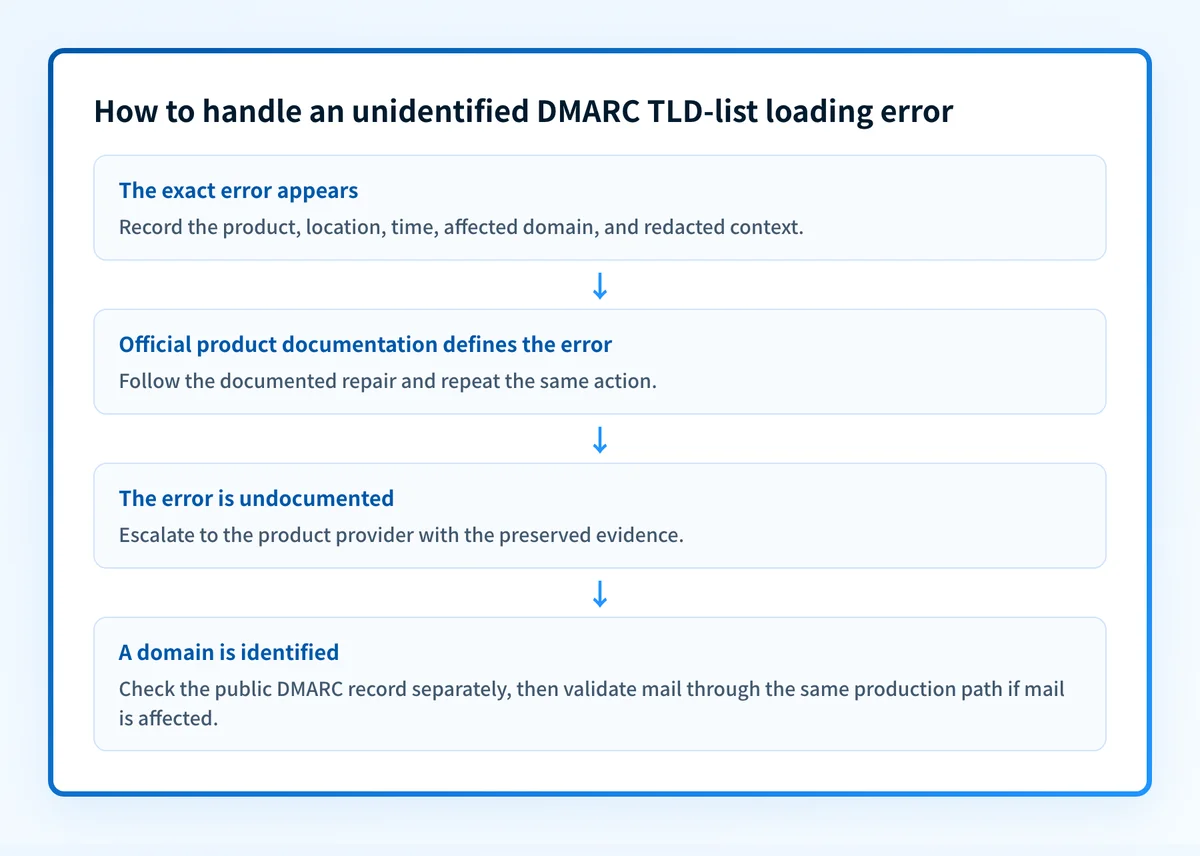
Record the product name and the precise location where "failure to load tld list" appears. Preserve the page URL, API endpoint if visible, timestamp, account or workspace context, and the domain entered at the time.
If the message appears in a browser, retain a redacted capture that includes the surrounding page context. If it appears in an API response, preserve the exact response text and status information after removing credentials, tokens, and customer data.
Do not rely on a paraphrase such as "the DMARC page failed." The literal string and its location are the starting evidence.
2. Check the product's official documentation and status information
Search the affected product's official documentation for the exact phrase. Also check its official status information and support guidance for the relevant feature.
The outcome of this step should be one of two clear findings:
- The provider documents what the string means and gives a supported repair or retry path.
- The provider does not document the string, so the issue needs provider support with the preserved evidence.
3. Separate the public DMARC record from the loading error
Once you know the affected domain, check its DMARC record. Compare the returned record with the domain you intended to inspect, including the exact organizational domain and any subdomain involved in the product workflow.
A public check is useful for a narrow question: whether the domain has a publicly discoverable DMARC record at the time of the check. It is not evidence that the product's domain list is available, that aggregate reports are processing, or that a sender's messages pass DMARC.
Keep the result with the incident notes. It prevents a separate public-record concern from being confused with the unidentified loading error.
4. Preserve received-message evidence only if mail is also failing
If the report includes a delivery or authentication problem, obtain the full raw source of a message sent through the exact production path. Record the trusted receiving system's Authentication-Results header and redact addresses and other private data before sharing it.
Do not infer an authentication failure from the TLD-list wording. The DMARC alignment failure guide is relevant only when message evidence identifies alignment as the issue.
5. Escalate with a bounded problem statement
Send the product's support channel the exact error, affected time, affected domain, page or endpoint, redacted capture or response, and the result of any separate public DMARC record check. Ask what feature uses the TLD list, whether a known service condition applies, and what verification confirms recovery.
This keeps the request focused on the product-controlled failure. It also gives support enough context to distinguish a loading issue from a configuration or protocol issue.
How do I fix it?
Follow the affected product's documented repair
Use a repair only when the product that emitted the string documents its meaning and the required action. The available evidence does not support a universal configuration change, DNS edit, allowlist rule, or retry sequence for this error.
If the provider identifies a service condition, follow its stated recovery or validation process. If it identifies a domain-input or configuration requirement, apply only that requirement to the affected function.
Do not loosen the DMARC policy to make this error disappear. Changing p= changes requested enforcement, but it does not identify, repair, or validate a TLD-list loading failure.
Correct a separately confirmed DMARC record issue
If the record check identifies a separate publication problem, repair that issue according to the DNS provider and the DMARC implementation workflow. The implementation sequence described by PowerDMARC includes configuring the domain, policy, and aggregate reporting, then publishing the record in DNS.
That is a record-publication branch, not a documented fix for the TLD-list message. Keep the two incident tracks separate until the product confirms a relationship.
Escalate an undocumented product error
If official documentation does not define the error, do not invent a repair from the phrase. Provide support with the preserved context and ask for the product-specific cause, remediation, and validation method.
A support response may identify an external dependency, a temporary product condition, or a domain-specific input issue. Until that response is documented for the affected product, those remain possibilities rather than established causes.
How do I validate the repair?
Repeat the same action that produced "failure to load tld list" in the same product, with the same affected domain and account context. Confirm that the product's documented success state appears or that its support team confirms the expected result.
Validate the DMARC implementation independently:
- Check the intended domain's public record through the DMARC checker.
- Confirm the vendor's own status where the vendor provides one.
- Send a new message through the exact production path and inspect the trusted receiver-added authentication results if mail authentication was part of the incident.
- Review DMARC aggregate-report data after it has accumulated when the domain uses reporting.
Check the domain record after identifying the affected product
Once you have the domain involved in the error, inspect its public DMARC record before making a DNS change. This helps separate a record-publication issue from a product loading failure.
A record check cannot identify which product emitted "failure to load tld list," repair that product's dependency, monitor its future state, or prove why an individual receiver accepted or rejected a message.
If the domain has multiple senders or recurring DMARC-report work, Palisade is agentic DMARC software that analyzes aggregate-report data, identifies sending sources and authentication or alignment issues, and creates prioritized remediation tickets. It proposes the next policy step from the evidence, while a human reviews and applies any change. Start with Palisade. Palisade does not repair an unidentified third-party TLD-list loading error or control that provider's service state.
For larger domain inventories, bulk DMARC checking can help establish which domains have publicly visible records. It still does not prove how a particular product handles a TLD list.
Evidence
Sources and further reading
Questions readers ask
Frequently asked questions
How do I fix DMARC authentication failure?
Start with a message that actually failed and read the receiving system's Authentication-Results header, which shows which mechanism or alignment condition broke. Repair that specific condition, then send a new message through the same production path to confirm the result. The string "failure to load tld list" does not identify an authentication failure, so it is not the place to start.
How to solve DMARC issue?
Name the observable symptom first, because "DMARC issue" covers several different problems with different repairs. For "failure to load tld list," identify the product that displayed the string and follow its official documentation or support guidance. Check the domain's public DMARC record separately, since that check cannot explain a product's loading error.
What causes DMARC failure?
A DMARC failure is caused by something in the message path, so the cause sits in evidence tied to the affected domain, a received message, or a DNS result. The string "failure to load tld list" is not one of those causes and no provider documents it as one. If a message really did fail authentication, work from the receiver's authentication results and the DMARC alignment failure guide.
How do I enable DMARC for my domain?
Configure the domain, DMARC policy, and aggregate reporting, then publish the DMARC record in DNS. PowerDMARC describes this as an implementation workflow. Its workflow does not provide universal record syntax or a vendor-neutral validation procedure.
Does a published DMARC record fix a TLD-list loading error?
No, because the record lives in your DNS while the error belongs to the product that displayed it. A record check answers a public DNS question and nothing more. Use the affected product's own validation step once you have identified where the error came from.

Written by
Samuel ChenardCEO & Co-Founder, Palisade
Samuel Chenard is the CEO and co-founder of Palisade, agentic DMARC software for IT teams and MSPs, from one domain to thousands.
More from Samuel →