DMARC failure for domain: how to diagnose it
 ChatGPT
 Claude
 Gemini
 Perplexity
 Grok
GrokIn brief
DMARC failure for domain results need domain-specific DNS and message evidence. Collect the failure signal, isolate its scope, then retest the same path.
A DMARC failure for a domain is not specific enough to fix from a scan label alone. Start with the exact result, then collect the domain's public DMARC DNS answer and a redacted received-message header or aggregate-report evidence from the affected sending path. Repair only the condition those records show, then send a new test through that same path. For broader context, see the DMARC learning hub.
At a glance
Quick takeaways
- A scan result can identify a DMARC policy concern, but it does not prove why a particular message failed.
- Preserve the exact scan result, DNS response, and trusted received-message evidence before changing records.
- A public DMARC lookup checks published DNS, not every sending service that uses the domain.
- A reporting-address authorization issue is distinct from a general domain authentication failure.
- Do not loosen a DMARC policy as a substitute for identifying the failing sending path.
- Retest with a new message sent through the same application, route, and recipient path.
What does the failure mean?
"DMARC failure for domain" can describe a result from a domain-security scan, a received-message authentication result, an aggregate-report finding, or a receiver rejection. Those are different evidence types. They do not support the same repair.
One published domain scan presents a separate DMARC result with this exact string:
DMARC Policy: Score 0 of 10The published scan result shows that a domain-security scan can assess DMARC policy separately from SPF and DKIM. It does not identify an affected message, the sender that produced it, or a mailbox provider's decision.
Treat the scan as a signal to collect evidence, not as an instruction to change DNS. Record the domain name, the time of the result, and the exact text. Then determine whether the issue is limited to the published record, appears in a real received message, or appears in DMARC reporting.
A reporting destination can introduce its own authorization problem. If the concern is specifically about an external reporting address, use the focused guidance on DMARC RUA and RUF domain authorization. Do not treat that issue as proof that all mail sent by the domain has failed.
What usually causes it?
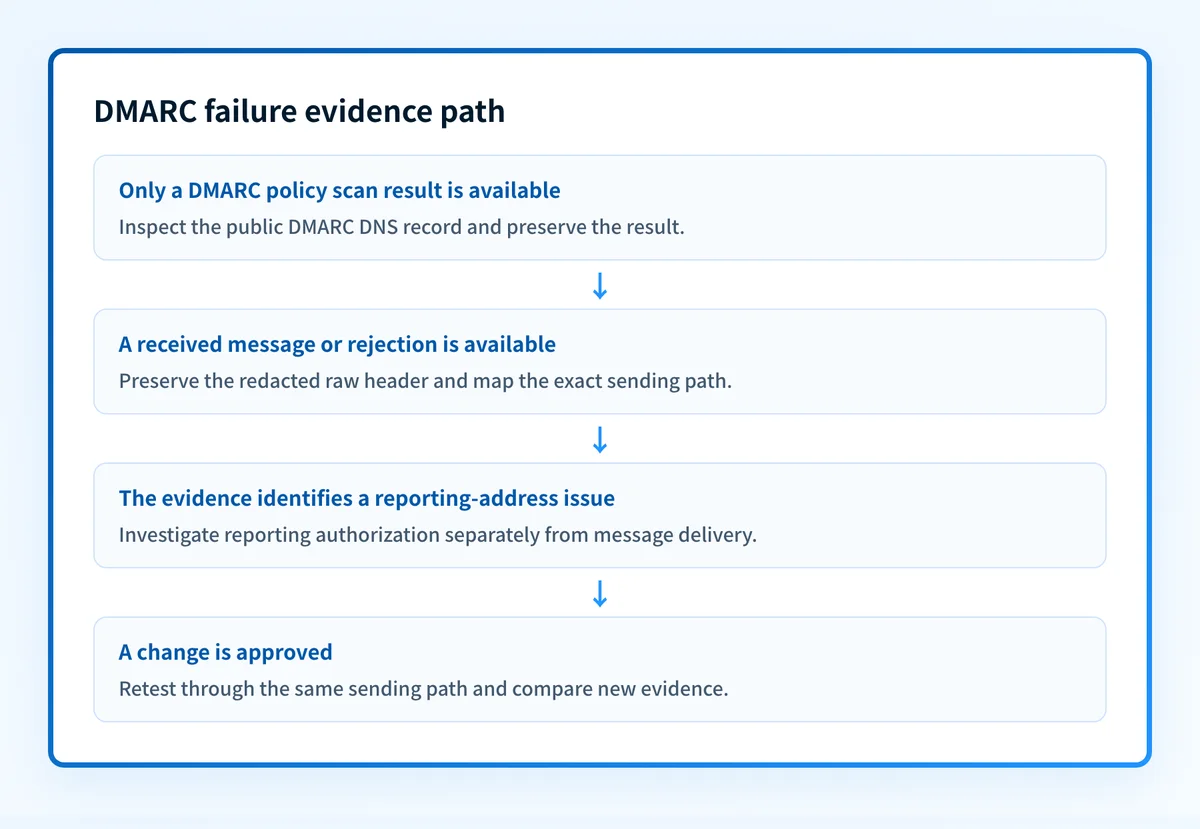
The result is only a policy scan result
A scan can report a DMARC policy result independently of SPF and DKIM. That result can justify inspection of the public DNS record, but it does not establish a message-level cause.
This is the most likely interpretation when the only evidence is a score, warning, or dashboard label. The narrow next step is to save the exact result and inspect the published DMARC record. Do not change the record merely to change a scan score.
The failing path has not been identified
A single domain can send mail through more than one application, provider, or route. A scan of public DNS does not show which production source generated the message under review.
This is an operational inference from the evidence gap. Identify the application, sending service, recipient provider, approximate send time, and Message-ID for the affected message. Without those details, a broad DNS change can affect mail that was not involved in the failure.
The evidence comes from a different message copy
Forwarded, resent, or modified copies may not represent the original production path. A scan result also cannot substitute for the recipient's received message.
Use the complete raw source from the receiver for the exact affected message. Keep private addresses, tokens, and customer data out of tickets or shared diagnostics. A screenshot of a mail client does not preserve the header evidence needed to compare paths.
A reporting-address issue is being treated as a sending failure
DMARC reporting configuration and production message authentication are separate areas of investigation. If the observed failure concerns an aggregate-report destination, isolate that authorization question before making claims about messages sent by the domain.
Keep the evidence sets separate. A corrected reporting destination does not prove that a sender's messages will pass later checks, and a delivered message does not by itself validate every reporting destination.
A receiver rejection is being inferred from a public lookup
A public DNS result can reveal the record published at the time of the lookup. It cannot prove a receiver's private decision about one message or predict future placement.
If the observable symptom is a rejection, preserve the exact rejection text and the received-message evidence. The related guide for 550 message rejected due to sender's DMARC policy is useful only when that is the actual symptom.
How do I diagnose the failure?
1. Preserve the strongest available evidence
Start with the received message if one exists. Save its complete raw source and record the Message-ID, sending time, sender application, sending domain, recipient provider, and delivery outcome.
If no message is available, preserve the scan result exactly as shown. State that the current evidence is a DNS or scan observation, not a message-level finding. Avoid filling gaps with assumptions about SPF, DKIM, alignment, or a receiver's policy.
2. Inspect the published DMARC record
Run the sending domain through the DMARC checker. Save the result with the lookup time and compare it with the domain in the observed failure.
The check can inspect a public DNS answer. It cannot inspect private sender configuration, identify every application using the domain, prove a continuous state, or explain a single receiver decision.
Use a structural record shape only as a comparison aid:
Do not publish this example as a production record. The correct values and any reporting destinations must be based on the domain's own approved configuration.
Illustrative only
Host: _dmarc.yourdomain.com
Type: TXT
Value: v=DMARC1; p=none
Record what the checker returns without copying values from another tenant or provider account. If the result differs across tools, note each tool, time, and resolver behavior before editing DNS.
3. Tie the result to one sending path
Map the affected path in plain language:
application -> sending service -> outbound route -> recipient providerFor each stage, record the owner and the evidence available. The purpose is to distinguish a public-record concern from a problem confined to one service or route.
Do not infer the responsible service from the visible From address. Use the received message, approved service logs, or aggregate-report evidence that is available to the domain owner.
4. Separate a reporting issue from a sending issue
If the evidence concerns report delivery or a reporting destination, diagnose that configuration separately. The DMARC RUA and RUF domain authorization guide covers that narrower question.
If the evidence concerns a received message, keep the raw header and the sending-path record together. This prevents a reporting repair from being mistaken for a repair to the production mail path.
5. Define the smallest supported change
Write down the exact condition supported by the evidence and the change that addresses only that condition. Include the owner, expected result, rollback step, and the same path that will be used for retesting.
If the evidence only shows a scan score, the supported action may be continued investigation rather than a DNS change. That is a valid outcome.
How do I fix it?
Correct only the confirmed domain configuration issue
When the public lookup identifies a record issue that the domain owner can verify, correct that specific DNS configuration through the authorized DNS process. Preserve the prior value and change window so it can be restored if the change causes an unexpected result.
This changes published DNS. It does not prove that every sender uses the intended configuration or that a receiver will accept every future message.
Repair the confirmed sending path
When received-message or report evidence identifies one production source, make the smallest approved change in that source's configuration or route. Keep the change scoped to the source and domain involved.
Do not apply a domain-wide change because one application is suspected. A sender-specific repair requires evidence from that sender's actual production path.
Treat reporting authorization as a separate repair
When the evidence identifies a reporting-address authorization issue, repair that authorization through the owning domain's approved DNS process. Do not reuse account-generated destinations, tokens, or hostnames from examples or other tenants.
This repair changes reporting configuration. It does not repair an unrelated received-message failure.
Do not reduce the DMARC policy to make a scan warning disappear. A policy change affects requested enforcement. It does not identify the source of a domain-specific failure or repair an unverified sending path.
Investigate this with your coding agent
Use this after collecting a public DNS result and a redacted header from the affected message. Remove recipient addresses, tokens, private keys, and customer content before sharing either input.
Agent handoff
Copy the prepared prompt
Give this to a coding agent that can inspect the relevant repository or configuration source of truth.
Problem: A domain has a reported DMARC failure, but the available evidence may be limited to a public DNS result and one redacted received-message header.
Evidence: Domain name, lookup timestamp, public DMARC DNS result, redacted Authentication-Results and relevant message headers, Message-ID, sending application, and recipient outcome.
Repository scope: Read-only inspection of the domain's public DNS record and the supplied redacted message-header text.
Constraints: Inspect before editing. Do not apply changes until I approve the proposed diff. Do not request or process private keys, tokens, unredacted headers, customer data, or production credentials.
Requested output: Diagnosis, minimal proposed change, rollback, and unknowns.
Verification: Run a new lookup after any approved DNS change and send a new test through the same application, outbound route, and recipient path.
Stop if: Credentials, private data, production mutation, or missing evidence is required.
Human approval required: Review the proposed diff and verification plan before allowing changes. Do not paste secrets, private keys, API tokens, unredacted headers, or customer data.
How do I validate the repair?
Repeat the same diagnostic path that produced the original result. If the original evidence was a public lookup, perform a new lookup after the authorized DNS change and record the result and time. If it was a received message, send a new message through the same application, service, route, and recipient provider.
Check four layers where they apply:
- DNS: confirm the published result through the authoritative DNS process and at least one public lookup.
- Vendor: check the sender platform's current status when the platform provides a relevant verification state.
- Message: inspect the new received message from the same path, not a forwarded copy or a different test service.
- DMARC: review aggregate-report evidence after data has had time to accumulate.
Check the DMARC record before expanding the fix
If the evidence so far is a policy score or public-record result, check the domain's DMARC record before changing a sender configuration. Compare the result with the exact domain and sending path under review.
For an ongoing estate of domains or senders, Palisade is agentic DMARC software that analyzes DMARC aggregate-report data, identifies sending sources and authentication or alignment issues, and creates prioritized remediation tickets. It can propose a next policy step when the evidence supports it, while a human reviews the evidence and applies any change.
A public DMARC check and Palisade's report analysis do not prove why one receiver rejected one message, repair a sender automatically, or guarantee future delivery.
Evidence
Sources and further reading
Questions readers ask
Frequently asked questions
Does a DMARC scan score prove that messages are failing?
No, because a scan score describes the published record rather than any message that was actually sent. It cannot name the message, the sending service behind it, a recipient's decision, or a future delivery result. Collect a received message or aggregate-report evidence before you act on a score.
Can I fix a domain DMARC failure by changing the policy?
No, because the policy controls the enforcement a domain requests, not the reason a message failed. Collect the public DNS answer and evidence from the affected sending path first, then change only the condition that evidence supports.
Should I start with the DNS record or the message header?
Start with the received message whenever you have one, because it is the only evidence that shows what happened on the real sending path. Fall back to a public DNS lookup when the only evidence you hold is a scan result or a concern about the published record.
Can a DMARC checker identify every sender that uses my domain?
No, because a checker reads public DNS, and DNS does not list the applications sending for your domain. To build that inventory, review DMARC aggregate-report data once enough of it has accumulated.
Is a reporting-address issue the same as a sending failure?
No, a reporting-address authorization issue is a separate question about where DMARC reports are allowed to be sent. Diagnose it on its own, and do not read it as evidence that messages from the domain failed authentication.

Written by
Samuel ChenardCEO & Co-Founder, Palisade
Samuel Chenard is the CEO and co-founder of Palisade, agentic DMARC software for IT teams and MSPs, from one domain to thousands.
More from Samuel →