Why does DMARC say an rua or ruf domain is not authorized?
 ChatGPT
 Claude
 Gemini
 Perplexity
 Grok
GrokIn brief
DMARC says an rua or ruf domain is not authorized when an external report destination lacks the DNS consent record required for that policy domain.
DMARC says an rua or ruf domain is not authorized when a report address points outside the applicable DMARC policy domain and the destination domain has not published the required DNS consent record. This check prevents one domain from directing DMARC reports to an unrelated recipient. Check the exact policy domain, the domain after @ in each reporting address, and the authorization record defined by RFC 9990.
At a glance
Quick takeaways
- An external DMARC reporting address needs DNS authorization from the domain that receives the reports.
- The authorization record belongs under the report destination domain, not only under the domain publishing DMARC.
ruaandrufaddresses require separate checks when they use different destination domains.- An unauthorized report destination does not by itself make SPF, DKIM, or DMARC alignment fail.
- The lookup name includes the exact DMARC policy domain, so a subdomain can produce a different authorization name.
- A DNS result confirms publication, not that a report processor is receiving and handling production reports.
How external DMARC report authorization works
DMARC policy records can request aggregate feedback through rua and can include failure-report destinations through ruf. Reporting addresses are normally within the policy domain. When an address uses another domain, the receiving domain must explicitly authorize that relationship through DNS.
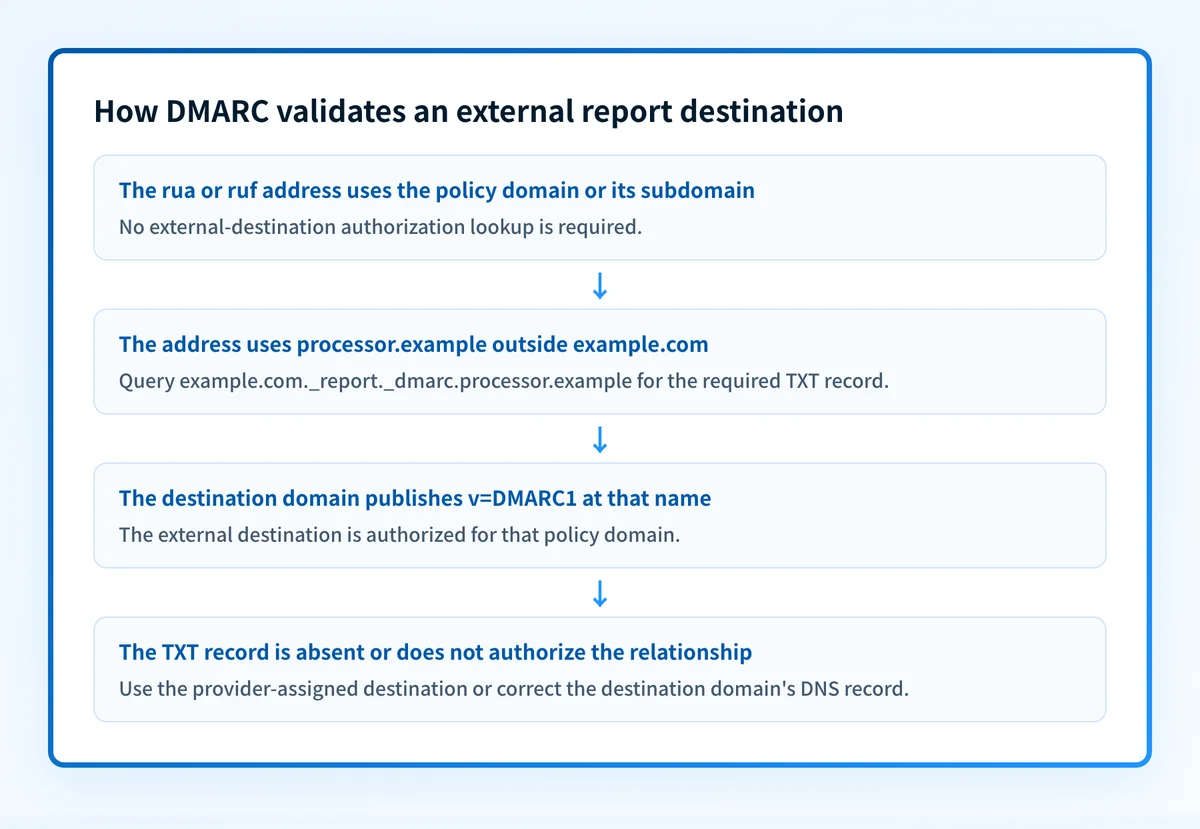
For aggregate reporting, RFC 9990 defines the external-destination check. The receiver forms a TXT lookup name from the policy domain and the destination domain. A valid authorization record tells the receiver that the destination agrees to accept reports about that policy domain.
This is separate from message authentication. A report destination can be unauthorized while a message still has an aligned SPF or DKIM pass. For the broader protocol, see the DMARC learning hub.
When an rua or ruf domain is not authorized
Treat an address as external when its domain is neither the policy domain nor a subdomain of that policy domain. The important comparison is against the domain whose DMARC policy supplies the reporting URI.
For example, if the policy record is published for example.com and includes rua=mailto:reports@processor.example, the report address is external. The receiver checks whether processor.example authorizes reports for example.com.
The answer can change in these cases:
- A reporting address at
reports.example.comis withinexample.com, so it is not an external destination for this check. - A policy published specifically for
marketing.example.comcreates an authorization relationship formarketing.example.com, not automatically forexample.com. - Multiple
ruaorrufaddresses can use different destination domains. Check each external domain separately. - A destination service may provide a customer-specific address and publish the needed authorization itself. Use the address and DNS instructions assigned by that service.
Worked authorization-record example
For this illustrative DMARC policy:
v=DMARC1; p=none; rua=mailto:dmarc-reports@processor.exampleIf example.com is the policy domain, the external authorization lookup is:
example.com._report._dmarc.processor.example IN TXT "v=DMARC1"This is illustrative only. Do not publish this exact record in another domain's DNS. The report destination provider must supply or confirm the real authorization record for its own domain.
The parts have distinct jobs:
example.comis the exact domain whose DMARC policy contains the reporting URI._report._dmarcidentifies the external DMARC reporting authorization namespace.processor.exampleis the domain after@in the destination address.v=DMARC1identifies the authorization record format specified by RFC 9990.
_dmarc.example.com, or under the source domain's zone. Neither location gives processor.example consent to receive external reports.
What to check next
Start with the evidence you have.
If you have only the domain name, use the DMARC checker to inspect the public DMARC record and copy each rua or ruf destination exactly. Then identify the policy domain that supplied the record and query the required external authorization name.
If you control the report destination domain, confirm the TXT record on its authoritative DNS servers and through at least one public resolver. If the answers differ, investigate the destination zone, delegation, and DNS propagation before changing the DMARC record.
If a hosted reporting service owns the destination domain, use the reporting address it assigned and its current onboarding instructions. Do not copy an authorization hostname from another customer or assume that a wildcard record is accepted.
After DNS confirms the record, check the report processor for accepted aggregate files once receivers have had time to send them. Receiving systems determine when they generate reports, so immediate arrival is not proof of a successful change. If you are also investigating a delivery rejection, keep that work separate from report authorization. For example, SMTP error 550 5.7.509 concerns a sender's DMARC verification, not an external report mailbox.
Check the external DMARC report destination
Inspect the published DMARC record first, then construct the authorization lookup from the exact policy domain and report destination domain.
A public DNS check cannot prove that every receiver will send reports, that a mailbox or processor accepted a report file, or that the production sending path passes DMARC. Palisade is agentic DMARC software that analyzes aggregate-report data, identifies sources and authentication or alignment issues, and creates prioritized remediation tickets. A human reviews the evidence and applies any DNS or policy change.
Evidence
Sources and further reading
Questions readers ask
Frequently asked questions

Written by
Samuel ChenardCEO & Co-Founder, Palisade
Samuel Chenard is the CEO and co-founder of Palisade, agentic DMARC software for IT teams and MSPs, from one domain to thousands.
More from Samuel →