DMARC feedback type auth failure
 ChatGPT
 Claude
 Gemini
 Perplexity
 Grok
GrokIn brief
DMARC feedback type auth failure needs the original report or message evidence before a repair. Preserve the evidence, identify its source, and retest.
DMARC feedback type auth failure is not enough evidence to identify a DMARC fault or choose a repair. Preserve the complete report, its delivery context, and any related received-message headers before changing DNS or policy. The phrase may refer to a report field, a recipient-specific diagnostic, or another system's label. The narrowest safe next step is to obtain the original evidence and identify the specification or provider that produced it.
At a glance
Quick takeaways
- The phrase
feedback type auth failuredoes not identify a specific DNS, SPF, DKIM, alignment, or DMARC-policy fault on its own. - Do not change a DMARC policy to make an unclear failure label disappear.
- Save the original report or message source before forwarding, editing, or copying fragments into a ticket.
- The system that generated the label is part of the evidence needed to interpret it.
- A public DMARC record check can inspect a published record, but it cannot explain an individual report label without the report itself.
- Validate any repair through the same production sending path that produced the evidence.
What does the failure mean?
The observable symptom is the exact text below:
feedback type auth failureThat text alone does not establish what failed. It does not show a sending domain, an SPF result, a DKIM result, an identifier-alignment result, a policy disposition, or the receiver that generated the text.
The RFC Editor describes the RFC Series as the authoritative source for RFCs. A reliable interpretation needs the canonical specification that defines the field or the original receiver or reporting-system evidence that contains it. Without either, assigning the phrase to a DMARC authentication condition would be an inference, not a documented diagnosis.
Keep the evidence in its original form. A copied label can lose the surrounding header fields, report metadata, sender identity, timestamp, or provider context needed to determine its meaning. The foundational DMARC learning guide can help distinguish DMARC records, authentication outcomes, and reporting concepts once you know which artifact you have.
What usually causes it?
The phrase was separated from its original report
A ticket, chat message, or monitoring alert may retain only a short label. That can remove the fields needed to establish whether the text belongs to a DMARC feedback report, a message-authentication result, or an application-specific status.
This is the most likely explanation when no original report, complete raw message, or provider diagnostic accompanies the phrase. It is an evidence limitation, not a documented DMARC failure mode.
A reporting or receiving system used its own label
A mailbox provider, security gateway, reporting service, or internal tool can display its own status labels. The available material does not identify a provider that defines feedback type auth failure, so the label cannot be treated as universal DMARC terminology.
The Google Workspace Help Center is a general support entry point. It does not, by itself, define this phrase or provide a repair path for it. Treat a provider label as provider-specific until that provider's current documentation or original diagnostic confirms its meaning.
The evidence may concern message authentication, not the published DMARC record
A published DMARC record and a received message are different evidence layers. A record can be syntactically present while the exact production message still has an authentication or alignment issue. The inverse can also occur when a copied alert refers to a historical condition rather than the record currently visible in DNS.
This is an inference from the missing context. Do not assume that editing the DMARC record will address the phrase.
The label may refer to a report-delivery or processing problem
The available text does not show whether auth failure describes a reported event, a report-delivery issue, or processing performed by the system that displayed it. A product marketing page is not a protocol definition. For example, the Valimail website does not provide a canonical definition of this exact label.
Do not map the phrase to report delivery, SPF, DKIM, or alignment until the producing system's evidence supports that mapping.
How do I diagnose the failure?
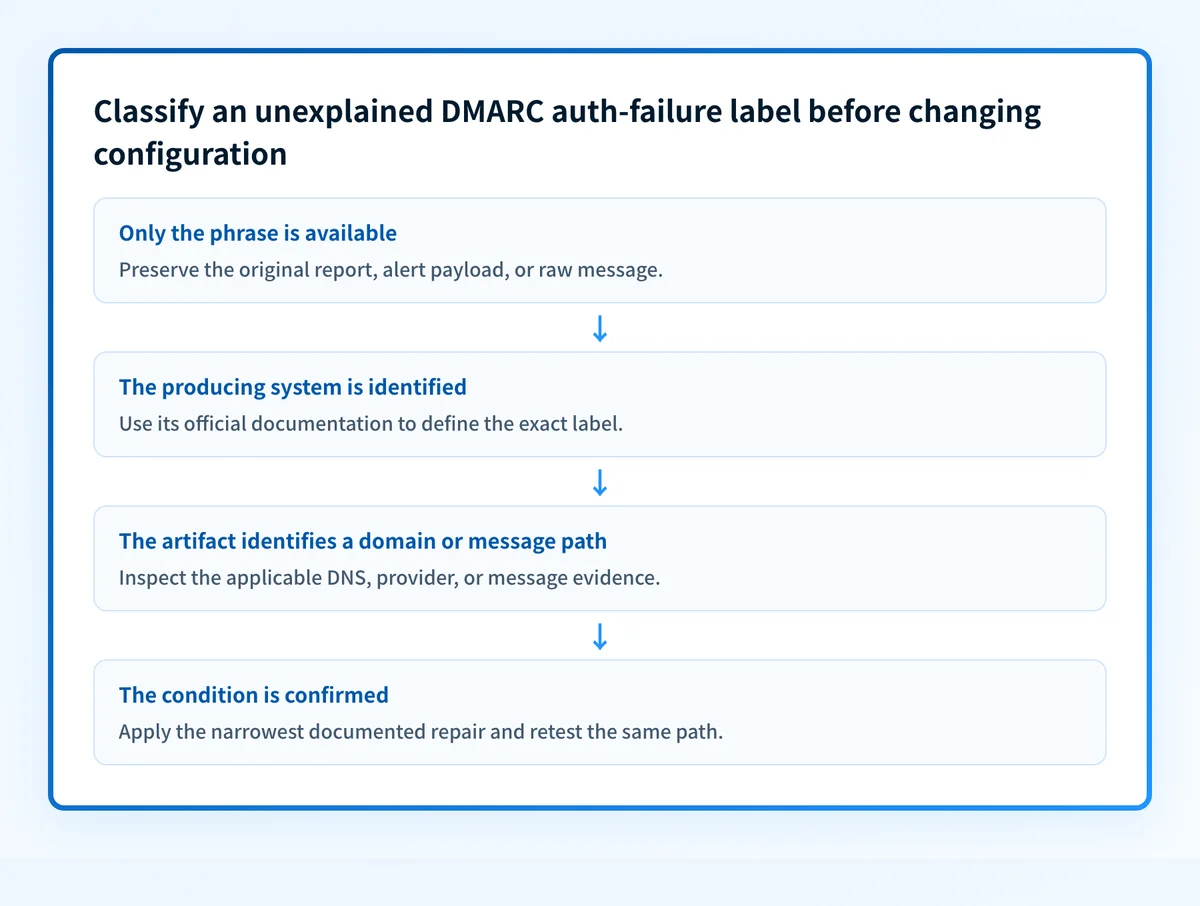
1. Preserve the complete original artifact
Obtain the original feedback report, alert payload, or raw message that contains feedback type auth failure. Keep its unmodified copy in the incident record. Record where it came from, when it was received, the affected domain, and the system that displayed it.
If the text came from a received email, save the full source rather than a screenshot. If it came from a dashboard or API, export the available event details and retain the exact field names. Redact recipient addresses and customer data before sharing evidence outside the team.
2. Identify the system that produced the label
Determine whether the phrase came from a mailbox provider, a DMARC-report processor, a gateway, an ESP, or an internal alerting system. Look for the report sender, product name, API endpoint, message headers, or dashboard URL that establishes origin.
Do not use a generic web search result as the definition. Find the producing system's official documentation or support diagnostic that uses the same wording. If you cannot identify the producer, keep the incident classified as unresolved evidence rather than as a DMARC authentication failure.
3. Separate DNS evidence from message evidence
Inspect the artifact for a domain, a message identifier, a timestamp, and any stated authentication result. Only then decide which layer needs inspection.
- If the artifact identifies a published DMARC record problem, inspect the record.
- If it identifies a delivered or rejected message, preserve the receiver's message evidence and follow that exact sending path.
- If it identifies a reporting-system issue, use that system's documented diagnostic process.
- If it identifies none of these, request the full artifact before making a change.
4. Compare the exact domain and timestamp
Match the evidence to the production sender, visible From domain, sending service, recipient system, and time of the event. Avoid testing a different domain or a manually forwarded copy of the message.
A current public DNS result can differ from the state at the time the event occurred. Record both the incident time and the time of any later DNS lookup. This keeps a later record change from being mistaken for the cause of an earlier label.
5. Determine whether alignment evidence exists
If the original artifact names an alignment failure, use the complete message and the source documentation that defines the result. The DMARC alignment failure guide covers the related troubleshooting topic. Do not assume alignment failed merely because the phrase contains auth failure.
When the original evidence has no explicit authentication or alignment result, stop the diagnosis at that point. Request the missing report or provider diagnostic.
How do I fix it?
Repair the evidence collection first
When only the phrase is available, the repair is to recover the original report, message source, or provider diagnostic. This does not change authentication, alignment, reporting, or enforcement. It gives you the evidence needed to select a technical repair safely.
Document the source system and preserve a redacted incident copy. If the source cannot provide additional evidence, record that the condition remains unclassified.
Apply only the repair supported by the identified source
Once official documentation or complete evidence defines the condition, change only the component it identifies. A message-authentication issue needs message-path evidence. A published-record issue needs DNS evidence. A reporting-system issue needs the reporting system's documented remedy.
Do not relax the DMARC policy as a response to an unexplained label. A policy change affects requested enforcement. It does not establish why this phrase appeared or repair an unknown authentication condition.
Keep a rollback plan for any confirmed change. Record the previous DNS record, sending configuration, or reporting configuration before changing it. Revert the specific confirmed change if the same sending path produces a new failure or interrupts expected mail flow.
Do not treat a public lookup as proof of the incident
A public record check can help inspect the currently published DMARC record after the evidence identifies a domain. It cannot inspect a private report payload, prove an individual receiver's decision, repair authentication, or show every production sender that used the domain at the incident time.
How do I validate the repair?
Repeat the same sending path that produced the original evidence. Use the same application, sending domain, recipient system, and message type where possible. Preserve the new report or raw message alongside the original.
Validate at the applicable layers:
- Check authoritative DNS and at least one public resolver when the confirmed repair changed a DMARC record.
- Check the producing provider's current status when its documentation identifies a provider-side condition.
- Check the full received-message evidence when the issue concerns a delivered or rejected message.
- Review DMARC aggregate reporting after data accumulates when the confirmed issue concerns production sending sources.
Check the published DMARC record after you identify the domain
If the original evidence identifies the sending domain, use the DMARC checker to inspect the record currently published for that domain. Compare the result with the preserved report or message evidence before changing policy.
Check the published DMARC record
A DMARC record check cannot define feedback type auth failure, inspect a private feedback report, prove why one receiver produced a label, or replace same-path message evidence.
Evidence
Sources and further reading
Questions readers ask
Frequently asked questions
How do I fix DMARC authentication failure?
Work out which check failed before you change anything, because DMARC fails when neither SPF nor DKIM produces a passing result that aligns with your From domain. Read the Authentication-Results header on a real failing message, or the aggregate report row for that source, to see which of the two broke. Then fix that one sending service and retest through the same path.
What causes DMARC failure?
DMARC fails when neither SPF nor DKIM gives a passing result that aligns with the domain in your visible From address. In practice that usually means a sending service nobody added to SPF, a DKIM signature that is missing or signed with a different domain, or forwarding that breaks SPF along the way. The report or the message headers will tell you which of those it was.
How to solve DMARC issue?
Classify the issue first, then fix only what the evidence names. Work out whether you are looking at a problem in the published DNS record, an authentication failure on a real message, or a reporting problem, because each has a different fix and a different owner. Never loosen the DMARC policy as a shortcut around the diagnosis.
How to authenticate DMARC?
Publish a DMARC TXT record at _dmarc.yourdomain.com, then make SPF or DKIM pass and align for every service that sends as your domain. DMARC has nothing of its own to authenticate: it reads the SPF and DKIM results and checks whether either one matches your visible From domain. Confirm it worked by sending through the same path again and reading that message's authentication results.

Written by
Samuel ChenardCEO & Co-Founder, Palisade
Samuel Chenard is the CEO and co-founder of Palisade, agentic DMARC software for IT teams and MSPs, from one domain to thousands.
More from Samuel →