What is a DMARC failure report?
 ChatGPT
 Claude
 Gemini
 Perplexity
 Grok
GrokIn brief
DMARC failure reports are optional message-level reports about DMARC failures. Learn what they can contain, why delivery varies, and how to use them.
A DMARC failure report, also called a forensic report, is an optional message-level report that a receiving mail system may send after a DMARC evaluation meets the reporting conditions published by the domain owner. It can help investigate a specific authentication failure, but it is not guaranteed, immediate, or complete because receivers can limit reporting and protect message data. Aggregate reports remain the primary evidence for broad sender inventory and DMARC monitoring.
At a glance
Quick takeaways
- DMARC failure reports describe individual messages or message samples that triggered a receiver's failure-reporting conditions.
- A
ruftag requests destinations for failure reports, but receivers are not required to send them. - The
fotag requests which authentication failure conditions can generate a report. - Failure reports can contain sensitive message data, so receivers may redact or omit content.
- DMARC aggregate reports show wider traffic patterns and are usually more useful for ongoing source inventory.
- A published
rufaddress does not prove that reports will arrive or that every DMARC failure will be reported.
How DMARC failure reporting works
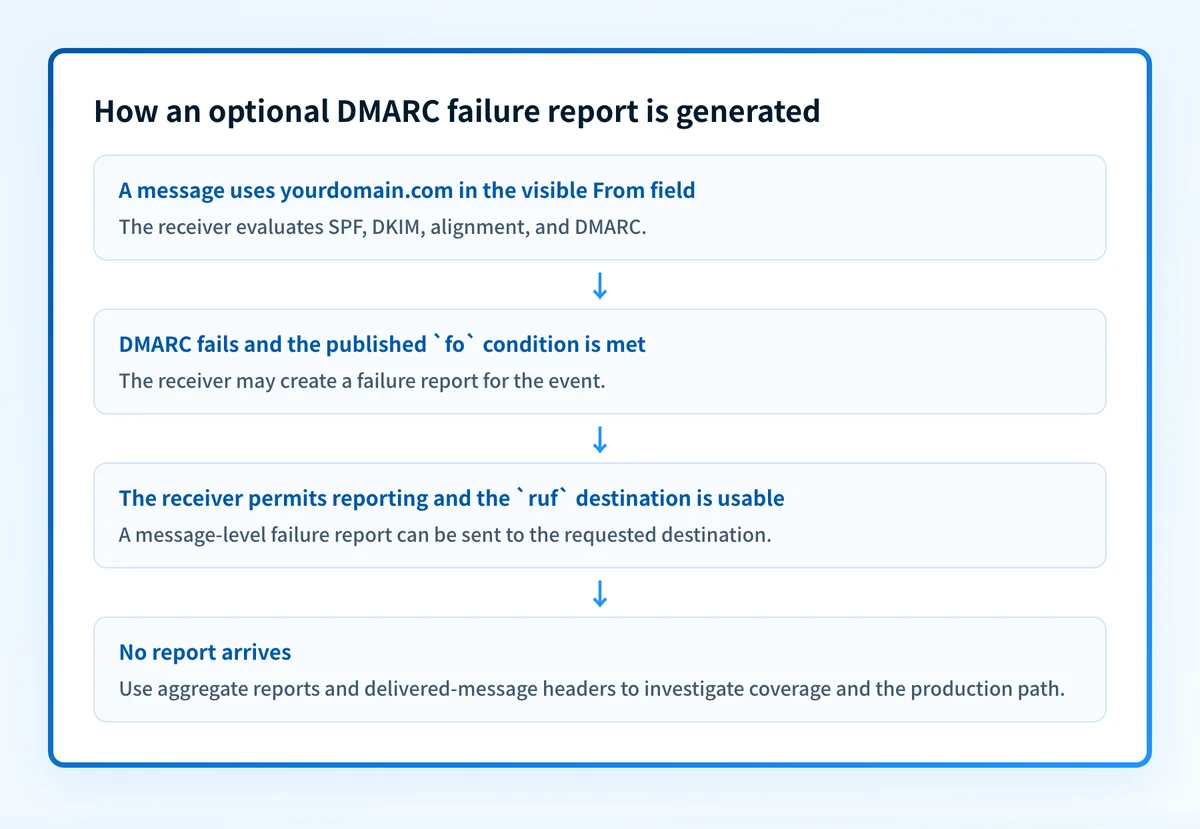
Failure reporting rules in RFC 9991 define failure reports as optional reports sent to the destination requested through the ruf tag. A receiver first evaluates DMARC by checking whether SPF or DKIM passes with an identifier aligned to the visible From domain. If DMARC fails and the receiver chooses to generate a report under the requested conditions, it can send a message-level failure report.
The report is different from a DMARC aggregate report. Aggregate reports use the rua tag and provide periodic XML data about observed traffic. Failure reports focus on a particular failed evaluation and can carry diagnostic details from that message. For broader context, see the Palisade DMARC learning hub.
Receivers have discretion. RFC 9991 permits a receiver to limit failure-report volume and to suppress or redact data for privacy, security, or abuse-prevention reasons. That means a quiet ruf mailbox does not prove that no messages failed DMARC. It may mean that a receiver did not send a report, sent it elsewhere, rate-limited it, or removed sensitive details.
When a DMARC failure report is useful, and when it is not
A failure report is most useful when you have a specific incident to investigate, such as an unexpected authentication failure from a known sending path or an apparent unauthorized use of the visible From domain. Its message-level evidence can help compare the visible From domain, SPF identity, DKIM signing domain, and receiver evaluation.
The answer changes when the question is about coverage rather than one event. Use aggregate reports to identify all observed sending sources, estimate the scope of alignment failures, and watch changes over time. A failure report is not a reliable traffic inventory.
Use this decision rule:
- Use a failure report when you have received one and need to inspect the authentication evidence for that reported message.
- Use aggregate reports when you need to identify legitimate senders and recurring DMARC failures across a domain.
- Use delivered-message headers when you need to verify the exact production path for a message your team sent.
- Use a public DNS lookup when you need to inspect the DMARC record currently published for a domain.
p=reject record does not show whether a marketing platform signs with an aligned DKIM domain. A real message from that platform and its Authentication-Results header provide evidence about that path. The Google DMARC report guide is useful when provider reporting changes affect how you interpret report data.
Do not treat a failure-report mailbox as the only alert for DMARC problems. A receiver can suppress reports, and a missing report does not confirm that production mail is healthy.
Worked example: reading ruf and fo
The following is an illustrative DNS record shape only. Do not publish this example unchanged. Use a reporting destination your organization controls, and confirm that an external reporting address is authorized as required by the DMARC specification.
v=DMARC1; p=none; rua=mailto:dmarc-aggregate@yourdomain.com; ruf=mailto:dmarc-failures@yourdomain.com; fo=1RFC 9989 section 4.7 defines ruf as the URI for failure reports. The reporting specifications also let a receiver check authorization before sending reports to a destination outside the policy domain.
In this example:
ruf=mailto:dmarc-failures@yourdomain.comrequests failure reports at a mailbox under the example domain.fo=1requests a report if either SPF or DKIM produces a failure condition described by the specification.rua=mailto:dmarc-aggregate@yourdomain.comseparately requests aggregate reports.p=nonerequests no specific handling for a DMARC failure. It does not disable reporting.
fo values have distinct meanings in the failure-reporting specification, RFC 9991:
0requests a report if all underlying authentication mechanisms fail to produce an aligned pass.1requests a report if any underlying authentication mechanism fails to produce an aligned pass.drequests a report when a DKIM signature fails evaluation.srequests a report when SPF fails evaluation.
What to do with the evidence you have
If you have a received failure report, preserve a redacted copy and compare its visible From domain, SPF result, DKIM result, and any available authentication identifiers with the sending application you expected to use. Then send a controlled test message through that same application and inspect the delivered headers. RFC 8601 defines the Authentication-Results header field, which receivers use to record authentication assessment results.
If you only have a domain name, use the DMARC checker to inspect the public DMARC record and see whether it contains ruf, rua, and a policy. A public DNS check cannot prove that a receiver sent a failure report, that an application is using the intended signing path, or that future messages will pass DMARC.
If you are deciding whether to rely on failure reports, keep them as supplemental incident evidence and use aggregate data for the ongoing work. The related guide on whether DMARC failure reports are worth the trouble covers that operational tradeoff.
Continue from a failure report with Palisade
A received failure report can explain one reported event, but it does not inventory every sender using the domain or show which authentication and alignment failures repeat across aggregate-report data. Palisade is agentic DMARC software that analyzes DMARC aggregate-report data, identifies sending sources and authentication or alignment issues, and creates prioritized remediation tickets.
Palisade can propose the next policy step from the evidence, while a human reviews it and applies any DNS change. It does not make a receiver send a failure report, change a receiver's private delivery decision, or prove every future message will authenticate.
Evidence
Sources and further reading
Questions readers ask
Frequently asked questions
Are DMARC failure reports sent for every failed message?
No. A domain can request failure reports, but receiving systems can decide whether to send them and can apply rate limits, privacy controls, or other local restrictions.
Does ruf enable DMARC aggregate reports?
No. The ruf tag requests failure-report destinations. The rua tag requests aggregate-report destinations, and the two report types have different purposes.
Can a DMARC failure report contain email content?
Yes. Failure reports can contain message-related data, but receivers may redact or omit content to reduce privacy and security risk. Handle any received report as potentially sensitive.
Is fo=1 the same as a DMARC failure?
No. fo=1 requests reporting when either underlying SPF or DKIM authentication mechanism fails to produce an aligned pass. The receiver still controls report generation, and the message's final DMARC result depends on the full evaluation.
Should I publish a ruf address outside my domain?
Only when the external destination is authorized to receive reports. The DMARCbis reporting specifications (RFC 9990 and RFC 9991) carry forward the authorization check for external reporting destinations to reduce abuse.
Can a public DMARC checker confirm that failure reports are arriving?
No. A public checker can inspect the published DNS record. It cannot confirm receiver reporting behavior, mailbox delivery, report parsing, or the authentication results of a production message.

Written by
Samuel ChenardCEO & Co-Founder, Palisade
Samuel Chenard is the CEO and co-founder of Palisade, agentic DMARC software for IT teams and MSPs, from one domain to thousands.
More from Samuel →