What is the DMARC np tag and how do you use it?
 ChatGPT
 Claude
 Gemini
 Perplexity
 Grok
GrokIn brief
The np tag applies a policy to subdomains that do not exist, closing the gap attackers use to spoof made-up subdomains. When to add np=reject, and when not to.
The DMARC np tag sets the policy for a non-existent subdomain, such as billing.yourdomain.com when that name does not exist in DNS. Under RFC 9989, a domain owner can publish np=none, np=quarantine, or np=reject in the organizational domain's DMARC record. Use it when you want an explicit policy for invented subdomains while keeping p and sp policies for other cases.
At a glance
Quick takeaways
- The
nptag is defined by RFC 9989, the current DMARC standard that obsoletes RFC 7489. npapplies only when the RFC 5322.From domain is a non-existent subdomain of the organizational domain.- Valid
npvalues arenone,quarantine, andreject. - The
nptag belongs in the organizational domain's DMARC TXT record, not on an invented subdomain. - A receiver that does not implement RFC 9989 may not apply
np, sopandspstill matter. - A published DMARC record does not prove that a production sender authenticates or aligns correctly.
Who is affected?
The np tag affects domain owners that publish DMARC for an organizational domain and want to define the requested disposition for mail that uses a child domain that does not exist. For example, example.com can publish an np policy that a receiver evaluates when mail claims to be from notice.example.com and that subdomain does not exist.
RFC 9989 defines DMARC discovery and policy evaluation for participating receivers. It does not require every receiving system to implement every optional feature immediately, and it does not make np mandatory for domain owners. The standard says a domain owner MAY publish an np tag. See RFC 9989 section 6.3 for the DMARC record tags and their meanings.
np does not apply to the organizational domain itself. It also does not replace a DMARC record published directly at an existing subdomain. If marketing.example.com exists and has _dmarc.marketing.example.com, that subdomain's own DMARC record is the relevant policy record.
For the wider policy model, see Palisade's DMARC learning hub and the related explanation of what the DMARC np tag means.
What are the requirements?
The np tag uses a DMARC disposition value
RFC 9989 defines np as the requested policy for non-existent subdomains. Its permitted values match the policy values used by p and sp: none, quarantine, and reject. The value expresses the domain owner's requested handling when DMARC evaluation fails. It does not instruct a receiver to override its local policy or guarantee a particular mailbox outcome.
v=DMARC1; p=reject; sp=quarantine; np=rejectDo not publish this example unchanged. Add np to the one existing DMARC TXT record for your organizational domain, preserving the reporting and policy tags your domain already needs.
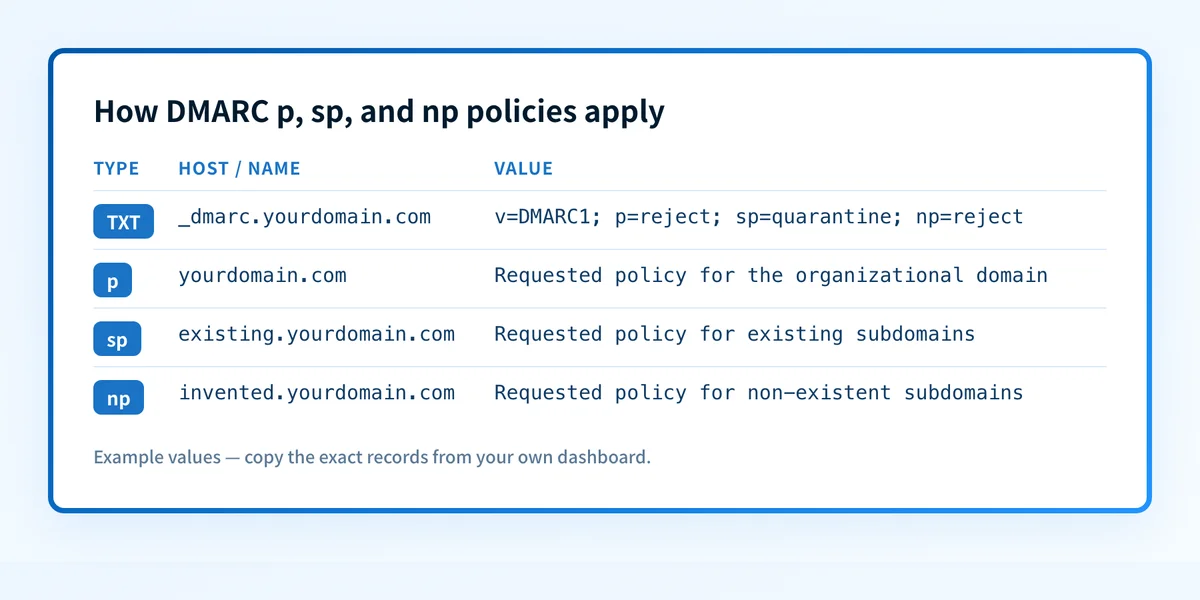
In this illustrative record, p=reject is the requested policy for yourdomain.com, sp=quarantine is the requested subdomain policy, and np=reject is the requested policy when the evaluated child domain does not exist. The RFC 9989 DMARC record syntax requires v=DMARC1 to be the first tag.
A non-existent subdomain has a specific policy path
RFC 9989 distinguishes a non-existent domain from an existing subdomain that lacks its own DMARC record. During DMARC policy discovery, the receiver determines the organizational domain and evaluates the relevant record. When the RFC 5322.From domain is a non-existent subdomain, the np tag provides the requested policy if it is present. If it is absent, the applicable policy falls back to the organizational domain's p value. The sp tag applies to subdomains in the ordinary subdomain policy case described by the standard. RFC 9989 section 6.6.3 defines this policy discovery behavior.
This makes np a narrow control. Do not assume it protects every message using a subdomain-like name. The receiver must first treat that name as a non-existent subdomain under its DMARC evaluation process, then DMARC must fail before the requested disposition becomes relevant.
The np tag belongs in the organizational DMARC record
Publish np in the DMARC record at _dmarc.yourdomain.com, where yourdomain.com is the organizational domain. Do not create a TXT record at _dmarc.billing.yourdomain.com for a non-existent name. Creating DNS records for that label can change whether the label is non-existent, which changes the policy path that RFC 9989 describes.
DMARC permits one valid record at a given policy-discovery name. Multiple records at _dmarc.yourdomain.com can cause receivers to treat the DMARC record as invalid. RFC 9989 specifies that multiple records found during lookup are a permanent error. RFC 9989 section 6.6.3 covers the lookup result.
When does the requirement take effect?
RFC 9989 was published in May 2026 as a Proposed Standard and obsoletes RFC 7489. It defines np, but it does not set a future enforcement date for all senders or receivers. The np tag is optional for a domain owner because the standard uses MAY for publishing it. RFC 9989 publication metadata is the controlling source for its status and obsolescence relationship.
There is no universal date after which every mailbox provider must honor np. A receiver's current implementation is separate from the protocol definition. Keep p and, where appropriate, sp aligned with the policy you want receivers that do not apply np to evaluate.
How do I implement the requirement?
1. Find the organizational domain's existing DMARC record
Query _dmarc.yourdomain.com at the authoritative DNS provider and inspect the TXT record before changing it. Confirm that you are editing the organizational domain, not a sending subdomain with its own DMARC policy.
Use Palisade's DMARC checker to inspect the public record after you identify the domain. A public lookup shows the record currently returned by DNS. It cannot show whether every production sender uses that domain correctly.
2. Decide the requested policy for invented subdomains
Choose the np value that matches the policy you want a participating receiver to evaluate after a DMARC failure. np=none requests no specific disposition, np=quarantine requests the quarantine disposition, and np=reject requests rejection.
This is implementation guidance, not a requirement to use reject. Before selecting an enforcement value, account for any legitimate mail that uses a child domain which might be treated as non-existent. Give real sending domains deliberate DNS and DMARC configuration instead of relying on an implicit fallback.
3. Add one np tag to the existing record
Append the tag to the existing DMARC record. Keep v=DMARC1 first and retain the tags required for your reporting and rollout process.
v=DMARC1; p=quarantine; sp=quarantine; np=reject; rua=mailto:dmarc-reports@yourdomain.comThe address and policies above are illustrative only. Use a reporting address and policy values approved for your domain. Do not create a second DMARC TXT record to add np.
4. Publish the DNS change and allow caches to expire
Save the change at the authoritative DNS provider. DNS responses can remain cached according to the record's TTL, so compare the authoritative value with a public resolver response after publication.
If the record contains other policy controls, review them separately. For example, the DMARC adkim tag changes DKIM alignment strictness. It does not control how np applies to a non-existent subdomain.
How do I validate compliance?
Validate the record at four layers.
- DNS: query the authoritative DNS service and at least one public resolver for
_dmarc.yourdomain.com. Confirm one parseable DMARC record contains the intendednpvalue. - Vendor: if your DNS provider has a publication status, use it to confirm the provider accepted the TXT value. That status is not proof of receiver behavior.
- Message: send a controlled message through each real production path and inspect its
Authentication-Resultsheader. This confirms authentication and alignment for that message, not the handling of a hypothetical non-existent subdomain. - DMARC: review aggregate reports after data accumulates to identify sources and failures. A report period can reveal traffic that a single DNS lookup cannot.
np test, use a domain and receiver path your organization is authorized to test. Do not add records to the test child domain after defining it as non-existent, because that changes the condition under evaluation. Compare the delivered-message headers and receiver result with the public DMARC record, while recognizing that a receiver's local handling remains its own decision.
Inspect the DMARC record before changing policy
Check the organizational domain's current DMARC record before adding np, then compare it with the DNS value after publication.
Palisade is DMARC software that analyzes DMARC aggregate-report data, identifies sending sources and authentication or alignment issues, and creates prioritized remediation tickets. It can propose the next DMARC policy step for human review, but it does not autonomously change the policy or guarantee a receiver's delivery decision. A public DMARC check cannot prove which production sources will fail alignment later or how every receiver will apply np.
Evidence
Sources and further reading
Questions readers ask
Frequently asked questions
Is the DMARC np tag required?
No. RFC 9989 says a domain owner MAY publish an np tag. A valid DMARC record can omit it, in which case the receiver follows the applicable policy behavior defined by the standard.
Does np=reject reject every spoofed message?
No. The np tag is relevant only when the RFC 5322.From domain is a non-existent subdomain and DMARC evaluation fails. A receiver also retains its own local policy and delivery decision.
Does np replace the sp tag?
No. The tags cover different policy cases. np addresses non-existent subdomains, while sp is the subdomain policy tag. Keep the organizational policy design explicit instead of assuming one tag replaces all subdomain handling.
Where do I publish the np tag?
Publish np in the organizational domain's DMARC TXT record, such as _dmarc.yourdomain.com. Do not publish it on a child domain that is meant to remain non-existent.
Can a DMARC checker prove that np works at every mailbox provider?
No. A checker can show whether the public record contains a valid np tag. It cannot prove a receiver's implementation, its private disposition decision, or the authentication outcome of future production messages.

Written by
Samuel ChenardCEO & Co-Founder, Palisade
Samuel Chenard is the CEO and co-founder of Palisade, agentic DMARC software for IT teams and MSPs, from one domain to thousands.
More from Samuel →